


TFXS Titan Ultimate EA MT5 v10.12 + SetFiles For Build 5640+
$14.95
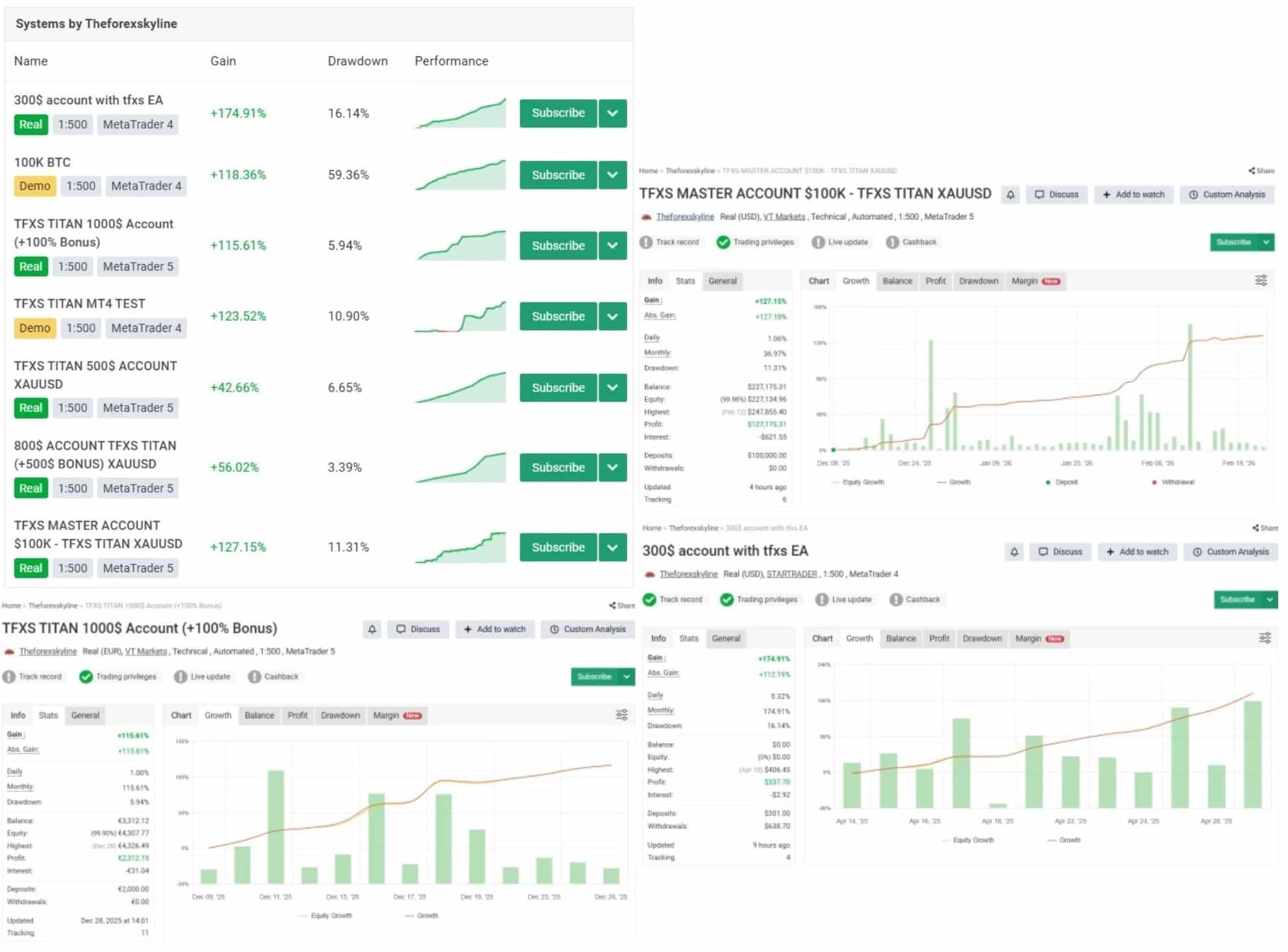
Expert TFXS Titan Ultimate EA is an advanced Forex robot that applies cutting-edge machine learning to optimize trading strategies on the MetaTrader platform.




Description
TFXS Titan Ultimate EA: Complete Review, Setup Guide, and Long-Term Trading Tips
Alternative Title
TFXS Titan Ultimate EA – The AI-Smart Expert Advisor for MetaTrader 5
Table of Contents
- Quick Overview
- Installation & First-Time Setup
- Choosing a Broker, VPS, and Leverage
- Troubleshooting & Frequent Questions
- Best Practice Checklist
- Final Thoughts
Quick Overview
TFXS Titan Ultimate EA is an AI-driven automated trading system created for the MetaTrader 5 (MT5) platform. Instead of relying on traditional indicators alone, it evaluates:
- Price behaviour and recent order-flow patterns
- Momentum strength across multiple look-back periods
- Market volatility shifts, especially during news events
- Active liquidity movement on the bid-ask spread
The Expert Advisor trades 24 hours a day, five days per week on Forex majors, Gold (XAUUSD), and a handful of crypto pairs. It aims for consistent performance with controlled drawdown by combining multi-layer analysis, structured position sizing, and an adaptive trailing stop. Recommended capital starts at 500 USD with 1:100 leverage or higher.
Installation & First-Time Setup for TFXS Titan Ultimate EA
Follow the step-by-step checklist below:
- Download the
TFXS-Titan-Ultimate.ex5file from the vendor portal. - Open MetaTrader 5 ➜
File➜Open Data Folder. - Copy the file into
MQL5/Experts/and restart MT5. - Drag the EA onto your chosen chart (e.g., XAUUSD, M30).
- Tick Allow Algo Trading and Allow DLL Imports (optional for some features).
- Press OK. You should see
SMILEY 🙂in the top-right corner, meaning Titan Ultimate EA is active. - Leave the chart and terminal running or use a VPS (see next section).
Choosing a Broker, VPS, and Leverage
Broker
- Look for tight average spreads (below 15 points on Gold, below 1.0 pips on EURUSD).
- Check that the broker supports MT5 hedging accounts.
- Confirm 1:100 leverage or more is available.
VPS
Latency under 10 ms to your broker’s server is ideal. Popular choices:
- MetaQuotes VPS (inside MT5) – quick one-click setup.
- Commercial VPS providers in London, New York, or Tokyo.
Leverage
The EA does not grid or martingale, but 1:100–1:200 leverage keeps margin free during multi-pair exposure.
Troubleshooting & Frequent Questions regarding TFXS Titan Ultimate EA
1. The EA does not take trades. Why?
- Check if Algo Trading is on.
- Spread may be above filter.
- News filter might be pausing.
- No signals met – be patient.
2. I see ‘Trade Context Busy’ errors.
- Reduce the number of EAs on the same terminal.
- Use a faster VPS.
3. Can I run Titan Ultimate EA on MT4?No. It’s designed for MT5 only.
Best Practice Checklist with TFXS Titan Ultimate EA
- Use a reputable ECN broker with raw spreads.
- Fund at least 500 USD or the equivalent in your currency.
- Choose 1:100 leverage or above.
- Enable VPS hosting for 24/5 uptime.
- Keep risk per trade ≤ 2 %.
- Review the account weekly, not hourly.
- Record settings and changes in a simple diary.
Final Thoughts for TFXS Titan Ultimate EA
TFXS Titan Ultimate EA offers a balanced approach to algorithmic trading. By combining AI-informed analysis with solid risk control, it targets steady growth rather than short-lived high-risk gains. Traders who can follow basic best practices—adequate funding, low-latency hosting, disciplined risk limits—may find it a helpful addition to a diversified portfolio.
Disclaimer: Trading carries risk. Past performance does not guarantee future results. This article is for educational purposes only and not financial advice.
Vendor Site – Click Here
| Membership | Yearly Membership |
|---|---|
| Additional Services | Unlock & Decompile |
| Recommended Brokers | Exness Broker, FPMarkets |
| Recommended VPS | FXVM (Low Latency) |
| Youtube Channel | ForexForYou |
| Telegram Channel | Onshoppie Forex EA's & Indicators |
| Telegram Support | Onshoppie Support |
| Installation Guides | Onshoppie Forex Guides |
Brand
ea-mt5
Only logged in customers who have purchased this product may leave a review.
Related products



Products
-
 Wisdom EA MT4 + SetFiles For Build 1471+
$14.95
Wisdom EA MT4 + SetFiles For Build 1471+
$14.95
-
 Daily Target EA MT5 v1.07 For Build 5833+
$14.95
Daily Target EA MT5 v1.07 For Build 5833+
$14.95
-
 Ultimate Breakout System EA MT5 v5.6 + For Build 5833+
$14.95
Ultimate Breakout System EA MT5 v5.6 + For Build 5833+
$14.95
-
 MFXT PHANTOM X EA MT5 v2.0 For Build 5833+
$14.95
MFXT PHANTOM X EA MT5 v2.0 For Build 5833+
$14.95
-
 DowGold EA MT5 v5.26 For Build 5833+
Original price was: $1,999.00.$14.95Current price is: $14.95.
DowGold EA MT5 v5.26 For Build 5833+
Original price was: $1,999.00.$14.95Current price is: $14.95.
-
 Stable Gold Scalping EA MT5 v2.0 + SetFiles For Build 5833+
Original price was: $1,999.00.$14.95Current price is: $14.95.
Stable Gold Scalping EA MT5 v2.0 + SetFiles For Build 5833+
Original price was: $1,999.00.$14.95Current price is: $14.95.
-
 FAT Bot Auto Trade AI MT5 v3.4 EA With DLL 5833
$14.95
FAT Bot Auto Trade AI MT5 v3.4 EA With DLL 5833
$14.95
-
 Quantum Bitcoin EA MT5 v3.2 For Build 5833+
Original price was: $699.00.$14.95Current price is: $14.95.
Quantum Bitcoin EA MT5 v3.2 For Build 5833+
Original price was: $699.00.$14.95Current price is: $14.95.
Recent reviews
-
 Advanced Dashboard Currency Strength
by Balram
Advanced Dashboard Currency Strength
by Balram
Reviews
There are no reviews yet.