


Stable Gold Scalping EA MT5 v2.0 + SetFiles For Build 5833+
Original price was: $1,999.00.$14.95Current price is: $14.95.
Stable Gold Scalping EA watches these turning points. When price pushes through the last swing top, the move suggests bullish strength.
Description
Stable Gold Scalping EA: A Straight-Forward Guide to Consistent Breakout Trades on Gold
Stable Gold Scalping EA – Clear Steps for Smarter XAUUSD Automation
Table of Contents
- What Is the Stable Gold Scalping EA?
- Why Trade Gold (XAUUSD) With an Expert Advisor?
- Risk Management and Money Control
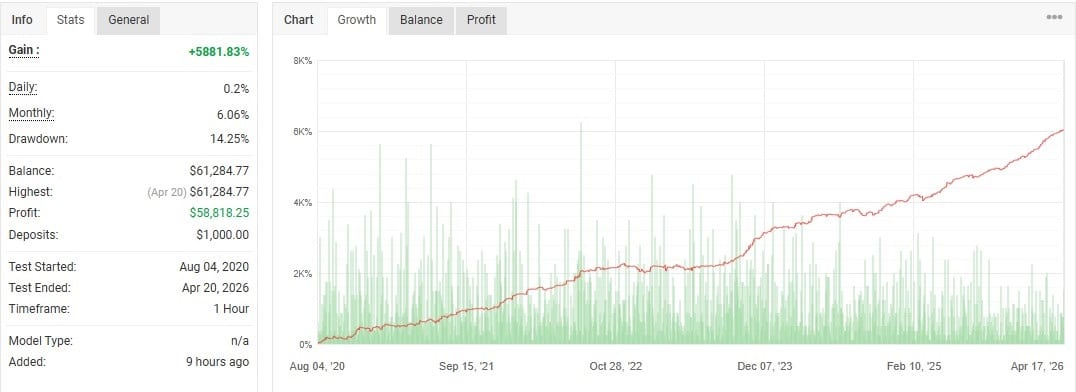
- Transparent Performance Tracking
- Installation and First-Time Setup
- Best Practices for Running the EA
- Final Thoughts
What Is the Stable Gold Scalping EA?
The Stable Gold Scalping EA is a gold-focused Expert Advisor built for MetaTrader to capture breakout opportunities on XAUUSD. It runs one trade at a time, applies structured risk management, and offers transparent performance tracking through detailed logs and trade history.
Key points in plain words:
- Targets gold only — no other pairs.
- Uses an optimized breakout method to look for fresh momentum.
- Includes safety nets like Stop Loss (SL) and Take Profit (TP).
- Checks spread, slippage, and unusual price spikes before opening a trade.
- Records every action so you can see exactly what the EA is doing.
Why Trade Gold (XAUUSD) With an Expert Advisor?
Gold is liquid, trades almost 24 hours, and often reacts sharply to news. That mix makes it perfect for a rule-based robot. Here’s why many traders pick an EA for gold:
- Speed – The EA reacts in milliseconds, faster than manual clicks.
- Consistency – Rules never change on their own; emotions stay out.
- Overnight Coverage – London, New York, and Asian sessions bring different moves. The robot never sleeps.
- Risk Control – Pre-set maximum loss per trade cuts surprises.
- Data Depth – Long historical data for XAUUSD lets you test and tweak rules.
Risk Management and Money Control
4.1 Stop Loss, Take Profit & Trailing Stop
- Stop Loss (SL) is pre-set at every entry.
- Take Profit (TP) locks gains at a fixed reward level.
- Trailing Stop moves the SL to breakeven, then follows price at defined steps.
This three-layer shield helps guard the account while allowing room for profits.
4.2 Lot Sizing and Auto-Risk
The EA offers:
- Fixed lot mode – Choose 0.01 lot, 0.10 lot, etc.
- Auto-lot – Sets size as a % of balance, e.g., 1% risk per trade.
- Step lot – Increases size at certain balance milestones.
Using risk as a percentage is clearer: lose 1%, not 50 pips—this keeps size in line with account growth or drawdown.
4.3 Spread & Slippage Protection
During high-impact news, spreads widen and fills slip. The EA will:
- Measure current spread in points.
- Compare to your max-spread input.
- Halt new orders if above the line.
It also compares expected vs. actual price when opening orders. If the gap is too wide, it cancels the entry, preventing hidden costs.
Transparent Performance Tracking
A tool is only helpful if you can trust the numbers. Stable Gold Scalping EA keeps things open:
- On-chart panel – Shows current spread, last trade result, and live risk.
- CSV log file – Exports trade details for your spreadsheet.
- Magic number tagging – Separates its trades from any other EA.
- Myfxbook or FX Blue compatibility** – Share or verify records publicly.
Installation and First-Time Setup for Stable Gold Scalping EA
- Download the .ex4 or .ex5 file.
- Open MetaTrader → File → Open Data Folder → MQL4/5 → Experts.
- Paste the file, then restart MetaTrader.
- Drag Stable Gold Scalping EA onto a Gold (XAUUSD) chart, preferably M5 or M15.
- Enable “Allow DLL imports” if the EA uses extra libraries.
- In inputs:
- Choose risk mode (fixed or auto).
- Set max spread.
- Adjust SL/TP distance if allowed by broker.
- Click AutoTrading. A smiley icon in the top right of the chart means it is active.
Tip: Run the EA on a VPS so disconnections do not stop trades. Many brokers offer a free VPS if you trade enough volume.
Best Practices for Running the EA
- Use a reputable ECN broker with low spreads on gold.
- Backtest at least ten years of data to see different market phases.
- Forward test on demo for two weeks before funding live.
- Avoid overlapping EAs on the same account unless you assign unique magic numbers.
- Keep MetaTrader updated—older builds may break expert functions.
- Monitor news. While the EA manages risk, halting during major Fed speeches may be safer.
- Review weekly. Compare live results with your backtest to spot drift early.
Final Thoughts for Stable Gold Scalping EA
The Stable Gold Scalping EA gives traders a rule-based way to explore gold breakouts while keeping risk in check. Its single-shot style limits drawdowns, and built-in filters reduce bad fills. By pairing it with solid broker choice, a VPS, and regular performance reviews, you can aim for consistent results without watching charts all day.
Vendor Site – Click Here
| Membership | Yearly Membership |
|---|---|
| Additional Services | Unlock & Decompile |
| Recommended Brokers | Exness Broker, FPMarkets |
| Recommended VPS | FXVM (Low Latency) |
| Youtube Channel | ForexForYou |
| Telegram Channel | Onshoppie Forex EA's & Indicators |
| Telegram Support | Onshoppie Support |
| Installation Guides | Onshoppie Forex Guides |
Brand
ea-mt5
Only logged in customers who have purchased this product may leave a review.
Related products


Products
-
 H4 Gold Scalper EA MT5 V1.5 With DLL Build 6122
Original price was: $150.00.$14.95Current price is: $14.95.
H4 Gold Scalper EA MT5 V1.5 With DLL Build 6122
Original price was: $150.00.$14.95Current price is: $14.95.
-
 Mavrik Scalper EA MT5 V18.306 For Build 6140+
$14.95
Mavrik Scalper EA MT5 V18.306 For Build 6140+
$14.95
-
 Dude Alpha Gold EA MT5 V1.4.2 + Set Files For Build 6140+
Original price was: $499.00.$14.95Current price is: $14.95.
Dude Alpha Gold EA MT5 V1.4.2 + Set Files For Build 6140+
Original price was: $499.00.$14.95Current price is: $14.95.
-
 Ultra Beast EA MT5 + Setfiles For Build 6140+
$14.95
Ultra Beast EA MT5 + Setfiles For Build 6140+
$14.95
-
 Algo Edge SMC AI EA MT5 V3 For Build 6140+
$14.95
Algo Edge SMC AI EA MT5 V3 For Build 6140+
$14.95
-
 Aura Absolute EA MT4 V1.1 For Build 1476+
$14.95
Aura Absolute EA MT4 V1.1 For Build 1476+
$14.95
-
 Gold Neural Core EA MT5 V1.5 For Build 6140+
Original price was: $500.00.$14.95Current price is: $14.95.
Gold Neural Core EA MT5 V1.5 For Build 6140+
Original price was: $500.00.$14.95Current price is: $14.95.
-
 Global Trade Plan EA MT5 V3.1 + SetFiles With DLL 6140
Original price was: $399.00.$14.95Current price is: $14.95.
Global Trade Plan EA MT5 V3.1 + SetFiles With DLL 6140
Original price was: $399.00.$14.95Current price is: $14.95.
Recent reviews
-
 Advanced Dashboard Currency Strength
by Balram
Advanced Dashboard Currency Strength
by Balram
Reviews
There are no reviews yet.