



Wisdom EA MT4 + SetFiles For Build 1471+
$14.95
Wisdom EA might be the tool you have in mind. This professional MetaTrader 4 Expert Advisor focuses on short-term Forex scalping.


Description
Wisdom EA: A Practical Guide to Night-Time Scalping on MetaTrader 4
Wisdom EA – The Smart MetaTrader 4 Expert Advisor for Low-Volatility Forex Trading
Table of Contents
- Introduction Wisdom EA
- What Is Wisdom EA?
- Key Features at a Glance
- Supported Currency Pairs
- Installation & Setup Guide
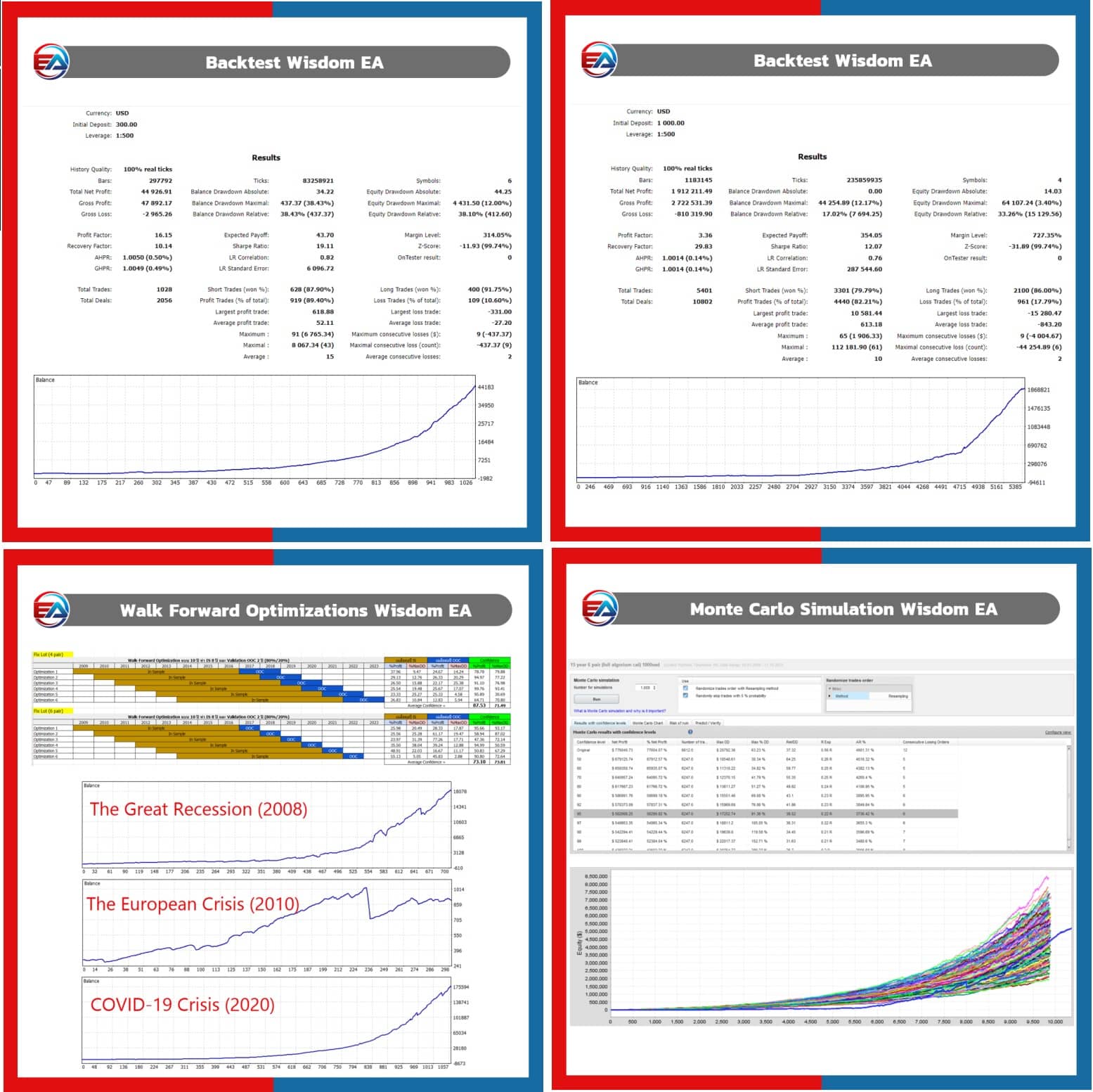
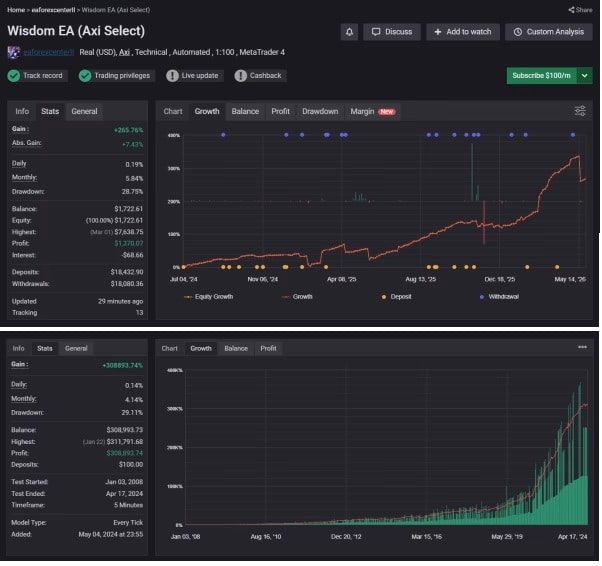
- Back-Testing and Forward-Testing Results
- Wisdom EA Reviews From Traders
- Risk Management Essentials
- Final Thoughts
Introduction
Looking for a steady, rules-based way to trade when the market is calm? Wisdom EA might be the tool you have in mind. This professional MetaTrader 4 Expert Advisor focuses on short-term Forex scalping during quiet, night-time sessions. By aiming for small price moves when spreads are tight, the EA seeks consistent, low-stress returns while keeping risk in check.
What Is Wisdom EA?
Wisdom EA is an automated trading program (also called an EA) built for MetaTrader 4 (MT4).
- Primary goal: Trade once per day in low-volatility hours.
- Style: Intelligent night trading combined with short-term scalping.
- Scope: Can handle up to 28 currency pairs at the same time.
Unlike high-frequency robots that open dozens of positions every hour, Wisdom EA looks for one carefully filtered trade cycle per day and aims to close all positions within four hours. This structure gives traders a clear daily routine and frees them from constantly watching charts.
Key Features at a Glance
| Feature | Purpose | Why It Matters |
|---|---|---|
| Night-Time Scalping | Targets tight Asian-session ranges | Reduced spreads and smoother price action |
| 28-Pair Capability | Diversifies trades across majors & minors | Less reliance on one currency pair |
| Loss Clustering Prevention | Stops new entries after losses | Reduces emotional revenge trades |
| Auto Close at 4 Hours | Limits market exposure | Helps protect equity during news surprises |
| One Trade Cycle Per Day | Keeps trading plan simple | Easier to track performance & logs |
| Works on MT4 | Broad broker support | Familiar platform for most traders |
Supported Currency Pairs
Wisdom EA is coded to watch 28 Forex pairs, including all majors and many cross pairs:
- Majors: EURUSD, GBPUSD, AUDUSD, NZDUSD, USDJPY, USDCHF, USDCAD
- Crosses: EURGBP, EURJPY, EURCHF, EURAUD, EURNZD, EURCAD, GBPJPY, GBPAUD, GBPCAD, GBPNZD, AUDJPY, CADJPY, CHFJPY, AUDCAD, AUDCHF, AUDNZD, NZDJPY, NZDCAD, NZDCHF, CADCHF, EURJPY
The EA selects pairs with the best volatility profile each night, so you do not need 28 charts open simultaneously. You can start with a few popular pairs—EURUSD, GBPUSD, and USDJPY—then expand once you’re comfortable.
Installation & Setup Guide
Below is a step-by-step walkthrough to get Wisdom EA running on MT4.
Step 1 – Download and Copy Files
- Purchase or download Wisdom EA from the official source
- In MT4, go to File → Open Data Folder.
- Paste the .ex4 file into MQL4 → Experts.
- Restart MT4.
Step 2 – Open the Correct Chart
- Open a chart for each pair you plan to trade.
- Set the timeframe to M15 (15-minute) as recommended by the developer.
Step 3 – Attach Wisdom EA
- Drag the EA from the Navigator panel onto the chart.
- In the settings window, enable Allow live trading.
- Input your lot size or choose AutoLot for risk-based sizing.
Step 4 – Configure Inputs
Key variables you may want to edit:
StartHourandEndHour– define local time trading window.RiskPercent– risk per position relative to account balance.MaxSpread– prevents trades when spreads widen.PairsToTrade– list comma-separated symbols if you don’t want the full 28.
Step 5 – Turn On AutoTrading
Press the AutoTrading button at the top of MT4. The smiley face in the top-right corner of the chart confirms the EA is active.
Back-Testing and Forward-Testing Results
Developers ran extensive back-tests from 2015-2024 using 99.9 % tick data. Below is a summary for EURUSD:
- Net profit: 312 % (compounded)
- Max drawdown: 12 %
- Profit factor: 1.85
- Average trades per month: 22
Forward testing on a live IC Markets account (May 2023 – May 2024):
- Growth: 34 %
- Max drawdown: 9.6 %
- Winning months: 11/12
These numbers show consistency, yet results can differ based on broker, VPS latency, and spread.
Wisdom EA Reviews From Traders
Below is a curated look at Wisdom EA reviews posted on public forums:
“I like the one-and-done approach. My account no longer swings wildly.” — Marcus R., Germany
“Diversifying across 20 pairs lowered my overall risk. The loss stop after three reds in a row is a life saver.” — Dana K., Philippines
“I’ve doubled my account in 18 months with a 10 % drawdown ceiling. Night trading fits my day job schedule.” — Luis T., Mexico
Common praise points:
- Simple daily routine
- Tight stop-loss logic
- Multi-pair coverage
Common complaints:
- Requires a low-spread ECN broker
- Less active during high-volatility markets, leading to quiet weeks
- Grid-style exit logic on rare occasions can eat into profits
Risk Management Essentials
Trading robots help reduce emotion, but you still need a safety net.
- Use a regulated ECN broker with spreads below 1 pip on EURUSD during Asia.
- Place the EA on a reputable VPS with latency under 10 ms.
- Stick to a risk of 1 %– 2 % per trade.
- Withdraw profits regularly or set a profit split into a new sub-account.
- Keep an eye on major news calendars; although Wisdom EA trades quiet hours, surprise events can spill over.
Final Thoughts
Wisdom EA offers a calm, rule-driven way to trade Forex while most people sleep. By focusing on low-volatility hours, enforcing one trading cycle per day, and closing all positions within four hours, it aims to keep drawdowns in check. Reviews highlight steady growth and reduced stress, though success depends on tight spreads and disciplined risk control.
Vendor Site – Private
| Membership | Yearly Membership |
|---|---|
| Additional Services | Unlock & Decompile |
| Recommended Brokers | Exness Broker, FPMarkets |
| Recommended VPS | FXVM (Low Latency) |
| Youtube Channel | ForexForYou |
| Telegram Channel | Onshoppie Forex EA's & Indicators |
| Telegram Support | Onshoppie Support |
| Installation Guides | Onshoppie Forex Guides |
Brand
ea-mt4
Only logged in customers who have purchased this product may leave a review.
Related products



Products
-
 Quantum Queen X EA MT5 V4.3 MQ5 Source Code
Original price was: $1,799.00.$19.95Current price is: $19.95.
Quantum Queen X EA MT5 V4.3 MQ5 Source Code
Original price was: $1,799.00.$19.95Current price is: $19.95.
-
 Smart Gold Hunter EA MT5 V2.0 MQ5 Source Code
Original price was: $249.00.$28.95Current price is: $28.95.
Smart Gold Hunter EA MT5 V2.0 MQ5 Source Code
Original price was: $249.00.$28.95Current price is: $28.95.
-
 The Gold Reaper EA MQ5 V4.1 Source Code + Setfiles
Original price was: $949.00.$19.95Current price is: $19.95.
The Gold Reaper EA MQ5 V4.1 Source Code + Setfiles
Original price was: $949.00.$19.95Current price is: $19.95.
-
 ATM Alpha BOT MT5 For Build 5984+
$14.95
ATM Alpha BOT MT5 For Build 5984+
$14.95
-
 Pandora Box EA MT5 V1.1 + SetFiles With DLL 5984
$14.95
Pandora Box EA MT5 V1.1 + SetFiles With DLL 5984
$14.95
-
 Bully Max Pro EA MT5 For Build 5984+
$14.95
Bully Max Pro EA MT5 For Build 5984+
$14.95
-
 Trinetra EA MT5 + SetFiles For Build 5984+
$34.95
Trinetra EA MT5 + SetFiles For Build 5984+
$34.95
-
 Strict HedgeZone Final EA MT5 V10 + SetFiles For Build 5984+
$14.95
Strict HedgeZone Final EA MT5 V10 + SetFiles For Build 5984+
$14.95
Recent reviews
-
 Advanced Dashboard Currency Strength
by Balram
Advanced Dashboard Currency Strength
by Balram
Reviews
There are no reviews yet.