


DowGold EA MT5 v5.15 With DLL 5836
Original price was: $1,999.00.$14.95Current price is: $14.95.
DowGold EA watches these turning points. When price pushes through the last swing top, the move suggests bullish strength.



Description
DowGold EA: Short, Sharp Trades on Gold and US30
DowGold EA: Faster Than the News, Safer Than the Hype
Table of Contents
- Why Traders Are Talking About DowGold EA
- How DowGold Trades in Plain English
- The Cloud-Based Brain: Real-Time Adaptation
- Step-by-Step Setup Guide for MT5
- Final Thoughts & Next Steps
Why Traders Are Talking About DowGold EA
DowGold EA has carved a niche by doing one thing well: taking quick, low-risk shots on the two most-traded markets—Gold (XAUUSD) and the Dow Jones 30 index (US30). In a world filled with bots that overtrade, chase losses, or drown in settings, DowGold EA stands out for its simple rules:
- Each trade is cut if it moves the wrong way.
- No doubling down when a trade hurts.
- A typical position is over before you’ve refilled your coffee.
This blend of speed and restraint has attracted day traders, prop firm candidates, and even casual investors who want their accounts protected when major news hits.
How DowGold Trades in Plain English
Gold (XAUUSD) and US30 Only
Focusing on two liquid instruments keeps spreads tight and execution smooth. Gold and US30 are also among the most active during the New York and London sessions, giving the EA plenty of movement without the noise of thin markets.
Trade Duration: Under 10 Minutes
DowGold EA looks for a surge in momentum, hops on, and aims to exit inside ten minutes. This short, sharp trade style trims swap fees and avoids lingering exposure overnight.
Hard Stop-Loss on Every Position
The EA drops a fixed stop as soon as it opens a trade, so the worst-case loss is known upfront. This fits neatly with prop firm rules and keeps risk calculations simple.
No Martingale, No Averaging
Some robots pile into losers hoping they’ll bounce. DowGold EA refuses to do that. Each trade is a single shot: hit or miss, then move on.
The Cloud-Based Brain: Real-Time Adaptation
The logic running on your MT5 platform is only half the story. A cloud service tracks:
- Intraday volatility
- Current spread levels
- Momentum across Gold and US30
- News schedule from major calendars
When conditions shift, the cloud flips settings behind the scenes. You don’t have to download files or chase new builds. If the developers refine entry logic, it flows into every linked EA in minutes.
Tip: Keep your VPS or computer online so the EA can talk to the cloud. If the link drops, DowGold EA stops trading rather than flying blind.
Step-by-Step Setup Guide for MT5 for DowGold EA
- Download & Install
- Copy the
DowGoldEA.ex5file toMQL5\Experts.
- Copy the
- Attach to Chart
- Open a 1-minute Gold or US30 chart.
- Drag the EA on.
- Allow WebRequests
- Go to
Tools > Options > Expert Advisors. - Add the cloud URL provided in your license email.
- Go to
- Load Preset
- Choose Flipping, Balanced, or Prop Firm
.setfile.
- Choose Flipping, Balanced, or Prop Firm
- Input Your License Key
- Paste it into the first field.
- Check Smile Face
- Enable AutoTrading.
- Test in Demo
- Let it run for at least a week on demo or a small live account.
Final Thoughts & Next Steps for DowGold EA
DowGold EA keeps things simple: quick trades, hard stops, no emotional baggage. By sticking to Gold and US30, it avoids the scattergun approach of many expert advisors. If you value tight risk controls, an automatic news filter, and no martingale tricks, DowGold EA is worth a look.
Happy trading, and stay disciplined!
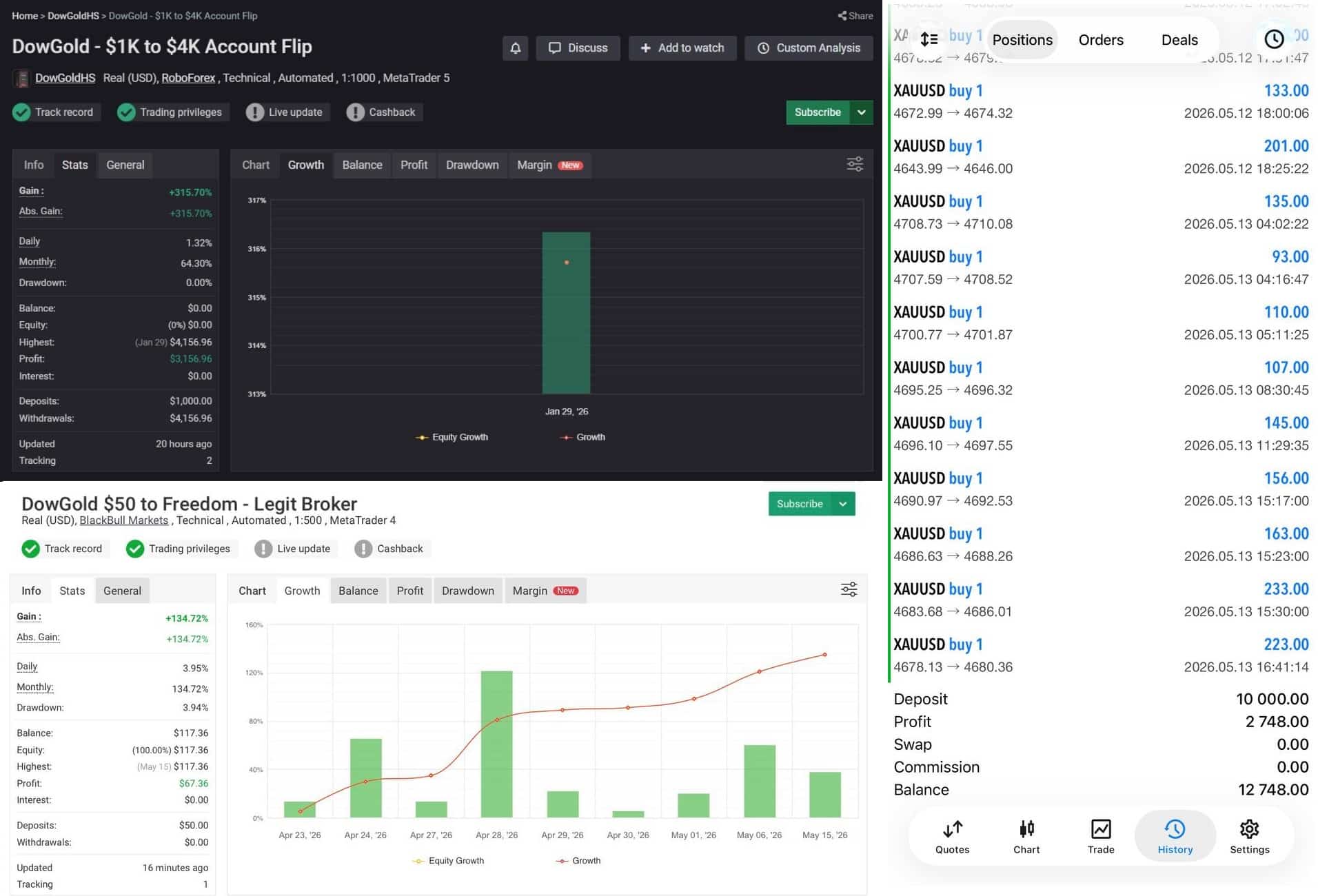
Live Results – Click Here
Vendor Site – Click Here
| Membership | Yearly Membership |
|---|---|
| Additional Services | Unlock & Decompile |
| Recommended Brokers | Exness Broker, FPMarkets |
| Recommended VPS | FXVM (Low Latency) |
| Youtube Channel | ForexForYou |
| Telegram Channel | Onshoppie Forex EA's & Indicators |
| Telegram Support | Onshoppie Support |
| Installation Guides | Onshoppie Forex Guides |
Brand
ea-mt5
Only logged in customers who have purchased this product may leave a review.
Related products



Products
-
 H4 Gold Scalper EA MT5 V1.5 With DLL Build 6122
Original price was: $150.00.$14.95Current price is: $14.95.
H4 Gold Scalper EA MT5 V1.5 With DLL Build 6122
Original price was: $150.00.$14.95Current price is: $14.95.
-
 Mavrik Scalper EA MT5 V18.306 For Build 6140+
$14.95
Mavrik Scalper EA MT5 V18.306 For Build 6140+
$14.95
-
 Dude Alpha Gold EA MT5 V1.4.2 + Set Files For Build 6140+
Original price was: $499.00.$14.95Current price is: $14.95.
Dude Alpha Gold EA MT5 V1.4.2 + Set Files For Build 6140+
Original price was: $499.00.$14.95Current price is: $14.95.
-
 Ultra Beast EA MT5 + Setfiles For Build 6140+
$14.95
Ultra Beast EA MT5 + Setfiles For Build 6140+
$14.95
-
 Algo Edge SMC AI EA MT5 V3 For Build 6140+
$14.95
Algo Edge SMC AI EA MT5 V3 For Build 6140+
$14.95
-
 Aura Absolute EA MT4 V1.1 For Build 1476+
$14.95
Aura Absolute EA MT4 V1.1 For Build 1476+
$14.95
-
 Gold Neural Core EA MT5 V1.5 For Build 6140+
Original price was: $500.00.$14.95Current price is: $14.95.
Gold Neural Core EA MT5 V1.5 For Build 6140+
Original price was: $500.00.$14.95Current price is: $14.95.
-
 Global Trade Plan EA MT5 V3.1 + SetFiles With DLL 6140
Original price was: $399.00.$14.95Current price is: $14.95.
Global Trade Plan EA MT5 V3.1 + SetFiles With DLL 6140
Original price was: $399.00.$14.95Current price is: $14.95.
Recent reviews
-
 Advanced Dashboard Currency Strength
by Balram
Advanced Dashboard Currency Strength
by Balram
Reviews
There are no reviews yet.