

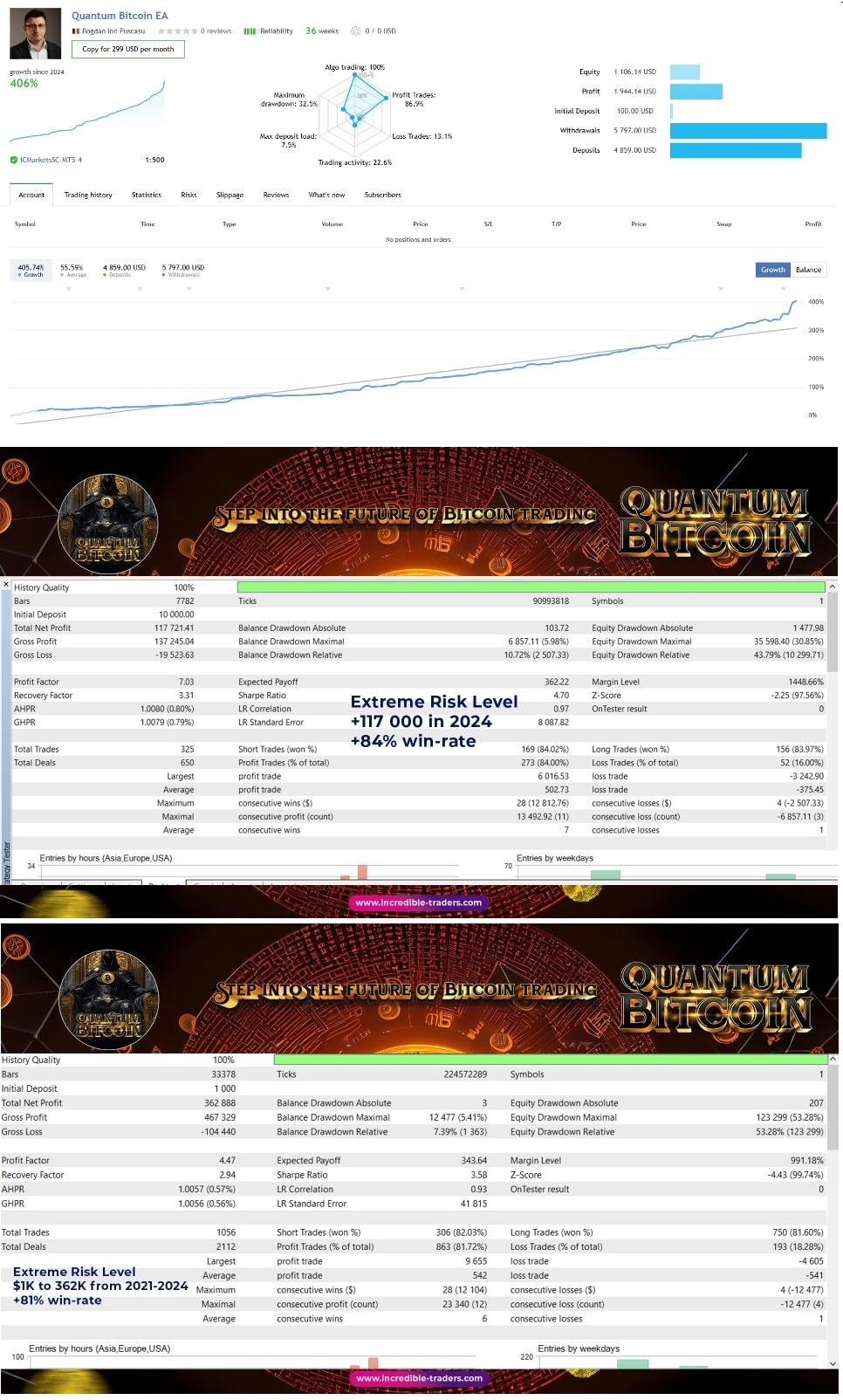


Quantum Bitcoin EA MT5 V3.2 For Build 6094+
Original price was: $699.00.$14.95Current price is: $14.95.
Quantum Bitcoin EA watches these turning points. When price pushes through the last swing top, the move suggests bullish strength.




Description
Quantum Bitcoin EA: The Future-Proof Expert Advisor for BTCUSD
Quantum Bitcoin EA – Beat Bitcoin’s Wild Swings With Science-Based Trading
Table of Contents
- What Is Quantum Bitcoin EA?
- Why Trade Bitcoin With a Dedicated EA?
- Key Features at a Glance
- Recommended Settings
- Tips to Get the Most From Quantum Bitcoin EA
- Getting Started in 5 Simple Steps
- Final Thoughts
What Is Quantum Bitcoin EA?
Quantum Bitcoin EA is an automated trading program (also called an Expert Advisor or EA) coded for the MetaTrader 4/5 platform by a top-ranked MQL5 developer. It focuses on one market only—BTCUSD—and runs on the H1 timeframe.
“Quantum Bitcoin EA: There is no such thing as impossible, it’s only a matter of figuring out how to do it!”
That motto sums up the idea behind the EA: complicated Bitcoin moves can be broken down into repeatable patterns and traded in a systematic way.
Instead of guessing direction, the EA:
- Detects the dominant trend.
- Opens a starter trade in that direction.
- Adds positions with a calculated grid if price pulls back.
- Closes the whole basket when the market moves back toward the trend, locking in profit.
Because Bitcoin often makes strong trend runs after temporary whipsaws, the approach turns volatility into a friend rather than a foe.
Why Trade Bitcoin With a Dedicated EA?
- 24/7 Market – Bitcoin never sleeps; humans need rest. An EA covers the clock.
- High Volatility – Manual traders often panic during big moves. An algorithm follows rules only.
- Four-Year Halving Cycle – Quantum Bitcoin EA is tuned to patterns seen across 2013, 2017, 2021, and the ongoing 2024 cycle.
- Spreads Make or Break – The EA checks broker spreads in real time and pauses if they widen.
Key Features at a Glance
| Feature | Benefit |
|---|---|
| Single-pair focus (BTCUSD) | All parameters fine-tuned for one market instead of a “one size fits all” approach. |
| H1 timeframe | Balances signal accuracy and trade frequency. |
| Trend-plus-grid method | Captures swings while limiting drawdown. |
| 1:500 leverage support | Works on accounts with low margin requirements. |
| News filter | Pauses trading during major Fed or CPI releases to avoid slippage. |
| Hedging mode | Compatible with ECN/Raw/Razor accounts. |
Recommended Settings
5.1 Best Brokers and Account Types
| Broker | Account | Spread on BTCUSD | Why It Matters |
|---|---|---|---|
| IC Markets | Raw | 1.5–2.5 USD | Low spread keeps grid gaps tight. |
| IC Trading | ECN | 2–3 USD | Good execution speed for crypto. |
Important: Always pick a LOW SPREAD account. A wide spread forces the EA to place larger grid gaps and may reduce win frequency.
5.2 Lot Size and Risk Guidance
- Minimum deposit: $1,000 (smaller balances may work but limit cycles).
- Default lot multiplier: 0.01 lots per $1,000.
- Max open orders in grid: 10 (adjustable).
- Suggested risk: Keep overall exposure below 10% of equity at any moment.
Tips to Get the Most From Quantum Bitcoin EA
- Run a VPS close to your broker. Latency under 5 ms improves fill quality.
- Stick to the default timeframe. Changing to M30 or H4 breaks the calibration.
- Leave the EA on 24/7. Turning it off mid-cycle can freeze trades.
- Withdraw profits regularly. Bitcoin moves fast; protect gains outside the platform.
- Update the EA. Check the MQL5 product page for new versions after each major Bitcoin event.
Getting Started in 5 Simple Steps
- Open a low-spread ECN account. IC Markets or IC Trading are popular choices.
- Deposit at least $1,000. More capital gives the grid room.
- Install MetaTrader 5 and Quantum Bitcoin EA. Follow the MQL5 guide.
- Load the EA on BTCUSD H1. Keep default inputs for best accuracy.
- Start the VPS and monitor weekly. Review equity and broker spread every Friday.
Final Thoughts About Quantum Bitcoin EA
Quantum Bitcoin EA offers a straightforward path to automated Bitcoin trading. By focusing on trend direction and a carefully designed grid, it aims to finish every cycle in profit—even in the world’s most volatile market. Pair it with a low-spread, 1:500 leverage account, follow the default rules, and monitor your risk. Traders who do so may find that “there is no such thing as impossible,” only solutions waiting to be applied to Bitcoin’s unique rhythm.
Thinking about giving Quantum Bitcoin EA a try? Download the demo, run a back-test on your chosen broker, and see how the numbers look on your end. Happy trading!
This post contains external links for reference only. Always test on a demo account before risking real funds.
Vendor Site – Click Here
| Membership | Yearly Membership |
|---|---|
| Additional Services | Unlock & Decompile |
| Recommended Brokers | Exness Broker, FPMarkets |
| Recommended VPS | FXVM (Low Latency) |
| Youtube Channel | ForexForYou |
| Telegram Channel | Onshoppie Forex EA's & Indicators |
| Telegram Support | Onshoppie Support |
| Installation Guides | Onshoppie Forex Guides |
Brand
ea-mt5
Only logged in customers who have purchased this product may leave a review.
Related products



Products
-
 Quantum Queen X EA MT5 V4.3 MQ5 Source Code
Original price was: $1,799.00.$19.95Current price is: $19.95.
Quantum Queen X EA MT5 V4.3 MQ5 Source Code
Original price was: $1,799.00.$19.95Current price is: $19.95.
-
 Smart Gold Hunter EA MT5 V2.0 MQ5 Source Code
Original price was: $249.00.$28.95Current price is: $28.95.
Smart Gold Hunter EA MT5 V2.0 MQ5 Source Code
Original price was: $249.00.$28.95Current price is: $28.95.
-
 The Gold Reaper EA MQ5 V4.1 Source Code + Setfiles
Original price was: $949.00.$19.95Current price is: $19.95.
The Gold Reaper EA MQ5 V4.1 Source Code + Setfiles
Original price was: $949.00.$19.95Current price is: $19.95.
-
 ATM Alpha BOT MT5 For Build 5984+
$14.95
ATM Alpha BOT MT5 For Build 5984+
$14.95
-
 Pandora Box EA MT5 V1.1 + SetFiles With DLL 5984
$14.95
Pandora Box EA MT5 V1.1 + SetFiles With DLL 5984
$14.95
-
 Bully Max Pro EA MT5 For Build 5984+
$14.95
Bully Max Pro EA MT5 For Build 5984+
$14.95
-
 Trinetra EA MT5 + SetFiles For Build 5984+
$34.95
Trinetra EA MT5 + SetFiles For Build 5984+
$34.95
-
 Strict HedgeZone Final EA MT5 V10 + SetFiles For Build 5984+
$14.95
Strict HedgeZone Final EA MT5 V10 + SetFiles For Build 5984+
$14.95
Recent reviews
-
 Advanced Dashboard Currency Strength
by Balram
Advanced Dashboard Currency Strength
by Balram
Reviews
There are no reviews yet.