

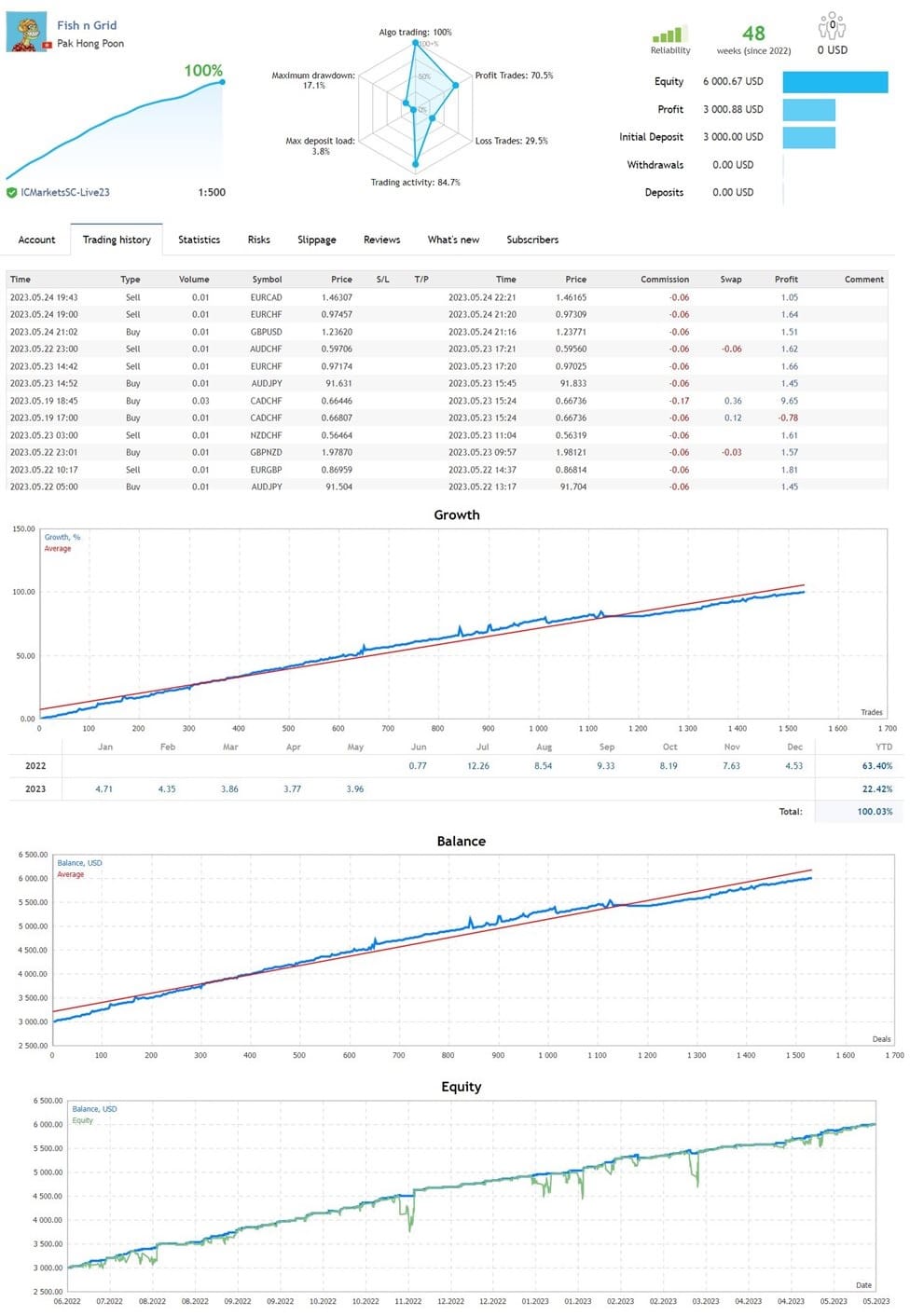

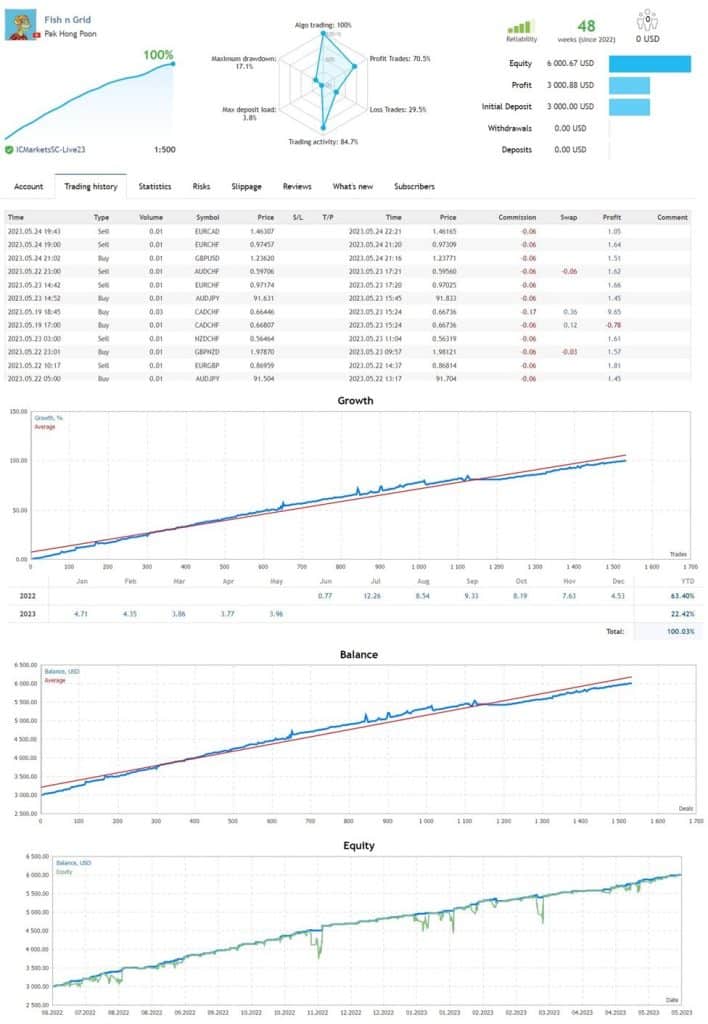
Fish N Grid EA MT4 + SetFiles For Build 1455+
Original price was: $199.00.$9.95Current price is: $9.95.
Fish n Grid EA takes advantage of the market’s mean reversion characteristic with a calculated, dynamic, multicurrency grid system.




Description
Fish n Grid EA: The Complete User-Friendly Guide for 2024
Fish n Grid EA – A Step-by-Step Manual for Safe Multicurrency Grid Trading
Table of Contents
- What Is Fish n Grid EA?
- Why a Multicurrency Grid System Matters
- Key Features at a Glance
- Account & Broker Requirements
- Quick Start: One-Chart Setup
- Optional Settings for More Control
- Lot Size, Deposit, and Risk Examples
- Best Currency Pairs to Trade
- Tips for Day-to-Day Monitoring
- Common Questions and Simple Answers
- Final Thoughts
What Is Fish n Grid EA?
Fish n Grid EA is an automatic trading robot for MetaTrader 4 that runs a calculated multicurrency grid system. It aims to benefit from the market’s mean-reversion tendency by opening and managing positions across several currency pairs at once. Because the expert advisor (EA) works on many symbols from a single chart, setup is quick even for beginners.
Why a Multicurrency Grid System Matters
A grid system places buy and sell orders at fixed price intervals. When prices swing back toward the average—also called mean reversion—the EA closes trades in profit. Running this logic on several pairs can:
- Spread risk over many markets
- Catch small price swings almost every day
- Reduce exposure to a single currency’s news shock
Fish n Grid EA handles all this automatically. You only fine-tune lot size, stop-loss in dollars, and decide whether you want one-chart or multi-chart control.
Key Features at a Glance
| Feature | Why It Helps You |
|---|---|
| Fully automatic | Trade even when your computer is off (using a VPS). |
| One-chart setup | Save time; reduce MT4 memory use. |
| Multicurrency portfolio | Seventeen recommended pairs, two higher-risk pairs. |
| Calculated grid parameters | Each pair has its own spacing and targets. |
| Dynamic stop-loss at night | Extra safety during thin liquidity. |
| Manual override | Close a grid any time without breaking the EA. |
Tip: Use the comment field in MT4 to label the EA so you can filter trades in the history tab later.
Account & Broker Requirements
- Hedging account – the EA opens buys and sells at the same time.
- Raw ECN spreads – look for 0.0–0.3 pip average on majors.
- Low commission – under $7 per round lot is ideal.
- Fast execution – <50 ms is best; consider a forex VPS.
- Minimum deposit: $3,000 for 0.01-lot grid. Double the capital if you start at 0.02 lot, and so on.
Brokers many users mention (do your own checks):
- IC Markets
- Pepperstone
- Fusion Markets
Quick Start: One-Chart Setup
Follow these steps once you have funded your MT4 account.
- Download
Fish_n_Grid_EA.ex4and place it insideMQL4/Experts. - Restart MT4 or click “Refresh” in the Navigator.
- Open a EURUSD H1 chart.
- Drag the EA onto that chart.
- In the Inputs tab:
Multicurrency_Switch = trueFirst_Order_Lot_Size = 0.01(or your choice)Stoploss_In_Dollar = 3000(matches the minimum deposit for 0.01 lot)
- Click OK, then enable AutoTrading (the green play button).
That’s it. The EA will scan and open trades across all recommended symbols even though only EURUSD is on your screen.
Optional Settings for More Control
| Setting | What It Does | When to Adjust |
|---|---|---|
Multicurrency_Switch |
True = one-chart mode; False = multi-chart mode. | Set to False if you prefer visual orders per pair. |
Prefix_Suffix_Auto |
Detects symbols like “EURUSD.a”. | Turn on if your broker uses unusual names. |
Stoploss_In_Dollar |
Closes all trades when loss hits the set amount. | Raise it for wider risk; lower it for tight control. |
First_Order_Lot_Size |
Starting size of each grid. | Base it on equity and comfort. |
| Manual TP/SL | Close all orders for a pair with one click. | Use during major news or platform issues. |
Note: The EA re-opens grids after you manually close them unless you disable AutoTrading.
Lot Size, Deposit, and Risk Examples
Below are sample numbers to help you match lot size, stop-loss, and deposit.
| Starting Lot | Suggested Deposit | Stop-loss in Dollars |
|---|---|---|
| 0.01 | $3,000 | $3,000 |
| 0.02 | $6,000 | $6,000 |
| 0.05 | $15,000 | $15,000 |
Simple rule: Deposit ≈ Stop-loss ≈ (Lot × 300,000). Round numbers to keep things easy.
Best Currency Pairs to Trade
The developer designed parameters for 17 core pairs plus 2 higher-risk pairs.
Core Pairs (default):AUDCAD, AUDCHF, AUDJPY, AUDUSDCADCHFEURCAD, EURCHF, EURGBP, EURJPY, EURUSDGBPCHF, GBPNZD, GBPUSDNZDCAD, NZDCHFUSDCAD, USDCHF
Higher-Risk Pairs:AUDNZD, USDCAD (second time but with larger grid steps)
You can turn off any pair in the inputs list if spreads or swaps are poor at your broker.
Tips for Day-to-Day Monitoring
- Check the VPS or PC once a day to confirm the smiley face is still in the corner of the chart.
- Review the Account Balance vs. Equity; a gap of 10–15 % is normal during active grids.
- Avoid large withdrawals when many grids are open; cut size slowly or close profitable chains first.
- Pause AutoTrading 5–10 minutes before non-farm payrolls if you want lower exposure.
- Keep MT4 updated to the latest build to avoid connection drops.
Common Questions and Simple Answers
Q: Does Fish n Grid EA need a news filter?A: The grid sizes are wide enough that short spikes rarely break the system. Still, many users disable AutoTrading just before high-impact news to be extra safe.
Q: Can I use it on a netting account (no hedging)?A: No. The EA opens opposite orders, so you must have a hedging account.
Q: Is the EA FIFO compliant?A: Not fully. U.S. traders who must obey FIFO should use offshore brokers with hedging.
Q: What if I close MT4?A: Trades stay on the broker’s server, but no new logic runs. Use a VPS if you cannot keep your PC on 24/5.
Q: How often does it trade?A: Almost daily across all pairs. Expect 50–150 trades per week at 0.01 lot size.
Final Thoughts
Fish n Grid EA offers a simple path into multicurrency grid trading by combining a one-chart setup with calculated parameters for each pair. Make sure you meet the minimum deposit, pick a low-spread ECN broker, and start with a lot size that matches your comfort level. With regular monitoring and sensible stop-loss settings, this automatic trading robot can take advantage of mean-reversion moves across the forex market while you focus on other tasks.
Ready to try Fish n Grid EA?Download the EA here and start with a demo account today. Test the settings above, tweak them to suit your style, and see if this multicurrency grid system fits your trading plan.
Have questions or tips of your own? Leave a comment below—let’s trade smarter together.
Vendor Site – Click Here
| Membership | Yearly Membership |
|---|---|
| Additional Services | Unlock & Decompile |
| Recommended Brokers | Exness Broker, FPMarkets |
| Recommended VPS | FXVM (Low Latency) |
| Youtube Channel | ForexForYou |
| Telegram Channel | Onshoppie Forex EA's & Indicators |
| Telegram Support | Onshoppie Support |
| Installation Guides | Onshoppie Forex Guides |
Brand
ea-mt4
Only logged in customers who have purchased this product may leave a review.
Related products



Products
-
 ThunderGold Scalper MT5 V1.3 + Setfiles For Build 6140+
Original price was: $379.00.$14.95Current price is: $14.95.
ThunderGold Scalper MT5 V1.3 + Setfiles For Build 6140+
Original price was: $379.00.$14.95Current price is: $14.95.
-
 Steve Pro EA MT5 V5.0 + Setfiles For Build 6140+
$14.95
Steve Pro EA MT5 V5.0 + Setfiles For Build 6140+
$14.95
-
 HEXA FX Scalper EA MT5 With DLL Build 6140
Original price was: $749.00.$34.95Current price is: $34.95.
HEXA FX Scalper EA MT5 With DLL Build 6140
Original price was: $749.00.$34.95Current price is: $34.95.
-
 H4 Gold Scalper EA MT5 V1.5 With DLL Build 6122
Original price was: $150.00.$14.95Current price is: $14.95.
H4 Gold Scalper EA MT5 V1.5 With DLL Build 6122
Original price was: $150.00.$14.95Current price is: $14.95.
-
 Mavrik Scalper EA MT5 V18.306 For Build 6140+
$14.95
Mavrik Scalper EA MT5 V18.306 For Build 6140+
$14.95
-
 Dude Alpha Gold EA MT5 V1.4.2 + Set Files For Build 6140+
Original price was: $499.00.$14.95Current price is: $14.95.
Dude Alpha Gold EA MT5 V1.4.2 + Set Files For Build 6140+
Original price was: $499.00.$14.95Current price is: $14.95.
-
 Ultra Beast EA MT5 + Setfiles For Build 6140+
$14.95
Ultra Beast EA MT5 + Setfiles For Build 6140+
$14.95
-
 Algo Edge SMC AI EA MT5 V3 For Build 6140+
$14.95
Algo Edge SMC AI EA MT5 V3 For Build 6140+
$14.95
Recent reviews
-
 Advanced Dashboard Currency Strength
by Balram
Advanced Dashboard Currency Strength
by Balram
Reviews
There are no reviews yet.