



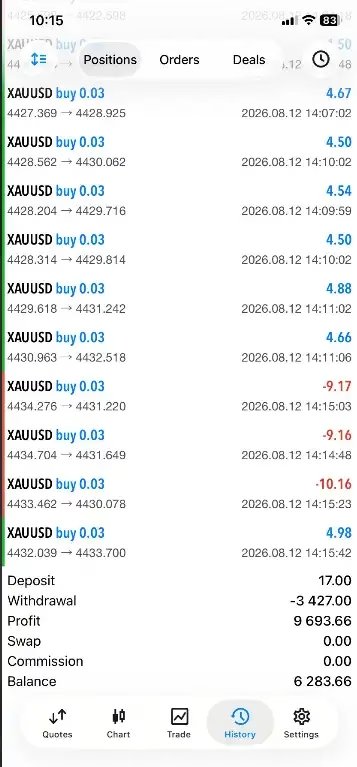


Ultra Beast EA MT5 + Setfiles For Build 6140+
$14.95
Ultra Beast EA MT5 automates XAUUSD Gold trading on MT5 with M1 scalping, risk controls, adjustable lot sizing, and unlimited use.



Description
Ultra Beast EA MT5 – The Expert Advisor That Puts XAUUSD on Auto-Pilot
Table of Contents
- Ultra Beast EA MT5 in a Nutshell
- Why Trade XAUUSD (Gold) With an Expert Advisor?
- Key Features of Ultra Beast EA MT5
- Minimum Capital, Leverage, and Lot Sizing
- Installing and Configuring the EA on MetaTrader 5
- Working With the M1 Timeframe
- Frequently Asked Questions
- Final Thoughts & Next Steps
Ultra Beast EA MT5 in a Nutshell
Ultra Beast EA MT5 is an automated trading Expert Advisor designed for XAUUSD Gold on the MetaTrader 5 platform. The EA runs on the M1 (one-minute) timeframe and looks to capture short-term moves without the need to watch charts all day.
Core idea: once the EA is attached to a Gold chart, trade entries, exits, and risk controls follow the code rather than your emotions.
Key points you need to know right away:
| Item | Detail |
|---|---|
| Platform | MetaTrader 5 |
| Instrument | XAUUSD (Gold vs US Dollar) |
| Timeframe | M1 (one-minute) |
| Trading Style | Fully automated |
| Suggested Starting Capital | US $1,000 (depends on broker & risk) |
Unlike many “multi-asset” robots, Ultra Beast EA MT5 focuses on one market. A single-market focus makes optimisation and troubleshooting easier because you only deal with Gold’s behaviour.
Why Trade XAUUSD (Gold) With an Expert Advisor?
Gold is active almost 24 hours per day and reacts fast to:
- U.S. interest-rate expectations
- Dollar strength or weakness
- Geopolitical headlines
- Inflation data
That constant movement can be a gift or a headache. An Expert Advisor (EA) takes over the repetitive steps—order placement, stop-loss adjustment, partial closing—so you can:
- Apply a plan instead of a hunch
- Avoid missed signals at 3 a.m.
- Collect performance statistics automatically
Still, remember that automation does not remove risk. You should treat an EA as a tool, not a magic machine.
Key Features of Ultra Beast EA MT5
Single-Market Focus
Dedicated code for XAUUSD means the strategy is tuned for Gold’s volatility, spread, and typical range—not for Euro pairs or crypto.
M1 Precision
Working on the one-minute chart allows:
- More trade opportunities each day
- Tighter stops compared with higher timeframes
- Fast feedback when you tweak settings
Automated Risk Controls
The EA can set stop loss, take profit, and trailing stops as soon as a position opens. No manual dragging of lines.
Unlimited License
The word “Unlimited” in Ultra Beast EA MT5 usually refers to:
- No limit on the number of trading accounts (check seller terms)
- No expiry date on usage
- Freedom to change brokers without buying a second license
User-Editable Parameters
Common adjustable inputs include:
| Parameter | What It Does | Typical Range |
|---|---|---|
| Fixed_Lot | Sets a constant lot size | 0.01 – 1.0 |
| Auto_Lot | Calculates lot size from equity and risk % | On / Off |
| Risk_Percent | % of equity per trade | 0.5 – 3 |
| Max_Spread | Skip trades if spread too wide | 30 – 100 points |
| Trading_Hours | Limit activity to set hours | 00:00 – 23:59 server time |
(Exact labels vary by EA version. Always read the input guide that comes with your file.)
Minimum Capital, Leverage, and Lot Sizing
The developer suggests US $1,000 as a starting point. Use this figure only as a guideline. The money you need depends on:
- Broker leverage (e.g., 1:100 vs. 1:500)
- Typical Gold margin requirement
- Spread + commission structure
- Number of positions that the EA can hold at once
- Your risk tolerance
A simple way to see if your account size is realistic is to back-test with tick data at the same leverage. Then check the worst historical drawdown and add a safety buffer.
Tip: Keep position sizes small while you gather live data. Scaling up later is easier than making back a large loss.
Installing and Configuring the EA on MetaTrader 5
Follow these steps in plain English:
- Download the EA file (
Ultra Beast EA MT5.ex5). - Open MetaTrader 5 →
File→Open Data Folder. - In the new window, go to
MQL5→Expertsand paste the file. - Restart MetaTrader 5.
- Drag a XAUUSD chart to your workspace and set the timeframe to M1.
- In the Navigator panel, locate Ultra Beast EA MT5, then drag it onto the chart.
- Check “Allow Algo Trading” in the pop-up.
- Review input parameters. Start with defaults or lower lot sizes during your first week.
- Press AutoTrading (top toolbar) so the green arrow shows.
Quick Visual Checklist
- Green smiley face in the top-right corner of the chart = EA is active
- Terminal → Experts tab shows “Initialized” message
- Journal tab shows no error lines
If you see a sad or neutral face:
- Check that algo trading is enabled in platform options (
Ctrl+O→ Expert Advisors). - Make sure you are on the M1 timeframe.
- Verify that Gold trading is allowed during your broker’s trading hours.
Working With the M1 Timeframe
Running an EA on M1 feels different from trading H1 or D1. Here is what to expect:
| Aspect | M1 Reality |
|---|---|
| Spread Impact | Bigger in % terms; filter high-spread periods |
| Trade Frequency | Many small trades per session |
| Chart Noise | More random ticks; rely on coded filters |
| Broker Execution | Slippage is common; use an ECN account if possible |
| Data Quality | Use tick data for back-testing; seconds matter |
Keep your platform running on a VPS or a stable PC to avoid missed ticks.
Frequently Asked Questions Regarding Ultra Beast EA
Q1. Is Ultra Beast EA MT5 legal to use?Yes, automated trading is legal with most brokerage firms. Check your broker’s terms on algorithmic trading.
Q2. Do I need coding skills to use this EA?No. Installation uses drag-and-drop. All settings are visible in plain text.
Q3. Can the EA run on other pairs?It might open trades, but the strategy is designed for XAUUSD. Use it on other symbols at your own risk.
Q4. What if I only have US $500?You can test with smaller capital, but use micro lots. Understand that margin pressure is higher.
Q5. Does the EA guarantee profits?No. Like any trading system, it can lose money. Perform due diligence and keep risk controlled.
Final Thoughts & Next Steps For Ultra Beast EA
Ultra Beast EA MT5 offers a clear, rules-based way to automate Gold trading on MetaTrader 5. Its single-market design, M1 focus, and built-in risk controls suit traders who want frequent price action without constant screen time.
Before moving to a real account, remember to:
- Back-test with quality tick data.
- Run the EA on a demo or small live account for at least 30 days.
- Adjust lot sizes to keep drawdowns tolerable.
- Monitor spread, slippage, and execution quality with your broker.
Vendor Site – Click Here
| Membership | Yearly Membership |
|---|---|
| Additional Services | Unlock & Decompile |
| Recommended Brokers | Exness Broker, FPMarkets |
| Recommended VPS | FXVM (Low Latency) |
| Youtube Channel | ForexForYou |
| Telegram Channel | Onshoppie Forex EA's & Indicators |
| Telegram Support | Onshoppie Support |
| Installation Guides | Onshoppie Forex Guides |
Brand
ea-mt5
Only logged in customers who have purchased this product may leave a review.
Related products



Products
-
 H4 Gold Scalper EA MT5 V1.5 With DLL Build 6122
Original price was: $150.00.$14.95Current price is: $14.95.
H4 Gold Scalper EA MT5 V1.5 With DLL Build 6122
Original price was: $150.00.$14.95Current price is: $14.95.
-
 Mavrik Scalper EA MT5 V18.306 For Build 6140+
$14.95
Mavrik Scalper EA MT5 V18.306 For Build 6140+
$14.95
-
 Dude Alpha Gold EA MT5 V1.4.2 + Set Files For Build 6140+
Original price was: $499.00.$14.95Current price is: $14.95.
Dude Alpha Gold EA MT5 V1.4.2 + Set Files For Build 6140+
Original price was: $499.00.$14.95Current price is: $14.95.
-
Ultra Beast EA MT5 + Setfiles For Build 6140+
$14.95
-
 Algo Edge SMC AI EA MT5 V3 For Build 6140+
$14.95
Algo Edge SMC AI EA MT5 V3 For Build 6140+
$14.95
-
 Aura Absolute EA MT4 V1.1 For Build 1476+
$14.95
Aura Absolute EA MT4 V1.1 For Build 1476+
$14.95
-
 Gold Neural Core EA MT5 V1.5 For Build 6140+
Original price was: $500.00.$14.95Current price is: $14.95.
Gold Neural Core EA MT5 V1.5 For Build 6140+
Original price was: $500.00.$14.95Current price is: $14.95.
-
 Global Trade Plan EA MT5 V3.1 + SetFiles With DLL 6140
Original price was: $399.00.$14.95Current price is: $14.95.
Global Trade Plan EA MT5 V3.1 + SetFiles With DLL 6140
Original price was: $399.00.$14.95Current price is: $14.95.
Recent reviews
-
 Advanced Dashboard Currency Strength
by Balram
Advanced Dashboard Currency Strength
by Balram
Reviews
There are no reviews yet.