


Logan MT5 V2.94 + Setfiles For Build 6184+
Logan MT5 V2.94 + Setfiles For Build 6184+


Original price was: $289.00.$11.95Current price is: $11.95.
Buy Logan MT5 EA for automated XAUUSD grid trading. Explore smart entries, ATR-based grid spacing, dynamic lots, risk controls, and MT5 features.

This item: Logan MT5 V2.94 + Setfiles For Build 6184+
Original price was: $289.00.$11.95Current price is: $11.95.
Original price was: $289.00.$11.95Current price is: $11.95.


Original price was: $9.95.$7.96Current price is: $7.96.

Original price was: $14.95.$11.96Current price is: $11.96.
Logan MT5: A Practical Guide to Smarter Gold Grid Trading
Table of Contents
- Quick Overview
- Why Logan MT5 Is Different From a Typical Gold Grid EA
- Installation Guide (MT5 Step-by-Step)
- Recommended Account Setup
- Best Practices for Running Logan MT5 24/5
- FAQ
- Final Thoughts
Quick Overview
Logan MT5 is a grid Expert Advisor for XAUUSD (gold) that aims to trade less and trade smarter. Instead of placing orders at fixed distances until margin is gone, it waits for a high-probability setup, opens a single position, and only starts its recovery grid if price moves the wrong way.
Key points in plain English:
- Works on the M15 chart of XAUUSD.
- Uses three EMAs, ADX, tick volume, ATR, candle momentum, and spread filters to find an entry.
- Grid spacing is not fixed; it adapts to current ATR.
- Lot size progression is dynamic, so the EA tries to recover losses with the smallest practical exposure.
- Built-in daily drawdown stop to protect your account.
- Best on RAW / ECN accounts with low spreads.
Why Logan MT5 Is Different From a Typical Gold Grid EA
Most traditional grid robots throw orders at the market until either:
- Price comes back and they close everything in profit, or
- The account hits margin call and shuts down.
Logan MT5 avoids that scenario by adding three layers of protection:
| Layer | How It Helps |
|---|---|
| Selective entry | The EA opens a trade only when all technical checks align. No alignment, no trade. |
| ATR-based spacing | During high volatility, orders are spaced wider; during quiet periods, spacing tightens. |
| Dynamic lots | Position size increases in a measured way rather than by a fixed multiplier, keeping risk growth steady. |
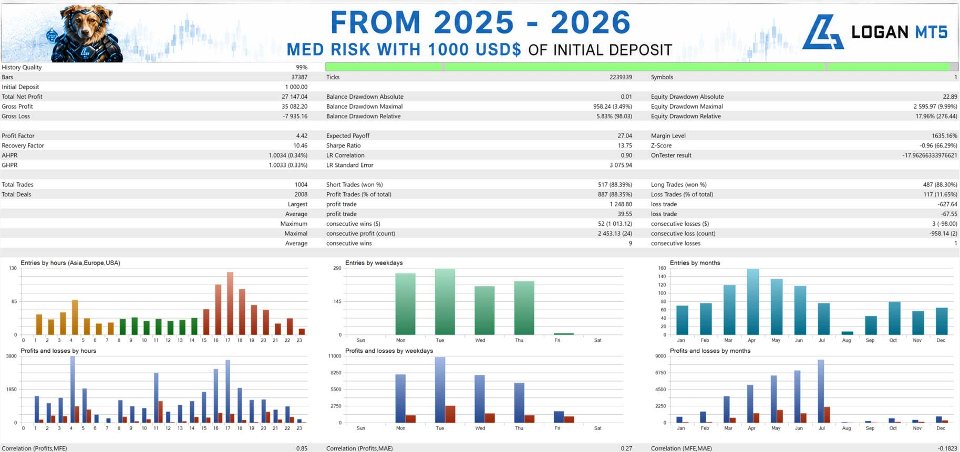
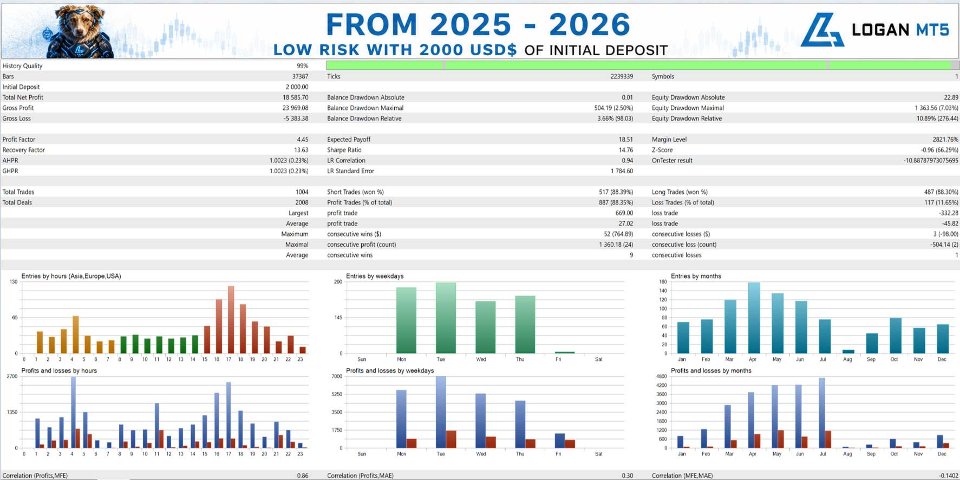
Because of this approach, backtests and forward tests show that over 80 % of trades close on the very first position. That means the grid is a backup plan, not the primary method of profit.
Installation Guide (MT5 Step-by-Step)
- Enable WebRequest
- MT5 → Tools → Options → Expert Advisors.
- Tick “Allow WebRequest for listed URL.”
- Add
https://nfs.faireconomy.media(for news filter).
- Attach the EA
- Open an XAUUSD M15 chart.
- Drag
Logan MT5.ex5onto the chart.
- Choose Lot Mode
- Fixed lots: type 0.01, 0.02, etc.
- Auto lots: set a risk factor (e.g., 0.5 % per 0.01 lot per $1,000).
- Set Drawdown Limit
- Example: 5 % daily.
- Optional: “Close all trades at limit = true” to flatten everything.
- Pick Broker Type
- Default suits most brokers.
- If you have an Exness raw account, change
BrokerType = Exness.
- Save & Enable Algo Trading
- Click the MT5 “Algo Trading” button.
- Check the smiley face in the top-right corner of the chart.
Recommended Account Setup
| Parameter | Minimum | Suggested |
|---|---|---|
| Deposit | $1,000 | $2,000+ |
| Leverage | 1:100 | 1:200–1:500 |
| Account Type | Hedge or Netting | Hedge, RAW/ECN |
| VPS | Not required | Yes (24/5 uptime) |
| Broker | Any low-spread | See list below |
⚠️ Avoid cent accounts. They often have unusual price feeds that break the EA’s spread and ATR math.
Best Practices for Running Logan MT5 24/5
- Stable Connection – A VPS with < 50 ms latency to your broker helps fills.
- Keep MT5 Updated – The EA relies on the latest build for WebRequest.
- Monitor Spread – During news or rollover, you may pause trading manually if spreads widen above 50 points.
- Weekly Database Cleanup – In MT5:
Tools → Options → Charts → Max bars. Keeping it below 100 000 speeds up backtesting and live execution. - Backtest Each MT5 Build – Minor platform updates can change tick modeling. Always run a quick test after updating.
- No Over-Optimization – Stick close to default. Over-curve-fitting one year will often hurt the next.
FAQ
Q1: Can I run Logan MT5 on EURUSD or other pairs?A: Technically you can, but the entry logic and ATR scaling are tuned for gold volatility. Results on forex majors are not officially supported.
Q2: What is the minimum recommended VPS spec?A: 1 vCPU, 1 GB RAM, Windows Server 2016 or later. Ping < 50 ms to your broker’s trade server.
Q3: Does Logan MT5 hedge?A: In hedge accounts it can open both long and short baskets at different times. In netting mode, it uses one basket at a time.
Q4: I hit my daily drawdown limit early. Should I raise it?A: Consider reducing your lot size first. Raising the limit increases risk and may defeat the purpose of the protection.
Q5: How do I restore default settings?A: Detach the EA, drag it again from the Navigator, click Reset at the bottom of the Inputs tab, then save.
Final Thoughts
Logan MT5 shows that a grid EA does not have to be reckless. By waiting for clear trend signals, using ATR to space recovery orders, and respecting daily loss caps, it offers a calculated way to trade gold on MT5. Always demo first, track your drawdown, and remember: protecting capital is part of making profit.
Live Signal – Click Here
Vendor Site – Click Here
| Membership | Yearly Membership |
|---|---|
| Additional Services | Unlock & Decompile |
| Recommended Brokers | Exness Broker, FPMarkets |
| Recommended VPS | FXVM (Low Latency) |
| Youtube Channel | ForexForYou |
| Telegram Channel | Onshoppie Forex EA's & Indicators |
| Telegram Support | Onshoppie Support |
| Installation Guides | Onshoppie Forex Guides |
Brand
ea-mt5
Only logged in customers who have purchased this product may leave a review.
Related products

Out of stock
$9.95


Out of stock

Out of stock
$9.95

Out of stock
$9.95

Out of stock
$9.95

Out of stock

Out of stock
$9.95
Reviews
There are no reviews yet.