


Ghost Scalper MT5 V2.50 For Build 6157+
Ghost Scalper MT5 V2.50 For Build 6157+


Original price was: $499.00.$11.95Current price is: $11.95.
Buy Ghost Scalper MT5 EA for automated Gold XAUUSD trading. Get 4 strategies, flexible risk management, news filtering and advanced trade protection.
Ghost Scalper MT5: A Complete Guide to Trading Gold With This Expert Advisor
Table of Contents
- What Is Ghost Scalper?
- The Four Independent Strategies
- Money-Management Options
- Trailing & Protection System
- Built-In News Filter
- Recommended Platform Setup
- Step-by-Step Installation Guide
- Best Practices for Day-to-Day Use
- Frequently Asked Questions
- Final Thoughts & Next Steps
What Is Ghost Scalper MT5?
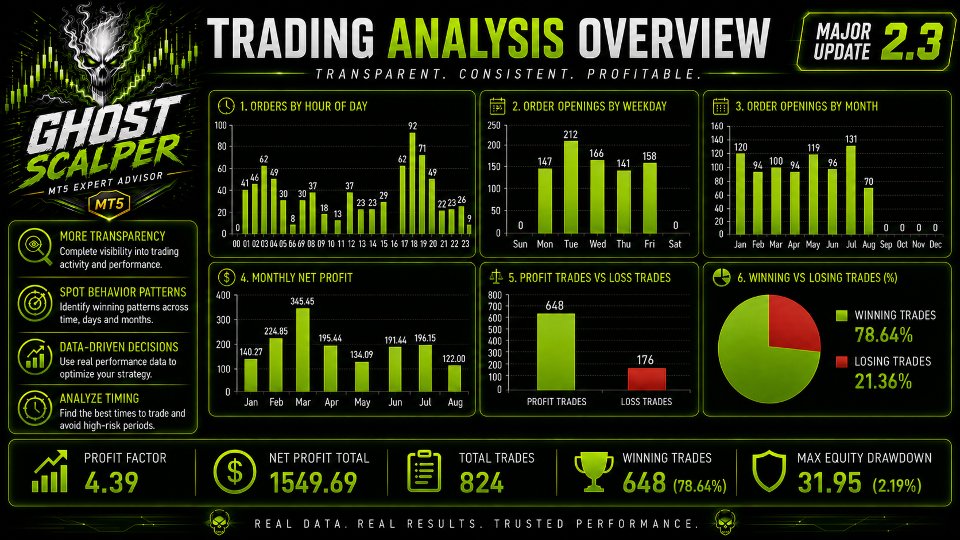
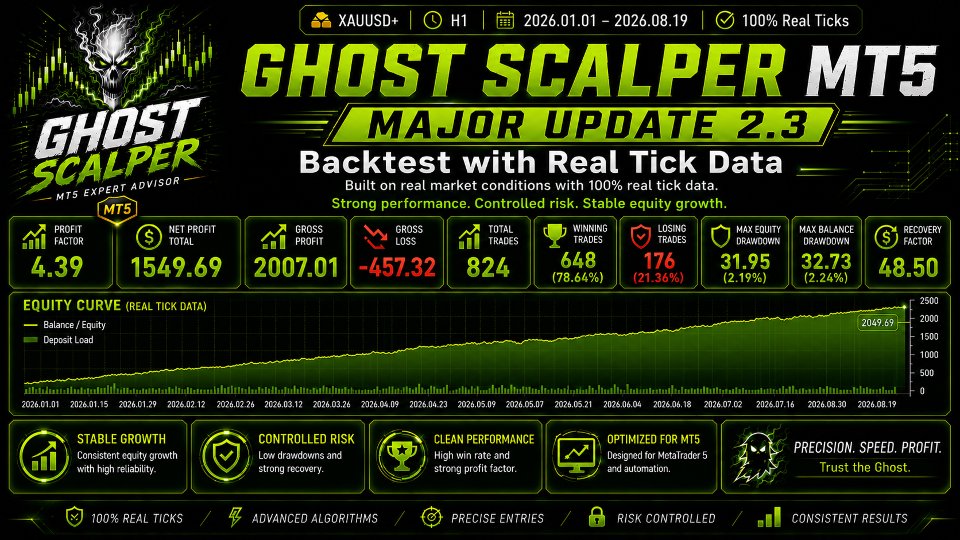
Ghost Scalper MT5 is a fully automated Expert Advisor (EA) built for the MetaTrader 5 platform. It is designed specifically to trade XAUUSD (Gold) and uses selective breakout and momentum-based logic. Unlike many EAs that keep opening trades around the clock, Ghost waits patiently until its internal market conditions line up. Only then does it place a pending order or live order.
Key points at a glance:
| Feature | Detail |
|---|---|
| Platform | MetaTrader 5 |
| Instrument | XAUUSD / Gold |
| Timeframe | H1 (recommended) |
| Trading Style | Selective breakouts & momentum |
| Number of Strategies | 4 (independent) |
| Money Management | 3 methods |
| News Filter | Yes, optional |
| Dashboard | BIG, SMALL, OFF modes |
The Four Independent Strategies
One of the most distinctive aspects of Ghost Scalper MT5 is the separation into four self-contained strategies, each with its own logic, entry filter, trade management, and risk setting. You can keep all four on, or mix and match.
Ghost A
- Breakout logic oriented around the Asian session range.
- Often provides the first trade after long quiet periods.
Ghost B
- Momentum filter that looks for sharp moves in U.S. trading hours.
- Uses tighter stop loss and faster trailing than Ghost A.
Ghost C
- Counter-breakout method that waits for false breaks of recent highs or lows.
- Smaller trade frequency but can balance the other strategies.
Ghost D
- Hybrid: combines multi-timeframe confirmation with a volatility filter.
- Trades less often, though historically has the highest average profit per trade.
Why four strategies matter:
| Benefit | Explanation |
|---|---|
| Diversification | Losses from one approach can be offset by wins in another. |
| Flexibility | You can disable a method that is out of sync with current market behavior. |
| Risk Granularity | Each strategy has its own lot / risk parameter. |
Money-Management Options
Fixed Lot
You tell the EA to open every position with the same lot size—e.g., 0.10 lots. Suitable for accounts where you prefer a stable cost per pip regardless of balance swings.
Risk Percent
The EA calculates lot size so that the selected percentage of your account is at risk if the stop loss is hit. Example: 2 % risk on each Ghost A trade.
Risk per Balance
A “step” model in which lot size automatically scales when your account equity passes predefined tiers (e.g., add 0.01 lots for every $1,000 added).
Important tips:
- Never add the individual strategy risk values blindly. If Ghost A–D can open trades at the same time, the combined exposure can exceed your comfort level.
- Start small on a demo or cent account to confirm that the risk engine reacts as expected with your broker’s XAUUSD contract.
Trailing & Protection System
The trailing and protection module takes into account:
- Stop Levels & Freeze Levels specific to your broker (these are the minimum distances a stop order must be from current price).
- Slippage monitoring—if the slippage on a modification attempt exceeds a threshold, the EA logs it and tries again.
- Alternative trailing modes: step, dynamic, breakeven-only.
- A time-based escape: if a trade has been open for X hours without progress, the EA can close at market or tighten stops.
Built-In News Filter
Because U.S. economic releases can throw Gold in any direction within seconds, the EA can:
- Block new trades a set number of minutes before and after news events like NFP, CPI, FOMC, PCE, unemployment claims, and similar.
- Cut risk (half-risk mode) during “red flag” weeks if you prefer fewer surprises.
- Be fully disabled for traders who want the highest number of trade opportunities.
Data source: The EA pulls news in real time through MetaTrader’s calendar. Make sure “Allow WebRequest for listed URL” is enabled in MT5 settings.
Recommended Platform Setup
- Symbol:
XAUUSD(some brokers label spot gold asGOLD,XAUSDorXAUUSDm; pick the symbol with the tightest spread). - Timeframe:
H1chart. - Algo Trading:
ONin MetaTrader 5. - VPS: location should be within 2–5 ms ping of the broker for best fills.
- Data History: press Ctrl+U in MT5 and download complete history before you attach the EA.
Tip: Add a second H4 chart of Gold without the EA for manual analysis—it will not disturb Ghost’s operation and can help you understand what the EA sees.
Step-by-Step Installation Guide For Ghost Scalper MT5
- Purchase from onshoppie.com.
- Drag the EA onto an H1
XAUUSDchart. - Tick Allow Algo Trading and Allow DLL imports (DLL is optional, check dev notes).
- Press OK.
- Confirm that the smiley-face icon appears in the chart’s top-right corner.
- Let the terminal run 24/5. MT5 has to stay connected for orders to execute.
Best Practices for Day-to-Day Use
- Schedule a weekly check of the dashboard for any slippage spikes.
- Re-read economic calendars every Sunday and decide if you want to lower risk for the week.
- Update MT5 and Windows/VPS once a month outside trading hours.
- Keep a journal: note why you turned a certain strategy off or changed risk settings.
- Test broker upgrades promptly—new server IPs can affect latency.
- If your balance doubles, revisit risk levels; scaling too fast can distort performance.
Frequently Asked Questions Regarding Ghost Scalper MT5
Q1: Does Ghost Scalper MT5 work on other symbols? A: The logic is optimised for Gold. Running it on EURUSD or indices will likely show worse performance and is not supported by the developer.
Q2: Can I run multiple EAs on the same terminal? Yes, but never on the same chart. Each EA needs its own chart to prevent order conflicts.
Q3: What is the minimum account size? There is no hard minimum, but because gold pip value is large, most users start at $1,000 or more if they want to risk 1 % per trade comfortably. A cent account can reduce the hurdle.
Q4: Is it FIFO compliant for U.S. accounts? The EA uses unique magic numbers and does not hedge opposite positions at the same time. It should meet FIFO rules, but test on a demo with your broker first.
Final Thoughts & Next Steps For Ghost Scalper MT5
Ghost Scalper MT5 stands out in a crowded EA market by combining four distinct strategies, solid money-management options, and an execution dashboard that tells the truth about your broker’s fills. It is not a magic bullet, and it certainly will not trade every day, yet it can add structure and discipline to a gold-focused portfolio when used responsibly.
Trading CFDs involves risk, and past results are no guarantee of future performance. Always test on a demo account first.
Live Results – Click Here
Vendor Site – Click Here
| Membership | Yearly Membership |
|---|---|
| Additional Services | Unlock & Decompile |
| Recommended Brokers | Exness Broker, FPMarkets |
| Recommended VPS | FXVM (Low Latency) |
| Youtube Channel | ForexForYou |
| Telegram Channel | Onshoppie Forex EA's & Indicators |
| Telegram Support | Onshoppie Support |
| Installation Guides | Onshoppie Forex Guides |
Brand
ea-mt5
Only logged in customers who have purchased this product may leave a review.
Related products

Out of stock
$9.95


Out of stock
$9.95
Out of stock

Out of stock
$9.95

Out of stock
$9.95

Out of stock
$9.95

Out of stock
$9.95
Reviews
There are no reviews yet.