


SALE
SALE
SALE


Galileo FX EA MT5 + Setfiles For Build 5833+
Galileo FX EA MT5 + Setfiles For Build 5833+


Original price was: $2,000.00.$14.95Current price is: $14.95.
Expert analysis of Galileo FX EA shows jaw-dropping beautiful trading automation. Discover why traders are excited about this breakthrough forex solution.

This item: Galileo FX EA MT5 + Setfiles For Build 5833+
Original price was: $2,000.00.$14.95Current price is: $14.95.
Original price was: $2,000.00.$14.95Current price is: $14.95.

Original price was: $9.95.$7.96Current price is: $7.96.

Galileo FX EA: The Complete Guide to Automated Trading on MT5
Galileo FX EA – Your Step-by-Step Roadmap to Smart MT5 Automation
Table of Contents
- Overview: What Is Galileo FX EA?
- Key Benefits at a Glance
- System Requirements & Preparation
- How to Install Galileo FX EA on MT5
- Fine-Tuning Your Trading Style & Risk
- First Contact: Testing on a Demo Account
- Switching to Live Trading & Mobile Monitoring
- Trading Across Multiple Markets 24/7
- Deep Dive: 300+ Myfxbook-Verified Backtests
- Troubleshooting & FAQs
- Conclusion & Next Steps
1. Overview: What Is Galileo FX EA?
Galileo FX EA is an expert advisor (EA) designed for the MetaTrader 5 (MT5) platform. It automates trading decisions, order placement, and trade management based on predefined rules. Once installed, the robot can scan multiple markets, open or close positions, manage stops, and adjust lot size without manual input.
Key facts:
- Platform: MT5
- Tradable assets: Up to 20 currency pairs (major, minor, or exotic), plus CFDs depending on your broker
- Operation: 24 hours a day, five days a week—no breaks, no coffee needed
2. Key Benefits of Galileo FX EA at a Glance
| Benefit | Why It Matters |
|---|---|
| Plug-and-play installation | Get started quickly, even if you are new to MT5 |
| Fine-grained risk control | Shift from conservative to aggressive with one click |
| Multi-pair capability | Trade many pairs at once, not just one |
| 300+ verified backtests | Transparent data, validated by Myfxbook |
| Mobile oversight | Check trades anytime from your phone |
| 24/7 execution | Trades fire even while you sleep—or travel to another planet |
| Flexible styles | Orbit between day trading, swing trading, or long-term investing |
3. System Requirements & Preparation for Galileo FX EA
Before installation, verify the following:
- MT5 platform installed from your broker or the official MetaQuotes website.
- Stable internet (minimum 1 Mbps, preferably wired or VPS).
- Windows 10/11 with a MT5.
- VPS (optional but recommended) to ensure the EA runs if your home PC shuts down.
- Trading account: Start with a demo; move to live once you are comfortable.
Tip: Keep MT5 updated to the latest build. Older builds may block DLL calls or new EA features.
4. How to Install Galileo FX EA on MT5
Follow this step-by-step process:
4.1 Download & Copy Files
- Download the
GalileoFXEA.ex5file from the official website. - Open MT5 → File → Open Data Folder.
- Navigate to MQL5 → Experts.
- Paste the
.ex5file. - Restart MT5 so the EA appears in the Navigator pane.
4.2 Attach to a Chart
- Pick a currency pair, e.g., EURUSD, and open a chart.
- Drag the EA from Navigator → Experts onto the chart.
- In the settings window, enable Allow algorithmic trading.
4.3 Load or Save Presets
- Presets (*.set files) ship with the EA.
- Choose a preset matching your desired strategy (day, swing, or long-term).
- You can save custom settings for later use.
4.4 Confirm Journal Messages
Open the Journal tab in MT5 to confirm:
Galileo FX EA started on EURUSD M15
Initialization completed
If you see error codes, check file paths or contact support.
5. Fine-Tuning Your Trading Style & Risk
Once Galileo FX EA MT5 is installed, set your trading style and risk tolerance to orbit between day trading, swing trading, or long-term investing, easily adjusting from conservative to aggressive strategies with just a click.
5.1 Selecting a Trading Style
| Style | Typical Timeframe | Pros | Cons |
|---|---|---|---|
| Day trading | M5 to M15 | Many signals, quick feedback | Higher spread cost |
| Swing trading | H1 to H4 | Fewer trades, steadier moves | Patience required |
| Long-term | D1+ | Follows big trends | Larger drawdowns possible |
5.2 Using the Risk Slider
- Risk-Low (Conservative): 0.5% equity per trade.
- Risk-Medium: 1–2% equity per trade.
- Risk-High (Aggressive): Up to 5% equity per trade.
Move the slider or type the percentage. The EA recalculates lot size in real time.
6. First Contact: Testing on a Demo Account
Launch with a demo account to explore the universe of Galileo FX’s capabilities without financial risk. A demo lets you:
- Observe live charts in real market conditions.
- See trade entry and exit logic in action.
- Test different presets and risk settings.
- Verify spread, slippage, and VPS latency.
6.1 Checklist for Demo Testing
- Attach EA to at least three currency pairs.
- Run for two full trading days to gather data.
- Export the Strategy Tester report nightly.
- Note max drawdown and win rate.
Evaluate results weekly. Once satisfied, prepare to go live.
7. Switching to Live Trading & Mobile Monitoring
Transition to live trading where you can track your trades anytime from your phone.
7.1 Moving to a Live Account
- Open a small-funded live account (e.g., $1,000).
- Copy the same EA settings from your demo.
- Test on one pair for the first week, then add more pairs.
7.2 MT5 Mobile App
- Download MetaTrader 5 from Google Play or the App Store.
- Log in with your broker credentials.
- Under Trade, you will see open positions placed by Galileo FX EA.
- You can close trades manually if necessary.
Alerts: Enable push notifications so you know when new trades open or close.
8. Trading Across Multiple Markets 24/7 with Galileo FX EA
With Galileo FX, your trades are executed across multiple markets 24/7, even while you’re on another planet.
8.1 Supported Pairs & Assets
| Category | Examples |
|---|---|
| Majors | EURUSD, GBPUSD, USDJPY, USDCHF |
| Minors | AUDCAD, EURGBP, NZDJPY |
| Exotics* | USDZAR, USDMXN |
*Depends on broker availability and spread.
8.2 Recommended Pair Limits
- Demo: Start with 5 pairs.
- Live small account (< $5k): 10 pairs max.
- Live larger account: Up to 20 pairs.
Each chart must have its own EA instance to avoid ticket mix-ups.
9. Deep Dive: 300+ Myfxbook-Verified Backtests of Galileo FX EA
Explore the potential of Galileo FX EA MT5 with over 300 Myfxbook verified backtests, covering a range of settings, capital amounts, and currency pairs. All performance results from tests conducted from June 17 to June 21, 2024, are validated by Myfxbook, a reputable third-party service.
9.1 How to Access the Backtests
- Visit the official Myfxbook Galileo FX profile.
- Click the Portfolio tab.
- Filters let you sort by date, pair, balance, or preset.
- Each entry shows equity curve, drawdown, and profit factor.
9.2 Snapshot of Key Backtests (EURUSD Only)
| Test ID | Balance | Period | Net Return | Max DD | Profit Factor |
|---|---|---|---|---|---|
| EU-Day-2024-01 | $10,000 | 06/17–06/21 | 8.2% | 4.5% | 2.6 |
| EU-Swing-2024-05 | $5,000 | 06/17–06/21 | 6.1% | 3.8% | 2.2 |
| EU-Long-2024-12 | $20,000 | 06/17–06/21 | 3.7% | 2.1% | 3.1 |
The displayed outcomes reflect the automated capabilities of the trading robot under specified settings and conditions.
9.3 What About Other Pairs?
While the table above shows just one currency pair, Galileo FX can simultaneously trade up to 20 pairs. Backtests for AUDUSD, GBPJPY, and more are in the same Myfxbook profile.
10. Troubleshooting & FAQs Regarding Galileo FX EA
Q1: The EA shows “off” in the upper-right corner.A: Ensure the “Algo Trading” button at the top of MT5 is green. Red means automated trading is disabled.
Q2: I see “invalid lots amount” errors.A: Lot size is below broker minimum. Increase risk % or set a fixed lot above the threshold.
Q3: Does Galileo FX EA work on MT4?A: No, the current build is for MT5 only.
Q4: Can I close trades manually?A: Yes, but the EA may reopen positions according to its logic. Disable the EA first if you want full manual control.
Q5: What VPS spec is ideal?A: 1 CPU core, 1 GB RAM, and ping below 10 ms to your broker’s server.
11. Conclusion & Next Steps For Galileo FX EA
Galileo FX EA offers a balanced path into automated trading:
- Simple setup on MT5
- Flexible styles from day trading to long-term investing
- Adjustable risk with a single slider
- Verified transparency through 300+ Myfxbook backtests
- 24/7 multi-market execution you can monitor straight from your phone
Happy trading—and may your equity curve keep climbing!
Vendor Site – Click Here
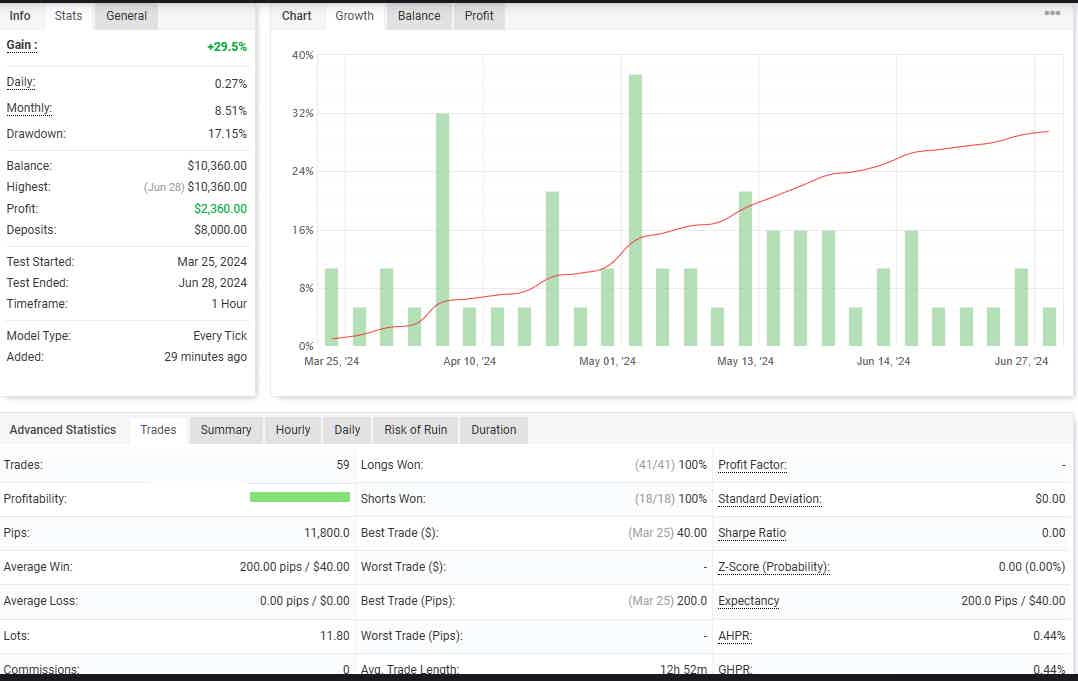
+29.5% XAU/USD- Timeframe: H1
March 25, 2024 – Jun 28, 2024
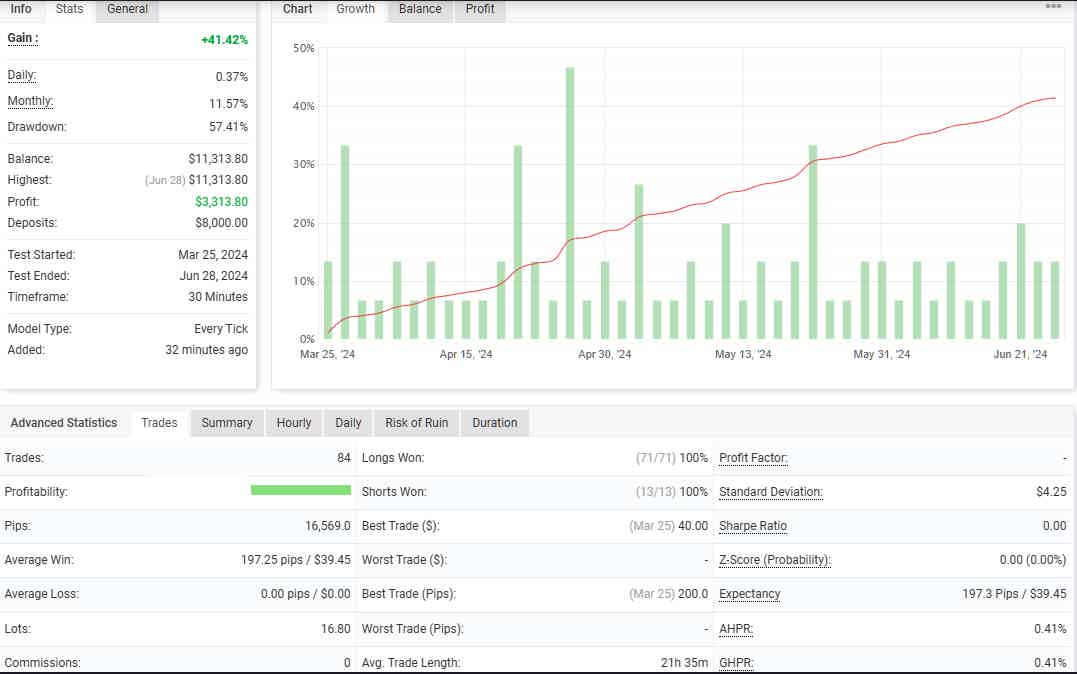
+41.42% XAU/USD- Timeframe: M30
March 25, 2024 – Jun 28, 2024
+19.6% USD/JPY- Timeframe: H1
March 25, 2024 – Jun 28, 2024

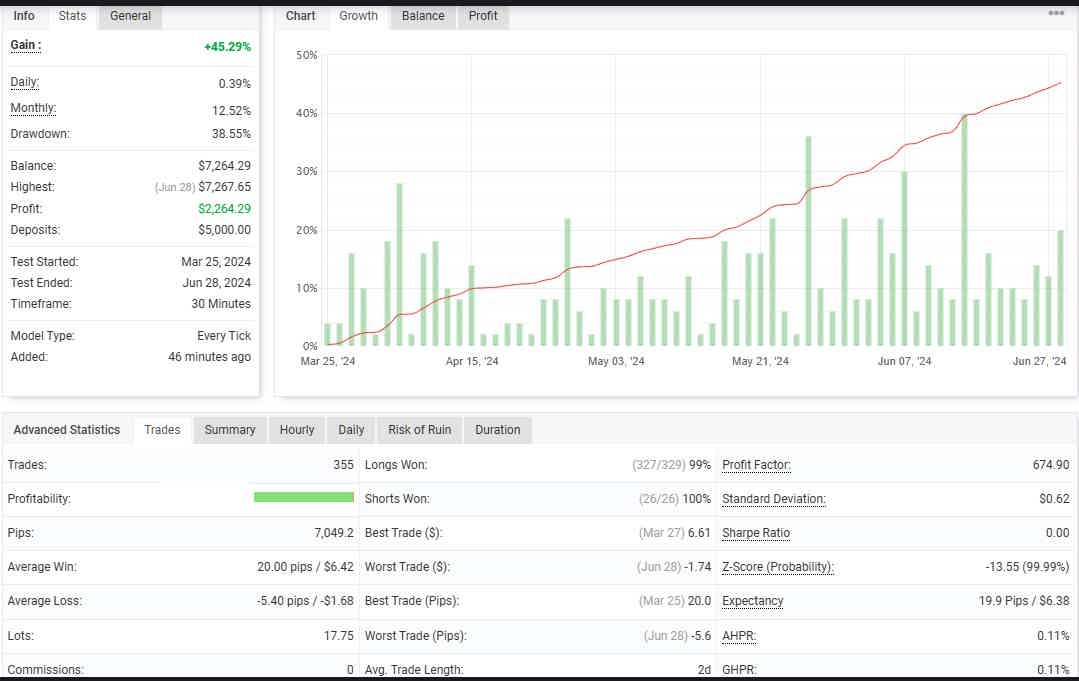
+45.29% USD/JPY- Timeframe: M30
March 25, 2024 – Jun 28, 2024
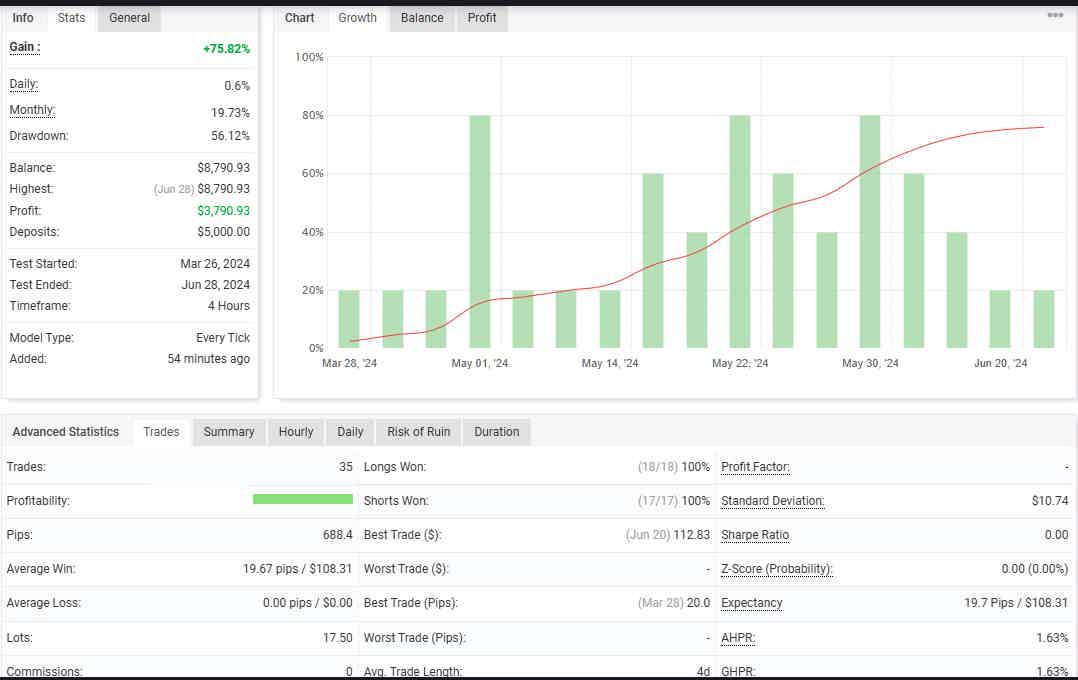
+75.82% USD/CHF- Timeframe: H4
March 26, 2024 – Jun 28, 2024
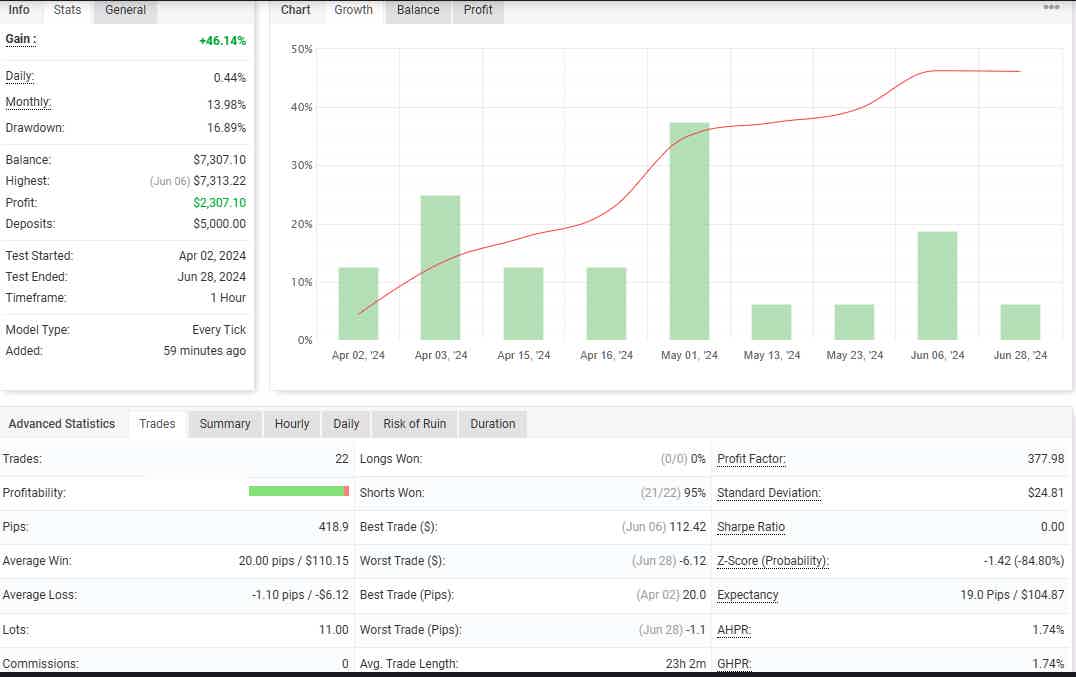
+46.14% USD/CHF- Timeframe: H1
April 02, 2024 – Jun 28, 2024
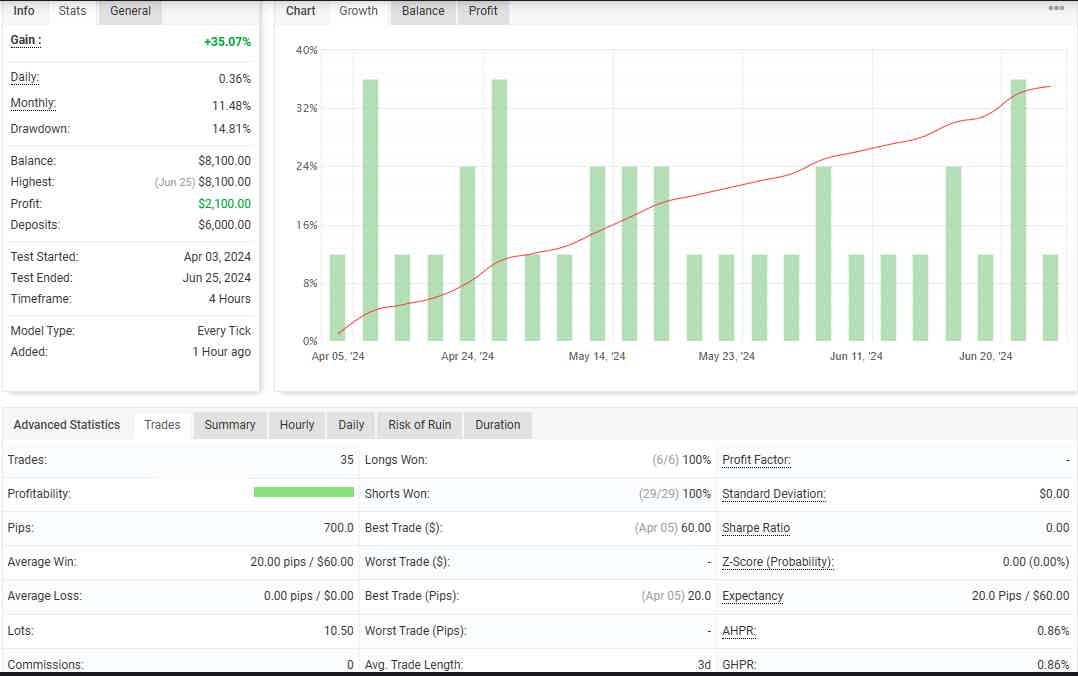
+35.07% EUR/USD- Timeframe: H4
April 03, 2024 – Jun 25, 2024
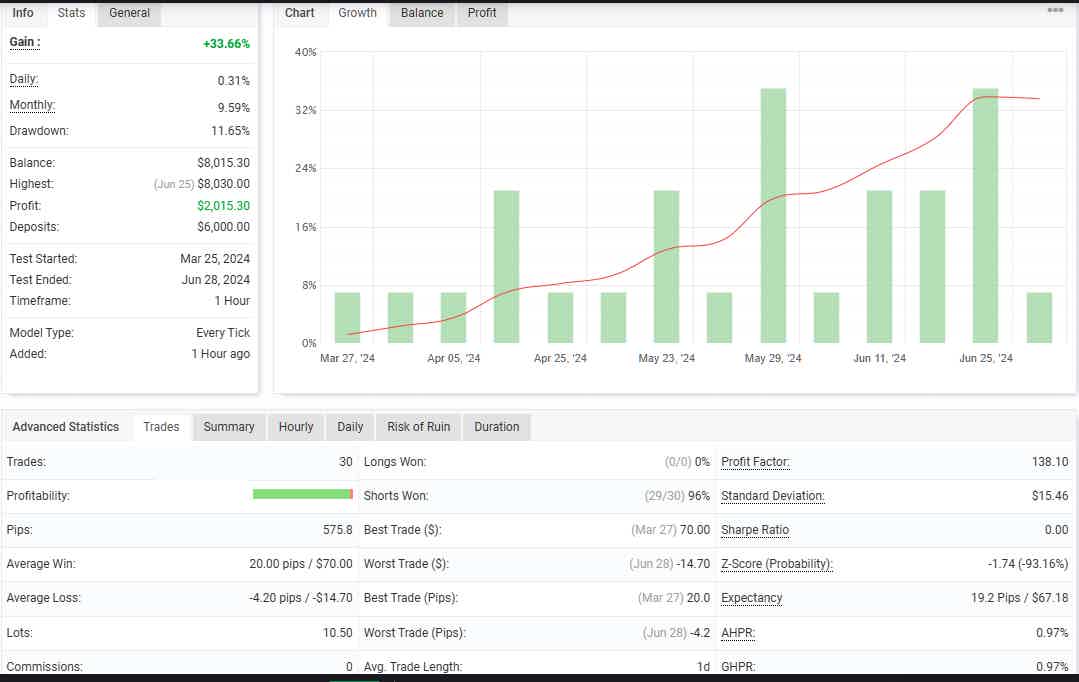
+33.66% EUR/USD- Timeframe: H1
March 25, 2024 – June 28, 2024
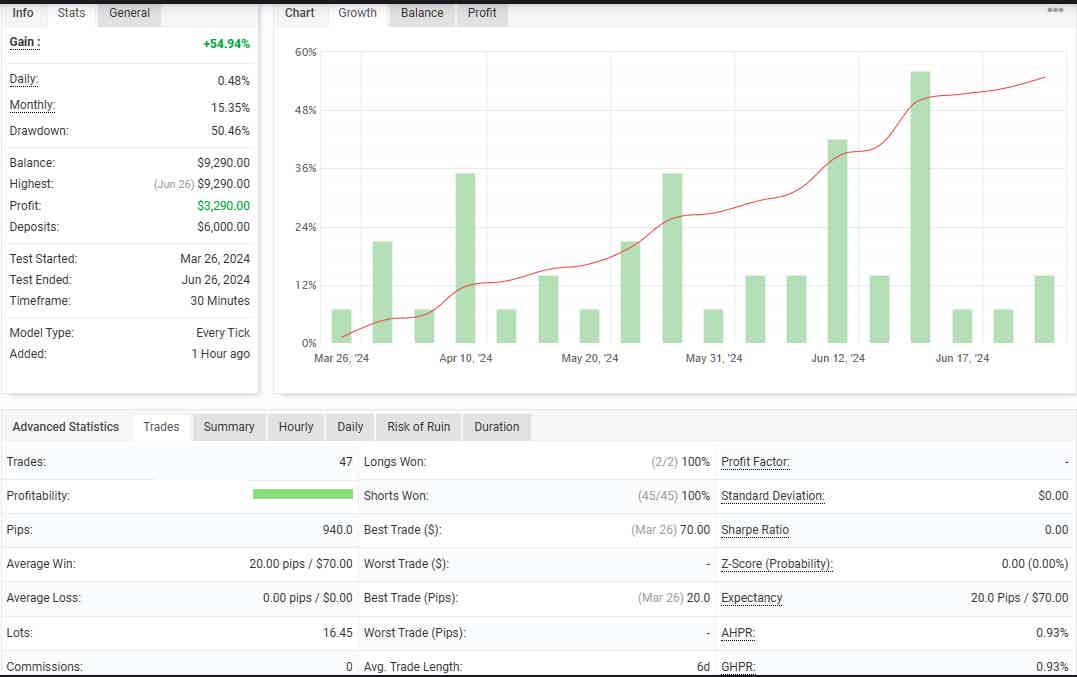
+54.94% EUR/USD- Timeframe: M30
March 26, 2024 – June 26, 2024
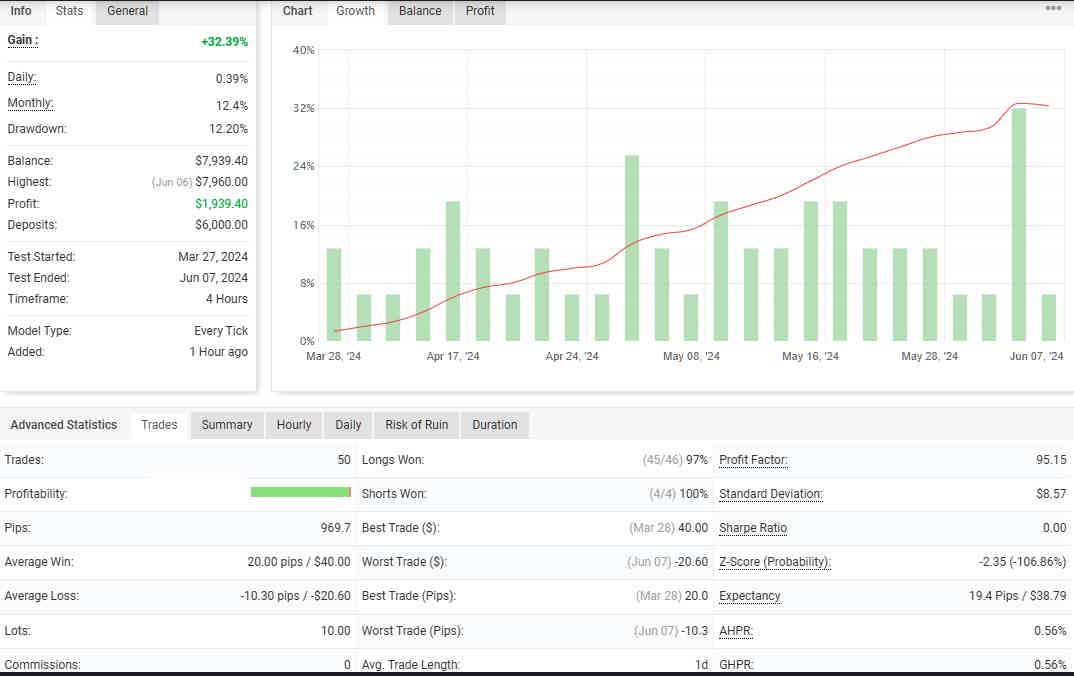
+32.39% AUD/USD- Timeframe: H4
March 27, 2024 – June 07, 2024
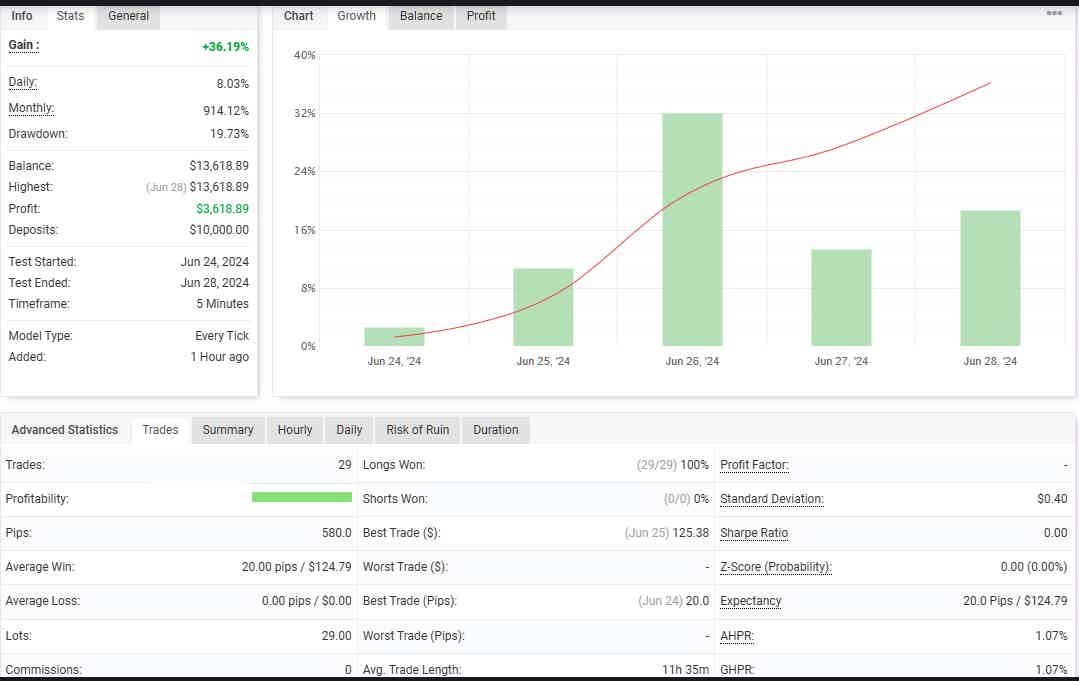
+36.19% USD /JPY- Timeframe: M5
June 24, 2024 – June 28, 2024
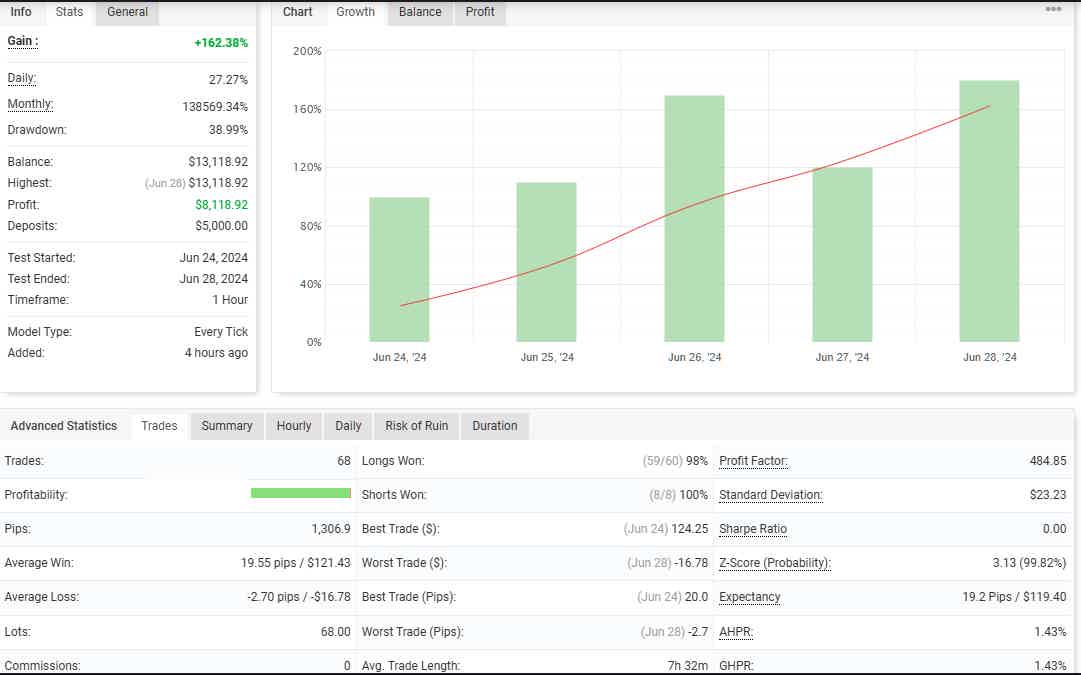
+162.38% GBP/JPY- Timeframe: H1
June 24, 2024 – June 28, 2024
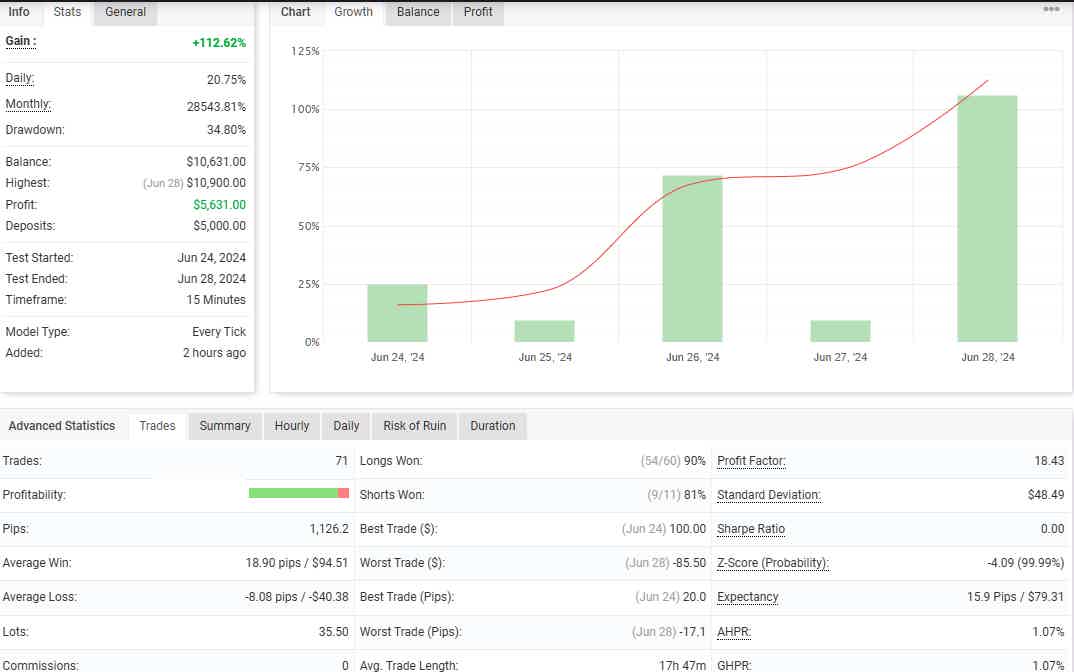
+112.62% USD/CAD- Timeframe: M15
June 24, 2024 – June 28, 2024
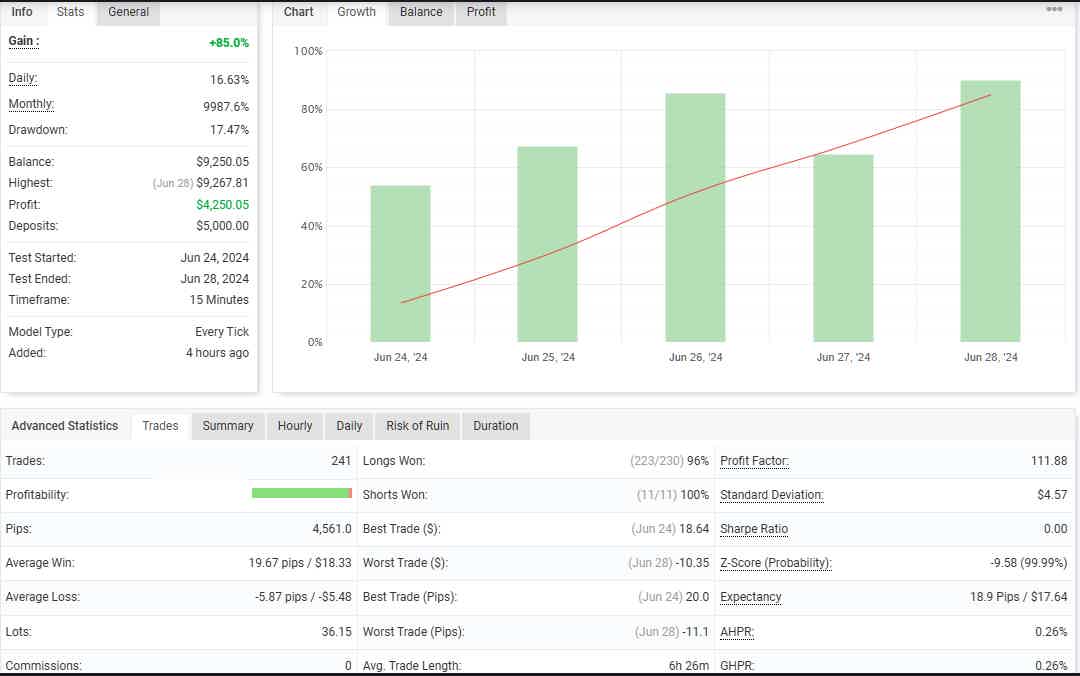
+85.0% GBP/JPY- Timeframe: M15
June 24, 2024 – June 28, 2024
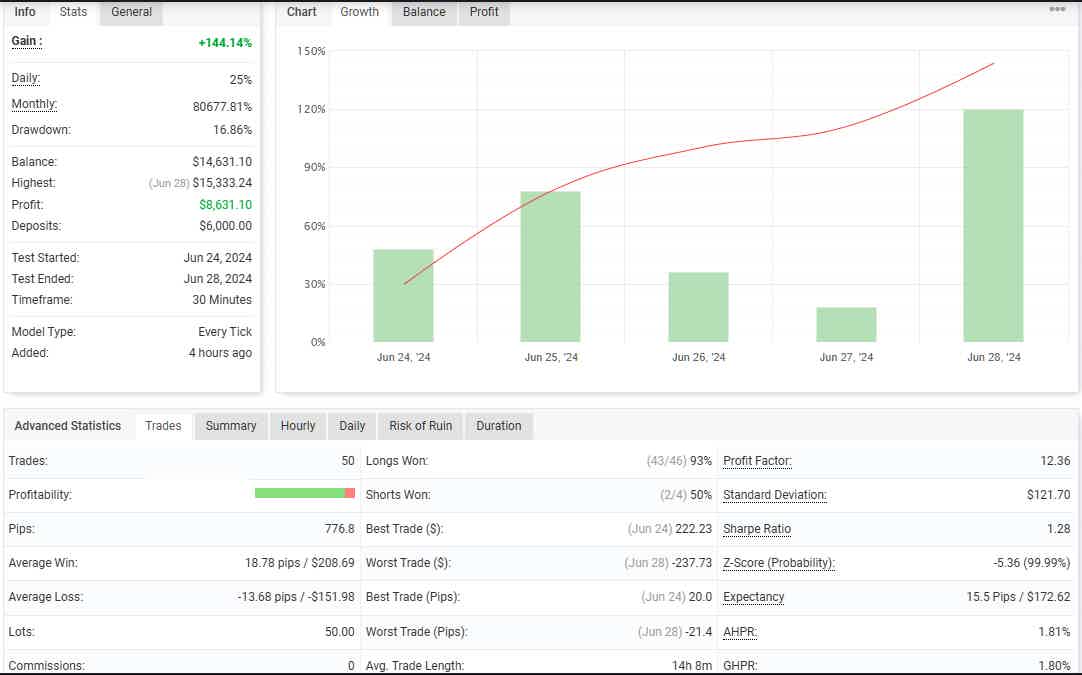
+144.14% GBP/CHF- Timeframe: M30
June 24, 2024 – June 28, 2024
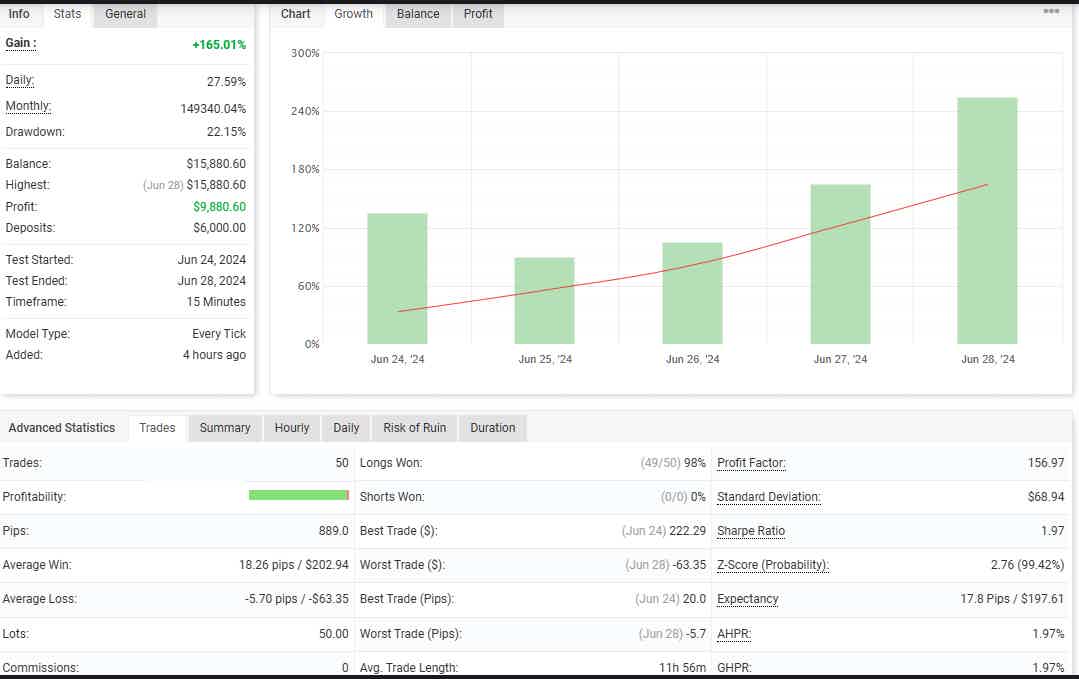
+165.01% GBP/CHF- Timeframe: M15
June 24, 2024 – June 28, 2024
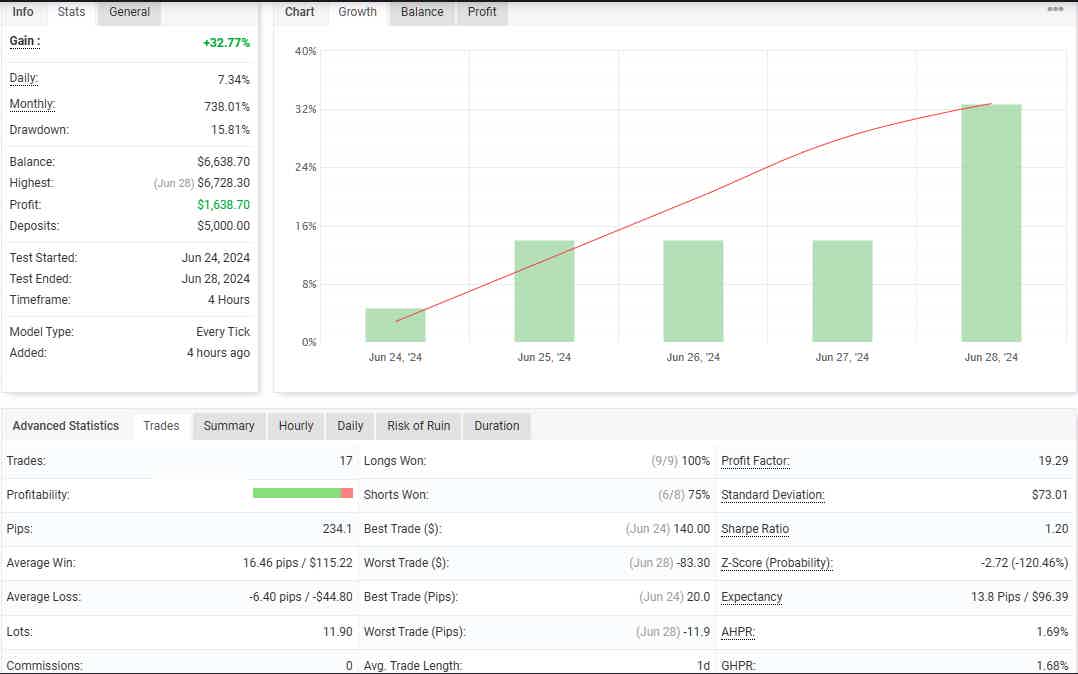
+32.77% EUR/USD- Timeframe: H4
June 24, 2024 – June 28, 2024
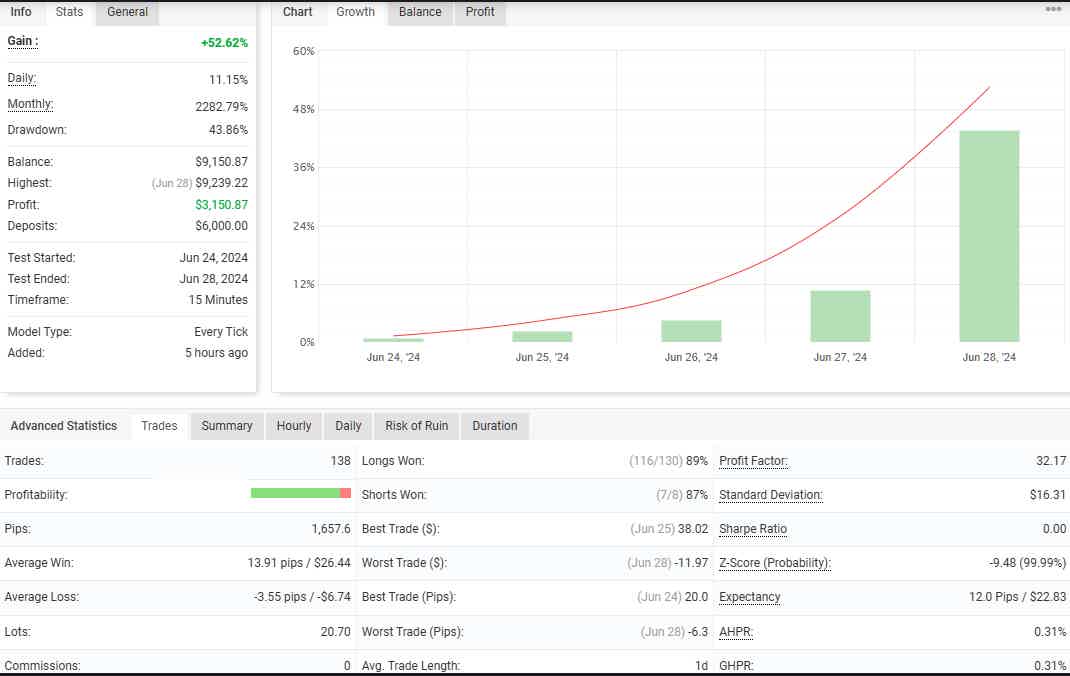
+52.62% EUR/GBP- Timeframe: M15
June 24, 2024 – June 28, 2024
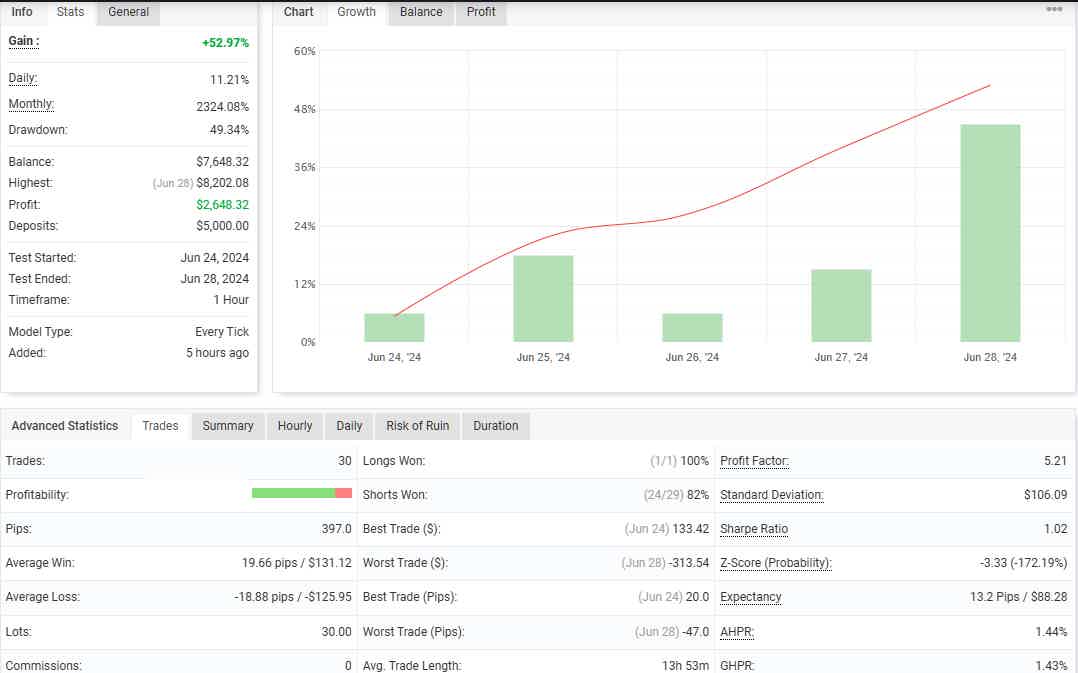
+52.97% EUR/AUD- Timeframe: H1
June 24, 2024 – June 28, 2024
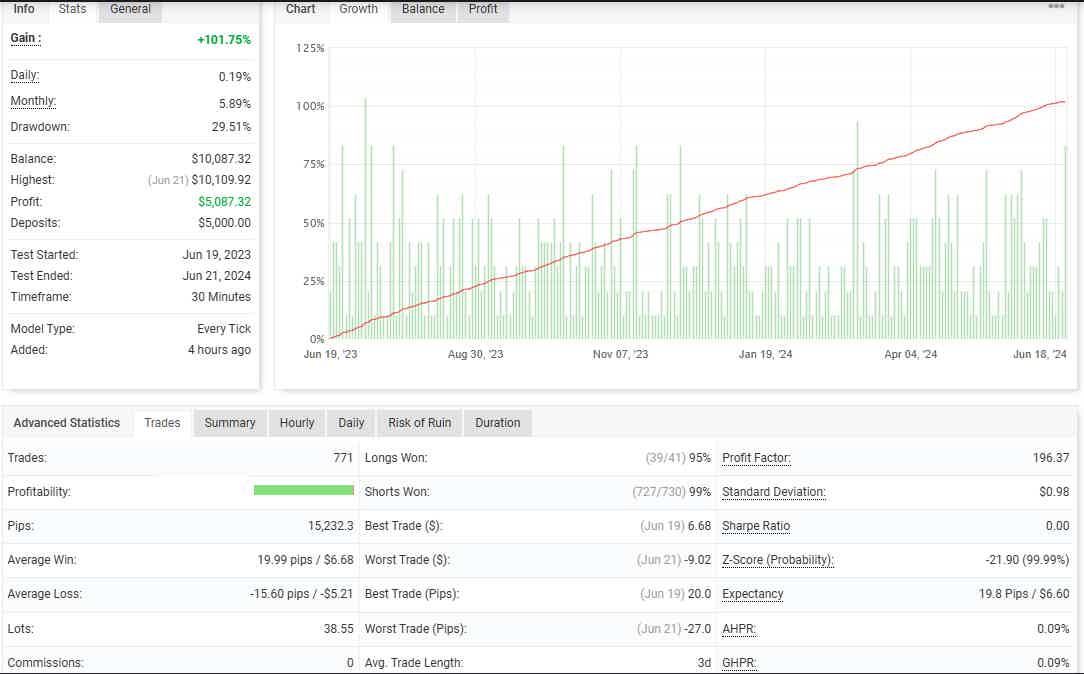
+101.75% EUR/AUD- Timeframe: M30
June 19, 2023 – June 21, 2024
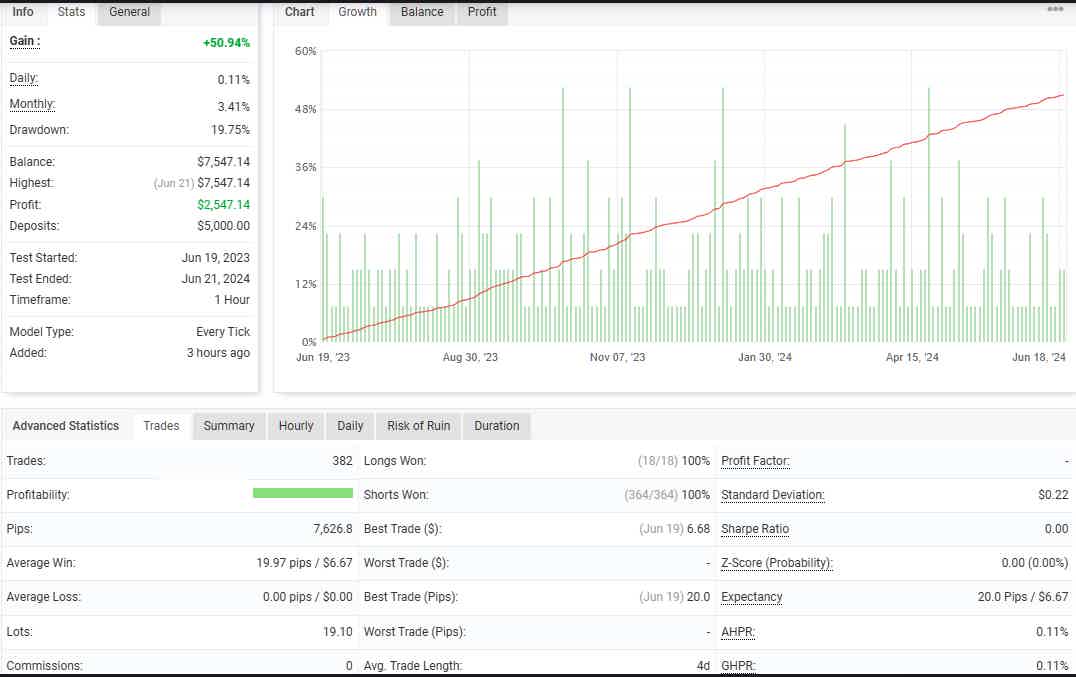
+50.94% EUR/AUD- Timeframe: H1
June 19, 2023 – June 21, 2024
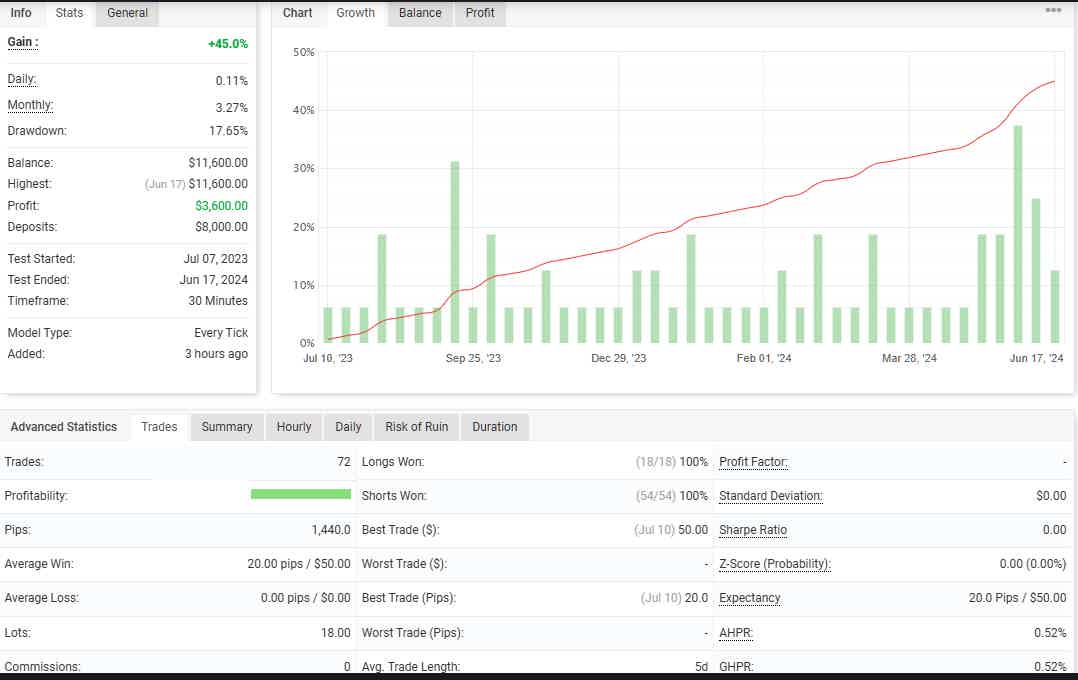
+45.0% EUR/USD- Timeframe: M30
July 07, 2023 – June 17, 2024
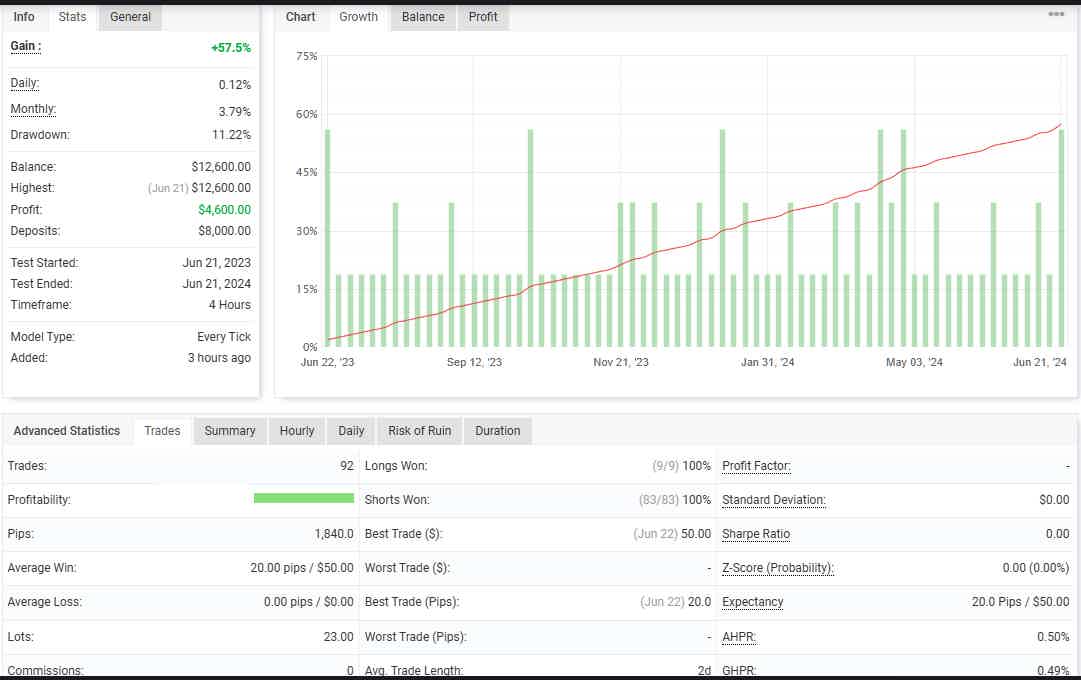
+57.5% EUR/USD- Timeframe: H4
June 21, 2023 – June 21, 2024
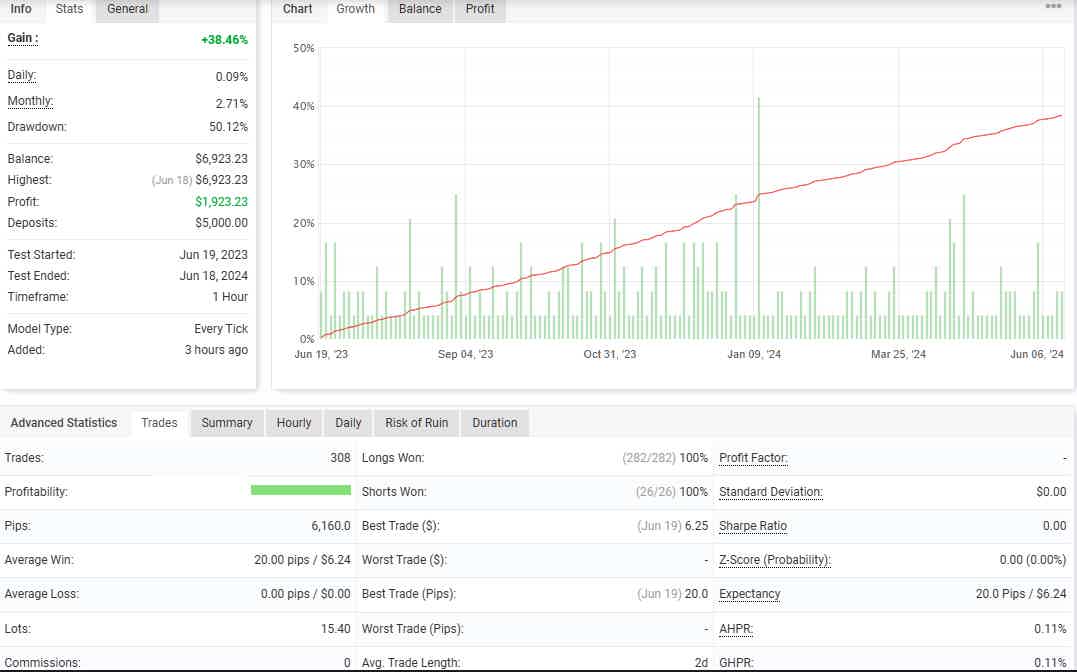
+38.46% GBP/JPY- Timeframe: H1
June 19, 2023 – June 18, 2024
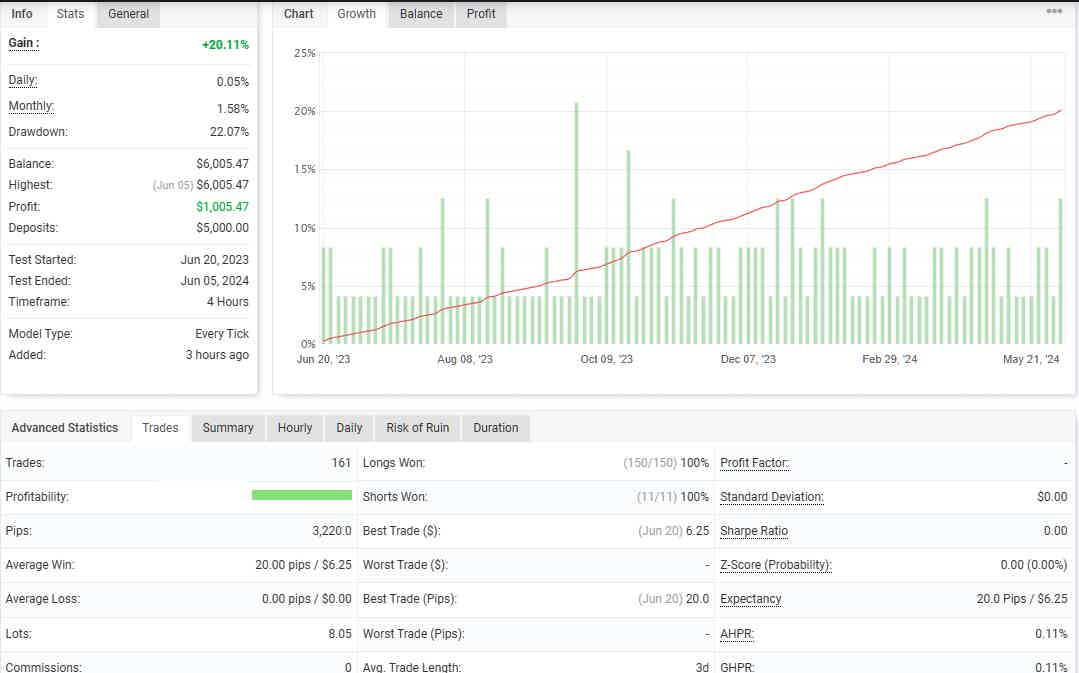
+20.11% GBP/JPY- Timeframe: H4
June 20, 2023 – June 05, 2024
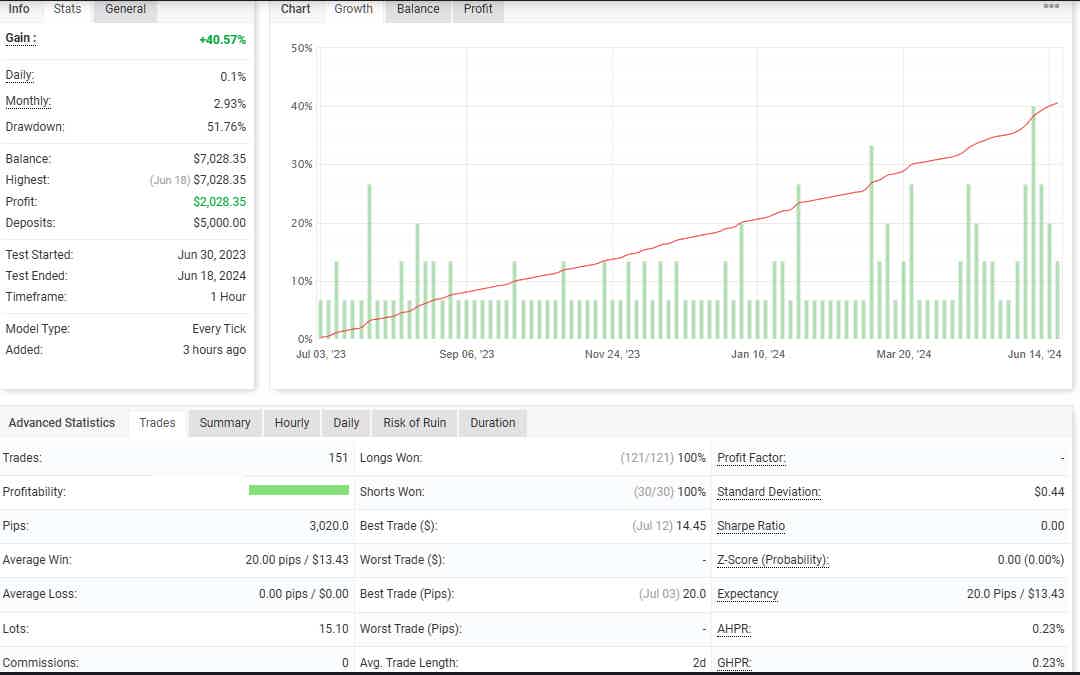
+40.57% USD/JPY- Timeframe: H1
June 30, 2023 – June 18, 2024
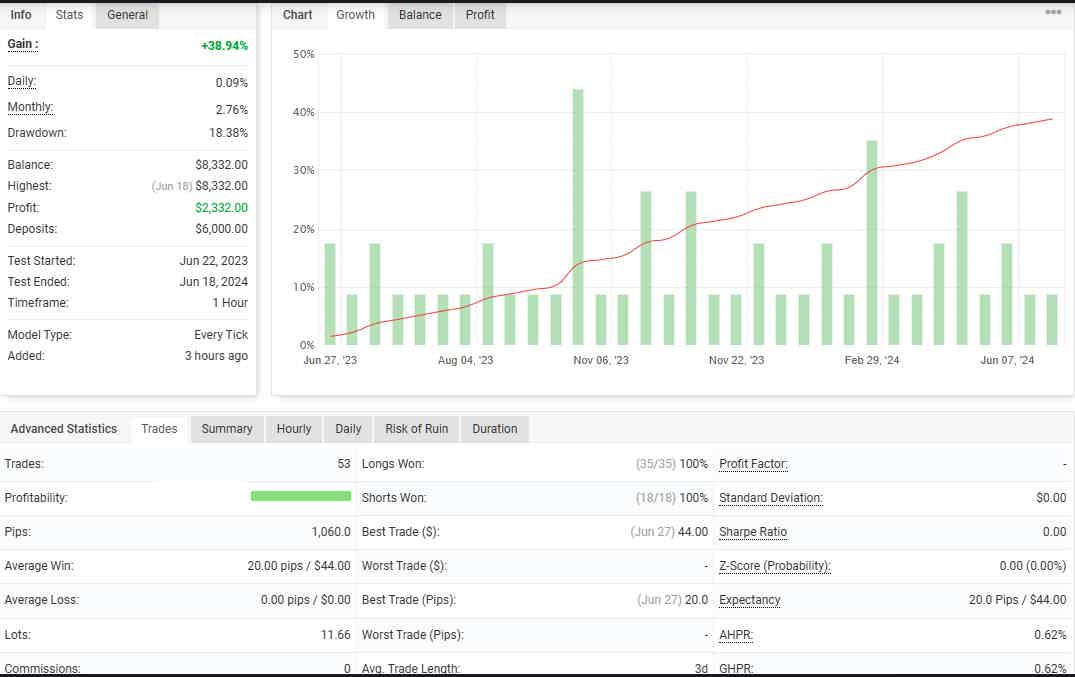
+38.94% NZD/USD- Timeframe: H1
June 22, 2023 – June 18, 2024
+52.61% NZD/USD- Timeframe: H4
June 28, 2023 – May 30, 2024
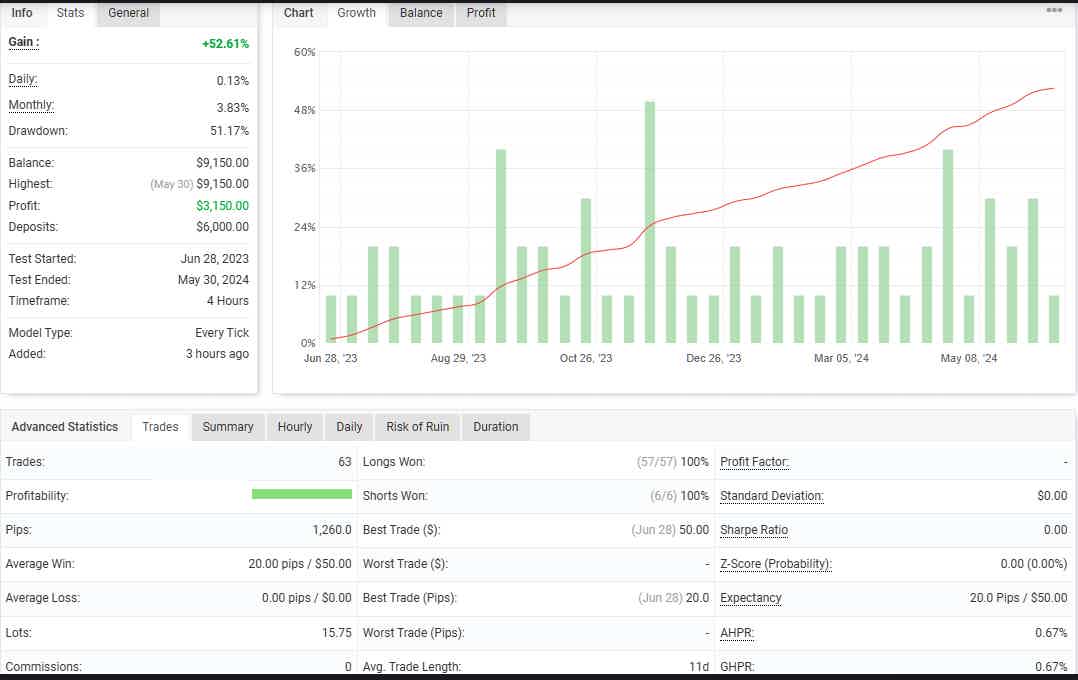
+19.78% USD/CAD- Timeframe: H1
June 21, 2023 – May 29, 2024
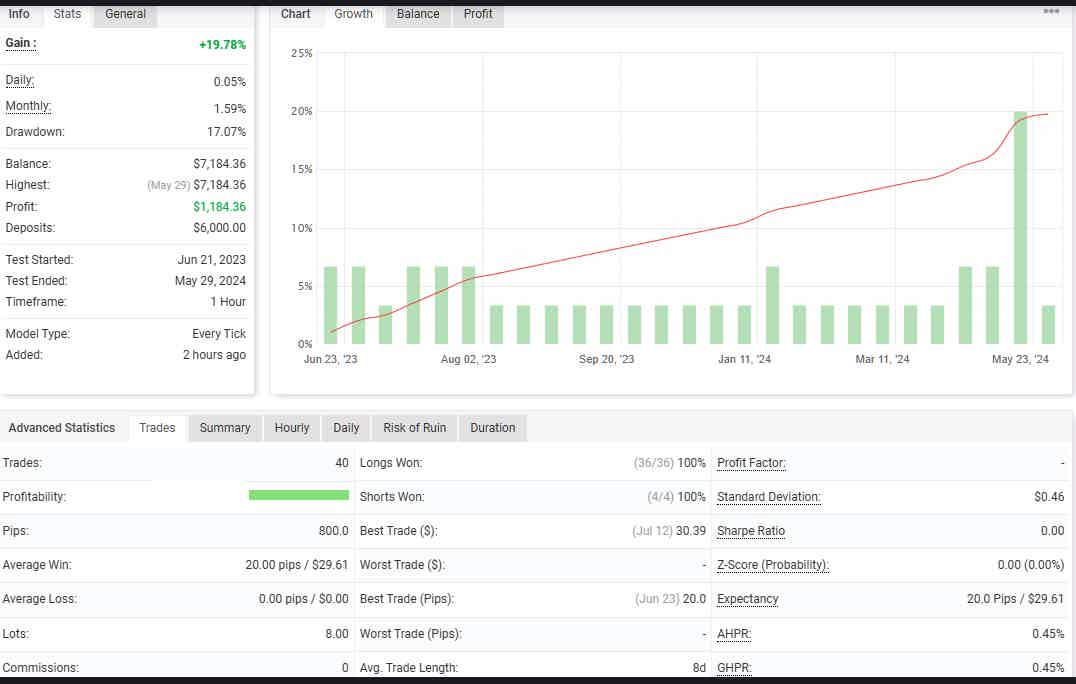
+19.78% USD/CAD- Timeframe: H1
June 21, 2023 – May 29, 2024
| Membership | Yearly Membership |
|---|---|
| Additional Services | Unlock & Decompile |
| Recommended Brokers | Exness Broker, FPMarkets |
| Recommended VPS | FXVM (Low Latency) |
| Youtube Channel | ForexForYou |
| Telegram Channel | Onshoppie Forex EA's & Indicators |
| Telegram Support | Onshoppie Support |
| Installation Guides | Onshoppie Forex Guides |
Brand
ea-mt5
Only logged in customers who have purchased this product may leave a review.









Reviews
There are no reviews yet.