



FXACCURATE SCANNER INDICATOR MT4 For Build 1455+
FXACCURATE SCANNER INDICATOR MT4 For Build 1455+


$9.95
Amazing FXAccurate Scanner makes forex trading exciting and profitable. Download this game-changing indicator and watch your trading results soar.
This item: FXACCURATE SCANNER INDICATOR MT4 For Build 1455+
$9.95
$9.95



Original price was: $14.95.$11.96Current price is: $11.96.

FXAccurate Scanner Indicator: The Practical Trader’s Guide to Catching Trends Early
FXAccurate Scanner Indicator – Your Roadmap to Clearer Entries, Stops & Targets
Table of Contents
- What Is the FXAccurate Scanner Indicator?
- How the Indicator Works
- Key Features at a Glance
- Setting Up FXAccurate Scanner
- Reading the Multi-Timeframe Dashboard
- Best Practices for Forex & Binary Trading
- Sample Trade Walk-Through
- Frequently Asked Questions
- Final Thoughts
What Is the FXAccurate Scanner Indicator?
The FXAccurate Scanner Indicator is a chart tool for MetaTrader that scans every symbol in your Market Watch. Its goal is simple: point out moments when price movement supports a clear entry, give you a logical stop-loss, and project a target based on recent trend behavior.
Although some traders call it the “fxscanner accurate scanner indicator for forex and binary 100 percent profitable,” it is best seen as a data assistant rather than a magic button. It does not repaint, meaning once a signal is printed, it stays on the chart.
Quick definition: A non-repainting indicator does not change past signals when new candles form. What you see in the history is what the indicator displayed in real time.
How the Indicator Works
- Trend Confirmation
- The scanner checks higher-timeframe direction (example: H1, H4, D1).
- It then drills down to a trading timeframe (M5, M15, M30) to find pullbacks.
- Price Action Filters
- Inside bars, engulfing patterns, and simple moving averages shape the final signal.
- If all filters line up, the indicator plots Entry, Stop, and Target on the chart.
- Quality Assessment
- A small label next to each signal marks its past win rate on that pair and timeframe.
- You can turn this on or off in the settings.
Key Features at a Glance
| Feature | Why It Matters to You |
|---|---|
| Non-repainting signals | You can back-test with trust; what you see is what happened. |
| Market Watch scanning | No need to click pair by pair; get alerts on all symbols you follow. |
| Entry / Stop / Target levels | Avoid guesswork; levels are based on recent structure, not gut feeling. |
| Multi-timeframe dashboard | Confirm trend across periods in one place. |
| On-chart performance stats | Spot pairs where the indicator tends to do well. |
Key Alerts
- Pop-up inside MetaTrader
- Email to your inbox
- Push notification to the mobile app
Receiving alerts on time is crucial, especially in binary options where expiry windows are tight.
Setting Up FXAccurate Scanner
1. Download & Install
- Place the
FXAccurateScanner.ex4orFXAccurateScanner.ex5file in the…/MQL4/Indicatorsfolder. - Refresh or restart MetaTrader.
- Attach the indicator to any chart.
2. Market Watch List
- Right-click inside Market Watch → Show All to let the scanner cover every pair CFD or commodity you follow.
3. Parameter Tuning
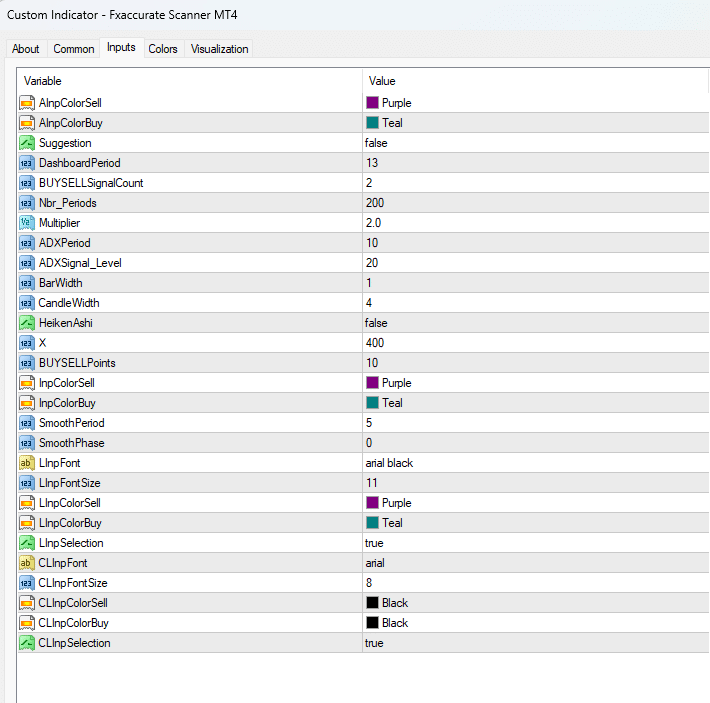
| Parameter | Default | Purpose | Common Tweaks |
|---|---|---|---|
DashboardTimeframes |
H1,H4,D1 | Trend check | Add W1 for position trading. |
SignalTimeframe |
M15 | Entry chart | Switch to M5 for scalping. |
RiskToReward |
1:2 | Sets target | Adjust to 1:3 in strong trends. |
UseFilter_MA |
true | Moving average filter | Turn off for pure price action. |
AlertOnClose |
true | Delay signal until candle closes | Turn off for earlier heads-up (more noise). |
Tip:Always forward-test on a demo account for at least two weeks. Past performance labels are useful, but live conditions show slippage, spread spikes, and your reaction time.
Reading the Multi-Timeframe Dashboard
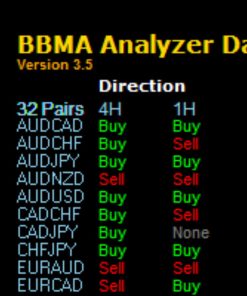
The coloured grid in the corner of your chart shows:
- Green box: trend is up on that timeframe.
- Red box: trend is down on that timeframe.
- Grey box: ranging or no clear trend.
A typical high-probability long signal might look like this:
| M5 | M15 | H1 | H4 | D1 |
|---|---|---|---|---|
| Long | Long | Long | Long | Long |
If the H4 or D1 boxes are grey or red, you might lower position size or skip the trade.
Best Practices for Forex & Binary Trading with FXAccurate Scanner
Forex Trading
- Follow higher-timeframe trend
- Use the scanner’s stop-loss suggestion as your hard stop.
- Trail half position at +1R to secure some profit.
- Avoid trading during major news releases (check Forex Factory Calendar).
Binary Options
- Expiry Selection
- M5 signals → 15 or 20-minute expiry.
- M15 signals → 45 or 60-minute expiry.
- One trade per signal to avoid overexposure.
- Stay with top-tier brokers with fixed payouts and clear regulation.
Money Management
- Risk 1%–2% of account balance per forex trade.
- Cap daily binary loss to 5% of account.
- Keep a simple journal (date, pair, setup status, result).
Sample Trade Walk-Through with FXAccurate Scanner
Below is a practical example using EURUSD on the 15-minute chart.
Date: 13 MarchDashboard: All green up to H4
- Signal Print – Arrow at 09:15, Entry 1.0750, Stop 1.0735, Target 1.0780.
- Position Size – 1% risk, 15-pip stop, EUR account. Lot size calculator gives 0.33 lots.
- Trade Management – Price reaches +15 pips after 22 minutes (1R). Moved stop to break-even.
- Outcome – Target hit at 10:05. R = 2 profit.
Screen capture saved to journal folder. Notes: “Quick move after London open; higher-timeframe helped.”
Binary approach: 30-minute call finished ITM (in the money) with 0.0009 buffer.
Frequently Asked Questions regarding FXAccurate Scanner
Is the FXAccurate Scanner Indicator really 100 percent profitable?No strategy is perfect. The indicator has winning streaks and losing streaks. Combine it with good risk control.
Does it work on indices or crypto?Yes, as long as the broker feeds those symbols into MetaTrader. Always forward-test: spreads on crypto can be wide.
What brokers support it?Any MT4 or MT5 broker. Check that they allow EA/indicator alerts and do not restrict hedging if you plan to run multiple positions.
Can beginners use it?Yes, but study price basics first.
Is there a refund policy?Contact the seller or marketplace where you purchased. Policies differ.
Final Thoughts About FXAccurate Scanner
The FXAccurate Scanner Indicator offers clear entries, pre-defined stops, and realistic targets across every symbol you track. It does not repaint, so you can measure how well it fits your style. Add sound risk rules and a steady routine, and you have a solid framework for both forex and binary setups.
Ready to see it in action? Download the demo, test for two weeks, and share your results in the comments below. Trade smart, and may your next chart give you the confidence you seek.
| Membership | Yearly Membership |
|---|---|
| Additional Services | Unlock & Decompile |
| Recommended Brokers | Exness Broker, FPMarkets |
| Recommended VPS | FXVM (Low Latency) |
| Youtube Channel | ForexForYou |
| Telegram Channel | Onshoppie Forex EA's & Indicators |
| Telegram Support | Onshoppie Support |
| Installation Guides | Onshoppie Forex Guides |
Brand
Indicator-mt4
Only logged in customers who have purchased this product may leave a review.
Related products

Out of stock

Out of stock


Out of stock
Reviews
There are no reviews yet.