


Cycle Maestro Indicator MT4 V1.0 For Build 1473+
Cycle Maestro Indicator MT4 V1.0 For Build 1473+


Original price was: $497.00.$14.95Current price is: $14.95.
The amazing Cycle Maestro Indicator is now trending! Happy traders share their secrets for success. Get started and improve your trades today!

This item: Cycle Maestro Indicator MT4 V1.0 For Build 1473+
Original price was: $497.00.$14.95Current price is: $14.95.
Original price was: $497.00.$14.95Current price is: $14.95.

Original price was: $9.95.$7.96Current price is: $7.96.

Original price was: $9.95.$7.96Current price is: $7.96.

Original price was: $9.95.$7.96Current price is: $7.96.

Original price was: $399.00.$319.20Current price is: $319.20.

Original price was: $14.95.$11.96Current price is: $11.96.
Cycle Maestro Indicator: The Practical Tool for Clear Cyclic Analysis Signals
Alternative Title: Cycle Maestro Indicator – A Straight-Talking Guide to Consistent BUY, SELL, and STOP LOSS Decisions
Table of Contents
Introduction to Cycle Maestro
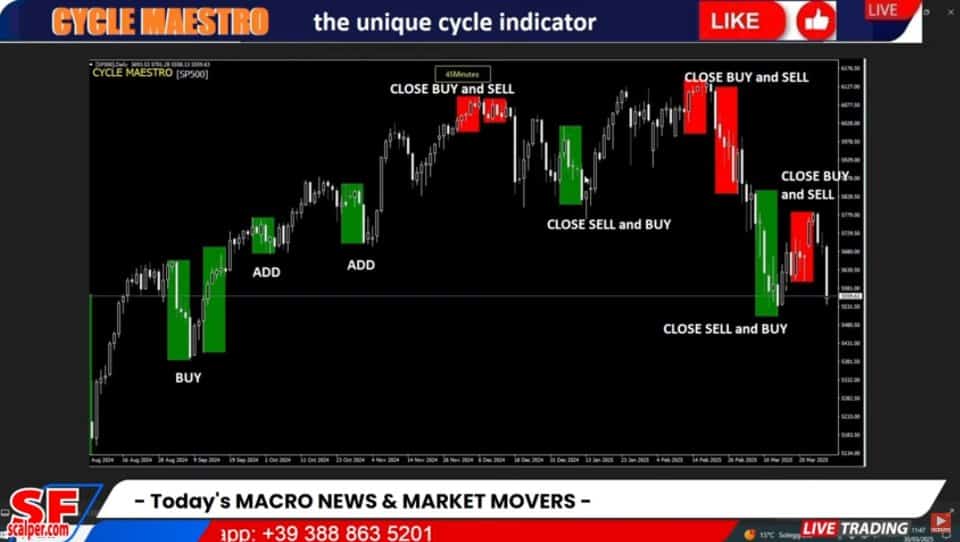
The Cycle Maestro Indicator—often written as CYCLEMAESTRO inside trading forums—offers a straightforward way to spot market rhythm without relying on personal guesswork. Designed around the ten-year research of Serghei Istrati and coded by Stefano Frisetti, it strips out theory that fails in live markets and leaves only what consistent backtests confirm. The result is a set of non-repainting BUY, SELL, and STOP LOSS zones you can see at a glance, whether you trade forex, stocks, futures, crypto, or bonds.
In this guide we will break down exactly how the Cycle Maestro Indicator works, how to install it on MetaTrader 4 (MT4) and MetaTrader 5 (MT5), and how to build trading plans around its clear signals. By the end you will understand why many traders who value practical cyclic analysis prefer this tool over more interpretive indicators.
What Makes the Cycle Maestro Indicator Different?
Most technical indicators leave room for personal interpretation: two traders can look at the same RSI or MACD chart and reach opposite views. Cycle Maestro aims to remove that ambiguity. It does so in three main ways:
- Non-repainting algorithm: once a signal prints, it stays.
- Predefined BUY/SELL areas: colored zones show direction without fuzzy shades of maybe.
- Built-in STOP LOSS and TAKE PROFIT suggestions: you see risk and potential reward right away.
Unlike multi-purpose oscillators that need parameter tuning for each asset, Cycle Maestro’s default settings are designed to work on any listed instrument and across common time frames, especially the Daily, H1, and M45 charts.
Installing Cycle Maestro on MT4 and MT5
1. Download the Indicator
You can obtain the latest build from the official developer page or reputable marketplaces such as the onshoppie.com. Ensure you get the .mq4/.ex4 file.
2. Add to MetaTrader
- Open your MetaTrader platform.
- Click File → Open Data Folder.
- Navigate to
MQL4/Indicators. - Copy the Cycle Maestro file into that folder.
- Restart MetaTrader or refresh the Navigator window.
3. Attach to a Chart
- Open the chart of your chosen instrument.
- Drag Cycle Maestro Indicator from the Navigator onto the chart.
- Keep the default input values for your first runs.
Practical Trading Set-ups
Daily Breakout Plan
- Scan all major forex pairs at 22:00 server time.
- Mark charts where a new Cycle Maestro zone emerged on the daily close.
- Place entry orders 10 pips above (BUY) or below (SELL) the zone edge.
- Use zone opposite edge as STOP LOSS.
- Set TAKE PROFIT at 1.5× risk or at the next high/low.
Intra-Day Momentum on H1
- At the top of each hour check H1 charts for fresh zones.
- Enter immediately on candle close; do not chase if price already moved over half the zone width.
- Trail STOP LOSS to new area if continuation appears.
Swing on M45
- Focus on assets with strong news catalysts.
- Combine with a fundamental calendar (e.g., ForexFactory).
- Only trade in the direction of the fundamental bias if the Cycle Maestro zone agrees.
Best Practices for Risk Management
- Fixed Fractional Risk
- Risk 1 %–2 % of account per trade based on zone size.
- Position Sizing Formula
Lot Size = (Account × %Risk) / (Pip Value × Stop Distance) - No Double Position if Zone Overlaps
- Only add when a new, non-overlapping continuation zone appears.
- Weekly Review
- Compare planned vs. executed trades; adjust if average risk exceeds plan.
- Use a Trading Journal
- Log pair, timeframe, zone color, entry, exit, reason for exit, emotional notes.
Advanced Tips for Experienced Traders
- Combine With Volume
- Confirm zone strength when volume exceeds 20-period average.
- Multi-Time-Frame Sync
- Trade only when higher timeframe zone aligns with your execution timeframe.
- Diversify Across Asset Classes
- Because Cycle Maestro works on any listed asset, you can split risk—e.g., one forex pair, one commodity, one index.
- Algorithmic Integration
- Use MetaTrader’s Expert Advisor (EA) framework to automate Cycle Maestro signals.
- Equity Curve Filtering
- Pause trading if drawdown reaches 5 % and wait for next equity high.
Frequently Asked Questions Regarding Cycle Maestro
Q1: Does the Cycle Maestro Indicator lag?Every indicator uses past data, but Cycle Maestro’s proprietary cycle detection reduces delay by focusing on dominant, recent swings rather than long historical averages.
Q2: Can I change the colors?Yes. In the indicator settings, switch BuyColor and SellColor to any shade you prefer. Keep contrast high for clarity.
Q3: What markets does it fail on?So far, stress testing shows reliable performance on both trending and ranging assets. Thin-liquidity markets (penny stocks) may produce wider zones; adjust position size accordingly.
Q4: Is it beginner-friendly?Yes. The visual zones and set levels are easier to follow than multi-line oscillators. Still, basic trading education is vital.
Q5: Does it work during news spikes?High-impact events can create slippage. If spreads widen, consider standing aside until the next candle confirms stability.
Key Takeaways of Cycle Maestro
- The Cycle Maestro Indicator gives simple, non-repainting BUY and SELL zones with built-in STOP LOSS and TAKE PROFIT suggestions.
- Default settings suit nearly every listed asset on MT4 and MT5, particularly Daily, H1, and M45 charts.
- Practical cyclic analysis, distilled from ten years of research, removes much of the guesswork common with traditional indicators.
- Solid risk management and a consistent review process remain essential, even with clear signals.
Vendor Site – Click Here
| Membership | Yearly Membership |
|---|---|
| Additional Services | Unlock & Decompile |
| Recommended Brokers | Exness Broker, FPMarkets |
| Recommended VPS | FXVM (Low Latency) |
| Youtube Channel | ForexForYou |
| Telegram Channel | Onshoppie Forex EA's & Indicators |
| Telegram Support | Onshoppie Support |
| Installation Guides | Onshoppie Forex Guides |
Brand
Indicator-mt4
Only logged in customers who have purchased this product may leave a review.







Reviews
There are no reviews yet.