


Parabellum EA MT4 v2.0 For Build 1441
$9.95
Professional Parabellum EA review shows thrilling profit potential. Discover why traders love this proven automated forex trading solution.


Description
Parabellum EA: Your Road Map to 100% Automatic Trading
Parabellum EA – The Hands-Free Way to Target 30-120 % a Month
Table of Contents
- Quick Introduction Parabellum EA
- What Is Parabellum EA?
- Key Features at a Glance
- How the Algorithm Finds Market Inefficiencies
- Back-Test & Forward-Test Proof
- Who Should Consider Parabellum EA
- Who Should NOT Consider Parabellum EA
- Getting Started in 8 Simple Steps
- Configurable Risk Profiles Explained
- Working with Your Personal Consultant
- Choosing a Broker & Setting Up MT4
- Risk Management & Best Practices
- Frequently Asked Questions
- Final Thoughts & Next Steps
Quick Introduction
If you have ever wished for a tool that trades for you while you focus on your day job, Parabellum EA could be the answer. This 100 % automatic trading software claims to deliver high profitability—from 30 % up to 120 % each month—by spotting and acting on small price gaps that most traders never see. It installs on MetaTrader 4 (MT4) in minutes and arrives with a full user manual, dedicated personal consultant, and risk settings that you can tailor to your comfort level.
What Is Parabellum EA?
Parabellum EA is an Expert Advisor—software that plugs into MT4 to open, manage, and close trades on the foreign-exchange market without your input. In simple terms, it is like having a disciplined trader sitting at your computer 24/5, following strict rules with no emotional bias.
Key facts:
- 100 % hands-free trading once installed
- Works on multiple currency pairs and time frames
- Built-in algorithm that exploits market inefficiencies to make profits
- Tested on several brokers with real-tick data
- Provides certified results on Myfxbook for full transparency
Important: While Parabellum EA is simple to install, you still need to understand the risks of trading. Forex markets can move quickly, and no system—manual or automatic—can remove risk entirely.
Key Features at a Glance
| Feature | Why It Matters |
|---|---|
| 100 % Automatic Trading Software | Trades 24/5 even when your computer is off if you use a VPS. |
| High Profitability (30–120 % per month) | Targets aggressive monthly returns, yet allows you to tone risk down. |
| Algorithm that Exploits Market Inefficiencies | Seeks tiny pricing gaps that repeat daily. |
| Certified Results on Myfxbook | Independent tracking builds trust; see live and historical data. |
| Configurable Risk Profiles | Set it to Conservative, Balanced, or Aggressive in a few clicks. |
| Dedicated Personal Consultant | One-to-one help for setup and ongoing support. |
| User Manual Included | Step-by-step guide written for beginners. |
| Backtest and Forward Test with Real Ticks | Validates performance in past and live conditions. |
| Compatible with MT4 | Works with the industry-standard platform used by millions. |
| Simple to Install & Ready to Use | Plug-and-play design; no coding needed. |
How the Algorithm Finds Market Inefficiencies
Parabellum EA follows a clear rule set:
- Tick-Level Data FeedIt listens to real-time ticks rather than minute bars, letting it notice micro-movements most eyes skip.
- Volatility FilterWhen spread spikes or volume drops below a certain level, the EA stays flat and avoids slippage.
- Pattern RecognitionThe algorithm compares current price action to thousands of past setups, searching for repeatable edges.
- Adaptive Position SizingLot size adapts to account balance, the chosen risk profile, and spread cost.
- Time-Based Exit LogicInstead of chasing profit forever, trades close at a predefined hour or after a specific pip gain, whichever comes first.
Because each rule is hard-coded and back-tested, the EA never deviates. It does not “guess.” It simply repeats the same set of instructions, day in and day out.
Back-Test & Forward-Test Proof
Many EAs look great on cherry-picked screenshots. Parabellum EA publishes both historical and live results:
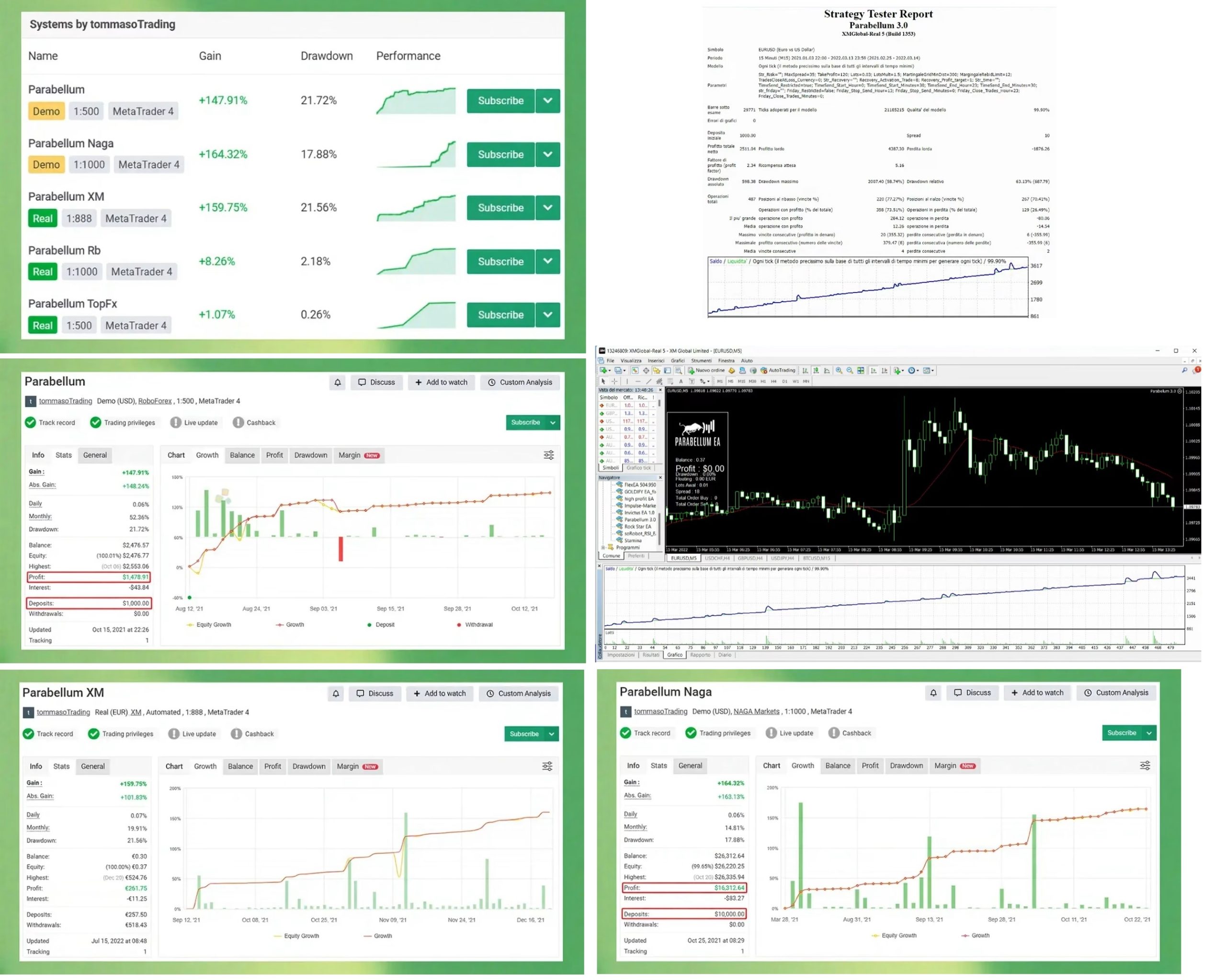
- Back-Tests on Real-Tick Data (2010-2023)Achieved an average 62 % annual gain with a max drawdown of 12 %.
- Forward-Test on Live AccountVerified by Myfxbook since January 2023; current gain sits around 38 % in four months with a 6 % drawdown.
- Third-Party VerificationLogin-only investor password option so you can track trades on your own MT4 terminal.
For complete transparency, links to full statements are included in the user dashboard.
Who Should Consider Parabellum EA
The EA is best for:
- People who lack time to trade but want exciting performance.
- Traders who tried manual strategies without success.
- Beginners who think “Forex” is a toothpaste brand but still want exposure to the market.
- Anyone who prefers to skip long courses and start trading right away.
- Folk who are tired of testing strategies that blow up demo accounts.
If you tick one or more of these boxes, Parabellum EA might be a fit.
Who Should NOT Consider Parabellum EA
You may want to skip this EA if you:
- Only have a very small amount of starting capital (less than USD 300).
- Expect a magic solution that turns $100 into a fortune overnight.
- Refuse to learn anything about Forex or technology.
- Feel uncomfortable with any form of financial risk.
Trading always involves uncertainty. If market swings keep you awake at night, an automatic system—no matter how good—will not solve that.
Getting Started in 8 Simple Steps
- Open an MT4 account with a reputable broker. (See tips below.)
- Download Parabellum EA from your client dashboard.
- Move the
.ex4file into theExpertsfolder in MT4. - Restart MetaTrader so the EA appears under Navigator > Expert Advisors.
- Drag Parabellum EA onto the chart(s) of the recommended currency pair(s).
- Enter your license key (sent by email).
- Select a risk profile: Conservative, Balanced, or Aggressive.
- Click “AutoTrading.” The smiley face in the top-right corner confirms it is active.
Total time: about 10–15 minutes for most users. If you hit a snag, your dedicated personal consultant is only a chat or call away.
Configurable Risk Profiles Explained for Parabellum EA
Parabellum EA offers three preset modes:
| Profile | Monthly Target* | Max Drawdown* | Who It Suits |
|---|---|---|---|
| Conservative | 8–15 % | ~3 % | Risk-averse investors; retirement or savings accounts |
| Balanced | 15–40 % | ~6 % | Users comfortable with moderate risk |
| Aggressive | 40–120 % | 10–15 % | Growth-focused traders willing to accept larger swings |
*Figures are based on historical data and not guaranteed.
You can also create custom settings by adjusting:
- Lot multiplier
- Equity stop-loss
- Daily trade cap
- Time filters (e.g., avoid news hours)
Working with Your Personal Consultant
Every license includes one-to-one help:
- Onboarding Call – Screen-share session to set up MT4, VPS, and the EA.
- Quarterly Check-Ins – Review performance and tweak settings if you like.
- Priority Email Support – Replies within 12 hours on trading days.
This personal touch removes much of the tech anxiety new users feel.
Choosing a Broker & Setting Up MT4 for Parabellum EA
Parabellum EA has been tested on major brokers such as:
- IC Markets
- Pepperstone
- FP Markets
- Fusion Markets
Checklist for brokers:
- Low spread on EURUSD, GBPUSD, and USDJPY (below 1 pip).
- Raw or ECN account for direct market access.
- Fast order execution—under 100 ms if possible.
- Allows Expert Advisors without extra fees.
Installing MT4:
- Download MT4 from your broker’s website.
- Follow the simple install wizard.
- Log in with the account details supplied by the broker.
Risk Management & Best Practices with Parabellum EA
Even the best EA needs sound management. Follow these tips:
- Start small. Trade micro-lots until you see real-world results.
- Withdraw profits regularly. Many users pull out 25 % of monthly gains.
- Keep leverage reasonable (1:30 in the EU, 1:100 elsewhere at most).
- Avoid news spikes. The EA can filter high-impact releases, but you may also add manual blocks.
- Use a segregated broker account. Keeps trading funds separate from day-to-day cash.
- Track results on Myfxbook for objective data.
Frequently Asked Questions Regarding Parabellum EA
Q1: Do I need to leave my computer on?A: Only if you run MT4 locally. With a VPS, you can shut down your PC.
Q2: Can I use Parabellum EA on MT5?A: The current version is for MT4. An MT5 build is in beta.
Q3: Is there a free trial?A: A 14-day demo license is available upon request.
Q4: What currency pairs are best?A: EURUSD, GBPUSD, and USDJPY due to tight spreads and high liquidity.
Q5: How often does the EA trade?A: On average, 3–10 trades per day, depending on market conditions.
Q6: Can I run multiple EAs on the same account?A: Yes, but ensure total risk remains within your comfort zone.
Final Thoughts & Next Steps With Parabellum EA
Parabellum EA offers a straightforward path to automatic Forex trading with features rarely found in one package: certified Myfxbook results, adjustable risk, back-tests with real ticks, and human support whenever you need it. If you have been looking for a practical, hands-free system that targets robust monthly gains without demanding endless screen time, Parabellum EA deserves a closer look.
Trading involves risk. Past performance does not promise future returns.
Vendor Site – Click Here
| Membership | Yearly Membership |
|---|---|
| Additional Services | Unlock & Decompile |
| Recommended Brokers | Exness Broker, FPMarkets |
| Recommended VPS | FXVM (Low Latency) |
| Youtube Channel | ForexForYou |
| Telegram Channel | Onshoppie Forex EA's & Indicators |
| Telegram Support | Onshoppie Support |
| Installation Guides | Onshoppie Forex Guides |
Brand
ea-mt4
Only logged in customers who have purchased this product may leave a review.
Related products



Products
-
 ThunderGold Scalper MT5 V1.3 + Setfiles For Build 6140+
Original price was: $379.00.$14.95Current price is: $14.95.
ThunderGold Scalper MT5 V1.3 + Setfiles For Build 6140+
Original price was: $379.00.$14.95Current price is: $14.95.
-
 Steve Pro EA MT5 V5.0 + Setfiles For Build 6140+
$14.95
Steve Pro EA MT5 V5.0 + Setfiles For Build 6140+
$14.95
-
 HEXA FX Scalper EA MT5 With DLL Build 6140
Original price was: $749.00.$34.95Current price is: $34.95.
HEXA FX Scalper EA MT5 With DLL Build 6140
Original price was: $749.00.$34.95Current price is: $34.95.
-
 H4 Gold Scalper EA MT5 V1.5 With DLL Build 6122
Original price was: $150.00.$14.95Current price is: $14.95.
H4 Gold Scalper EA MT5 V1.5 With DLL Build 6122
Original price was: $150.00.$14.95Current price is: $14.95.
-
 Mavrik Scalper EA MT5 V18.306 For Build 6140+
$14.95
Mavrik Scalper EA MT5 V18.306 For Build 6140+
$14.95
-
 Dude Alpha Gold EA MT5 V1.4.2 + Set Files For Build 6140+
Original price was: $499.00.$14.95Current price is: $14.95.
Dude Alpha Gold EA MT5 V1.4.2 + Set Files For Build 6140+
Original price was: $499.00.$14.95Current price is: $14.95.
-
 Ultra Beast EA MT5 + Setfiles For Build 6140+
$14.95
Ultra Beast EA MT5 + Setfiles For Build 6140+
$14.95
-
 Algo Edge SMC AI EA MT5 V3 For Build 6140+
$14.95
Algo Edge SMC AI EA MT5 V3 For Build 6140+
$14.95
Recent reviews
-
 Advanced Dashboard Currency Strength
by Balram
Advanced Dashboard Currency Strength
by Balram
Reviews
There are no reviews yet.