


Money FAST EA MT5 v1.8 With DLL 5833
$14.95
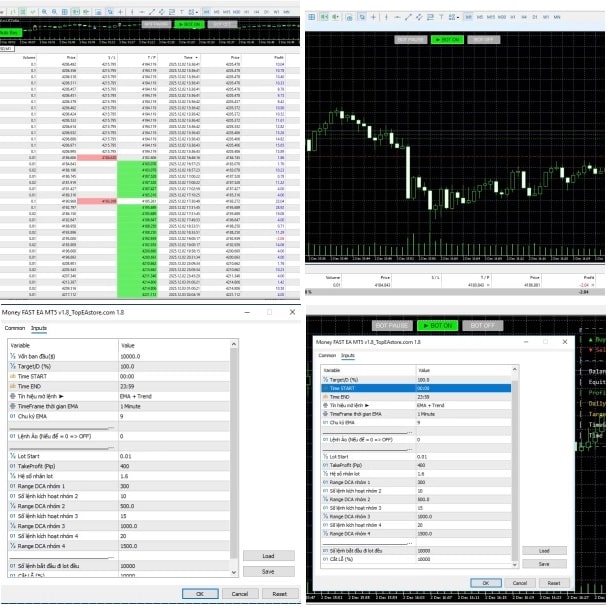
Money FAST EA MT5 is an intelligent, fully automated trading system optimized for XAUUSD on the M5 timeframe for Metatrader 5.



Description
Money FAST EA: A Practical Guide to Faster Gold Trading on MT5
Money FAST EA—The Fast-Acting MT5 Expert Advisor Gold Traders Are Talking About
Table of Contents
- Intro: What Makes Money FAST EA Different?
- Need to Know: Why Focus on XAUUSD on the M5 Chart?
- Key Features of Money FAST EA MT5
- Step-by-Step Setup Guide
- Risk Management Built In
- Final Thoughts & Next Steps
1. Intro: What Makes Money FAST EA Different?
Gold is one of the most active markets on any trading platform. Fast price swings give traders big chances—along with big risks. Money FAST EA MT5 is built to face that speed head-on. You load it on a MetaTrader 5 chart, keep the default settings, and let the program handle entries, exits, and risk. No complicated coding, no hunting for new settings each week.
If you enjoy trading XAUUSD but find manual clicking stressful, Money FAST EA can help by:
- Acting the moment a momentum phase appears
- Closing positions quickly if market direction shifts
- Controlling position size based on a fixed $1000 minimum balance
The goal is steady, repeatable execution—nothing flashy, just consistent action.
2. Need to Know: Why Focus on XAUUSD on the M5 Chart?
XAUUSD (gold priced in US dollars) has tight spreads and deep liquidity during most sessions. Pair that with the M5 timeframe, and you get:
- Quicker feedback versus H1 or H4 charts
- More trade signals each day
- Enough data points to filter out random noise compared with M1
Money FAST EA is optimized for this sweet spot; the developers tuned entry and exit rules so they react but do not overtrade. If you switch the EA to EURUSD, it may still trade, but the results will not match the gold-focused codebase the authors built.
3. Key Features of Money FAST EA MT5
| Feature | Why It Matters |
|---|---|
| Optimized for XAUUSD | Uses price behavior unique to gold, not generic forex code |
| Five-Minute Chart Logic | Fast enough for momentum, slow enough to confirm direction |
| Default Settings Ready | New traders can start in minutes |
| Dynamic Stop-Loss | Changes with volatility to protect gains |
| Controlled Drawdown | Limits how much is at risk per trade |
| Minimum Balance $1000 | Keeps leverage and position size realistic |
4. Step-by-Step Setup Guide
- Download Money FAST EA MT5 from the official marketplace.
- Open MetaTrader 5 → File → Open Data Folder.
- Copy the
.ex5file into theMQL5/Expertsdirectory. - Restart MT5 or right-click Experts → Refresh.
- Drag Money FAST EA onto an XAUUSD M5 chart.
- In the settings window, confirm:
LotSize = 0.01(auto-scales if balance grows).RiskPercent = 1(percent of balance at risk per trade).MaxSpread = 25(measured in points, adjusts for most brokers).
- Make sure AutoTrading (Algo Trading) is green.
- Leave the chart open. The EA now runs 24/5.
Tip: Check your broker’s margin requirements for gold. Each broker sets margin differently, so confirm your $1000 deposit supports the lot size the EA opens.
5. Risk Management Built In
Risk is the first thing the developers addressed:
- Dynamic Stop-Loss: Every trade has a hard stop based on current volatility—no large, hidden losses.
- Maximum Daily Risk: The EA will not place new trades after a fixed percentage of the account is lost.
- Lot Size Control: It uses balance, not equity peaks, to size positions—preventing over-leveraging after a winning streak.
- News Filter (optional): Disable trading during major announcements by choosing a built-in filter linked to the MetaTrader calendar.
If you would like to read more about position sizing, see BabyPips on risk per trade.
6. Final Thoughts & Next Steps For Money FAST EA
If you trade gold and want a steady, automated approach, Money FAST EA offers a clear set-and-forget path. You install it, stick to the default settings, and let the code handle the rapid moves that XAUUSD throws your way.
Vendor Site – Private
| Membership | Yearly Membership |
|---|---|
| Additional Services | Unlock & Decompile |
| Recommended Brokers | Exness Broker, FPMarkets |
| Recommended VPS | FXVM (Low Latency) |
| Youtube Channel | ForexForYou |
| Telegram Channel | Onshoppie Forex EA's & Indicators |
| Telegram Support | Onshoppie Support |
| Installation Guides | Onshoppie Forex Guides |
Brand
ea-mt5
Only logged in customers who have purchased this product may leave a review.
Related products
-

ALITA PRO Battle Cyborg EA MT4 For Build 1471+
Original price was: $439.00.$14.95Current price is: $14.95. Add to cart Buy Now -

Ai GbPUsD MT4 V1.90
$9.95 Read more -
 SALESALESALE
Advanced Gold Trading EA MT4 V6.4 + Setfiles For Build 1460+
Original price was: $199.00.$14.95Current price is: $14.95. Add to cart Buy Now
Products
-
 ThunderGold Scalper MT5 V1.3 + Setfiles For Build 6140+
Original price was: $379.00.$14.95Current price is: $14.95.
ThunderGold Scalper MT5 V1.3 + Setfiles For Build 6140+
Original price was: $379.00.$14.95Current price is: $14.95.
-
 Steve Pro EA MT5 V5.0 + Setfiles For Build 6140+
$14.95
Steve Pro EA MT5 V5.0 + Setfiles For Build 6140+
$14.95
-
 HEXA FX Scalper EA MT5 With DLL Build 6140
Original price was: $749.00.$34.95Current price is: $34.95.
HEXA FX Scalper EA MT5 With DLL Build 6140
Original price was: $749.00.$34.95Current price is: $34.95.
-
 H4 Gold Scalper EA MT5 V1.5 With DLL Build 6122
Original price was: $150.00.$14.95Current price is: $14.95.
H4 Gold Scalper EA MT5 V1.5 With DLL Build 6122
Original price was: $150.00.$14.95Current price is: $14.95.
-
 Mavrik Scalper EA MT5 V18.306 For Build 6140+
$14.95
Mavrik Scalper EA MT5 V18.306 For Build 6140+
$14.95
-
 Dude Alpha Gold EA MT5 V1.4.2 + Set Files For Build 6140+
Original price was: $499.00.$14.95Current price is: $14.95.
Dude Alpha Gold EA MT5 V1.4.2 + Set Files For Build 6140+
Original price was: $499.00.$14.95Current price is: $14.95.
-
 Ultra Beast EA MT5 + Setfiles For Build 6140+
$14.95
Ultra Beast EA MT5 + Setfiles For Build 6140+
$14.95
-
 Algo Edge SMC AI EA MT5 V3 For Build 6140+
$14.95
Algo Edge SMC AI EA MT5 V3 For Build 6140+
$14.95
Recent reviews
-
 Advanced Dashboard Currency Strength
by Balram
Advanced Dashboard Currency Strength
by Balram
Reviews
There are no reviews yet.