

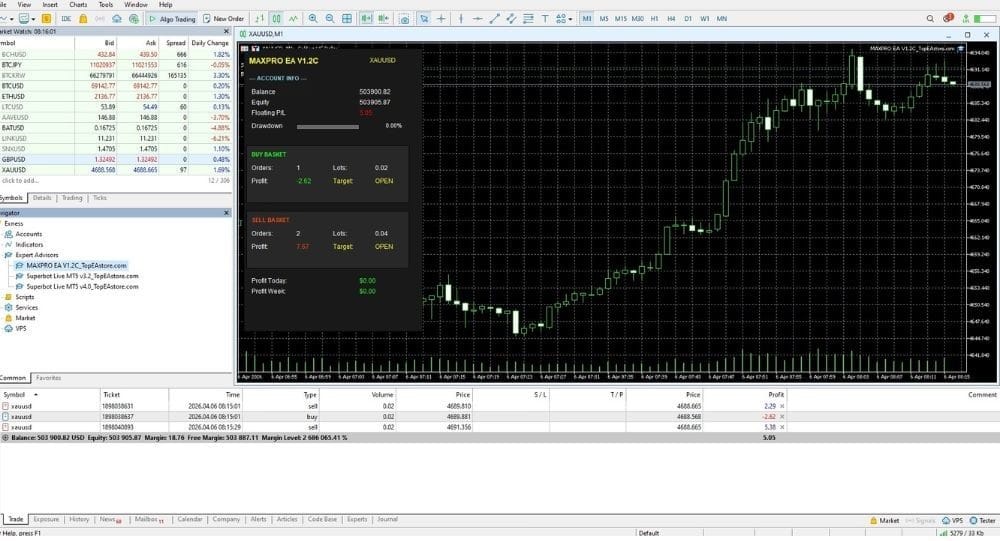

MAXPRO EA V1.2C MT5 For Build 5660+
$14.95
MAXPRO EA is a professional automated trading system built for the MetaTrader 5 platform. Instead of guessing market moves.
Description
MAXPRO EA: A Practical Guide to Consistent Automated Trading on MetaTrader 5
MAXPRO EA – Smart Automated Trading for Gold and Forex
Table of Contents
- What Is MAXPRO EA?
- Key Features at a Glance
- Installation and First-Time Setup
- Recommended Broker and Account Settings
- The Data-Driven Strategy Explained
- Risk Management & Drawdown Control
- MAXPRO EA vs Manual Trading
- Final Thoughts
What Is MAXPRO EA?
MAXPRO EA is a professional automated trading system built for the MetaTrader 5 platform. Instead of guessing market moves, it follows a data-driven strategy that looks for high-probability trade setups on gold (XAUUSD) and selected forex pairs. The Expert Advisor (EA) runs on the M15 timeframe and takes care of the full trading cycle—analysis, entry, exit, and risk control—without any emotional interference.
- Primary objective: deliver consistent performance through intelligent algorithmic execution.
- Target users: traders who want disciplined, hands-off trading with clear risk rules.
Key Features at a Glance
| Feature | Details |
|---|---|
| Platform | MetaTrader 5 |
| Markets | XAUUSD (Gold) and major forex pairs |
| Timeframe | 15-minute (M15) |
| Minimum Deposit | $500 |
| Suggested Leverage | 1:100 or higher |
| Automation Level | 100 % automated expert advisor |
| Strategy Focus | High-probability setups, adaptive to volatility |
| Risk Management | Hard stop-loss, trailing stop, equity guard |
| Updates | Free lifetime updates once purchased |
| Support | Email + community forum |
Installation and First-Time Setup
Follow these simple steps to get MAXPRO EA up and running:
- Download the EA file (.ex5).
- Open MetaTrader 5. Go to File ▸ Open Data Folder → MQL5 ▸ Experts.
- Drag the EA file into the Experts folder, then restart MT5.
- Attach MAXPRO EA to the chart:
- Open XAUUSD or a forex pair you intend to trade.
- Set the chart timeframe to M15.
- Drag the EA from Navigator ▸ Expert Advisors onto the chart.
- Input your settings:
- Lot size or risk percentage
- Max spread allowed
- Trading hours (if you want to restrict sessions)
- Enable AutoTrading in MetaTrader 5 (the button should turn green).
That’s it—the EA starts scanning and will trade once conditions are met.
Recommended Broker and Account Settings
Choosing the right broker can make a big difference:
- Low-spread, ECN or RAW accounts are preferred.
- Leverage: 1:100 lets the EA trade efficiently without forcing high margin usage.
- Execution speed: <100 ms round-trip helps reduce slippage on gold trades.
- Data feeds: Consistent price quotes for XAUUSD are essential.
Tip: Test the EA on a demo account with your broker before switching to live.
The Data-Driven Strategy Explained
Most EAs fall into two camps: random grid/martingale approaches or tight, rule-based systems. MAXPRO EA belongs to the second group. Here’s why:
Core Indicators
- Volatility Filter – Measures Average True Range (ATR) to avoid thin, choppy markets.
- Momentum Check – Uses moving averages plus RSI to catch trades aligning with current momentum.
- Supply-Demand Zones – Detects fresh support and resistance areas for precise entries.
Entry Logic
- A trade only triggers if all filters line up in the same direction.
- No martingale or doubling down; the EA opens one controlled position or a small basket with equal risk.
Exit Logic
- Hard stop-loss = 1–2 × ATR at order time.
- Take-profit = 1.5–3 × risk, adjusted by current volatility.
- Trailing stop moves to break-even after price covers 0.7 × risk.
Because the EA adapts each order to live data, it aims for steady gains rather than quick windfalls.
Risk Management & Drawdown Control
Risk is part of every trading system, but it should never be left to chance.
- Fixed Risk per Trade – You choose % of equity (e.g., 1 %).
- Equity Stop – Optional global drawdown cap (e.g., 20 % of account).
- Max Active Trades – Limits open positions to prevent over-exposure.
- News Filter – Option to pause trading during high-impact events.
These settings give you control, so the EA works within your comfort zone.
MAXPRO EA vs Manual Trading
| Aspect | MAXPRO EA | Manual Trading |
|---|---|---|
| Emotion | None | Fear/greed can affect decisions |
| Screen Time | Minimal | High |
| Consistency | Rule-based | Varies by trader |
| Entry Speed | Instant | Human delay |
| Adaptability | Programmed logic | Dependent on trader skills |
| Learning Curve | Basic MT5 knowledge | Technical/fundamental analysis |
If you struggle with discipline or can’t watch charts all day, the EA is a practical alternative.
Final Thoughts
MAXPRO EA offers a disciplined, fully automated approach for trading gold and key forex pairs on MetaTrader 5. Its data-driven strategy, built-in risk control, and hands-off execution help traders aim for steady long-term results without letting emotions take over. While no system is perfect, the back-tests and live stats suggest a practical tool for anyone seeking consistent performance
Ready to try MAXPRO EA? Head to our product page and start your free demo today.
Vendor Site – Private
| Membership | Yearly Membership |
|---|---|
| Additional Services | Unlock & Decompile |
| Recommended Brokers | Exness Broker, FPMarkets |
| Recommended VPS | FXVM (Low Latency) |
| Youtube Channel | ForexForYou |
| Telegram Channel | Onshoppie Forex EA's & Indicators |
| Telegram Support | Onshoppie Support |
| Installation Guides | Onshoppie Forex Guides |
Brand
ea-mt5
Only logged in customers who have purchased this product may leave a review.
Related products



Products
-
 ThunderGold Scalper MT5 V1.3 + Setfiles For Build 6140+
Original price was: $379.00.$14.95Current price is: $14.95.
ThunderGold Scalper MT5 V1.3 + Setfiles For Build 6140+
Original price was: $379.00.$14.95Current price is: $14.95.
-
 Steve Pro EA MT5 V5.0 + Setfiles For Build 6140+
$14.95
Steve Pro EA MT5 V5.0 + Setfiles For Build 6140+
$14.95
-
 HEXA FX Scalper EA MT5 With DLL Build 6140
Original price was: $749.00.$34.95Current price is: $34.95.
HEXA FX Scalper EA MT5 With DLL Build 6140
Original price was: $749.00.$34.95Current price is: $34.95.
-
 H4 Gold Scalper EA MT5 V1.5 With DLL Build 6122
Original price was: $150.00.$14.95Current price is: $14.95.
H4 Gold Scalper EA MT5 V1.5 With DLL Build 6122
Original price was: $150.00.$14.95Current price is: $14.95.
-
 Mavrik Scalper EA MT5 V18.306 For Build 6140+
$14.95
Mavrik Scalper EA MT5 V18.306 For Build 6140+
$14.95
-
 Dude Alpha Gold EA MT5 V1.4.2 + Set Files For Build 6140+
Original price was: $499.00.$14.95Current price is: $14.95.
Dude Alpha Gold EA MT5 V1.4.2 + Set Files For Build 6140+
Original price was: $499.00.$14.95Current price is: $14.95.
-
 Ultra Beast EA MT5 + Setfiles For Build 6140+
$14.95
Ultra Beast EA MT5 + Setfiles For Build 6140+
$14.95
-
 Algo Edge SMC AI EA MT5 V3 For Build 6140+
$14.95
Algo Edge SMC AI EA MT5 V3 For Build 6140+
$14.95
Recent reviews
-
 Advanced Dashboard Currency Strength
by Balram
Advanced Dashboard Currency Strength
by Balram
Reviews
There are no reviews yet.