


Gold M1 Dynamic Follow Trend Expert MT4 For Build 1455+
Original price was: $789.00.$9.95Current price is: $9.95.
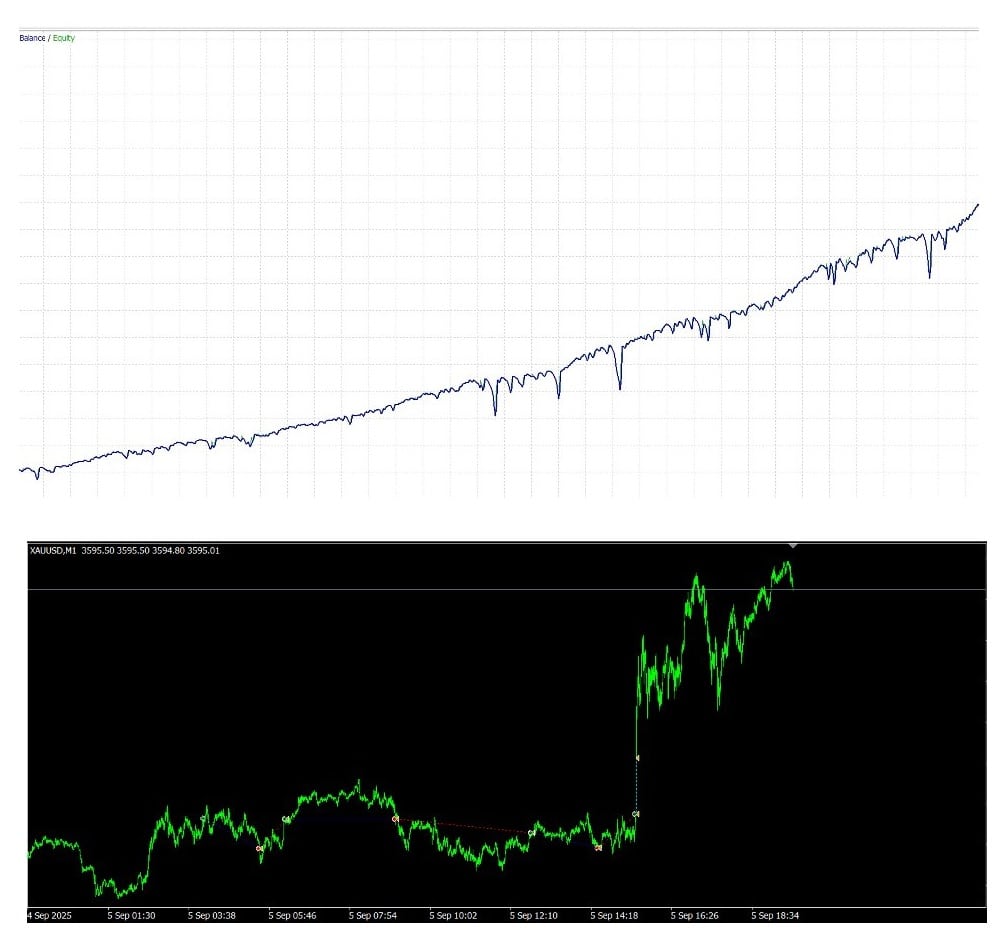
Gold M1 Dynamic EA is an automated trading robot built for MetaTrader 4 (MT4) that focuses on XAUUSD in the M1 timeframe.




Description
Gold M1 Dynamic EA: A Straight-Forward Guide to Automated Gold Trading
Alternative Title: Gold M1 Dynamic EA – How to Trade XAUUSD on the 1-Minute Chart Without Losing Sleep
Table of Contents
- What Is Gold M1 Dynamic EA?
- Minimum Deposit and Money Management
- Best Times to Run the EA
- Broker and Platform Tips
- Common Questions
- Step-by-Step Installation Guide
- Final Thoughts
1. What Is Gold M1 Dynamic EA?
Gold M1 Dynamic EA is an automated trading robot built for MetaTrader 4 (MT4) that focuses on XAUUSD in the M1 timeframe. In plain language, it watches price movements on the one-minute chart and opens or closes trades on your behalf.
Primary goals:
- Capture short-term trends in gold.
- Keep potential drawdowns small.
- Deliver a realistic profit curve without constant user input.
Experienced gold traders designed the algorithm after five years of live trading results. The coders baked those lessons into an expert advisor you can switch on and let it do the heavy lifting—subject to sensible rules you set around risk.
2. Minimum Deposit and Money Management
- Recommended minimum deposit: $2,000.
- Why $2,000? On a cent account this offers space for position scaling without breaching margin.
- If you use a smaller balance, you must reduce your risk per trade further, which can limit profit potential.
Example allocation using 1:500 leverage:
| Equity | Max Lots (first trade) | Max Trades | Note |
|---|---|---|---|
| $2,000 | 0.01 (0.10 on a cent) | 5 | Default EA setup |
| $5,000 | 0.03 | 7 | Higher room for scaling |
| $10,000 | 0.05 | 8 | Still balanced |
Remember: larger size brings larger swings. The EA attempts to manage risk, but you’re still the captain of the ship.
3. Best Times to Run the EA
- Tokyo Open (00:00–02:00 GMT+3)The developer recommends starting the EA here. Gold volume is thinner, spreads often remain decent, and price action can form clearer intraday moves.
- London-New York Overlap (12:00–16:00 GMT+3)High liquidity can help tight stops and faster exits. Spread remains low on most ECN brokers.
- Avoid Major U.S. NewsCheck an economic calendar like Forex Factory for events marked “red.” Pause the EA 30 minutes before and after:
- Non-Farm Payrolls
- FOMC statements
- CPI releases
- Late December CautionThe final trading days of the year can bring thin liquidity. Testing shows the EA may stay flat or earn small profits, but it’s sensible to take a break.
4. Broker and Platform Tips
- Low Spread or Raw Spread AccountsSpreads on gold can jump above 30 points on standard accounts. Raw or zero-spread accounts often keep it below 10, plus a fixed commission. That helps trade entries.• Need a primer? Read our guide to choosing a low-spread broker.
- Commission-Based PricingPaying a small per-lot fee is usually cheaper than a wide spread. It also gives you clearer price levels for stop-loss and take-profit.
- MetaTrader 4 (MT4) OnlyThe EA is coded for MT4. A fresh install avoids leftover files from other EAs that might slow your terminal.
- VPS HostingIf you can’t leave your PC on 24/5, use a virtual private server close to your broker’s data center. Latency below 20 ms keeps execution tight.
- Leverage1:200 or higher is common for gold. The EA does fine with 1:100 as long as you lower lots accordingly.
5. Common Questions Regarding Gold M1 Dynamic
Q1: Can I run other EAs on the same account?A: Yes, but place each EA on a separate chart and watch total margin use.
Q2: Is hedging allowed?A: The EA itself doesn’t hedge. If your broker blocks hedging, the EA still works because it closes positions before opening a trade in the opposite direction.
Q3: Does the robot trade silver or forex pairs?A: Not recommended. It is optimized for XAUUSD M1. Other instruments require new settings.
Q5: How often will I see trades?A: Anywhere from 5 to 20 trades per day, depending on volatility.
6. Step-by-Step Installation Guide for Gold M1 Dynamic
- Download the EA FileYou will get a .ex4 file named
Gold_M1_Dynamic.ex4. - Fresh MT4 Install
- Download MT4 directly from your broker or MetaQuotes.
- Install the platform; open it once to create necessary folders.
- Copy the EA
- Go to File → Open Data Folder in MT4.
- Navigate to
MQL4 → Expertsand paste the .ex4 file. - Restart MT4.
- Attach to Chart
- Open a 1-minute chart of XAUUSD.
- Drag
Gold_M1_Dynamicfrom the Navigator onto the chart. - Tick Allow live trading and Allow DLL imports.
- Load Settings
- Either keep Default or press Load to import a
.setfile. - Confirm.
- Either keep Default or press Load to import a
- Check Smiley FaceA smiling icon in the top-right corner signals the EA is live.
- Monitor
- Use the Journal tab to watch for any errors.
- Review trade list daily, especially before news.
7. Final Thoughts for Gold M1 Dynamic
Gold M1 Dynamic EA offers a balanced route into short-term XAUUSD trading. With a clear rule set, capped Martingale layers, and sensible money management, it aims to keep the account intact while chasing realistic gains on the one-minute chart.
To give it a fair chance:
- Start with the recommended $2,000 deposit or adjust lots if you trade smaller.
- Use a low-spread, commission-based account for gold.
- Pause during major U.S. news; focus on the Tokyo open for cleaner moves.
- Keep the default settings first, then fine-tune only after proper demo testing.
Ready to test the waters? Download Gold M1 Dynamic EA, try it on a demo account, and see if its approach matches your trading style.
Vendor Site – Click Here
| Membership | Yearly Membership |
|---|---|
| Additional Services | Unlock & Decompile |
| Recommended Brokers | Exness Broker, FPMarkets |
| Recommended VPS | FXVM (Low Latency) |
| Youtube Channel | ForexForYou |
| Telegram Channel | Onshoppie Forex EA's & Indicators |
| Telegram Support | Onshoppie Support |
| Installation Guides | Onshoppie Forex Guides |
Brand
ea-mt4
Only logged in customers who have purchased this product may leave a review.
Related products
-
 SALESALESALE
Advanced Gold Trading EA MT4 V6.4 + Setfiles For Build 1460+
Original price was: $199.00.$14.95Current price is: $14.95. Add to cart Buy Now -

1ENTRY EA MT4 For Build 1455+
$9.95 Read more -
AGI EA Prop Firm MT4 + Setfiles For Build 1455+
Original price was: $2,599.00.$14.95Current price is: $14.95. Add to cart Buy Now
Products
-
 ThunderGold Scalper MT5 V1.3 + Setfiles For Build 6140+
Original price was: $379.00.$14.95Current price is: $14.95.
ThunderGold Scalper MT5 V1.3 + Setfiles For Build 6140+
Original price was: $379.00.$14.95Current price is: $14.95.
-
 Steve Pro EA MT5 V5.0 + Setfiles For Build 6140+
$14.95
Steve Pro EA MT5 V5.0 + Setfiles For Build 6140+
$14.95
-
 HEXA FX Scalper EA MT5 With DLL Build 6140
Original price was: $749.00.$34.95Current price is: $34.95.
HEXA FX Scalper EA MT5 With DLL Build 6140
Original price was: $749.00.$34.95Current price is: $34.95.
-
 H4 Gold Scalper EA MT5 V1.5 With DLL Build 6122
Original price was: $150.00.$14.95Current price is: $14.95.
H4 Gold Scalper EA MT5 V1.5 With DLL Build 6122
Original price was: $150.00.$14.95Current price is: $14.95.
-
 Mavrik Scalper EA MT5 V18.306 For Build 6140+
$14.95
Mavrik Scalper EA MT5 V18.306 For Build 6140+
$14.95
-
 Dude Alpha Gold EA MT5 V1.4.2 + Set Files For Build 6140+
Original price was: $499.00.$14.95Current price is: $14.95.
Dude Alpha Gold EA MT5 V1.4.2 + Set Files For Build 6140+
Original price was: $499.00.$14.95Current price is: $14.95.
-
 Ultra Beast EA MT5 + Setfiles For Build 6140+
$14.95
Ultra Beast EA MT5 + Setfiles For Build 6140+
$14.95
-
 Algo Edge SMC AI EA MT5 V3 For Build 6140+
$14.95
Algo Edge SMC AI EA MT5 V3 For Build 6140+
$14.95
Recent reviews
-
 Advanced Dashboard Currency Strength
by Balram
Advanced Dashboard Currency Strength
by Balram
Reviews
There are no reviews yet.