


EA Super 8 MT4 For Build 1455+
$9.95
Discover the ultimate EA Super 8 trading secrets that deliver mind-blowing results. Get exclusive access to proven strategies that actually work!



Description
EA Super 8 MT4 Review: A Down-to-Earth Look at This Automated Forex Robot
EA Super 8: A Practical Guide to Emotion-Free Trading on MetaTrader 4
Table of Contents
- What Is EA Super 8 MT4?
- Key Features at a Glance
- How EA Super 8 Works Behind the Scenes
- Installation Guide
- Risk Management Tips
- Backtesting & Demo Testing
- Troubleshooting Common Issues
- Frequently Asked Questions
- Final Thoughts
What Is EA Super 8 MT4?
EA Super 8 MT4 is an automated Expert Advisor designed for the MetaTrader 4 trading platform. Instead of trying to guess where the market will go, it reacts to live price action, follows strict rules, and places trades with pre-set risk levels. That means no fear, no greed, and no late-night impulse clicks—just code doing its job.
Key Features of EA Super 8 at a Glance
- Emotion-Free Logic – No panic entries or revenge trading.
- Patience Built In – Sits out when conditions are poor; no overtrading.
- Stable on Most MT4 Brokers – Lightweight code, low CPU usage.
- Clear Settings Panel – Beginners can follow along; advanced users have depth.
- Market Phase Detection – Adjusts to trending, ranging, or volatile periods.
- Stop Loss & Take Profit on Every Trade – Risk defined from the start.
How EA Super 8 Works Behind the Scenes
- Data Feed ChecksIt listens to real-time price ticks from MT4 and filters out low-quality data spikes.
- Technical ConditionsThe EA looks at common indicators (moving averages, volatility filters, perhaps a momentum reading) to decide if a setup matches its rulebook.
- Risk CalculationBefore sending an order, it figures out lot size based on the risk percentage you set.
- Order Execution
- Stop Loss: X pips behind entry
- Take Profit: Y pips ahead (or trailing logic, depending on settings)
- Trade Management
- If profit reaches a certain level, it may trail the stop.
- If market whipsaws, the EA will close based on the protective stop level, not emotion.
Installation Guide for EA Super 8
Follow these steps on MetaTrader 4:
- Download EA Super 8 MT4 (from the vendor or a reputable marketplace).
- In MT4, click File ➜ Open Data Folder.
- Open MQL4 ➜ Experts and paste the
.ex4or.mq4file. - Close and reopen MT4 (or press Ctrl + R to refresh).
- Enable AutoTrading in the toolbar.
- Drag EA Super 8 onto your chart (any timeframe it recommends).
- Check Allow live trading within the inputs box.
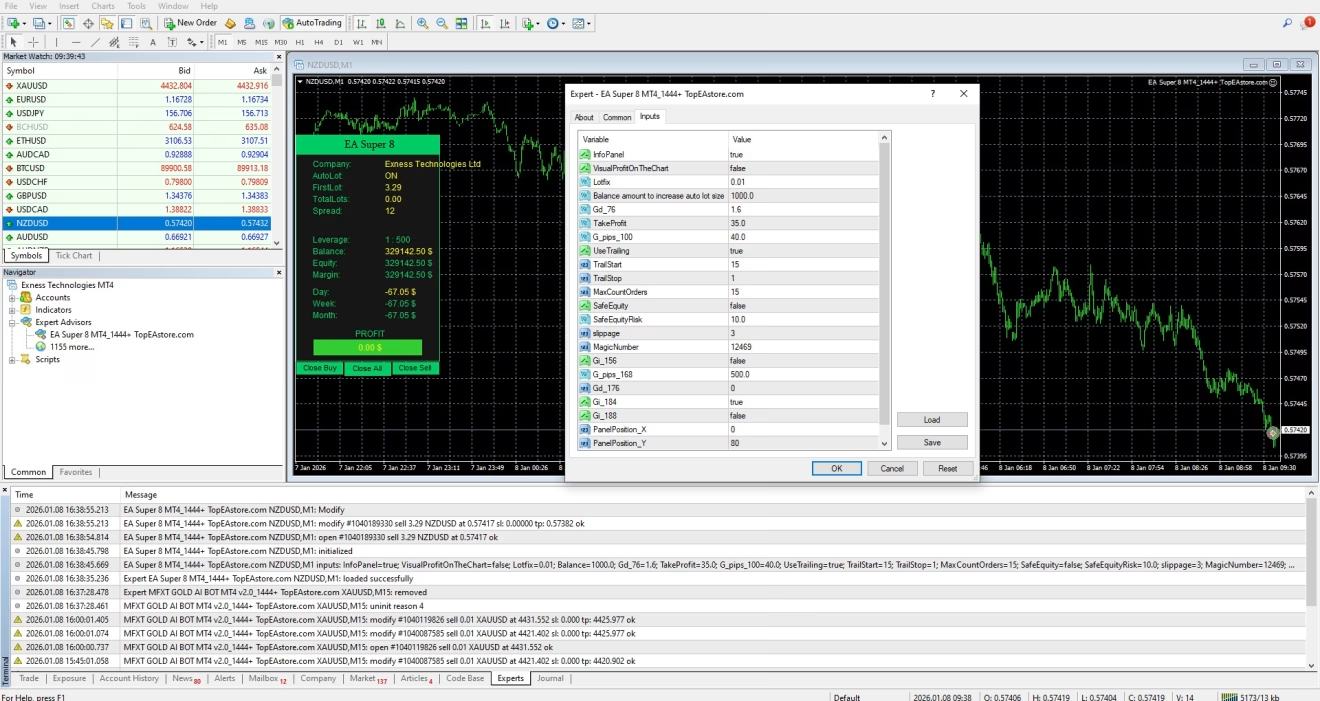
- Adjust settings as needed (see next section).
Risk Management Tips
- Stick to Low LeverageLeverage magnifies gains and losses. Many EA users do best at 1:100 or lower.
- Proper Position SizingA 1 % risk per trade leaves room for a string of losses without harmful drawdowns.
- Avoid Stacking Too Many PairsRunning five copies of the EA on correlated pairs can multiply risk.
- Use an Equity StopDecide on a daily or weekly loss cap. If hit, turn the EA off until the next session.
- Regular ReviewCheck monthly performance. Raise or lower risk only after enough trades for a fair sample.
Backtesting & Demo Testing for EA Super 8
A solid track record starts before live money is on the line.
How to Backtest in MT4
- Hit Ctrl + R for the Strategy Tester.
- Select EA Super 8 and choose a symbol (e.g., EURUSD).
- Pick a timeframe—often H1 or M30.
- Use Every Tick mode for accuracy.
- Set the date range (a few years is better).
- Click Start and wait for results.
Reading the Report
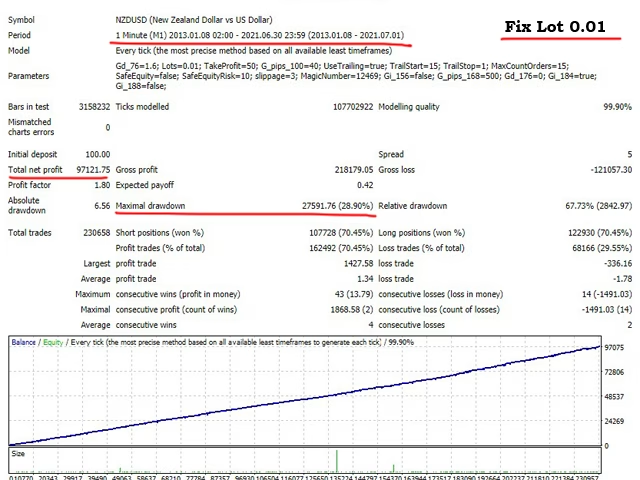
- Profit Factor – Above 1.5 is often considered healthy.
- Drawdown – Lower is safer; under 20 % is common for conservative settings.
- Trades – Enough trades (300 +) give a clearer picture.
Demo Testing
Place the EA on a demo account for at least 4–6 weeks. Watch:
- Real-time spread behavior.
- Broker slippage.
- Whether trades open & close exactly as planned.
Troubleshooting Common Issues
| Issue | Likely Cause | Fix |
|---|---|---|
| EA is not trading | AutoTrading off, market closed, wrong symbol suffix (like EURUSD.c) | Turn on AutoTrading, check broker symbols, confirm trading times |
| “Trade Context Busy” error | MT4 handling too many requests | Restart MT4, reduce other EAs |
| Large slippage | Broker execution speed, news event | Use a faster VPS, turn off EA during high-impact news |
| Wrong lot size | Risk % mis-typed, account currency mismatch | Re-enter settings, double-check account base currency |
| Compile error | Out-of-date MQ4 code | Ask vendor for latest version, update MT4 build |
Frequently Asked Questions Regarding EA Super 8
Q: Do I need coding skills?A: No. Installation is drag-and-drop and settings are menu driven.
Q: Which currency pairs work best?A: Most users focus on major pairs with tight spreads (EURUSD, GBPUSD, USDJPY).
Q: How much starting capital is required?A: The EA can run on small accounts, but $1 000 or more keeps risk percentages meaningful.
Q: Will it work with prop firm rules?A: Possibly, if daily drawdown limits and lot size caps are observed. Always test on a demo first.
Q: Is there a monthly fee?A: No
Final Thoughts About EA Super 8
EA Super 8 aims for steady, rule-driven trading rather than flashy overnight riches. With its focus on strict risk control, market awareness, and emotion-free logic, it can fit traders who value consistency.
As with any automated tool, results depend on:
- Sound settings matched to your account size
- Reliable broker execution
- Patient testing before going live
Treat the EA as a professional assistant, not a magic button, and it may help you build more systematic habits.
| Membership | Yearly Membership |
|---|---|
| Additional Services | Unlock & Decompile |
| Recommended Brokers | Exness Broker, FPMarkets |
| Recommended VPS | FXVM (Low Latency) |
| Youtube Channel | ForexForYou |
| Telegram Channel | Onshoppie Forex EA's & Indicators |
| Telegram Support | Onshoppie Support |
| Installation Guides | Onshoppie Forex Guides |
Brand
ea-mt4
Only logged in customers who have purchased this product may leave a review.
Related products



Products
-
 Straddle EA MT5 V1.138 MQ5 Source Code + SetFiles
$599.95
Straddle EA MT5 V1.138 MQ5 Source Code + SetFiles
$599.95
-
 ThunderGold Scalper MT5 V1.3 + Setfiles For Build 6140+
Original price was: $379.00.$14.95Current price is: $14.95.
ThunderGold Scalper MT5 V1.3 + Setfiles For Build 6140+
Original price was: $379.00.$14.95Current price is: $14.95.
-
 Steve Pro EA MT5 V5.0 + Setfiles For Build 6140+
$14.95
Steve Pro EA MT5 V5.0 + Setfiles For Build 6140+
$14.95
-
 HEXA FX Scalper EA MT5 With DLL Build 6140
Original price was: $749.00.$34.95Current price is: $34.95.
HEXA FX Scalper EA MT5 With DLL Build 6140
Original price was: $749.00.$34.95Current price is: $34.95.
-
 H4 Gold Scalper EA MT5 V1.5 With DLL Build 6122
Original price was: $150.00.$14.95Current price is: $14.95.
H4 Gold Scalper EA MT5 V1.5 With DLL Build 6122
Original price was: $150.00.$14.95Current price is: $14.95.
-
 Mavrik Scalper EA MT5 V18.306 For Build 6140+
$14.95
Mavrik Scalper EA MT5 V18.306 For Build 6140+
$14.95
-
 Dude Alpha Gold EA MT5 V1.4.2 + Set Files For Build 6140+
Original price was: $499.00.$14.95Current price is: $14.95.
Dude Alpha Gold EA MT5 V1.4.2 + Set Files For Build 6140+
Original price was: $499.00.$14.95Current price is: $14.95.
-
 Ultra Beast EA MT5 + Setfiles For Build 6140+
$14.95
Ultra Beast EA MT5 + Setfiles For Build 6140+
$14.95
Recent reviews
-
 Advanced Dashboard Currency Strength
by Balram
Advanced Dashboard Currency Strength
by Balram
Reviews
There are no reviews yet.