


DS Gold Robot EA MT4 V4.0 For Build 1460+
DS Gold Robot EA MT4 V4.0 For Build 1460+


Original price was: $799.00.$14.95Current price is: $14.95.
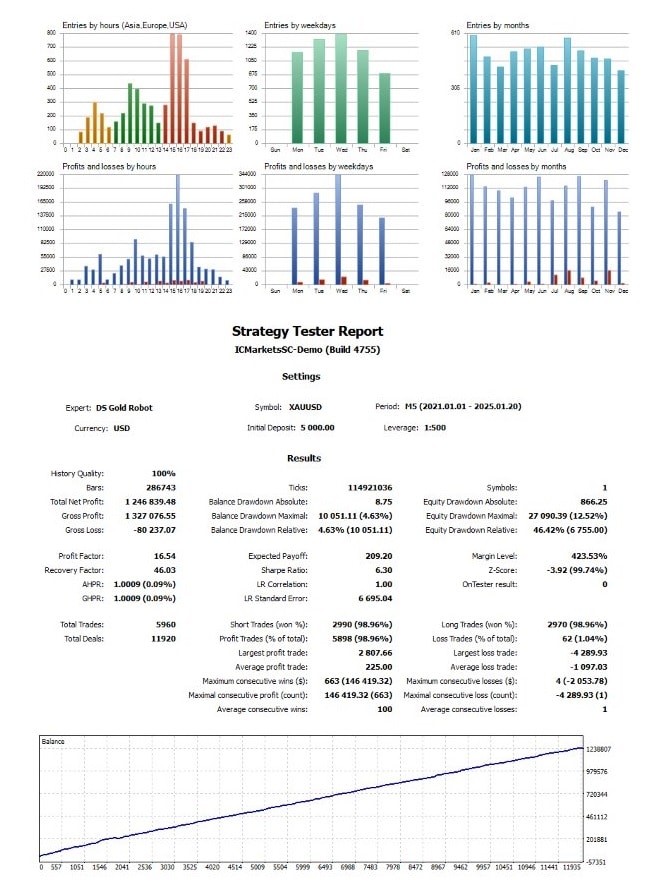
DS Gold Robot, your ultimate companion in navigating the intricate world of XAUUSD trading. And gaining profits In XAUUSD.

This item: DS Gold Robot EA MT4 V4.0 For Build 1460+
Original price was: $799.00.$14.95Current price is: $14.95.
Original price was: $799.00.$14.95Current price is: $14.95.

Original price was: $14.95.$11.96Current price is: $11.96.

Original price was: $9.95.$7.96Current price is: $7.96.
DS Gold Robot EA: A Practical Guide for Consistent XAUUSD Trading
DS Gold Robot EA – The Smart Way to Trade Gold Automatically
Table of Contents
- Overview
- What Is DS Gold Robot EA?
- Why Focus on XAUUSD?
- Core Logic Behind the Robot
- Main Features at a Glance
- Default Settings and Editable Inputs
- Step-by-Step Installation Guide
- Choosing a Suitable Broker
- Wrapping Up
1. Overview for DS Gold Robot
DS Gold Robot EA is an expert advisor built for MetaTrader 4 and MetaTrader 5. It was designed for traders who wish to automate their gold (XAUUSD) strategy without spending hours in front of the screen. In this post we walk through every part of the robot: how it opens trades, what each setting does, and how you can set it up in under ten minutes. All technical terms are explained in plain English.
2. What Is DS Gold Robot EA?
DS Gold Robot EA is an automated trading system, often called a “forex robot,” that follows predefined rules to buy or sell XAUUSD. It keeps track of the gold price on a five-minute chart (M5) and reacts faster than a human can. The expert advisor:
- Monitors volume, news, and short-term price action
- Opens up to five positions per day by default (this can be changed)
- Uses built-in Take Profit, Stop Loss, Trailing Stop, and Break-Even levels
- Stops trading when daily drawdown crosses a limit you set
Because the developer supplies the EA for both MT4 and MT5, you can run it on almost any broker that offers gold trading.
3. Why Focus on XAUUSD With DS Gold Robot?
Gold remains one of the most liquid metals in the world, and XAUUSD (Gold vs US Dollar) pairs that liquidity with nearly round-the-clock trading hours. Key reasons many traders like XAUUSD include:
- High average daily range, offering multiple short-term price moves
- Frequent reactions to macroeconomic news, giving volatility the robot can capture
- Tight spreads on most ECN and Raw accounts
- A strong store-of-value narrative that attracts retail and institutional traders alike
The DS Gold Robot EA was coded with these traits in mind.
4. Core Logic Behind the DS Gold Robot
Below is a simplified breakdown so you know what the robot is doing in the background:
- Trend Scan
- The “Gold trend” parameter checks a longer-timeframe direction (often H1 or H4) to decide whether short-term buys or sells are allowed.
- Volume Filter
- Live volume data helps the EA avoid thin liquidity periods, such as late Friday sessions or public holidays.
- News Filter
- A built-in USD news calendar tells the EA to pause before high-impact events like the Non-Farm Payrolls report.
- Entry Signal
- Once trend, volume, and news filters are clear, the robot uses short-term price patterns, moving averages, and candlestick shapes to open a trade.
- Position Management
- Each trade is protected with a Stop Loss and a target Take Profit.
- Once price moves in favor, a Trailing Stop or Break-Even rule locks in gains.
- A “Totalprofit” option can close all open trades if a certain dollar amount is reached.
- Risk Cut-Off
- The “Maximum daily drawdown %” setting halts new entries if the account loses more than the chosen level on any one day.
5. Main Features of DS Gold Robot at a Glance
| Feature | Why It Matters | Default |
|---|---|---|
| Platform | Works on MT4 & MT5 | — |
| Pair | XAUUSD only | — |
| Timeframe | M5 | — |
| Minimum Deposit | $1,000 | — |
| Lots | Editable | 0.01 |
| Max Orders per Day | Controls position count | 5 |
| Stop Loss | Pre-set | |
| Take Profit | Pre-set | |
| Trailing Stop | Protects open profit | On |
| Break Even | Locks zero-loss | On |
| News Filter | Avoids big USD events | On |
| Daily Drawdown Limit | Caps risk | |
| OCO Mode | For non-hedging accounts | Off |
| Panel | Shows session, pips, spread | On |
You can leave most settings at default, which keeps setup fast. The only field you must edit is the lot size.
6. Default Settings and Editable Inputs
The table below groups inputs into “Usually leave as is” and “Consider editing.”
Usually Leave As Is
- Take Profit
- Stop Loss
- Trailing Stop
- Break Even
- Gold Trend
- Volume Filter
- Panel display
Consider Editing
- Lots – choose based on account equity and appetite for risk
- Maximum daily drawdown % – e.g., 3 % to 5 % of account balance
- News filter sensitivity – if you want more or fewer pauses
- Max orders per day – set to 1 if you prefer a calmer approach
- Trading days – disable Friday if weekend gaps worry you
- Totalprofit close – set a daily target you feel comfortable with
- Magic number & Trade comment – keep unique if running multiple EAs
7. Step-by-Step Installation Guide
Below is a concise walkthrough for MetaTrader 4. The workflow for MT5 is nearly identical.
- Download the EA file
- You receive it by email or from the vendor portal after purchase.
- Open MetaTrader 4
- Click “File → Open Data Folder.”
- Navigate to
MQL4 → Experts- Paste the
.ex4or.mq4file here.
- Paste the
- Restart MetaTrader
- The robot will now appear inside the “Navigator → Expert Advisors” window.
- Drag the EA onto an XAUUSD M5 chart
- A settings window pops up.
- Enter your desired lot size under “Lots.”
- Example: 0.05 on a $10k account with 1:100 leverage.
- Verify “Allow Live Trading” is checked.
- Click “OK,” and a small smiley face on the top-right of the chart means the EA is running.
Optional: Join the Support Group
After purchase, private-message the developer to receive:
- A multilingual PDF manual
- An invite link to a support chat for troubleshooting
8. Choosing a Suitable Broker
Although DS Gold Robot EA is marked “compatible with all brokers,” real-world execution quality can differ. Keep these points in mind:
| Factor | What to Look For | Why It Helps |
|---|---|---|
| Spread on XAUUSD | 0.20–0.50 USD | Lower costs, faster TP hit |
| Commission | Under $7/lot | Keeps breakeven threshold small |
| Account Type | Raw, ECN, or Zero | Best fills in busy news hours |
| Leverage | 1:100–1:500 | Flexibility to pick smaller lot size tiers |
| Min Deposit | $200–$1,000+ | Meets EA’s $1,000 guideline |
| Hedging Allowed | Yes, if you prefer | OCO mode covers non-hedging accounts |
Tip: Test the broker in a demo first. If the spread is often above 0.80 USD on gold, look elsewhere.
9. Wrapping Up
DS Gold Robot EA offers a straightforward way to automate gold trades on the M5 chart with safety nets like Stop Loss, Trailing Stop, and daily drawdown limits. Because most settings come pre-configured, you just pick a lot size, attach the EA, and let it run. Still, treat it as a tool: monitor the account, follow healthy risk guidelines, and keep your MetaTrader platform updated.
Have questions about DS Gold Robot EA or automated gold trading in general? Leave a comment below and share your experience. Your feedback helps us and other readers improve their trading routine.
Vendor Site – Click Here
| Membership | Yearly Membership |
|---|---|
| Additional Services | Unlock & Decompile |
| Recommended Brokers | Exness Broker, FPMarkets |
| Recommended VPS | FXVM (Low Latency) |
| Youtube Channel | ForexForYou |
| Telegram Channel | Onshoppie Forex EA's & Indicators |
| Telegram Support | Onshoppie Support |
| Installation Guides | Onshoppie Forex Guides |
Brand
ea-mt4
Only logged in customers who have purchased this product may leave a review.
Related products

Out of stock
$9.95

Out of stock
$9.95

Out of stock

Out of stock

Out of stock


Reviews
There are no reviews yet.