


Professor Moriarty EA MT4 For Build 1470+
Professor Moriarty EA MT4 For Build 1470+


$14.95
Professor Moriarty EA is an automated trading system designed for MetaTrader 4 (MT4). Watches the market 24/7 looking for orders on your behalf.

This item: Professor Moriarty EA MT4 For Build 1470+
$14.95
$14.95

Original price was: $9.95.$7.96Current price is: $7.96.

Original price was: $9.95.$7.96Current price is: $7.96.

Original price was: $14.95.$11.96Current price is: $11.96.
PROFESSOR MORIARTY EA : A Practical Guide to Fast, Disciplined Trading on MT4
PROFESSOR MORIARTY EA – Everything You Need to Know Before You Hit “Enable Algo Trading”
Table of Contents
- Professor Moriarty EA Why Traders Keep Talking About
- Key Settings And What They Actually Do
- Installation & First-Time Setup
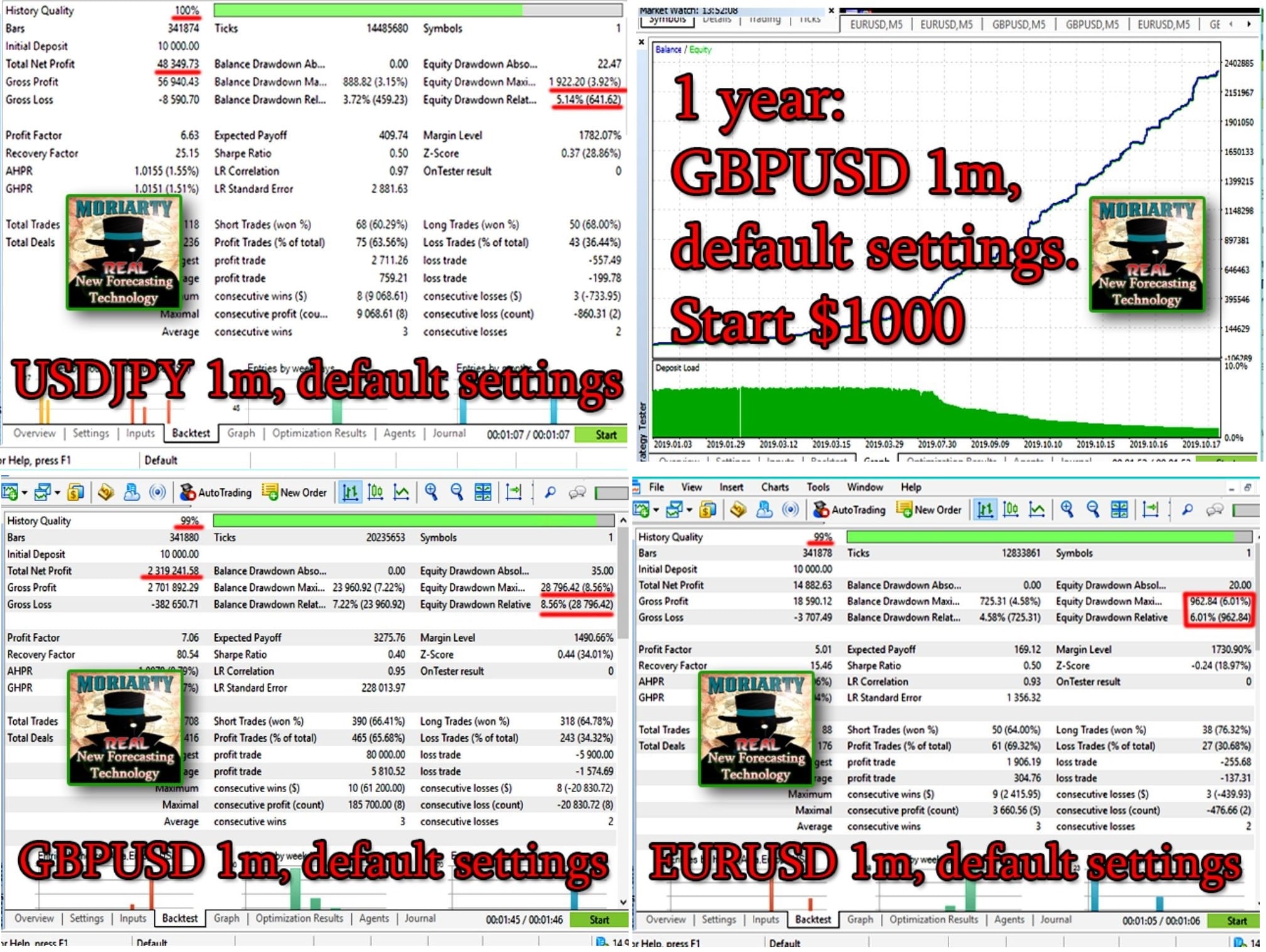
- Back-Testing: What to Expect
- Live Trading Checklist
- Final Thoughts & Next Steps
1. Why Traders Keep Talking About PROFESSOR MORIARTY EA
PROFESSOR MORIARTY EA review into any search engine and you will notice a mix of curiosity and cautious optimism. The tool brands itself as a correlation or statistical-arbitrage Expert Advisor for MetaTrader 4. Rather than firing off dozens of random orders, it waits for a short corrective move to open the door, trades toward the expected snap-back, and closes the deal at a pre-defined Stop Loss (SL) or Take Profit (TP).
What gets traders excited is its disciplined style:
- It avoids grid, martingale, and other compounding tricks.
- It has a reasonable number of parameters, so you do not have to be a programmer to try it.
- It works on GBPUSD, EURUSD, USDJPY, USDCAD, and EURGBP—pairs that almost every broker supports.
- It sticks to the M1 timeframe, which means frequent, but not reckless, trade opportunities.
If you like the idea of tight, planned trades instead of “let’s see what happens” entries, this EA is worth a closer look.
2. Key Settings And What They Actually Do
The EA comes with around a dozen sliders and text fields. Below are the ones most users tweak first.
2.1 Risk Management Controls
- MaxRisk – Sets how much of your account balance the EA can risk per trade. Example:
2.0means 2 % of balance. - MaxLot – A hard cap on lot size, useful for keeping order sizes consistent across brokers.
- Maximum number of orders – Limits how many open positions the EA may hold at once (default is often 5).
Tip: Start low. Many traders use 1 % per trade during testing, inching up only after seeing stable results.
2.2 Trade Execution Parameters
- Take Profit (TP) – Measured in pips. Sets the exit target once the market moves in your favor.
- Stop Loss (SL) – Also in pips. Cuts losses before they turn ugly.
- Sensitivity – Think of it as the “threshold” for detecting a gap. Lower numbers catch smaller discrepancies; higher numbers wait for larger, more obvious gaps.
- Trailing settings – Optional. Allows the SL to trail behind current price to lock in gains.
2.3 Quality-of-Life Settings (Slippage, Spread, Magic Number)
- Slippage – Maximum acceptable price slippage when the EA sends an order.
- Spread control – Keeps the EA from opening trades when spread spikes (common around news).
- Magic number – A unique ID so you can run multiple EAs on one account without mixing trades.
3. Installation & First-Time Setup
Getting the EA into MT4 takes less than five minutes. Here’s the short version.
3.1 Downloading and Placing the EA File
- Download
ProfessorMoriarty.ex4. - Open MT4 → File → Open Data Folder.
- Navigate to
MQL4 > Expertsand paste the file. - Restart MT4 or right-click Expert Advisors → Refresh.
3.2 Attaching to the Chart Correctly
- Open a GBPUSD M1 chart first (most traders call this the “master” chart).
- Drag PROFESSOR MORIARTY EA onto the chart.
- In the pop-up, check Allow live trading and Allow DLL imports (if requested by the EA).
- Enter your license key if the product uses one.
3.3 Linking Charts for Correlation Checks
Because the EA tracks price differences across pairs, make sure the other four pairs are open in the background—even if the EA sits on one chart only.
- Open EURUSD, USDJPY, USDCAD, EURGBP in M1.
- No need to attach the EA to each chart unless the manual says otherwise.
- Keep the charts minimized to save space; MT4 still feeds them price quotes.
4. Back-Testing: What to Expect
Before letting any algorithm trade your real money, run it through MT4’s Strategy Tester.
Checklist:
- Data Quality – Use tick data from a reputable source. Free broker data can leave gaps that ruin back-tests.
- Modeling Type – Choose Every tick based on real ticks when possible.
- Period – At least one year; three years gives better insight into different market regimes.
- Spread – Set to the current or average broker spread (e.g., 1 pip on EURUSD).
- Parameters – Match the settings you plan for live trading.
What you might see:
- A high trade count because M1 entries pop up frequently.
- A steady but narrow equity curve—expected when using fixed TP/SL.
- Occasional drawdown spikes during whipsaw markets when pairs temporarily decouple.
If the back-test looks chaotic—wild equity swings or endless drawdown periods—double-check:
- Your Sensitivity setting. Too low can mean trading random noise.
- Whether your tick data includes commission and swap fees.
- Spread spikes. Some back-testing tools offer variable spreads; use them.
5. Live Trading Checklist
Going live? A short but crucial checklist can prevent unpleasant surprises.
| Step | Question | Quick Fix |
|---|---|---|
| VPS | Is the EA running 24/5? | Rent a low-latency VPS near your broker (<5 ms if possible). |
| Broker | Does the broker allow algo trading on M1? | Ask support; check for restrictions. |
| Spread | Are spreads stable in London/New York time? | Enable spread filter and test during peak hours. |
| Leverage | Is leverage sufficient but not excessive? | 1:100 or 1:200 suits most small accounts. |
| Capital | Can you survive a string of losing trades? | Risk <2 % per trade; keep a cash buffer. |
| Updates | Does the EA auto-update? | Subscribe to vendor news; install patches quickly. |
6. Final Thoughts & Next Steps
The PROFESSOR MORIARTY EA offers a structured, correlation-based approach to trading popular currency pairs on the 1-minute chart. It keeps things straightforward—fixed SL/TP, no risky recovery systems, and enough settings to adapt to most broker conditions.
Happy trading, and keep your risk in check.
Vendor Site – Click Here
| Membership | Yearly Membership |
|---|---|
| Additional Services | Unlock & Decompile |
| Recommended Brokers | Exness Broker, FPMarkets |
| Recommended VPS | FXVM (Low Latency) |
| Youtube Channel | ForexForYou |
| Telegram Channel | Onshoppie Forex EA's & Indicators |
| Telegram Support | Onshoppie Support |
| Installation Guides | Onshoppie Forex Guides |
Brand
ea-mt4
Only logged in customers who have purchased this product may leave a review.








Reviews
There are no reviews yet.