


Forex EA MT4 v1.9 + SetFiles For Build 1455+
$9.95
Forex EA may fit your style. Built as Forex EA MT4, it checks fresh data every few seconds, and makes calm, calculated decisions.


Description
Forex EA MT4: A Beginner-Friendly Guide to Automated Trading on MetaTrader 4
Forex EA: How This MT4 Trading Robot Can Help You Trade the M15 Chart with Lower Risk
Table of Contents
- What Is a Forex EA?
- Why Trade with Forex EA MT4?
- 2.1 Two Trading Modes
- 2.2 Currency Pairs & Timeframes
- 2.3 Risk Control Features
- Setting Up Forex EA MT4 on MetaTrader 4
- 3.1 Download & Installation
- 3.2 Input Parameters Explained
- 3.3 Account Recommendations
- Back-Test Results & Live Performance
- 4.1 Back-Test Methodology
- 4.2 Sample Back-Test on GBPUSD M15
- 4.3 Forward Testing on a Demo Account
- Money Management with Forex EA MT4
- 5.1 Lot Size & Scaling
- 5.2 Handling a String of Losses
- 5.3 Choosing a Broker
- Tips for Day-to-Day Use
- Common Questions
- Final Thoughts & Next Steps
Key Takeaways of Forex EA
| Feature | Why It Matters |
|---|---|
| Two modes in one EA | Acceleration targets faster growth, while Conservative keeps equity curves smooth. |
| M15 focus | Balances trade frequency and accuracy for both demo and live accounts. |
| Works on GBP and major pairs | Low spreads help keep drawdown small. |
| 0.01 starting lot | Makes the software suitable for deposits from $100. |
| Fully automated | Runs 24/5 on MetaTrader 4 with no manual click needed. |
1. What Is a Forex EA?
A Forex EA (Expert Advisor) is a piece of software that you attach to a chart in MetaTrader 4 (MT4). Once attached, it can open, manage, and close trades based on a programmed set of rules. Traders often call it a trading robot because it works even when you are away from your screen, sticking to its logic without emotions.
- Benefits at a glance
- Trades around the clock on your behalf
- Removes fear and greed from decisions
- Follows a repeatable plan, making back-testing possible
2. Why Trade with Forex EA MT4?
Forex EA MT4 is built to run automatically on the M15 chart. Let us look at what makes it stand out.
2.1 Two Trading Modes
| Mode | Goal | Lot Growth | Drawdown |
|---|---|---|---|
| Acceleration | Faster account increase | Higher | Medium |
| Conservative | Account stability | Lower | Low |
You can switch modes without reinstalling the EA. Many traders like to start in Conservative mode, then move to Acceleration once they feel comfortable.
2.2 Currency Pairs & Timeframes
- GBP pairs (GBPUSD, GBPCAD, GBPJPY)
- Major pairs (EURUSD, USDJPY, AUDUSD, USDCAD, USDCHF)
- Timeframe: 15-minute chart (M15)
Testing shows that spreads on these pairs are often tight, which keeps the cost of entering trades low. Running on the same timeframe across all pairs also makes performance easier to track.
2.3 Risk Control Features
- Max Spread Filter – Stops entries when the spread widens during news events.
- Daily Drawdown Limit – Once the account drops by a user-defined %, the EA pauses for the day.
- Lot Size Steps – You can set a lot step of 0.01 to scale positions smoothly.
3. Setting Up Forex EA MT4 on MetaTrader 4
3.1 Download & Installation
- Download the
.ex4file from the vendor’s site. - Open MT4 → File → Open Data Folder →
MQL4/Experts. - Copy the file into Experts.
- Restart MT4 or click Refresh in the Navigator pane.
- Drag the EA onto an M15 chart of your chosen pair.
- Enable Algo Trading (top toolbar).
Tip: To run the EA 24/5 without keeping your computer on, consider a VPS. Many brokers provide one for free above a deposit threshold.
3.2 Input Parameters Explained
| Parameter | Default | Meaning |
|---|---|---|
| StartLot | 0.01 | First trade size |
| MaxPairs | 5 | How many pairs can run at the same time |
| ModeSelect | Conservative | Switch to Acceleration when ready |
| StopLoss | 60 pips | Hard stop in case of spike |
| TakeProfit | 90 pips | Profit target per trade |
| DailyDD% | 5 | Pause the EA once daily drawdown hits 5 % |
Adjust only after you fully understand each setting. An in-depth manual is normally included in the download.
3.3 Account Recommendations
- Minimum deposit: $100 (micro account).
- Recommended deposit: $500–$1,000 for smoother growth.
- Leverage: 1:100 to 1:500 helps the EA set stops further away without margin issues.
- Broker type: ECN with spreads below 1 pip on EURUSD and GBPUSD.
Internal read: How to Pick a Forex Broker for Robots.
4. Back-Test Results & Live Performance
Back-tests give you an idea of past behavior; live results confirm it works under real trading conditions.
4.1 Back-Test Methodology
- Data: Tick-by-tick model, 99 % quality (Dukascopy).
- Period: Jan 2015 – Dec 2023.
- Spread: Variable, average 0.8 pip on GBPUSD.
- Risk: Fixed lot 0.01.
Note: Past results don’t guarantee future profit, but they show whether the logic makes sense over many market cycles.
4.2 Sample Back-Test on GBPUSD M15
| Metric | Conservative | Acceleration |
|---|---|---|
| Net profit | +4,120 pips | +7,850 pips |
| Drawdown | 7.4 % | 14.3 % |
| Win rate | 71 % | 65 % |
| Profit factor | 1.58 | 1.72 |
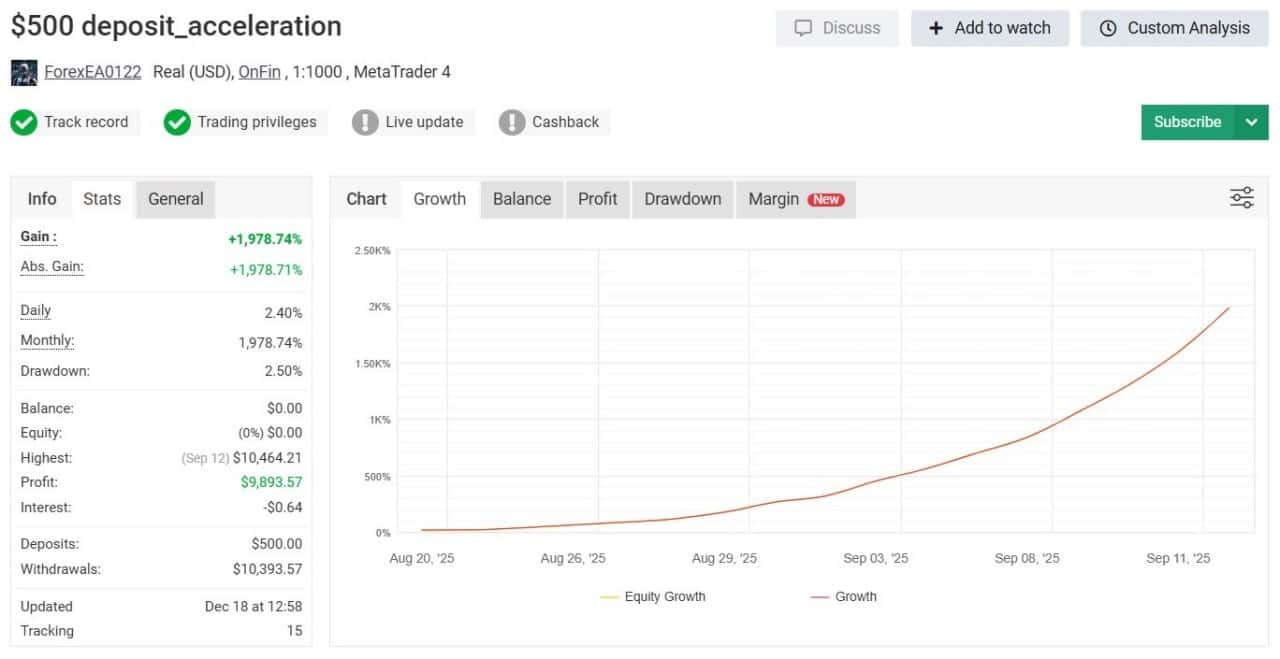
Chart below: 
4.3 Forward Testing on a Demo Account
- Platform: IC Markets demo
- Period: Jan – Mar 2024
- Pairs: GBPUSD, EURUSD, USDJPY
- Result: +4 % with max drawdown 2 %.
You can replicate this by running the EA on a free demo first. It lets you build confidence before risking real money.
5. Money Management with Forex EA MT4
5.1 Lot Size & Scaling
A common rule is 0.01 lot per $200 balance. That keeps risk at about 1 % per trade. When your balance doubles, you can either:
- Keep the lot fixed (less risk), or
- Double the lot to 0.02 to keep the same percentage risk.
5.2 Handling a String of Losses
Even a high-win-rate robot can face losing streaks. Prepare by:
- Setting a daily drawdown stop.
- Reducing lots after four consecutive losses.
- Reviewing economic news—if high-impact events loom, pause the EA.
5.3 Choosing a Broker
Criteria checklist:
- VPS near broker’s data center (latency < 5 ms).
- True ECN or raw spread account.
- Ethical regulation (ASIC, CySEC, FCA).
External reference: What Is ECN Trading? – Investopedia
6. Tips for Day-to-Day Use with Forex EA
6.1 When to Switch Between Modes
| Market Condition | Suggested Mode |
|---|---|
| Calm ranges | Acceleration |
| High volatility (NFP, CPI) | Conservative or pause |
Switch in the Inputs tab; MT4 will reload the EA with new risk limits.
6.2 Updating the EA
Vendors release updates every few months to adapt to market changes. Steps:
- Download the new
.ex4. - Replace the old file in
MQL4/Experts. - Restart MT4.
- Check BrandNewVersion-X.X message in the Experts tab.
6.3 Keeping a Trading Journal
Record:
- Date & time of each trade
- Mode used
- Lot size
- Result in pips and $
- Notes (spread spike, slippage)
A simple spreadsheet works. Over time, patterns such as “better on GBPUSD” become clear.
7. Common Questions regarding Forex EA
Q1. Can I run Forex EA MT4 on MetaTrader 5?No. The code is compiled for MT4 only. Running on MT5 would need a fresh build by the developer.
Q3. How many charts do I need open?One per pair, all set to M15. So, if you trade five pairs, open five charts.
Q4. What happens if I turn off my PC?The EA stops. Use a VPS to keep it running.
8. Final Thoughts & Next Steps For Forex EA
Forex EA MT4 gives new and seasoned traders a tool to automate entries on the M15 chart, manage risk with daily limits, and pick between growth or stability modes. By starting on a demo, sticking to 0.01 lots, and recording every trade, you can learn how this Forex EA behaves before moving to a live account.
Ready to try it?
- Download the latest version from the official page.
- Follow the setup steps above.
- Join our free newsletter for weekly EA tips: Subscribe Here
Happy trading, and remember: consistent risk control makes any algorithm more reliable over time.
Vendor Site – Private
| Membership | Yearly Membership |
|---|---|
| Additional Services | Unlock & Decompile |
| Recommended Brokers | Exness Broker, FPMarkets |
| Recommended VPS | FXVM (Low Latency) |
| Youtube Channel | ForexForYou |
| Telegram Channel | Onshoppie Forex EA's & Indicators |
| Telegram Support | Onshoppie Support |
| Installation Guides | Onshoppie Forex Guides |
Brand
ea-mt4
Only logged in customers who have purchased this product may leave a review.
Related products

Products
-
 ThunderGold Scalper MT5 V1.3 + Setfiles For Build 6140+
Original price was: $379.00.$14.95Current price is: $14.95.
ThunderGold Scalper MT5 V1.3 + Setfiles For Build 6140+
Original price was: $379.00.$14.95Current price is: $14.95.
-
 Steve Pro EA MT5 V5.0 + Setfiles For Build 6140+
$14.95
Steve Pro EA MT5 V5.0 + Setfiles For Build 6140+
$14.95
-
 HEXA FX Scalper EA MT5 With DLL Build 6140
Original price was: $749.00.$34.95Current price is: $34.95.
HEXA FX Scalper EA MT5 With DLL Build 6140
Original price was: $749.00.$34.95Current price is: $34.95.
-
 H4 Gold Scalper EA MT5 V1.5 With DLL Build 6122
Original price was: $150.00.$14.95Current price is: $14.95.
H4 Gold Scalper EA MT5 V1.5 With DLL Build 6122
Original price was: $150.00.$14.95Current price is: $14.95.
-
 Mavrik Scalper EA MT5 V18.306 For Build 6140+
$14.95
Mavrik Scalper EA MT5 V18.306 For Build 6140+
$14.95
-
 Dude Alpha Gold EA MT5 V1.4.2 + Set Files For Build 6140+
Original price was: $499.00.$14.95Current price is: $14.95.
Dude Alpha Gold EA MT5 V1.4.2 + Set Files For Build 6140+
Original price was: $499.00.$14.95Current price is: $14.95.
-
 Ultra Beast EA MT5 + Setfiles For Build 6140+
$14.95
Ultra Beast EA MT5 + Setfiles For Build 6140+
$14.95
-
 Algo Edge SMC AI EA MT5 V3 For Build 6140+
$14.95
Algo Edge SMC AI EA MT5 V3 For Build 6140+
$14.95
Recent reviews
-
 Advanced Dashboard Currency Strength
by Balram
Advanced Dashboard Currency Strength
by Balram
Reviews
There are no reviews yet.