

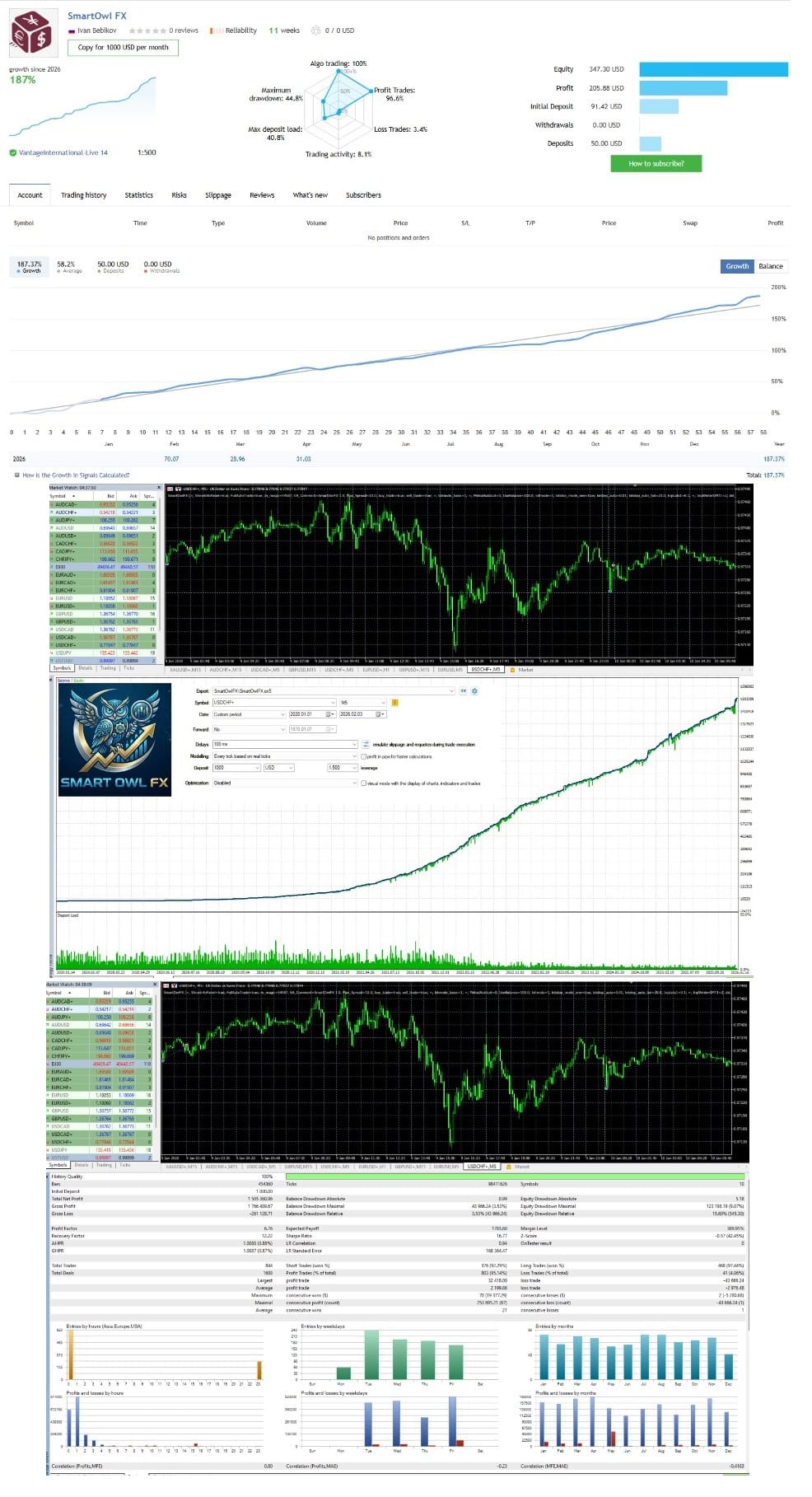

Smart Owl FX EA MT5 v1.4 + SetFiles For Build 5833+
Original price was: $399.00.$14.95Current price is: $14.95.
Smart Owl FX EA watches these turning points. When price pushes through the last swing top, the move suggests bullish strength.




Description
Smart Owl FX: Night-Time Trading with Surgical Accuracy
Smart Owl FX – The Quiet-Hour Algorithm Every Asian-Session Trader Should Know
Table of Contents
- Smart Owl FX Introduction
- What Makes Smart Owl FX Different?
- Key Features at a Glance
- System Requirements & Broker Checklist
- Step-by-Step Setup Guide
- Final Thoughts
Introduction
The Asian session is usually calm, yet packed with small price moves that can add up over time. This is where Smart Owl FX, a multicurrency trading algorithm, steps in. Instead of chasing fast daytime swings, Smart Owl FX looks for mean-reversion opportunities while most traders sleep. By sticking to fixed stop losses and solid market structure logic, it aims to deliver steady results without risky grid or martingale tactics.
What Makes Smart Owl FX Different?
Smart Owl FX focuses exclusively on late-night conditions—often called the rollover period—when spreads widen and liquidity thins out. Here’s why that matters:
| Common Night-Time Challenge | How Smart Owl FX Responds |
|---|---|
| Wide, unpredictable spreads | Opens trades only when spread thresholds are met |
| Sudden spikes from news | Built-in economic calendar pauses trading |
| Broker variance | Multicurrency logic seeks pairs with the best real-time conditions |
By using statistical analysis rather than luck or doubling strategies, Smart Owl FX targets small but repeatable edges on pairs like USDCHF, EURCHF, AUDNZD, and others.
Key Features at a Glance
- Multicurrency Intelligence – Monitors 8+ pairs from one chart; no need to attach the EA multiple times.
- Advanced News Filter – Auto-stops trading during high-impact events.
- Flexible Risk Modes – Very Low, Low, Medium, or Custom lot sizing.
- Safety First – Each trade has a non-negotiable stop loss.
- DST Compatibility – Supports European as well as U.S. daylight-saving rules.
- Low-Volatility Targeting – Designed purely for the Asian session, usually between 22:00–01:00 GMT.
System Requirements & Broker Checklist
| Requirement | Minimum | Recommended |
|---|---|---|
| Account Type | ECN / Raw Spread | ECN with commission ≤ $7/lot |
| Leverage | 1:30 (Very Low Risk mode) | 1:100 |
| Deposit | $100 | $500+ for smoother lot scaling |
| VPS | 24/5 uptime | < 5 ms ping to broker |
| Platform | MetaTrader 5 | MetaTrader 5 |
| GMT Offset | Manual entry | Auto-detect or verified with support |
Step-by-Step Setup Guide for Smart Owl FX
- Open the USDCHF M5 chart.
- Drag the EA onto the chart.
- Press OK to load the EA.
- Make sure the Algo Trading (or AutoTrading) button in MetaTrader is green/on.
- Keep the platform running on your VPS.
Tip: You only need this EA on one chart. It will manage other pairs automatically.
Final Thoughts for Smart Owl FX
This EA caters to traders who prefer a calm, rules-driven approach instead of all-day screen time. By concentrating on the Asian session, enforcing strict stop losses, and filtering out news shocks, it gives users a structured way to seek incremental gains while managing downside risk.
Most of the heavy lifting—pair selection, volatility checks, and timing—is automated. Your main job is to pick a solid ECN broker, run a stable VPS, and choose a risk level you are comfortable with.
Set File IC/VT/Vantage/Tickmil..set
Real Trading – Click Here
Vendor Site – Click Here
| Membership | Yearly Membership |
|---|---|
| Additional Services | Unlock & Decompile |
| Recommended Brokers | Exness Broker, FPMarkets |
| Recommended VPS | FXVM (Low Latency) |
| Youtube Channel | ForexForYou |
| Telegram Channel | Onshoppie Forex EA's & Indicators |
| Telegram Support | Onshoppie Support |
| Installation Guides | Onshoppie Forex Guides |
Brand
ea-mt5
Only logged in customers who have purchased this product may leave a review.
Related products
-

AGI EA Prop Firm MT4 + Setfiles For Build 1455+
Original price was: $2,599.00.$14.95Current price is: $14.95. Add to cart Buy Now -
Advanced Gold Pattern MT4 3.1V
$9.95 Read more -

ALITA PRO Battle Cyborg EA MT4 For Build 1471+
Original price was: $439.00.$14.95Current price is: $14.95. Add to cart Buy Now
Products
-
 Adaptive Gold Scalper EA MT5 V1.9 + Setfiles With DLL 5836
Original price was: $375.00.$14.95Current price is: $14.95.
Adaptive Gold Scalper EA MT5 V1.9 + Setfiles With DLL 5836
Original price was: $375.00.$14.95Current price is: $14.95.
-
 Zerqon EA MT5 V22.2 For Build 5836+
Original price was: $299.00.$14.95Current price is: $14.95.
Zerqon EA MT5 V22.2 For Build 5836+
Original price was: $299.00.$14.95Current price is: $14.95.
-
 MHD Scalper Pro EA MT5 V9.1 For Build 5836+
Original price was: $1,200.00.$14.95Current price is: $14.95.
MHD Scalper Pro EA MT5 V9.1 For Build 5836+
Original price was: $1,200.00.$14.95Current price is: $14.95.
-
 Quantum OmniGold EA MT5 V1.8 For Build 5836+
Original price was: $1,099.00.$14.95Current price is: $14.95.
Quantum OmniGold EA MT5 V1.8 For Build 5836+
Original price was: $1,099.00.$14.95Current price is: $14.95.
-
 BTC Scalper IA EA MT5 V1.2 For Build 5836+
$14.95
BTC Scalper IA EA MT5 V1.2 For Build 5836+
$14.95
-
 Eternal Engine EA MT5 V2.30 + Setfiles For Build 5836+
Original price was: $599.00.$29.95Current price is: $29.95.
Eternal Engine EA MT5 V2.30 + Setfiles For Build 5836+
Original price was: $599.00.$29.95Current price is: $29.95.
-
 Forex Flex EA MT4 V4.91 + Setfiles For Build 1473+
Original price was: $499.00.$29.95Current price is: $29.95.
Forex Flex EA MT4 V4.91 + Setfiles For Build 1473+
Original price was: $499.00.$29.95Current price is: $29.95.
-
 Scalping Robot Pro EA MT5 V2.0 For Build 5836+
Original price was: $1,599.00.$14.95Current price is: $14.95.
Scalping Robot Pro EA MT5 V2.0 For Build 5836+
Original price was: $1,599.00.$14.95Current price is: $14.95.
Recent reviews
-
 Advanced Dashboard Currency Strength
by Balram
Advanced Dashboard Currency Strength
by Balram
Reviews
There are no reviews yet.