





Sharkyra Gold EA MT5 V1.2 + SetFiles For Build 5836+
Original price was: $699.00.$14.95Current price is: $14.95.
Unlock the full potential of Sharkyra Gold EA today. This remarkable, proven tool empowers traders with exciting insights and a reliable edge in the market.



Description
Sharkyra Gold EA: A Practical Guide for Fast, Consistent Gold Trading
Sharkyra Gold EA – The Straight-Talking Roadmap to Steady XAUUSD Results
Table of Contents
- Introduction
- What Makes Sharkyra Gold EA Different?
- Recommended Settings
- How the Logic Engine Works
- Step-by-Step Setup Guide
- Choosing the Right Broker & VPS
- Risk Management Tips
- Common Questions
- Final Thoughts
Introduction
Sharkyra Gold EA is a fully automated Expert Advisor designed for traders who focus on the XAUUSD/GOLD pair. The newest and powerful Sharkyra Gold MT5 version relies on a smart, rule-based engine that reacts to micro market moves in seconds. If you like speed, accuracy, and consistency, this EA can free you from screen-watching while still giving you control over risk.
What Makes Sharkyra Gold EA Different?
Many gold-focused EAs promise quick gains yet overload the chart with indicators. Sharkyra Gold EA takes a lighter approach:
- Works on the M5 timeframe to capture short trends
- Reads trend strength on several timeframes before opening a trade
- Trades only one pair (XAUUSD) to stay focused
- Uses strict exit rules to avoid large drawdowns
Because the code is written for MetaTrader 5, you also gain access to the platform’s advanced order handling and faster back-testing engine.
Recommended Settings
You can start with the default file shipped with the EA, but the author suggests the following baseline:
| Parameter | Value |
|---|---|
| Trading Pair | XAUUSD (Gold) |
| Timeframe | M5 |
| Minimum Deposit | 300 USD |
| Account Type | Hedging |
| Typical Spread Target | 10 points or lower |
| VPS Latency | Below 20 ms ideal |
Tip: Test any tweak on a demo account first to ensure it still respects your risk limit.
How the Logic Engine Works
Sharkyra Gold EA follows three simple steps:
- Trend Check on Higher TimeframesIt scans H1 and H4 to see if gold is trending up, down, or ranging.
- Entry on M5 PullbacksWhen price pulls back slightly within the larger trend, the EA places a pending order just beyond a recent candle high or low.
- Exit Control
- A fixed stop-loss protects against shock moves
- A dynamic take-profit moves with the trend
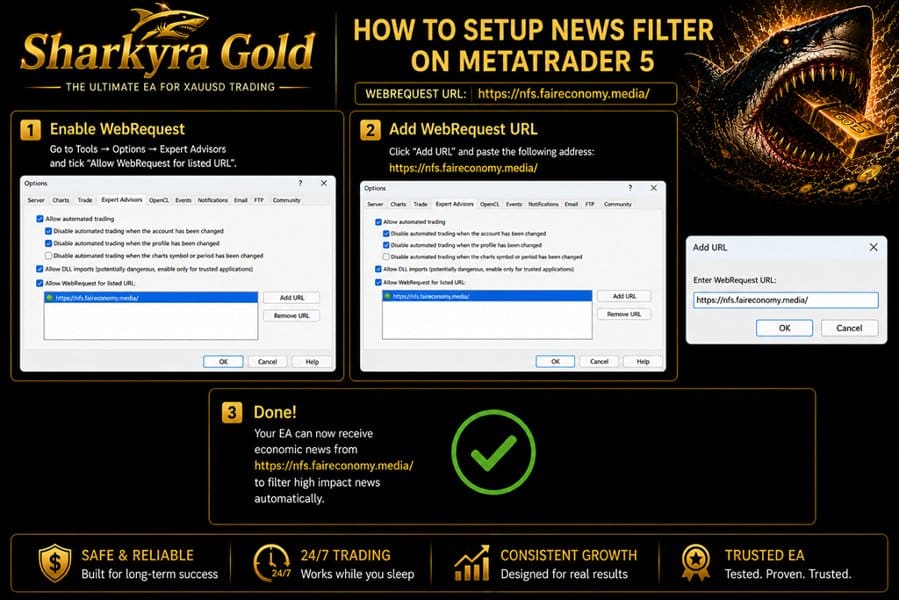
- A time-based exit closes trades before major news events (NFP, FOMC, CPI)**
Because the logic is transparent, you can open the settings panel and view or adjust the stop distance and trailing parameters to suit your style.
Step-by-Step Setup Guide
- Install MT5 if you don’t already have it.
- Open a Hedging Account with a broker that offers raw or low spreads on gold.
- Attach the EA
- Copy the Sharkyra Gold EA file into
MQL5/Experts/ - Drag it onto an XAUUSD M5 chart
- Copy the Sharkyra Gold EA file into
- Enable AutoTrading and confirm that the “smiley face” icon appears on the chart.
- Check Journal & Experts Tab for any startup errors such as “Trade is disabled” or “Not enough money”.
- Run on a VPS to keep MT5 online 24/7.
Choosing the Right Broker & VPS for Sharkyra Gold EA
A few simple checks can save headaches later:
• Spread – Aim for below 10 points during liquid hours.• Commission – A small fixed commission is fine if spread stays tight.• Execution Speed – Under 100 ms is ok; under 20 ms is ideal.• Server Uptime – The broker should show >99 % uptime for its trading servers.• Regulation – Look for reputable oversight (e.g., FCA, ASIC).
Risk Management Tips
- Use Fixed Lots or a Small % Risk – Start with 0.01 lot per 300 USD or 1 % of equity per trade.
- Set a Daily Loss Stop – Example: stop the EA once loss hits 3 % for the day.
- Avoid News – Though the EA closes trades before major events, you may choose to disable trading a few hours before and after high-impact news.
- Withdraw Profits – Taking partial profits each month helps you stay emotionally detached from fluctuations.
Common Questions regarding Sharkyra Gold EA
Q: Can I run Sharkyra Gold EA on MT4?A: The current version is coded for MT5 only.
Q: Is 300 USD really enough?A: It is the stated minimum, but starting with 500 USD or more gives extra room for spread spikes.
Q: Do I need to keep my computer on?A: You can, but a VPS is safer. If your local internet drops, the VPS keeps trading.
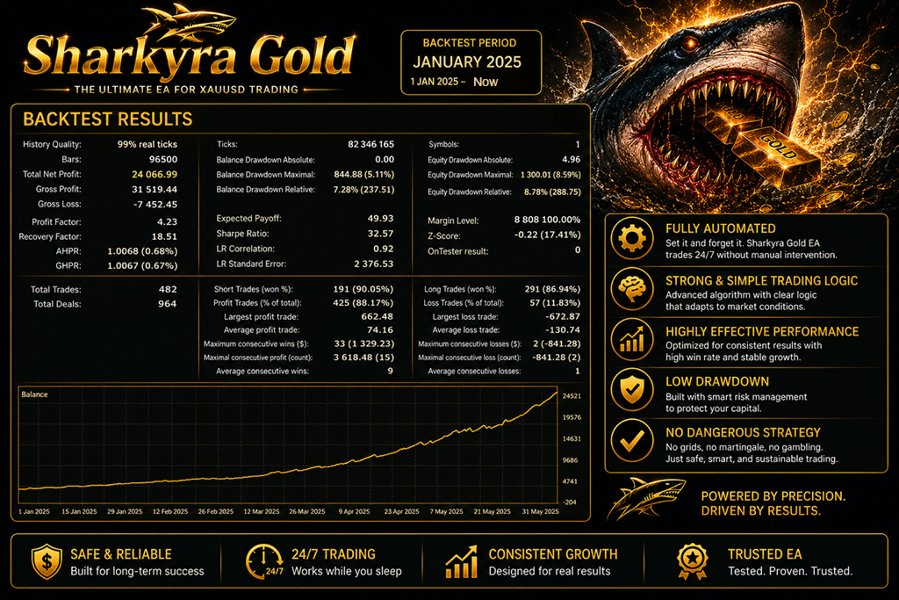
Q: Does the EA use martingale or grid tactics?A: No. Each trade is independent with a clear stop-loss.
Q: How often does it trade?A: On average 3-6 trades per day, more during high volatility sessions such as the US open.
Final Thoughts About Sharkyra Gold EA
Sharkyra Gold EA brings an organized, trend-based method to trading the XAUUSD pair on the M5 chart. By sticking to a single market, limiting drawdown, and running on fast servers, the system keeps the process simple and transparent. If you value clear rules and steady performance over guesswork, trying Sharkyra Gold EA on a demo or small live account may be a practical next step.
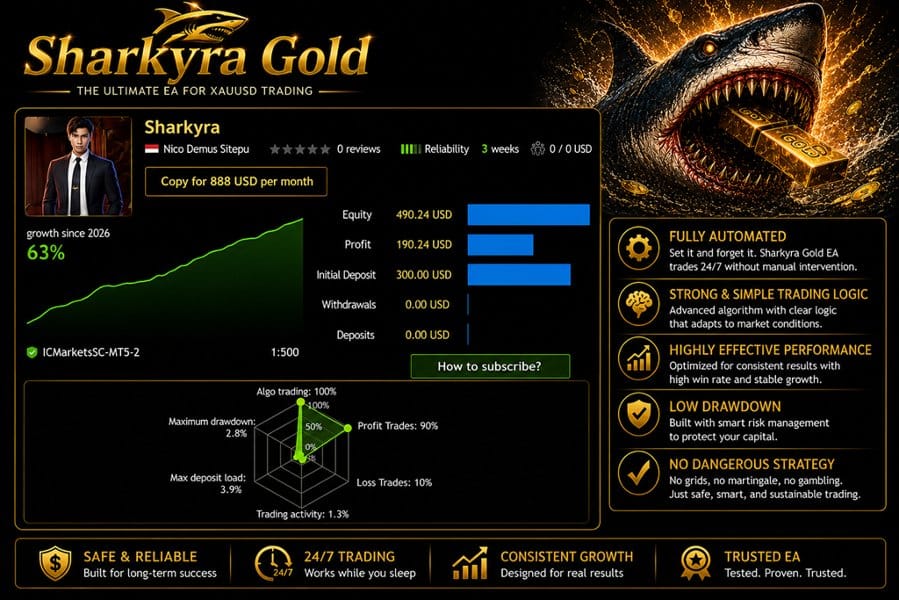
Live Signal – Click Here
Vendor Site – Click Here
| Membership | Yearly Membership |
|---|---|
| Additional Services | Unlock & Decompile |
| Recommended Brokers | Exness Broker, FPMarkets |
| Recommended VPS | FXVM (Low Latency) |
| Youtube Channel | ForexForYou |
| Telegram Channel | Onshoppie Forex EA's & Indicators |
| Telegram Support | Onshoppie Support |
| Installation Guides | Onshoppie Forex Guides |
Brand
ea-mt5
Only logged in customers who have purchased this product may leave a review.
Related products



Products
-
 Adaptive Gold Scalper EA MT5 V1.9 + Setfiles With DLL 5836
Original price was: $375.00.$14.95Current price is: $14.95.
Adaptive Gold Scalper EA MT5 V1.9 + Setfiles With DLL 5836
Original price was: $375.00.$14.95Current price is: $14.95.
-
 Zerqon EA MT5 V22.2 For Build 5836+
Original price was: $299.00.$14.95Current price is: $14.95.
Zerqon EA MT5 V22.2 For Build 5836+
Original price was: $299.00.$14.95Current price is: $14.95.
-
 MHD Scalper Pro EA MT5 V9.1 For Build 5836+
Original price was: $1,200.00.$14.95Current price is: $14.95.
MHD Scalper Pro EA MT5 V9.1 For Build 5836+
Original price was: $1,200.00.$14.95Current price is: $14.95.
-
 Quantum OmniGold EA MT5 V1.8 For Build 5836+
Original price was: $1,099.00.$14.95Current price is: $14.95.
Quantum OmniGold EA MT5 V1.8 For Build 5836+
Original price was: $1,099.00.$14.95Current price is: $14.95.
-
 BTC Scalper IA EA MT5 V1.2 For Build 5836+
$14.95
BTC Scalper IA EA MT5 V1.2 For Build 5836+
$14.95
-
 Eternal Engine EA MT5 V2.30 + Setfiles For Build 5836+
Original price was: $599.00.$29.95Current price is: $29.95.
Eternal Engine EA MT5 V2.30 + Setfiles For Build 5836+
Original price was: $599.00.$29.95Current price is: $29.95.
-
 Forex Flex EA MT4 V4.91 + Setfiles For Build 1473+
Original price was: $499.00.$29.95Current price is: $29.95.
Forex Flex EA MT4 V4.91 + Setfiles For Build 1473+
Original price was: $499.00.$29.95Current price is: $29.95.
-
 Scalping Robot Pro EA MT5 V2.0 For Build 5836+
Original price was: $1,599.00.$14.95Current price is: $14.95.
Scalping Robot Pro EA MT5 V2.0 For Build 5836+
Original price was: $1,599.00.$14.95Current price is: $14.95.
Recent reviews
-
 Advanced Dashboard Currency Strength
by Balram
Advanced Dashboard Currency Strength
by Balram
Reviews
There are no reviews yet.