

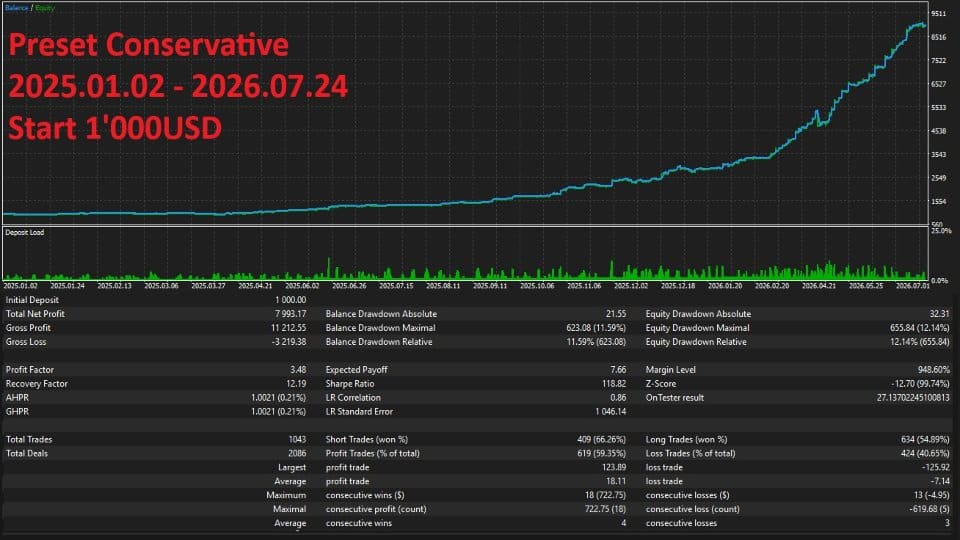



Lizard EA MT5 V1.72 + SetFiles For Build 6090+
Original price was: $199.00.$14.95Current price is: $14.95.
The ultimate secrets of Lizard EA and how it delivers proven forex profits. This exciting tool could completely transform your trading strategy today!




Description
Lizard EA: A Practical Guide for Gold Traders on MetaTrader 5
Lizard EA – The Expert Advisor Tailored for XAUUSD Breakouts
Table of Contents
- What Is Lizard EA?
- How Lizard EA Works
- Trade Management Rules
- Step-by-Step Installation Guide
- Frequently Asked Questions
- Final Thoughts
What Is Lizard EA?
Lizard EA is a fully automated Expert Advisor designed exclusively for trading gold (symbol XAUUSD) on the MetaTrader 5 platform. Unlike many robots that depend on grid or martingale tactics, Lizard EA adopts a clear swing-breakout model:
- Six independent strategies run in parallel.
- Every trade has a preset Stop Loss and Take Profit.
- A multi-layer exit engine manages each position 24/7.
Because the rules are fixed in code, the EA removes emotional decision-making. Yet it still leaves plenty of room for the trader to set risk per trade, daily draw-down limits, and kill-hours.
How Lizard EA Works
The Multi-Strategy Core
| Zone | Account Balance | Active Strategies | Typical Holding Time |
|---|---|---|---|
| Zone A | Up to $1 000 | 3 | Hours to 1 day |
| Zone B | $1 001 and above | 6 | Hours to several days |
The EA checks equity on every new tick. When the balance goes above $1 001, the extra three strategies turn on automatically—no input needed.
Swing-Breakout Logic in Plain Words
- Scan for StructureOn the H1 chart, Lizard EA marks recent swing highs and lows.
- Place Pending OrdersA Buy Stop sits a few pips above a swing high; a Sell Stop goes a bit below a swing low.
- Wait for a Confirmed BreakoutPrice must travel far enough to trigger momentum. A simple “wick touch” is rejected.
- Manage the Trade
- Break-Even: Once price moves by x pips, SL is moved to entry.
- Trailing SL: Shadows price at a fixed gap.
- Trailing TP: Slides the target to extract more if price keeps running.
- Virtual SL: Closes a trade in software even if the broker feed slips.
Trade Management Rules
- Stop Loss on every trade.
- Risk per position: user-defined (default 1 % of balance).
- Max trades open at once: six (one per strategy).
- Trailing modes can be toggled independently.
- No trade copying or lot doubling built in.
These rules promote steady equity growth rather than “all-or-nothing” runs.
Step-by-Step Installation Guide
- Download the EA file (.ex5)Obtain Lizard EA from onshoppie.com.
- Add to MT5
- Open MT5 →
File→Open Data Folder. - Navigate to
MQL5/Experts/. - Paste the EA file.
- Restart MT5 or right-click
Expertsand clickRefresh.
- Open MT5 →
- Attach to XAUUSD H1 Chart
- Drag
Lizard_EAonto the chart. - Check “Allow Algo Trading” in the settings window.
- Drag
- Enable Algo TradingClick the green “Algo Trading” button in the MT5 toolbar.
- Check the Experts LogLook for
Lizard EA initialised successfullymessage. Any error, such as “Enable hedge mode”, must be fixed before live use.
Frequently Asked Questions
Q1. Can I run Lizard EA on MT4?A1. No. The code uses functions only found in MetaTrader 5.
Q2. What if my balance drops below $1 001—do the extra strategies turn off?A2. Yes. The EA checks balance in real time and will revert to Zone A automatically.
Q3. Is a hedging account mandatory?A3. Yes. Netting accounts combine positions and will break the EA logic.
Q4. Do I need to keep the chart open?A4. Only one H1 XAUUSD chart with the EA attached must stay open. You can minimise it.
Final Thoughts
Lizard EA gives gold traders a structured, rule-based method without relying on risky recovery systems like martingale or grid. By tracking swing highs and lows and waiting for clean breakouts, it filters many false moves that often trap manual traders.
If you:
- Prefer one clear instrument (XAUUSD),
- Need fixed Stop Loss on each trade,
- Value built-in time and news filters,
then Lizard EA may fit well in your tool kit. As always, test first, use sound money management, and only trade with funds you can afford to lose.
Risk Warning: Trading gold carries significant risk. Past performance does not guarantee future results.
Live Signal – Click Here
Vendor Site – Click Here
| Membership | Yearly Membership |
|---|---|
| Additional Services | Unlock & Decompile |
| Recommended Brokers | Exness Broker, FPMarkets |
| Recommended VPS | FXVM (Low Latency) |
| Youtube Channel | ForexForYou |
| Telegram Channel | Onshoppie Forex EA's & Indicators |
| Telegram Support | Onshoppie Support |
| Installation Guides | Onshoppie Forex Guides |
Brand
ea-mt5
Only logged in customers who have purchased this product may leave a review.
Related products



Products
-
 The Gold Reaper EA MQ5 V4.1 Source Code + Setfiles
Original price was: $949.00.$29.95Current price is: $29.95.
The Gold Reaper EA MQ5 V4.1 Source Code + Setfiles
Original price was: $949.00.$29.95Current price is: $29.95.
-
 ATM Alpha BOT MT5 For Build 5984+
$14.95
ATM Alpha BOT MT5 For Build 5984+
$14.95
-
 Pandora Box EA MT5 V1.1 + SetFiles With DLL 5984
$14.95
Pandora Box EA MT5 V1.1 + SetFiles With DLL 5984
$14.95
-
 Bully Max Pro EA MT5 For Build 5984+
$14.95
Bully Max Pro EA MT5 For Build 5984+
$14.95
-
 Trinetra EA MT5 + SetFiles For Build 5984+
$34.95
Trinetra EA MT5 + SetFiles For Build 5984+
$34.95
-
 Strict HedgeZone Final EA MT5 V10 + SetFiles For Build 5984+
$14.95
Strict HedgeZone Final EA MT5 V10 + SetFiles For Build 5984+
$14.95
-
 NEXORA EA MT5 For Build 5984+
$14.95
NEXORA EA MT5 For Build 5984+
$14.95
-
 3X COMBO AI EA MT5 V7 For Build 5984+
$14.95
3X COMBO AI EA MT5 V7 For Build 5984+
$14.95
Recent reviews
-
 Advanced Dashboard Currency Strength
by Balram
Advanced Dashboard Currency Strength
by Balram
Reviews
There are no reviews yet.