

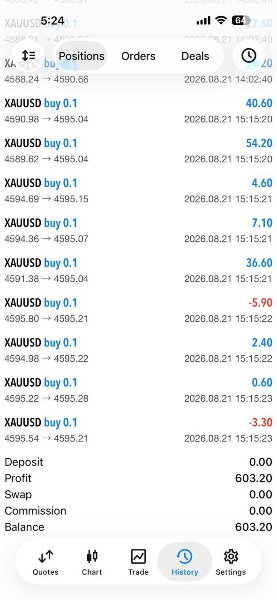
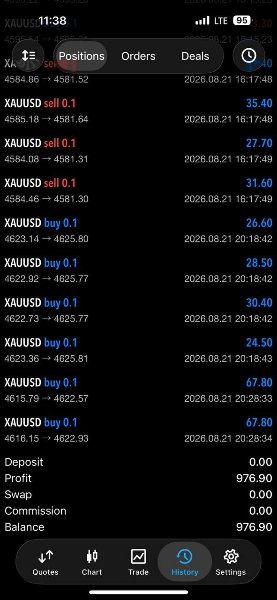
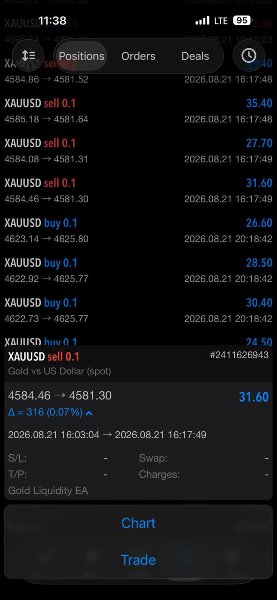



Gold Liquidity EA MT5 V5.3 + Setfiles For Build 6109+
Original price was: $299.00.$14.95Current price is: $14.95.
Discover the proven Gold Liquidity EA that traders swear by. Unlock remarkable forex profits with this powerful automated tool. Start trading smarter today!



Description
Gold Liquidity EA : A Clear-Cut Look at Running a Gold Scalper on the 1-Minute Chart
Table of Contents
- Gold Liquidity Explained
- Meet Gold Liquidity EA – Gold EA for XAUUSD Scalping on MT5
- How the Strategy Works
- Step-by-Step Installation Guide
- Picking a Broker and VPS for a Gold Scalper
- Frequently Asked Questions
- Key Takeaways
- Disclaimer
Gold Liquidity Explained
When traders talk about gold liquidity EA, they’re simply describing how quickly and at what price they can buy or sell gold—whether that’s physical bullion, gold futures, or XAUUSD on MetaTrader 5. High liquidity means:
- Tighter spreads
- Faster execution
- Lower risk of slippage
Because gold often reacts to global news, liquidity can shift in seconds. A scalper on the 1-minute (M1) chart needs to find these pockets of fast activity and act without delay. That is exactly the environment Gold Liquidity EA has been designed for.
Meet Gold Liquidity EA – Gold EA for XAUUSD Scalping on MT5
Gold Liquidity EA is an automated trading robot (MT5 EA) built for one job: catch small, quick price moves on XAUUSD. Below is a quick snapshot of what the robot aims to deliver:
| Feature | Details |
|---|---|
| Trading Pair | XAUUSD (Spot Gold vs. USD) |
| Timeframe | M1 (1-Minute) |
| Platform | MetaTrader 5 |
| Approach | Liquidity sweeps, momentum bursts, tight stops |
| Target Users | New or experienced traders who prefer automated scalping |
| Expected Monthly Growth (ideal conditions) | Up to 100% (not guaranteed) |
Why it focuses on liquidity
- Stop-loss clusters – price often spikes to clear obvious stop zones before moving in the original direction.
- Short-term inefficiencies – during news, spreads can widen and then snap back, leaving brief gaps.
- Momentum bursts – gold can rally or drop dozens of pips in seconds; fast execution is vital.
Because of these factors, the EA pays special attention to order book shifts and instant price momentum.
How the Strategy Works
The logic under the Gold Liquidity EA is straightforward, yet disciplined:
- Liquidity Sweep Detection
- The EA maps recent highs and lows.
- If price quickly pierces one of these levels on increased volume, the robot flags it as a possible “stop-run”.
- Entry Confirmation
- Once the sweep is complete and momentum stalls, a limit or market order is placed in the opposite direction.
- Tight stop (often <10 pips) keeps risk contained.
- Fast Exit
- Target is small (1–2× the stop).
- Positions rarely last more than a few minutes.
- Session Filters
- Highest activity during London and New York overlap.
- Reduced trading during calm Asian hours.
- Spread & Delay Checks
- If the broker’s spread or execution time exceeds a set threshold, the EA skips that trade.
Step-by-Step Installation Guide
Ready to load the Gold Liquidity EA? Follow these simple steps:
- Download the EA file
- $500 set-file
- $1,000 set-file (Blackstone broker)
- Move to the Experts folder
- In MT5, click
File → Open Data Folder → MQL5 → Experts. - Paste
GoldLiquidityEA.ex5inside.
- In MT5, click
- Place the set-file
- Go to
MQL5 → Profiles → Presets. - Drop the supplied
.setfile.
- Go to
- Restart MetaTrader 5
- Attach EA to the chart
- Open an XAUUSD M1 chart.
- Drag Gold Liquidity EA from the Navigator panel.
- Load the preset
- In the EA settings window, click
Loadand choose the relevant.setfile.
- In the EA settings window, click
- Allow algo trading
- Make sure the Algo Trading button on MT5’s top bar is green.
That’s it—Gold Liquidity EA should now start scanning for trades.
Picking a Broker and VPS for a Gold Scalper
A Gold Liquidity EA depends on two key vendors:
- Broker
- Look for 0.5 pips spread or tighter on XAUUSD.
- Check if the broker re-quotes during news.
- Confirm they permit scalping and have no minimum holding time.
- VPS
- Aim for <2 ms latency to the broker’s server.
- Use SSD storage and at least 1 CPU core clocked above 2.4 GHz.
Frequently Asked Questions Regarding Gold Liquidity EA
Q1: Can I run Gold Liquidity EA on MetaTrader 4?A1: No. The code is native to MT5.
Q2: How many charts can I attach the EA to?A4: One chart is enough; the EA manages everything internally.
Q3: What lot size should I use?A5: Use the default from the set-file. If you adjust, keep risk per trade below 2 %.
Key Takeaways of Gold Liquidity EA
- Gold liquidity EA can change in seconds; a quick Scalping EA like Gold Liquidity EA strives to make the most of these short windows.
- Success hinges on tight spreads, fast execution, and disciplined risk rules.
- A demo forward test lets you see real-time behavior before putting money on the line.
- Even strong results in the past do not guarantee future performance.
Disclaimer
Trading involves risk, and past performance is not a promise of future gains. The Gold Liquidity EA may lose money, especially in periods of low liquidity or unexpected market shocks. Only trade with capital you can afford to lose and always test on a demo account first.
Vendor Site – Click Here
| Membership | Yearly Membership |
|---|---|
| Additional Services | Unlock & Decompile |
| Recommended Brokers | Exness Broker, FPMarkets |
| Recommended VPS | FXVM (Low Latency) |
| Youtube Channel | ForexForYou |
| Telegram Channel | Onshoppie Forex EA's & Indicators |
| Telegram Support | Onshoppie Support |
| Installation Guides | Onshoppie Forex Guides |
Brand
ea-mt5
Only logged in customers who have purchased this product may leave a review.
Related products



Products
-
 H4 Gold Scalper EA MT5 V1.5 With DLL Build 6122
Original price was: $150.00.$14.95Current price is: $14.95.
H4 Gold Scalper EA MT5 V1.5 With DLL Build 6122
Original price was: $150.00.$14.95Current price is: $14.95.
-
 Mavrik Scalper EA MT5 V18.306 For Build 6140+
$14.95
Mavrik Scalper EA MT5 V18.306 For Build 6140+
$14.95
-
 Dude Alpha Gold EA MT5 V1.4.2 + Set Files For Build 6140+
Original price was: $499.00.$14.95Current price is: $14.95.
Dude Alpha Gold EA MT5 V1.4.2 + Set Files For Build 6140+
Original price was: $499.00.$14.95Current price is: $14.95.
-
 Ultra Beast EA MT5 + Setfiles For Build 6140+
$14.95
Ultra Beast EA MT5 + Setfiles For Build 6140+
$14.95
-
 Algo Edge SMC AI EA MT5 V3 For Build 6140+
$14.95
Algo Edge SMC AI EA MT5 V3 For Build 6140+
$14.95
-
 Aura Absolute EA MT4 V1.1 For Build 1476+
$14.95
Aura Absolute EA MT4 V1.1 For Build 1476+
$14.95
-
 Gold Neural Core EA MT5 V1.5 For Build 6140+
Original price was: $500.00.$14.95Current price is: $14.95.
Gold Neural Core EA MT5 V1.5 For Build 6140+
Original price was: $500.00.$14.95Current price is: $14.95.
-
 Global Trade Plan EA MT5 V3.1 + SetFiles With DLL 6140
Original price was: $399.00.$14.95Current price is: $14.95.
Global Trade Plan EA MT5 V3.1 + SetFiles With DLL 6140
Original price was: $399.00.$14.95Current price is: $14.95.
Recent reviews
-
 Advanced Dashboard Currency Strength
by Balram
Advanced Dashboard Currency Strength
by Balram
Reviews
There are no reviews yet.