


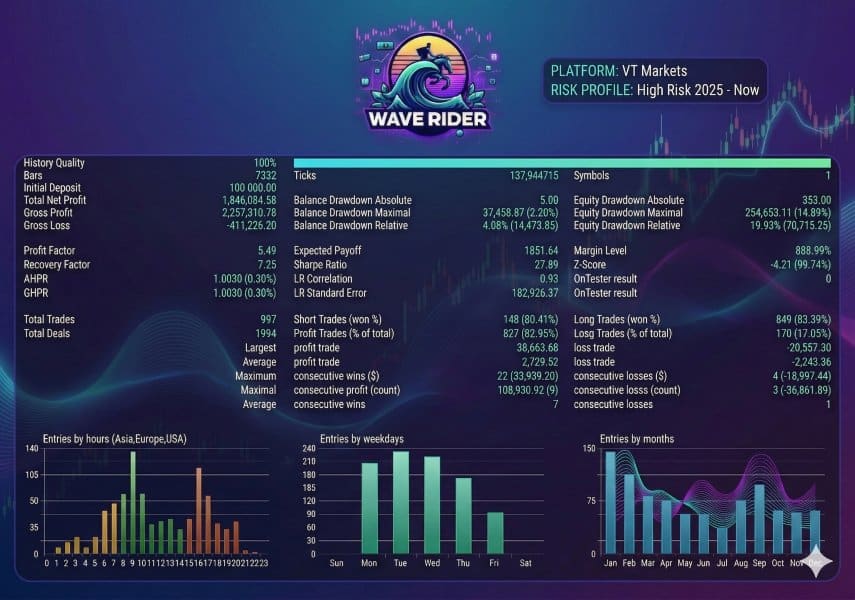
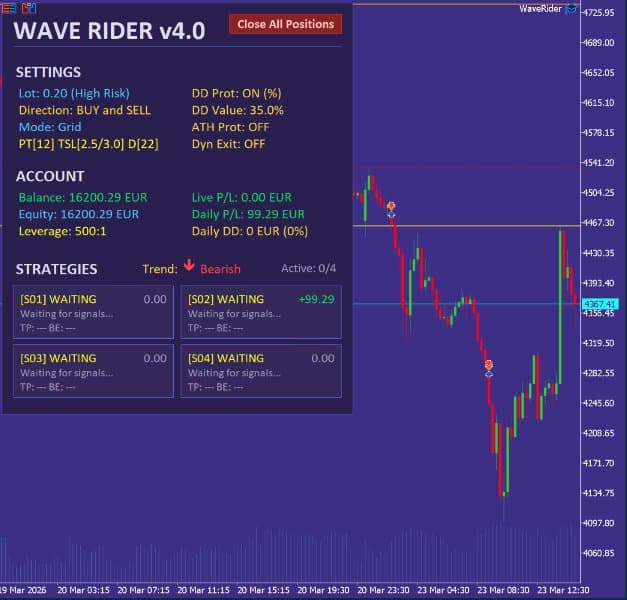



Wave Rider EA MT5 V4.1 For Build 5836+
Original price was: $499.00.$14.95Current price is: $14.95.
Wave Rider EA is the ultimate trading solution you’ve been waiting for. Jaw-dropping features and see how it energizes your portfolio with real results.


Description
Wave Rider EA: Consistent Gold Trading Without Guesswork
Wave Rider EA – Four Strategies, One Purpose: Safer Gold Scalping
Table of Contents
- Why Gold Needs Wave Rider EA
- What Is Wave Rider EA?
- Set-Up in Five Steps
- Broker, VPS, and Testing Tips
- Frequently Asked Questions
- Final Thoughts
Why Gold Needs Wave Rider EA
Wave Rider EA – Gold (XAUUSD) is fast, spiky, and news-driven. A quiet Asian session can turn into a 500-point move during New York open. Many expert advisors chase every tick, ignore big picture structure, and end up buying tops or selling bottoms. Accounts blow up when sharp drops or sudden reversals hit.
Wave Rider EA was created for one simple reason:
Knowing when not to trade is just as important as knowing when to enter.
With triple timeframe checks, clear drawdown cut-offs, and a choice between grid recovery or single-shot trades, Wave Rider focuses on safety first.
What Is Wave Rider EA?
Wave Rider EA is an automated trading system designed specifically for Gold. It blends scalper speed with sniper-style entries by looking at three timeframes at once:
- H1 for the main trend
- M30 or M15 for confirmation
- M5 or M1 for precise entry
Because of this layered check, the robot avoids choppy areas and shoots only when the market structure lines up. If price is near an all-time high, it skips new buys. If daily drawdown passes your limit, it switches itself off for the rest of the day.
Set-Up in Five Steps
- Install Wave Rider EA into
MQL5/Experts. - Open any XAUUSD chart (timeframe does not matter).
- Attach the EA. Confirm license/terminal permissions.
- Choose your trade mode, lot sizing, and max drawdown settings.
- Enable AutoTrading and keep the platform (or VPS) online 24/5.
Broker, VPS, and Testing Tips
- ECN/RAW spread brokers with two-digit Gold quotes work best (e.g., VT Markets, IC Markets, Fusion).
- Leverage 1:500 gives margin relief during grid; 1:100 minimum.
- Avoid 3-digit Gold brokers (Exness style) – price feed can distort tests.
- VPS with <5 ms latency helps M5 entries.
- Back-test from 2025 forward with real tick data for cleaner quality.
Frequently Asked Questions Regarding Wave Rider EA
Q: Does Wave Rider EA work on other pairs?A: It’s coded and optimised for XAUUSD. You may test on other metals, but results are not guaranteed.
Q: Is it martingale?A: No. Default multiplier is 1.0. You can raise it but the grid is already spaced wider each level, so compounding is optional.
Q: Can I use it with a prop firm?A: Yes, in Single Position mode. Still, prop rules (daily loss, max lot, etc.) vary. Always confirm with support first.
Q: Do I need to babysit the EA during news?A: The Dynamic Exit helps, and Triple Timeframe filter often keeps it out during unstable periods. You can also block entries around high-impact events by setting time filters.
Final Thoughts About Wave Rider EA
Wave Rider EA targets the middle ground between safety and activity. It does not try to trade every candle, and it does not rely on deep martingale to pull itself out of trouble. If you:
- focus on Gold,
- like clear trend-aligned entries,
- and want the option to choose between grid recovery or a clean single-shot trade,
then Wave Rider EA is worth a closer look. As always, demo first, keep drawdown tight, and let the EA show its discipline.
DISCLAIMER: Trading foreign exchange and CFDs carries a high level of risk. Past performance is not a reliable indicator of future results. Use small lot sizes, respect drawdown limits, and never trade money you cannot afford to lose.
Live Signal – Click Here
Vendor Site – Click Here
| Membership | Yearly Membership |
|---|---|
| Additional Services | Unlock & Decompile |
| Recommended Brokers | Exness Broker, FPMarkets |
| Recommended VPS | FXVM (Low Latency) |
| Youtube Channel | ForexForYou |
| Telegram Channel | Onshoppie Forex EA's & Indicators |
| Telegram Support | Onshoppie Support |
| Installation Guides | Onshoppie Forex Guides |
Brand
ea-mt5
Only logged in customers who have purchased this product may leave a review.
Related products
-
ALITA PRO Battle Cyborg EA MT4 For Build 1471+
Original price was: $439.00.$14.95Current price is: $14.95. Add to cart Buy Now -

AF SUPPLY AND DEMAND EA MT4 2022 For Build 1455+
Original price was: $797.00.$9.95Current price is: $9.95. Add to cart Buy Now -
 SALESALESALE
Advanced Gold Trading EA MT4 V6.4 + Setfiles For Build 1460+
Original price was: $199.00.$14.95Current price is: $14.95. Add to cart Buy Now
Products
-
 Adaptive Gold Scalper EA MT5 V1.9 + Setfiles With DLL 5836
Original price was: $375.00.$14.95Current price is: $14.95.
Adaptive Gold Scalper EA MT5 V1.9 + Setfiles With DLL 5836
Original price was: $375.00.$14.95Current price is: $14.95.
-
 Zerqon EA MT5 V22.2 For Build 5836+
Original price was: $299.00.$14.95Current price is: $14.95.
Zerqon EA MT5 V22.2 For Build 5836+
Original price was: $299.00.$14.95Current price is: $14.95.
-
 MHD Scalper Pro EA MT5 V9.1 For Build 5836+
Original price was: $1,200.00.$14.95Current price is: $14.95.
MHD Scalper Pro EA MT5 V9.1 For Build 5836+
Original price was: $1,200.00.$14.95Current price is: $14.95.
-
 Quantum OmniGold EA MT5 V1.8 For Build 5836+
Original price was: $1,099.00.$14.95Current price is: $14.95.
Quantum OmniGold EA MT5 V1.8 For Build 5836+
Original price was: $1,099.00.$14.95Current price is: $14.95.
-
 BTC Scalper IA EA MT5 V1.2 For Build 5836+
$14.95
BTC Scalper IA EA MT5 V1.2 For Build 5836+
$14.95
-
 Eternal Engine EA MT5 V2.30 + Setfiles For Build 5836+
Original price was: $599.00.$39.95Current price is: $39.95.
Eternal Engine EA MT5 V2.30 + Setfiles For Build 5836+
Original price was: $599.00.$39.95Current price is: $39.95.
-
 Forex Flex EA MT4 V4.91 + Setfiles For Build 1473+
Original price was: $499.00.$39.95Current price is: $39.95.
Forex Flex EA MT4 V4.91 + Setfiles For Build 1473+
Original price was: $499.00.$39.95Current price is: $39.95.
-
 Scalping Robot Pro EA MT5 V2.0 For Build 5836+
Original price was: $1,599.00.$14.95Current price is: $14.95.
Scalping Robot Pro EA MT5 V2.0 For Build 5836+
Original price was: $1,599.00.$14.95Current price is: $14.95.
Recent reviews
-
 Advanced Dashboard Currency Strength
by Balram
Advanced Dashboard Currency Strength
by Balram
Reviews
There are no reviews yet.