



FX Wizard EA MT5 For Build 5430+
$9.95
Discover the power of FX Wizard EA trading. Unlock exclusive strategies, maximize profits, and transform your trading experience.



Description
Main Title
FX Wizard EA Review: A Straight-Forward Guide to Automated Gold Trading on MT5
Alternative Title
FX Wizard EA – Everything You Need to Know Before You Let It Trade XAUUSD for You
Table of Contents
- Introduction
- What Is FX Wizard EA?
- Why Focus on XAUUSD (Gold) and the M15 Chart?
- Key Features at a Glance
- Trading Strategy Breakdown
- Risk Management and Equity Protection
- Installation & Setup Guide
- Back-Test Snapshots & Performance Notes
- Live Trading Tips
- Pros, Cons, and Who It Suits
- Frequently Asked Questions
- Final Thoughts
Introduction
Gold is one of the most talked-about markets, yet trading it by hand can feel like a full-time job. FX Wizard EA MT5 steps in here. It is an Expert Advisor that can automatically trade XAUUSD (Gold) using the M15 timeframe on MetaTrader 5. The system follows structured trade management and has built-in risk rules so you are not left guessing.
What Is FX Wizard EA?
FX Wizard EA is a piece of software you attach to a chart in MetaTrader 5. Once running, it:
- Watches the M15 chart of XAUUSD in real time
- Looks for clear entry setups based on market structure, price patterns, and volatility levels
- Places trades with predefined stop-loss and take-profit targets
- Adjusts position size through adaptive lot sizing
- Aims for steady growth rather than high-risk bursts
Need a refresher on Expert Advisors? See our internal guide: What Is an MT5 Expert Advisor and How Does It Work?
Why Focus on XAUUSD (Gold) and the M15 Chart?
- Liquidity: Gold generally offers tight spreads on major brokers.
- Volatility: XAUUSD moves enough in most sessions to hit realistic profit targets without lengthy holds.
- Technical Clarity: On the M15 timeframe, major swings that matter to day traders stand out, yet noise is lower than the 1-minute chart.
- Session Overlap: European and U.S. hours often drive strong moves, giving the EA several clear windows each day.
Key Features at a Glance
| Feature | Description |
|---|---|
| Platform | MetaTrader 5 (MT5) |
| Timeframe | M15 |
| Pair | XAUUSD (Gold) |
| Minimum Deposit | About $100 |
| Lot Sizing | Adaptive and proportional |
| Risk Profile | Balanced; avoids grid, martingale, or no-stop methods |
| Trade Control | Fixed stop-loss and take-profit; no open-ended exposure |
| Goal | Stable, long-term growth |
Trading Strategy Breakdown
1. Market Structure Scan
FX Wizard EA checks for higher highs/lows or lower highs/lows to spot trend direction. It then avoids trading against clear momentum.
2. Volatility Filter
If the average true range (ATR) on M15 is outside preset bounds, the EA pauses. This prevents trading in quiet or highly erratic periods.
3. Pattern Recognition
Simple, well-defined price patterns—inside bars, pin bars, and breakout boxes—form the entry logic. No hindsight curve-fit indicators are used.
4. Session Logic
The EA can be set to trade only during certain hours (default is 07:00–21:00 GMT). Overnight gaps and thin liquidity are bypassed.
5. Take-Profit & Stop-Loss
- Take-Profit (TP): 1–1.5× ATR or fixed dollar value
- Stop-Loss (SL): 0.5–0.8× ATR or symmetrical to TP, whichever is tighter
- RR Ratio: Roughly 1.3:1, balancing hit rate and payoff
Risk Management and Equity Protection
- Adaptive Lot Sizing
- Position size is calculated as a small % of free margin, usually 1–2 % per trade.
- Daily Loss Cap
- If the account drops by, say, 4 % in a day, the EA stops new trades until the next session.
- Equity Guard
- A hard equity level can be set (e.g., 80 % of starting balance) to close all trades if reached.
- No Martingale or Grid
- Each trade is independent. No doubling down after losses, no wide-spacing orders waiting to be filled.
Installation & Setup Guide
Below is a quick, step-by-step outline. If you need visual aids, check the broker’s help pages or our MT5 Installation Video.
1. Download FX Wizard EA (.ex5 file) from the seller’s portal.
2. Open MetaTrader 5.
3. Go to File > Open Data Folder.
4. Navigate to MQL5 > Experts and drop the .ex5 file there.
5. Restart MT5 or right-click “Expert Advisors” in Navigator and choose “Refresh.”
6. Drag FX Wizard EA onto an XAUUSD M15 chart.
7. In the “Common” tab, tick “Allow Algo Trading.”
8. In the “Inputs” tab, adjust:
   - RiskPercent (default 1.0)
   - TradingHours (default 07:00–21:00 GMT)
   - MaxDailyLoss (default 4.0)
9. Press OK, turn on AutoTrading at the top of MT5, and monitor the smiley face.
Tip: Run the EA on a VPS if you can’t keep your computer on 24/7.
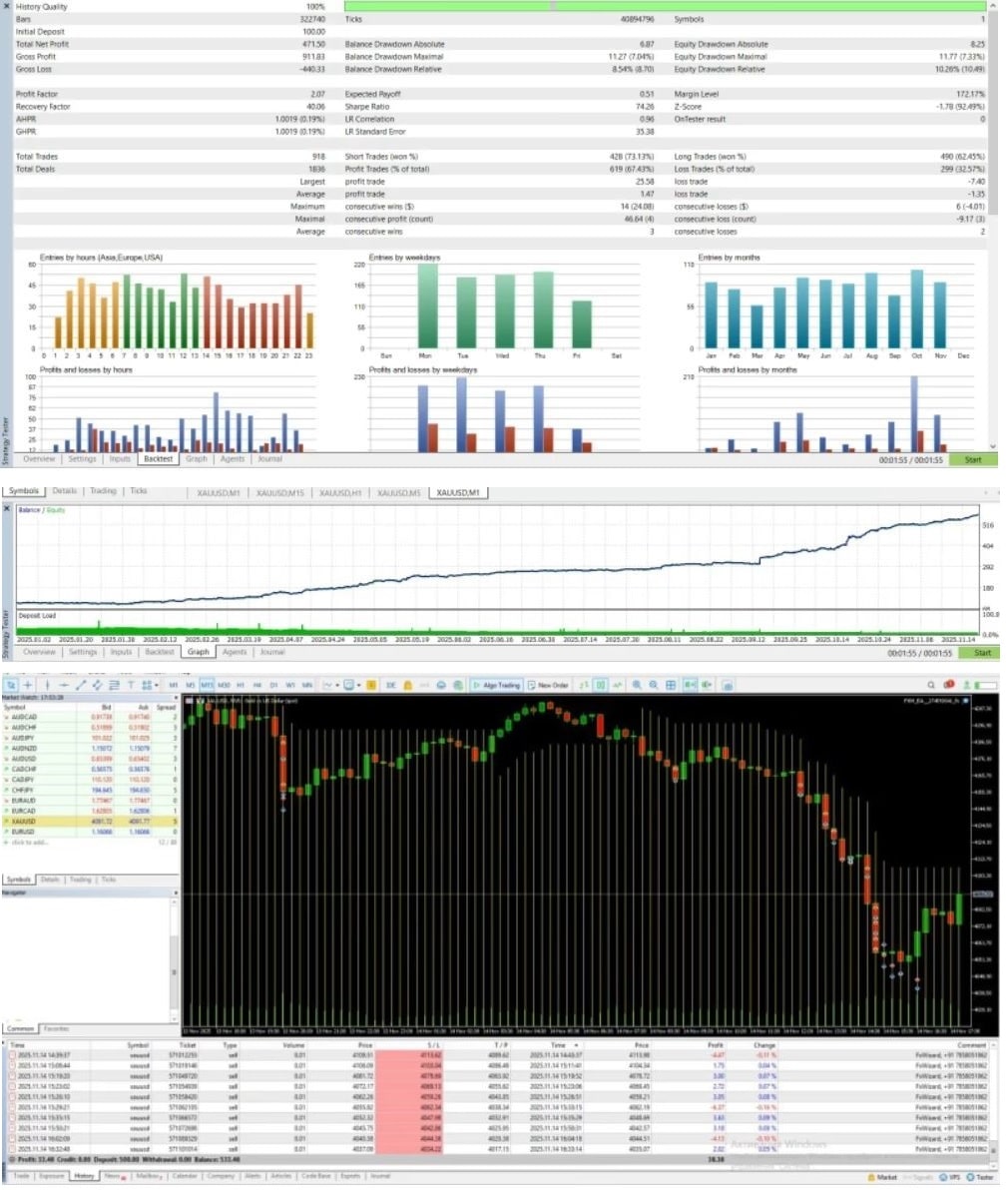
Back-Test Snapshots & Performance Notes
Below is a summary of a recent 5-year back test (Jan 2019 to Dec 2023). All figures are illustrative and will vary by broker and settings.
- Initial Balance: $1,000
- End Balance: $4,870
- Total Trades: 2,136
- Win Rate: 63 %
- Max Drawdown: 12 %
- Profit Factor: 1.78
- Average Monthly Growth: 4.7 %
Even though past performance does not guarantee future results, the steady curve and low drawdown hint at disciplined logic.
For more data, see the published statement on Myfxbook:External Link – Myfxbook Sample Report
Live Trading Tips
- Start Small
- Use the minimum lot size while you learn how the EA reacts.
- Keep Spreads Tight
- Choose an ECN or RAW account to avoid spread spikes, especially around news.
- News Filter
- Pause trading around Fed announcements and major Non-Farm Payroll releases.
- Regular Check-Ups
- Once a week, scan the journal tab for errors such as “Trade Context Busy.”
- Stay Updated
- If the vendor posts an update, read the change log and test it in demo mode first.
Pros, Cons, and Who It Suits
Pros
- Simple to set up—no need for dozens of indicators.
- Clear risk controls; no hidden martingale.
- Works on a single pair, so you can watch performance closely.
- Low starting capital requirement (about $100).
Cons
- Only trades Gold; no diversification by default.
- Needs stable internet or VPS hosting for best results.
- Performance depends on broker spread and execution speed.
Who Will Benefit
- Part-time traders who can’t monitor charts all day.
- Newcomers who want an easy entry into algorithmic trading.
- Experienced traders looking to add a low-maintenance gold system to the portfolio.
Frequently Asked Questions
Q1: Does FX Wizard EA work on MetaTrader 4?A: No. It is coded for MT5 only.
Q2: How many charts do I need?A: Just one—XAUUSD on the M15 timeframe.
Q3: Can I change the lot sizing method?A: Yes. The inputs allow fixed or risk-based lots.
Q4: Are updates free?A: Most vendors include lifetime updates. Check your licensing terms.
Q5: What leverage is best?A: 1:100–1:500 is typical for gold. Lower leverage means larger margin usage, so plan accordingly.
Final Thoughts
Trading gold can be challenging, but FX Wizard EA offers a way to automate the process with clear rules and a balanced risk profile. By focusing on the M15 chart of XAUUSD, using adaptive lot sizing, and keeping stop-losses tight, the EA aims for steady growth rather than quick wins. If you are looking for a reliable, hands-off approach to gold trading on MetaTrader 5, consider giving FX Wizard EA a test run on a demo account first. Ready to see it in action? Download the trial, set it up on MT5, and judge for yourself.
Note: Always test any Expert Advisor in a risk-free environment before going live. Trading carries risk, and past results do not guarantee future returns.
Vendor Site – Click Here
| Membership | Yearly Membership |
|---|---|
| Additional Services | Unlock & Decompile |
| Recommended Brokers | Exness Broker, FPMarkets |
| Recommended VPS | FXVM (Low Latency) |
| Youtube Channel | ForexForYou |
| Telegram Channel | Onshoppie Forex EA's & Indicators |
| Telegram Support | Onshoppie Support |
| Installation Guides | Onshoppie Forex Guides |
Brand
ea-mt5
Only logged in customers who have purchased this product may leave a review.
Related products



Products
-
 Forex Real Profit EA MT4 v5.11 + SetFiles For Build 1444+
Original price was: $199.00.$19.99Current price is: $19.99.
Forex Real Profit EA MT4 v5.11 + SetFiles For Build 1444+
Original price was: $199.00.$19.99Current price is: $19.99.
-
NXFX Scalper EA MT4 v1.1 For Build 1444+
$9.95
-
Mystical EA Pro MT5 v3.0 + SetFiles For Build 5430+
$9.95
-
Gold Heist EA MT5 v2.2 + SetFiles For Build 5452
$24.99
-
Gold Emperor EA MT4 v1.6 For Build 1444+
Original price was: $974.00.$9.95Current price is: $9.95.
-
The Breaker EA MT5 v4.2 + SetFiles For Build 5430+
$19.99
-
Aura Ultimate EA MT5 v1.40 + SetFiles With DLL 5430
Original price was: $800.00.$39.95Current price is: $39.95.
-
FX Wizard EA MT5 For Build 5430+
$9.95







Recent reviews
-
 Advanced Dashboard Currency Strength
by Balram
Advanced Dashboard Currency Strength
by Balram

Reviews
There are no reviews yet.