


Chronos Algo EA MT4 V1.5 For Build 1476+
Original price was: $159.00.$14.95Current price is: $14.95.
Exclusive Chronos Algo EA review uncovers jaw-dropping returns. See how this advanced trading system generates consistent profits in volatile markets today.


Description
Chronos Algo EA: The Low-Frequency EURUSD Robot With 3 Years of Live Proof
Chronos Algo EA — Proven EURUSD H1 Trading System You Can Verify Today
Table of Contents
- What Is Chronos Algo EA?
- Why the 3-Year Live Test Matters
- Suggested Account Setup
- Step-by-Step Installation on MT4
- Frequently Asked Questions
- Final Thoughts
What Is Chronos Algo EA?
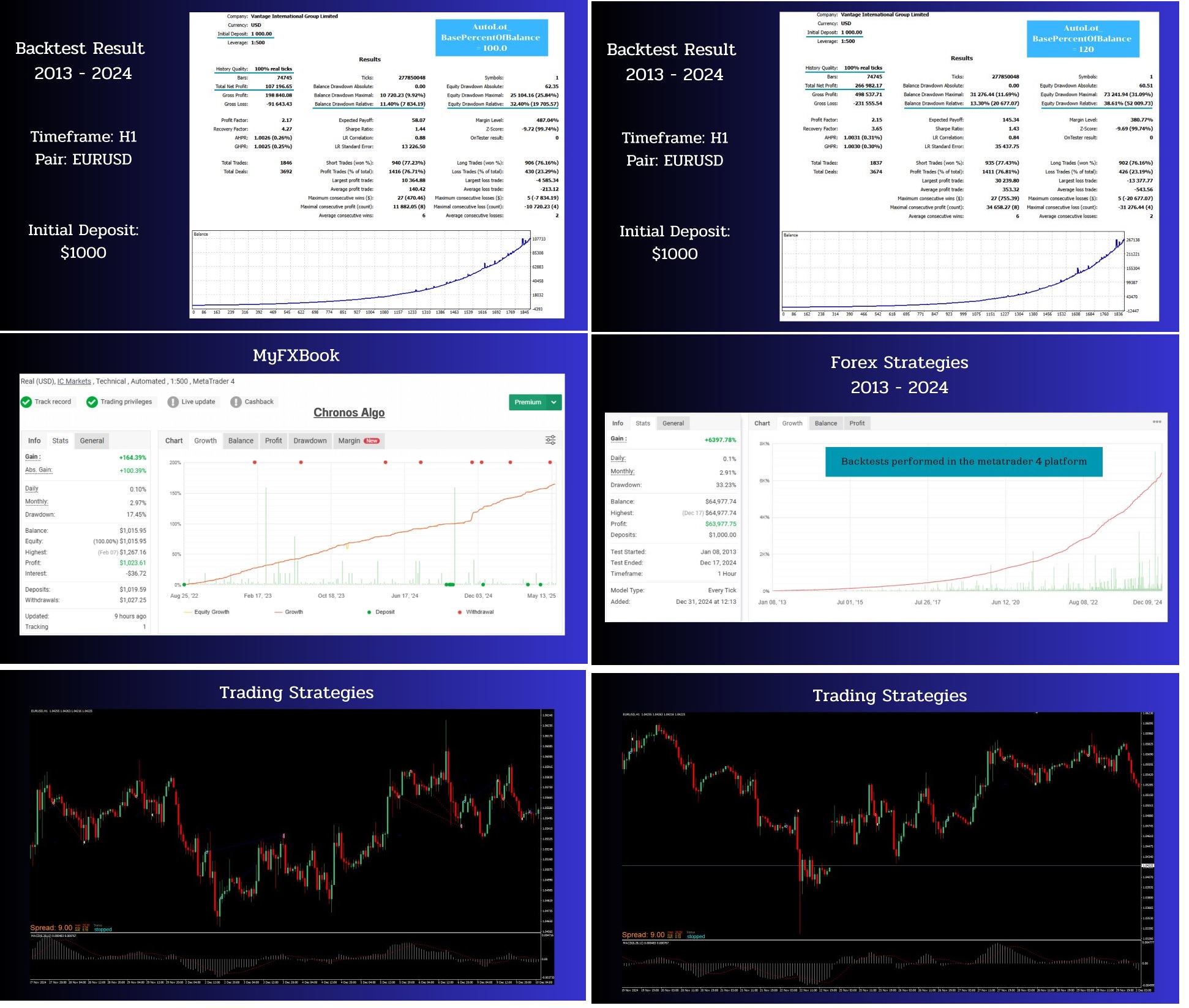
Chronos Algo EA is an automated trading robot designed exclusively for EURUSD on the H1 chart. Unlike most expert advisors that look great in a back-test and then stumble once real money is on the line, Chronos Algo EA has been trading on a real account for more than three years. Its performance is publicly available through an MQL5 signal page so anyone can check balance curves, drawdowns, and trade history.
In short, Chronos Algo MT4 is a live-proven system that opens fairly few, but highly filtered, positions. When price moves against an entry, the EA adds positions in a controlled grid that adapts to current volatility. This approach seeks to capture reversals without letting risk get out of hand.
Why the 3-Year Live Test Matters
Most commercial robots do the following:
- Optimize on historical data
- Publish a polished equity curve
- Go live and stop updating once the strategy breaks
Chronos Algo EA flipped the timeline:
- Launch on a small live account in early 2022
- Run through trending markets, ranging periods, rate-hike cycles, and news spikes
- Only after multiple years of verified profitability was the EA offered publicly
Because of that sequence, traders can evaluate real outcomes, not marketing claims. A three-year live record shows:
- How the grid handles extended trends
- What maximum drawdown looks like when spreads widen
- Whether average monthly returns are steady or random
- How slippage on a real broker influences results
No spreadsheet can replace that level of transparency.
Suggested Account Setup
• Symbol: EURUSD• Timeframe: H1• Broker account type: ECN, Raw, or Pro with spreads below 0.5 pip on EURUSD• Minimum capital: 1 000 USD (or equivalent cent account)• Leverage: 1 : 100 or higher• VPS: Located near broker server with latency < 5 ms• Risk setting: Start at 1 % per grid level while forward-testing
Tip: If you use a cent account, treat 100 000 cents as 1 000 USD when choosing lot sizes.
Step-by-Step Installation on MT4
- Download the Chronos Algo EA file (.ex4).
- Open MT4 → File → Open Data Folder → MQL4 → Experts.
- Copy-paste the .ex4 file into the Experts folder.
- Restart MT4 or press Ctrl + N → Right-click → Refresh.
- Drag Chronos Algo EA onto EURUSD H1.
- Enable Algo Trading (top-bar button turns green).
- Check the Experts tab for the message “Chronos Algo EA initialized.”
- Keep the platform on a VPS for 24/5 operation.
Frequently Asked Questions Regarding Chronos Algo EA
Q: Can I run Chronos Algo EA on another pair?A: The logic is tuned for EURUSD H1. Other pairs have not been tested live.
Q: Does it use grid?A: Yes.
Q: What happens during a sudden 200-pip spike?A: Grid steps widen automatically with ATR. Still, expect temporary drawdown.
Q: Can I change the indicator mix?A: Yes, but once you alter core filters the historical track record no longer applies.
Q: Is one VPS enough for multiple accounts?A: Yes, as long as CPU load stays below 60 % and RAM is sufficient.
Final Thoughts About Chronos Algo EA
Chronos Algo EA offers something rare in the expert-advisor space: public, multi-year live performance on the exact same settings you can download. Its five-indicator confirmation seeks quality over quantity, while an adaptive grid aims to control risk without constant babysitting. If you trade EURUSD and appreciate steady rather than spectacular returns, Chronos Algo MT4 could be a practical addition to your toolkit.
Manual – Click Here
Live Signal – Click Here
Vendor Site – Click Here
| Membership | Yearly Membership |
|---|---|
| Additional Services | Unlock & Decompile |
| Recommended Brokers | Exness Broker, FPMarkets |
| Recommended VPS | FXVM (Low Latency) |
| Youtube Channel | ForexForYou |
| Telegram Channel | Onshoppie Forex EA's & Indicators |
| Telegram Support | Onshoppie Support |
| Installation Guides | Onshoppie Forex Guides |
Brand
ea-mt4
Only logged in customers who have purchased this product may leave a review.
Related products



Products
-
 Quantum Queen X EA MT5 V4.3 MQ5 Source Code
Original price was: $1,799.00.$19.95Current price is: $19.95.
Quantum Queen X EA MT5 V4.3 MQ5 Source Code
Original price was: $1,799.00.$19.95Current price is: $19.95.
-
 Smart Gold Hunter EA MT5 V2.0 MQ5 Source Code
Original price was: $249.00.$28.95Current price is: $28.95.
Smart Gold Hunter EA MT5 V2.0 MQ5 Source Code
Original price was: $249.00.$28.95Current price is: $28.95.
-
 The Gold Reaper EA MQ5 V4.1 Source Code + Setfiles
Original price was: $949.00.$19.95Current price is: $19.95.
The Gold Reaper EA MQ5 V4.1 Source Code + Setfiles
Original price was: $949.00.$19.95Current price is: $19.95.
-
 ATM Alpha BOT MT5 For Build 5984+
$14.95
ATM Alpha BOT MT5 For Build 5984+
$14.95
-
 Pandora Box EA MT5 V1.1 + SetFiles With DLL 5984
$14.95
Pandora Box EA MT5 V1.1 + SetFiles With DLL 5984
$14.95
-
 Bully Max Pro EA MT5 For Build 5984+
$14.95
Bully Max Pro EA MT5 For Build 5984+
$14.95
-
 Trinetra EA MT5 + SetFiles For Build 5984+
$34.95
Trinetra EA MT5 + SetFiles For Build 5984+
$34.95
-
 Strict HedgeZone Final EA MT5 V10 + SetFiles For Build 5984+
$14.95
Strict HedgeZone Final EA MT5 V10 + SetFiles For Build 5984+
$14.95
Recent reviews
-
 Advanced Dashboard Currency Strength
by Balram
Advanced Dashboard Currency Strength
by Balram
Reviews
There are no reviews yet.