


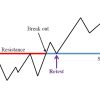


Breakout and Retest Scanner MT4 V2.28 For Build 1478+
Breakout and Retest Scanner MT4 V2.28 For Build 1478+

Original price was: $49.00.$11.95Current price is: $11.95.

This item: Breakout and Retest Scanner MT4 V2.28 For Build 1478+
Original price was: $49.00.$11.95Current price is: $11.95.
Original price was: $49.00.$11.95Current price is: $11.95.


Original price was: $9.95.$7.96Current price is: $7.96.


Breakout and Retest Scanner MT4 – How to Spot Clean Breakouts, Skip False Signals, and Confirm New Trends
Table of Contents
- Introduction
- Breakout and Retest Strategy in Plain Words
- Why a Breakout and Retest Scanner MT4 Makes Life Easier
- How the Scanner Works Behind the Scenes
- Quick Setup Guide
- Reading the Signals: Entry, Stop-Loss, Take-Profit
- Avoiding False Breakouts with the Scanner
- Pairing the Scanner with Other MT4 Tools
- Best Practices for Trading Support and Resistance Levels
- Common Pitfalls and How to Dodge Them
- Frequently Asked Questions
- Final Thoughts
Introduction
If you have stared at a MetaTrader 4 screen trying to decide whether that candle is a real break or a fake-out, you are not alone. The Breakout and Retest Scanner MT4 is built to solve that exact problem. By combining the classic breakout and retest strategy with automatic chart scanning, it helps you spot clean moves through support and resistance levels and keeps you from chasing false breakouts. In this post, we take a close look at how the scanner works, why it matters, and how you can set it up in minutes.
Breakout and Retest Strategy in Plain Words
1. What Is a Breakout?
- A breakout happens when price closes outside a well-watched support or resistance line.
- Traders look for a strong candle that clears the level with above-average volume (if volume is available).
2. Why the Retest Matters
- Many fake moves poke above a level and dive right back.
- A retest is when price comes back to the broken level, touches it from the other side, and then moves away again.
- That second touch shows the level might have flipped roles: old resistance turns into new support and vice versa.
3. Two Main Goals of the Strategy
- Skip False BreakoutsThe retest filters out many one-candle spikes that would otherwise trap traders.
- Confirm a New TrendWhen the market breaks, retests, and then keeps moving, it signals that buyers or sellers have taken control and a new trend may be underway.
Why a Breakout and Retest Scanner MT4 Makes Life Easier
| Manual Work | With Breakout and Retest Scanner MT4 |
|---|---|
| Check each symbol one by one | Scans every symbol in your Market Watch |
| Scroll through multiple time frames | Runs through all chosen time frames automatically |
| Draw levels by hand | Finds key support & resistance lines for you |
| Risk of missing a setup | Push alerts, emails, and on-screen signals |
| Subjective measurement | Same rules on every chart, every time |
Key Benefits
- Saves Time: A single scan checks dozens of charts in seconds.
- Reduces Errors: No more misplacing lines or mis-reading candle closes.
- Consistency: One set of rules applied the same way all day.
- Mobile Alerts: Get push notifications so you never miss the retest.
How the Scanner Works Behind the Scenes
- Fibonacci & Price Action LogicThe indicator combines built-in Fibonacci calculations with price action rules to identify likely breakout zones.
- Pattern RecognitionAfter a level is broken, the scanner waits for price to retest that same level within a user-defined number of candles.
- Entry, Stop, TargetOnce a valid retest appears, the scanner plots:
- An entry line just beyond the retest candle
- A stop-loss beyond the opposite end of the pattern
- One or more take-profit lines based on fixed R:R (for example 1:1, 1:2)
- Alert System
- On-screen pop-up
- Sound alert
- Email alert
- Push notification to the MT4 mobile app
Quick Setup Guide
Tip: The default settings work fine for most traders. Tweak only after you gain a feel for the indicator.
Step 1 – Install the Scanner
- Copy the
.ex4file intoMQL4/Indicators. - Restart MT4 or refresh the Navigator pane.
Step 2 – Attach to Any Chart
- Drag Breakout and Retest Scanner MT4 onto a blank chart (EURUSD H1 works well).
- No need to switch symbols; the scanner can cover them all.
Step 3 – Choose Symbols and Time Frames
| Setting | What It Does |
|---|---|
| Symbols to scan | “Current”, “Market Watch”, or a comma-separated list |
| Time frames | M5, M15, M30, H1, H4, D1, etc. |
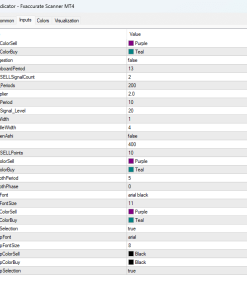
| Retest lookback | How many candles to allow for a retest (default: 5) |
Step 4 – Alerts and Notifications
- Set
SendPush = trueto get phone alerts. - Fill your email in MT4 options if you need mail.
Step 5 – Click “Scan”
- The scanner reviews every selected symbol and time frame.
- Hits appear in the dashboard; double-click to open that chart.
Reading the Signals: Entry, Stop-Loss, Take-Profit
When a valid pattern is spotted, you see three clear lines:
- Green Entry LinePlace a pending order a few pips beyond this line to let price prove itself.
- Red Stop-Loss LineGoes on the other side of the retest candle; keeps risk tight in case the move fails.
- Blue Take-Profit Lines
- First TP at 1:1 risk-to-reward
- Second TP at 1:2
- Optional trailing stop for the rest
Example:
EURUSD H1
Entry: 1.1050
Stop: 1.1030
TP1: 1.1070
TP2: 1.1090
Avoiding False Breakouts with the Scanner
False breakouts often start with a single candle that snaps above resistance then retreats. The scanner cuts down on these traps by:
- Waiting for a close above/below the level (not just a wick).
- Requiring a retest within a set number of candles.
- Plotting the entry only after the retest shows a clear rejection of the old level.
Result: You trade only after both conditions — breakout and retest — line up.
Pairing the Scanner with Other MT4 Tools
While the Breakout and Retest Scanner MT4 can stand on its own, many traders like to confirm with another tool:
- Moving Averages
- 50-EMA crossing above 200-EMA during an upside breakout adds trend strength.
- Relative Strength Index (RSI)
- Look for RSI to leave an overbought zone during a bearish breakout.
- Volume Indicators
- On brokers that offer tick volume, rising volume during a breakout improves the odds.
Internal Resource:How to Combine Moving Averages with Price Action
External Resource:Investopedia – Understanding Simple Moving Averages
Best Practices for Trading Support and Resistance Levels
- Mark Higher-Time-Frame Levels FirstDaily or 4-hour levels carry more weight than 15-minute ones.
- Mind the SpreadPlace entries a few pips beyond the level to avoid premature fills.
- Use Fixed Risk per TradeA common rule is 1–2 % of account balance per setup.
- Log Every TradeScreenshots plus notes on why you entered, where you exited, and what you could improve.
Common Pitfalls and How to Dodge Them
| Pitfall | Simple Fix |
|---|---|
| Taking every alert | Confirm with structure and trend. Skip setups against the higher-time-frame bias. |
| Moving stop too soon | Allow room for natural swing noise; follow your plan. |
| Ignoring news | Check an economic calendar; pause scanner trades 15–30 min before major releases. |
| Overloading with indicators | Two confirmations are usually enough. Keep charts clean. |
Frequently Asked Questions
Is the Breakout and Retest Scanner MT4 free?
Some versions are free; others come with a one-time cost. Check the MetaTrader Market place or the developer’s website for the latest.
Will it work on indices, crypto, or commodities?
Yes, as long as your broker offers the symbol in MT4 and provides enough data. Always test on a demo account first.
Does the scanner repaint?
Once a candle closes, the breakout detection is fixed. The entry, stop, and targets stay in place.
Can I change the risk-to-reward settings?
Sure. Head to the indicator inputs and adjust TP_Ratio1, TP_Ratio2, etc.
What time frame is best?
H1 and H4 give fewer but often cleaner signals. Intraday traders may prefer M15–M30. It depends on your style.
Final Thoughts
The Breakout and Retest Scanner MT4 turns a proven concept — price breaking and retesting key levels — into a repeatable, rules-based method. By automating the scan across many charts and time frames, it lets you spend less time hunting for setups and more time managing live trades. Give the default settings a try on a demo account, note how the signals line up with your trading plan, and adjust from there.
Have you tried a breakout and retest trade lately? Drop a comment below, share this post with a fellow trader, or join our newsletter for weekly MT4 tips and strategy ideas.
Brand
Indicator-mt4
Only logged in customers who have purchased this product may leave a review.
Related products



Out of stock


Reviews
There are no reviews yet.