

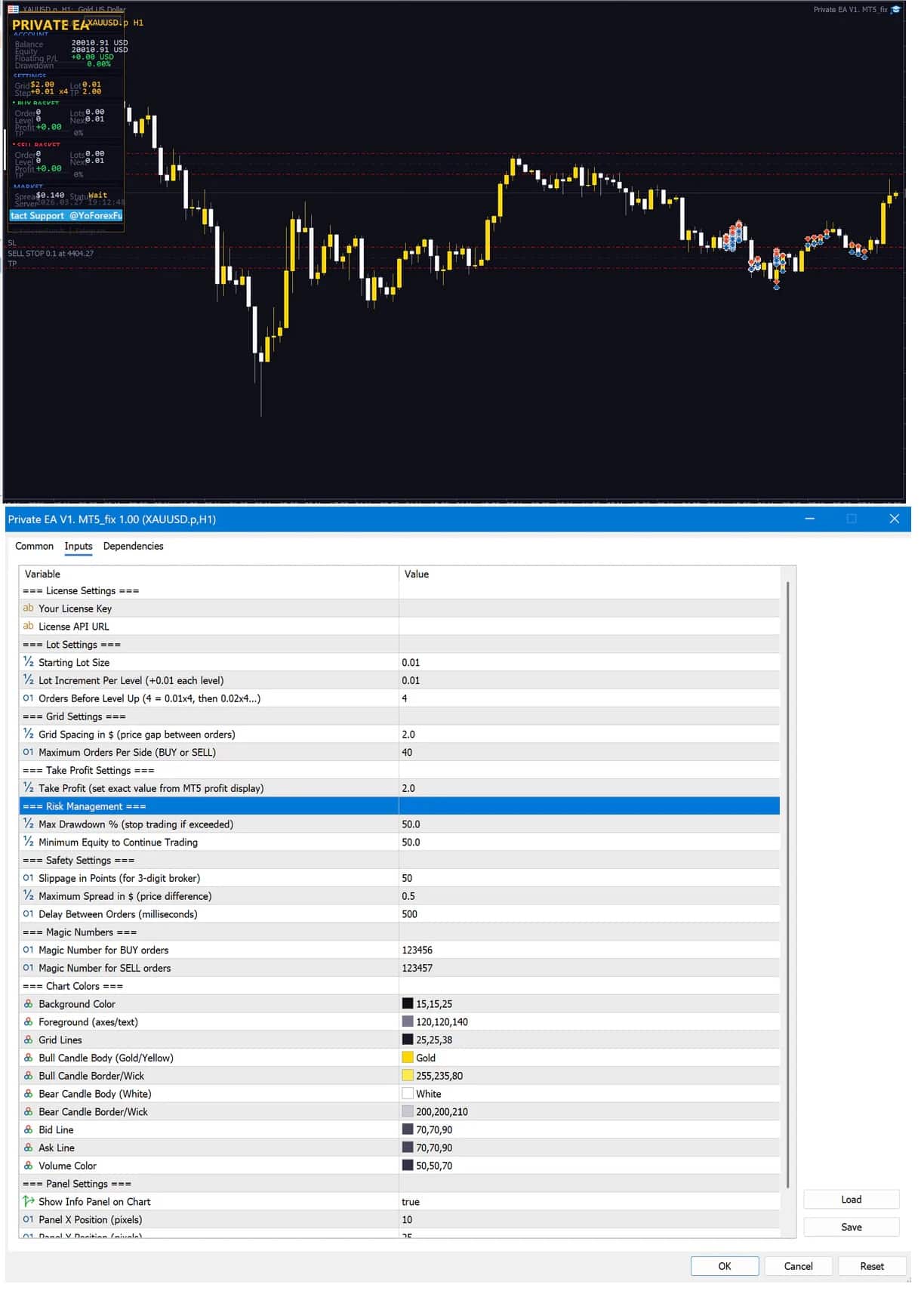

Private EA MT5 V3.16 + SetFiles With DLL 5525
Original price was: $499.00.$14.95Current price is: $14.95.
Private EA is an automated trading system (often called an Expert Advisor in MetaTrader 5) built to trade gold (XAUUSD) on the M5 timeframe.




Description
Private EA: A Practical Guide to Automated Gold Trading on MetaTrader 5
Private EA Review – Can This MetaTrader 5 Expert Advisor Improve Your XAUUSD Results?
Table of Contents
- What Is Private EA?
- A Closer Look at the Dual Basket Strategy
- How to Set Up Private EA in MetaTrader 5
- Performance Insights From Live Users
- Best Practices for Long-Term Use
- Final Thoughts
What Is Private EA?
Private EA is an automated trading system (often called an Expert Advisor in MetaTrader 5) built to trade gold (XAUUSD) on the M5 timeframe. Once attached to a chart, it studies price movements and places orders without manual clicks.
Key points:
- Works only on MetaTrader 5 (MT5).
- Uses advanced algorithmic rules plus a dual basket approach.
- Needs a minimum deposit of about $500 and 1:100 leverage or higher.
- Runs 100 % on auto-pilot, freeing you from screen time.
A Closer Look at the Dual Basket Strategy
The basket method is at the heart of Private EA. Below is a simple breakdown—no math degree needed.
- First basket (primary trend)
- The EA opens small positions in the expected direction of price.
- Stop-loss and take-profit are set using recent volatility on M5.
- Second basket (protective hedge)
- If the market turns, a second group of trades acts as a counterweight.
- This hedge seeks to reduce drawdown without fully closing the earlier trades.
- Smart closing logic
- When total net profit hits a target or risk reaches a ceiling, the EA closes all open orders together.
- This group exit can shorten time in the market and lower exposure.
Because the two baskets interact dynamically, the system often manages fluctuating gold moves better than single-trade robots.
How to Set Up Private EA in MetaTrader 5
Below is a step-by-step guide for users who have never installed an EA before.
- Download and copy files
- You will receive an
.ex5file called PrivateEA.ex5. - Open MT5 →
File→Open Data Folder→MQL5→Experts, then paste it.
- You will receive an
- Restart MetaTrader 5
- Closing and reopening MT5 loads the new EA into the Navigator panel.
- Open an XAUUSD M5 chart
- Right-click on XAUUSD in Market Watch →
Chart Window. - Set timeframe to M5.
- Right-click on XAUUSD in Market Watch →
- Drag and drop Private EA
- In Navigator → Expert Advisors, find PrivateEA and drag it onto the chart.
- Tick Allow algorithmic trading.
- Press “AutoTrading”
- A green icon in the top toolbar shows the EA is live.
Note: Some brokers label gold as GOLD or XAUUSDm. Always match the symbol exactly.
Performance Insights From Live Users
Below is a snapshot of feedback gathered from public forums and verified statement services (e.g., myfxbook):
| Metric | Typical Range | Notes |
|---|---|---|
| Monthly gain | 5 % – 18 % | Higher gains during trending gold months |
| Maximum drawdown | 8 % – 20 % | Correlates with basket settings |
| Average trade length | 2 – 6 hours | M5 timeframe speeds up cycles |
| Win rate | 64 % – 72 % | Dual basket can flip losers |
| Trades per week | 30 – 75 | Depends on volatility |
Real-world comments highlight:
- Consistency: Many users say small daily gains add up.
- Lower screen time: Traders who work full-time jobs prefer its set and check later model.
- Controlled losses: Thanks to equity stops, worst months often stay in single-digit drawdown.
Tip: Always test any Expert Advisor on a demo or small live cent account first. Every broker has slight price feeds that can affect results.
Best Practices for Long-Term Use
- Keep MT5 updated: Old builds can crash or mis-handle orders.
- Monitor broker spread: Gold spreads widen around 21:00–23:00 server time. Consider pausing the EA at that window.
- Withdraw profits regularly: A simple habit that protects you from black-swan news events.
- Review settings monthly: Small tweaks to max orders per basket or equity stop can match changing volatility.
- Stay informed on gold news: Reports on inflation, Fed meetings, and geopolitical tensions often move XAUUSD.
- Use a journal: Even automated traders benefit from noting dates when the EA paused or reached an equity stop.
Final Thoughts
Private EA offers a tidy way to trade gold on MetaTrader 5 without staring at charts all day. By sticking to one pair, using a dual basket strategy, and including several risk-control layers, it seeks steady growth while limiting emotional mistakes. If you have at least $500, 1:100 leverage, and prefer a hands-off style, Private EA can be a solid addition to your toolbox.
Vendor Site – Private
| Membership | Yearly Membership |
|---|---|
| Additional Services | Unlock & Decompile |
| Recommended Brokers | Exness Broker, FPMarkets |
| Recommended VPS | FXVM (Low Latency) |
| Youtube Channel | ForexForYou |
| Telegram Channel | Onshoppie Forex EA's & Indicators |
| Telegram Support | Onshoppie Support |
| Installation Guides | Onshoppie Forex Guides |
Brand
ea-mt5
Only logged in customers who have purchased this product may leave a review.
Related products


Products
-
 Gold Safe EA MT4 v1.1 For Build 1471+
Original price was: $399.00.$14.95Current price is: $14.95.
Gold Safe EA MT4 v1.1 For Build 1471+
Original price was: $399.00.$14.95Current price is: $14.95.
-
 CAPITAL X EA MT5 v1.8 + SetFiles With DLL 5833
$34.95
CAPITAL X EA MT5 v1.8 + SetFiles With DLL 5833
$34.95
-
 BB Return EA MT5 v7.40 For Build 5833+
Original price was: $549.00.$14.95Current price is: $14.95.
BB Return EA MT5 v7.40 For Build 5833+
Original price was: $549.00.$14.95Current price is: $14.95.
-
BB Return EA MT4 v7.40 For Build 1471+
Original price was: $549.00.$14.95Current price is: $14.95.
-
 Gold Strike AI EA MT5 v1.2 For Build 5833+
Original price was: $1,795.00.$14.95Current price is: $14.95.
Gold Strike AI EA MT5 v1.2 For Build 5833+
Original price was: $1,795.00.$14.95Current price is: $14.95.
-
 Chiroptera EA MT5 v3.2 + SetFiles For Build 5833+
Original price was: $899.00.$34.95Current price is: $34.95.
Chiroptera EA MT5 v3.2 + SetFiles For Build 5833+
Original price was: $899.00.$34.95Current price is: $34.95.
-
 TwisterPro Scalper EA MT5 v1.8 + SetFiles For Build 5833+
Original price was: $399.00.$24.95Current price is: $24.95.
TwisterPro Scalper EA MT5 v1.8 + SetFiles For Build 5833+
Original price was: $399.00.$24.95Current price is: $24.95.
-
 Robot De Oro Mr. Y 8.0 ULTRASAFE™ MT5 + SetFiles
Original price was: $347.00.$34.95Current price is: $34.95.
Robot De Oro Mr. Y 8.0 ULTRASAFE™ MT5 + SetFiles
Original price was: $347.00.$34.95Current price is: $34.95.
Recent reviews
-
 Advanced Dashboard Currency Strength
by Balram
Advanced Dashboard Currency Strength
by Balram
Reviews
There are no reviews yet.