


Gold GPT EA MT5 Forex Bot For Build 5660+
$14.95
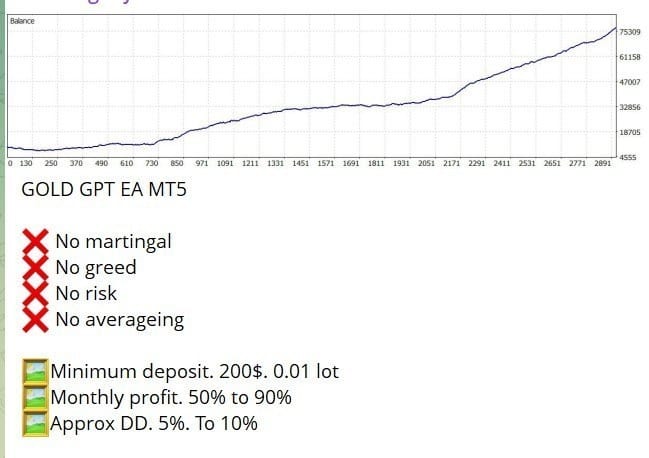
Gold GPT EA is an expert advisor designed for MetaTrader 5 (MT5) that trades XAUUSD with an emphasis on consistent returns and tight drawdown limits.



Description
Gold GPT EA: A Practical Guide to Low-Drawdown Gold Trading on MT5
Gold GPT EA – The Smart Way to Trade XAUUSD Without Martingale
Table of Contents
- What Is Gold GPT EA?
- Why Focus on the M5 Timeframe?
- Installation and Set-Up Guide
- Tips for Day-to-Day Use
- Final Thoughts
What Is Gold GPT EA?
Gold GPT EA is an expert advisor designed for MetaTrader 5 (MT5) that trades XAUUSD with an emphasis on consistent returns and tight drawdown limits. The system follows disciplined rules and avoids martingale, grid, or other high-risk averaging methods. Instead, it combines AI-inspired logic with structured market analysis to find short-term opportunities.
Related keyword used: Gold GPT EA MT5 is an automated trading system for XAUUSD on MT5 that focuses on consistent returns with strict drawdown control.
In Simple Terms
- It runs automatically on your MT5 platform.
- It scans the market, looking for short intraday moves.
- It opens and closes trades on the M5 chart with clear stop-loss and take-profit levels.
Why Focus on the M5 Timeframe?
- Fine-Grained Entries: M5 candles offer more entry points than H1 or H4, allowing the EA to trade more frequently without over-trading.
- Quick Feedback: Trades close faster, so you see results sooner.
- Better Risk Control: With smaller stops (relative to daily ranges), potential losses stay contained.
Installation and Set-Up Guide for Gold GPT EA
Step-by-Step
- Download the EA file (GoldGPT.ex5) from the developer site.
- Open MT5, then go to
File > Open Data Folder > MQL5 > Experts. - Copy the EA file into the Experts folder.
- Restart MT5 or hit
Ctrl+Rto refresh the navigator. - Drag Gold GPT EA onto the XAUUSD M5 chart.
- Check AutoTrading is enabled (green play button on MT5).
- Watch the smiley face in the upper-right corner of the chart to confirm it’s running.
Tip: Create a separate MT5 account for testing before going live.
Tips for Day-to-Day Use
- Keep VPS Latency Low
- Anything under 20 ms to your broker’s server helps with execution.
- Update MT5 Regularly
- New builds often contain stability fixes that benefit EAs.
- Avoid News Spikes
- Consider pausing the EA during major events like Non-Farm Payrolls.
- Review Logs Weekly
- MT5’s
ExpertsandJournaltabs give insights into slippage, order rejects, and potential broker issues.
- MT5’s
- Scale Lot Size Gradually
- If the EA shows a stable 3-month record, consider a small lot increase rather than a sudden jump.
Final Thoughts for Gold GPT EA
Gold GPT EA offers a clear, rule-based method for trading gold on MT5. By steering clear of martingale and aggressive averaging, it keeps drawdowns in check while still capturing frequent intraday moves. If you’re looking for an automated tool that trades XAUUSD with a focus on capital protection, Gold GPT EA is worth a closer look.
Vendor Site – Private
| Membership | Yearly Membership |
|---|---|
| Additional Services | Unlock & Decompile |
| Recommended Brokers | Exness Broker, FPMarkets |
| Recommended VPS | FXVM (Low Latency) |
| Youtube Channel | ForexForYou |
| Telegram Channel | Onshoppie Forex EA's & Indicators |
| Telegram Support | Onshoppie Support |
| Installation Guides | Onshoppie Forex Guides |
Brand
ea-mt5
Only logged in customers who have purchased this product may leave a review.
Related products


Products
-
 Gold Safe EA MT4 v1.1 For Build 1471+
Original price was: $399.00.$14.95Current price is: $14.95.
Gold Safe EA MT4 v1.1 For Build 1471+
Original price was: $399.00.$14.95Current price is: $14.95.
-
 CAPITAL X EA MT5 v1.8 + SetFiles With DLL 5833
$34.95
CAPITAL X EA MT5 v1.8 + SetFiles With DLL 5833
$34.95
-
 BB Return EA MT5 v7.40 For Build 5833+
Original price was: $549.00.$14.95Current price is: $14.95.
BB Return EA MT5 v7.40 For Build 5833+
Original price was: $549.00.$14.95Current price is: $14.95.
-
BB Return EA MT4 v7.40 For Build 1471+
Original price was: $549.00.$14.95Current price is: $14.95.
-
 Gold Strike AI EA MT5 v1.2 For Build 5833+
Original price was: $1,795.00.$14.95Current price is: $14.95.
Gold Strike AI EA MT5 v1.2 For Build 5833+
Original price was: $1,795.00.$14.95Current price is: $14.95.
-
 Chiroptera EA MT5 v3.2 + SetFiles For Build 5833+
Original price was: $899.00.$34.95Current price is: $34.95.
Chiroptera EA MT5 v3.2 + SetFiles For Build 5833+
Original price was: $899.00.$34.95Current price is: $34.95.
-
 TwisterPro Scalper EA MT5 v1.8 + SetFiles For Build 5833+
Original price was: $399.00.$24.95Current price is: $24.95.
TwisterPro Scalper EA MT5 v1.8 + SetFiles For Build 5833+
Original price was: $399.00.$24.95Current price is: $24.95.
-
 Robot De Oro Mr. Y 8.0 ULTRASAFE™ MT5 + SetFiles
Original price was: $347.00.$34.95Current price is: $34.95.
Robot De Oro Mr. Y 8.0 ULTRASAFE™ MT5 + SetFiles
Original price was: $347.00.$34.95Current price is: $34.95.
Recent reviews
-
 Advanced Dashboard Currency Strength
by Balram
Advanced Dashboard Currency Strength
by Balram
Reviews
There are no reviews yet.