

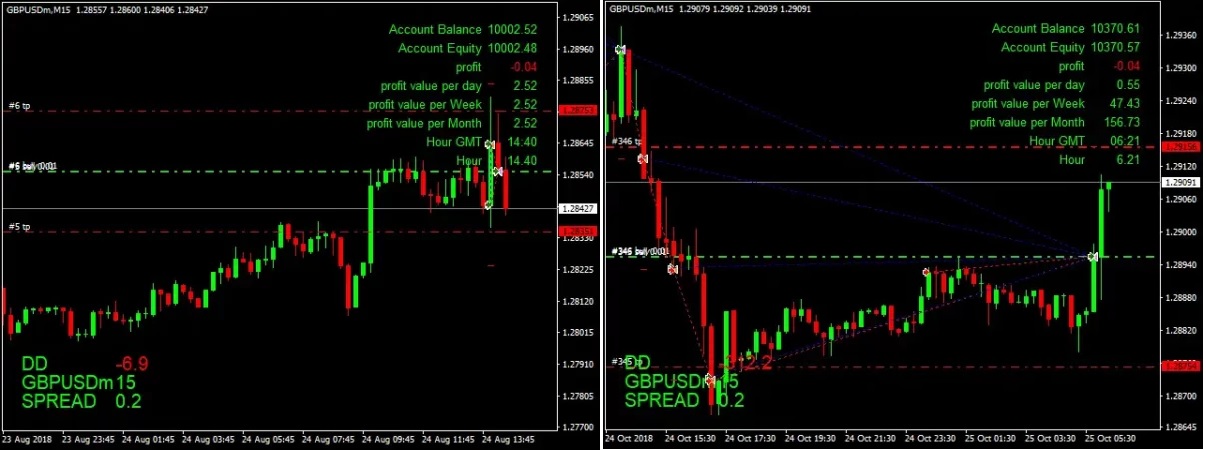

The King Hedging Forex EA MT4 v2.0 For Build 1455+
Original price was: $500.00.$9.95Current price is: $9.95.
The King Hedging Forex EA is a MetaTrader 4/5 expert advisor designed for short-term scalping on the 5-minute time frame.




Description
The King Hedging Forex EA: A Practical Guide for Safer Scalping
Alternative title: The King Hedging Forex EA—How to Open Two Hedging Deals for Consistent 20-Point Targets
Table of Contents
- Introduction
- What Is The King Hedging Forex EA?
- Best Currency Pairs and Time Frame
- Minimum Deposit, Leverage, and Lot Size
- Step-by-Step Installation and Setup
- Practical Risk Management Tips
- Final Thoughts
Introduction
If you have ever wanted an easy way to handle both buying and selling positions at the same time without sitting in front of the charts all day, you may want to look at The King Hedging Forex EA. This automated strategy works to open two hedging deals—one buy and one sell—each aiming for a 20-point profit. With its built-in option for opening several cooling trades at different lot sizes, the expert advisor focuses on steady, modest gains while holding risk in check.
What Is The King Hedging Forex EA?
The King Hedging Forex EA is a MetaTrader 4/5 expert advisor designed for short-term scalping on the 5-minute time frame. Rather than trying to guess market direction, it opens both a buy and a sell order simultaneously, creating a hedge. As the market moves, one side closes in profit first, while the other side is managed through cooling trades. The goal for each initial trade remains simple—20 points.
Key highlights:
- Runs on any currency pair, though spreads under 8 pips give best results.
- Designed to start and stop automatically during set trading hours (GMT).
- Adjustable auto lot size feature that aligns position size with account equity and preferred risk.
- Monitors current spread and avoids new positions if the spread is too high.
You can read more about hedging basics on Investopedia
Best Currency Pairs and Time Frame
While the EA technically works on any pair, many users focus on symbols where the spread is less than 8 pips:
- EURUSD
- GBPUSD
- USDJPY
- USDCHF
- AUDUSD
- EURJPY
- USDCAD
The M5 chart provides frequent trade opportunities while keeping noise manageable.
Minimum Deposit, Leverage, and Lot Size
- Minimum Recommended Deposit: $5,000 (or equivalent).
- Leverage: 1:400 or higher.
- Starting Lot Size: 0.01 when you first test live.
Note that you can still run the EA on smaller accounts, but you may need to lower risk settings (e.g., 0.5% Max_Risk) and allow longer recovery periods.
Step-by-Step Installation and Setup for The King Hedging Forex EA
| Step | Action |
|---|---|
| 1 | Download The King Hedging Forex EA .ex4 or .ex5 file. |
| 2 | Open MetaTrader. Go to File ➜ Open Data Folder ➜ MQL4/Experts (or MQL5/Experts) and paste the file. |
| 3 | Restart MetaTrader or right-click Expert Advisors ➜ Refresh. |
| 4 | Drag the EA onto your desired M5 chart. |
| 5 | Tick Allow algorithmic trading. |
| 6 | In the Inputs tab, fill in Lot1, Auto_Lot, Max_Risk, Max_SPREAD, Take_Profit, Start_Time, End_Time, Magic_Number. |
| 7 | Click OK and watch the smiley face icon turn on, signaling the EA is live. |
Tip: Before running on a real account, back-test or use a demo account for at least two weeks.
Practical Risk Management Tips
- Set Reasonable RiskKeep Max_Risk under 3% until you gather solid live performance stats.
- Avoid High-Spread PairsIf your broker shows more than 8 pips spread during most hours, skip that symbol.
- Stay Clear of Major NewsEven though the EA hedges, spreads widen dramatically around FOMC, NFP, and CPI releases.
- Withdraw Profits PeriodicallyMoving part of your gains out of the trading account keeps emotional pressure low.
- Run on a VPS24/5 uptime is essential. A virtual private server prevents missed trades caused by home-internet outages.
Final Thoughts for The King Hedging Forex EA
The King Hedging Forex EA gives traders a structured way to trade both sides of the market in short bursts. By focusing on two hedging deals with a clear 20-point target, the EA aims for small, regular profits instead of chasing big, unpredictable moves. Thoughtful settings—such as proper Lot1, a sensible Max_Risk, and a smart Start_Time/End_Time window—help protect your capital. Always test carefully, monitor live results, and tweak only one variable at a time.
Vendor Site – Click Here
| Membership | Yearly Membership |
|---|---|
| Additional Services | Unlock & Decompile |
| Recommended Brokers | Exness Broker, FPMarkets |
| Recommended VPS | FXVM (Low Latency) |
| Youtube Channel | ForexForYou |
| Telegram Channel | Onshoppie Forex EA's & Indicators |
| Telegram Support | Onshoppie Support |
| Installation Guides | Onshoppie Forex Guides |
Brand
ea-mt4
Only logged in customers who have purchased this product may leave a review.
Related products



Products
-
 Perceptrader AI EA MT5 V2.43 + Setfiles For Build 5836+
Original price was: $2,800.00.$14.95Current price is: $14.95.
Perceptrader AI EA MT5 V2.43 + Setfiles For Build 5836+
Original price was: $2,800.00.$14.95Current price is: $14.95.
-
 Quantum Emperor EA MT5 V7.5 For Build 5836+
Original price was: $799.00.$14.95Current price is: $14.95.
Quantum Emperor EA MT5 V7.5 For Build 5836+
Original price was: $799.00.$14.95Current price is: $14.95.
-
 Quantum King EA MT5 V3.1 For Build 5836+
Original price was: $649.00.$14.95Current price is: $14.95.
Quantum King EA MT5 V3.1 For Build 5836+
Original price was: $649.00.$14.95Current price is: $14.95.
-
 Bitcoin Robot Grid EA MT4 V6.0 For Build 1473+
Original price was: $899.00.$14.95Current price is: $14.95.
Bitcoin Robot Grid EA MT4 V6.0 For Build 1473+
Original price was: $899.00.$14.95Current price is: $14.95.
-
 IS PI Scalper EA Virtual Level Final MT4 + SetFiles
$14.95
IS PI Scalper EA Virtual Level Final MT4 + SetFiles
$14.95
-
 ArtQuant Gold EA MT5 V3.0 For Build 5836+
Original price was: $700.00.$14.95Current price is: $14.95.
ArtQuant Gold EA MT5 V3.0 For Build 5836+
Original price was: $700.00.$14.95Current price is: $14.95.
-
 Gold Trap EA MT5 V4.2.3 + Setfiles For Build 5836+
Original price was: $499.00.$19.95Current price is: $19.95.
Gold Trap EA MT5 V4.2.3 + Setfiles For Build 5836+
Original price was: $499.00.$19.95Current price is: $19.95.
-
 AI X HFT VIP EA MT4 V14 With DLL 1473
$14.95
AI X HFT VIP EA MT4 V14 With DLL 1473
$14.95
Recent reviews
-
 Advanced Dashboard Currency Strength
by Balram
Advanced Dashboard Currency Strength
by Balram
Reviews
There are no reviews yet.