


Challenger X EA MT4 v1.1 + SetFiles For Build 1455+
$9.95
Challenger X EA straightforward way to automate gold trading on MT4. Sticking to price action, avoiding risky position, allowing full user control over risk.



Description
Challenger X EA: Reliable Forex Automation for Steady Results
Challenger X EA – Your Consistent MetaTrader 4 Trading Partner 🌐
Table of Contents
- Quick Overview
- Step-by-Step Installation Guide
- Common Questions Answered
- Final Thoughts & Next Steps
Quick Overview
Challenger X EA, sometimes called Challenger X MT4, is a fully automated Expert Advisor (EA) built for MetaTrader 4. Designed for both novice and professional traders, the system blends algorithmic decision-making with robust risk controls to deliver steady, transparent performance across modern market conditions.
“Consistent performance, smart automation, superior market responsiveness, efficiency, plus transparency.”— Challenger X development team
Step-by-Step Installation Guide
Follow these simple steps to get Challenger X EA running on your MT4 terminal:
- Download the EA FileReceive the ChallengerX_EA.ex4 and preset .set files from the official source.
- Open MT4 Data Folder
- In MT4, click
File ➜ Open Data Folder. - Navigate to
MQL4 ➜ Experts, then paste ChallengerX_EA.ex4.
- In MT4, click
- Place Presets
- Copy .set files into
MQL4 ➜ Presets.
- Copy .set files into
- Restart MT4Close and reopen MT4 so the EA appears in the Navigator panel.
- Enable AutoTradingClick the green “AutoTrading” button in MT4’s toolbar.
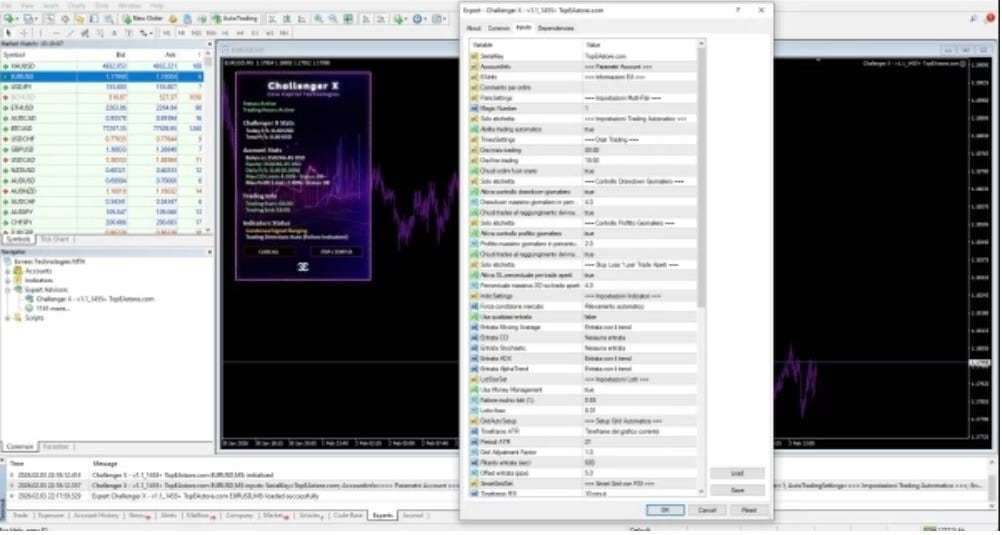
- Load a PresetIn the EA settings window, click Load, choose Conservative.set or another file, and hit OK.
- Verify Smiley FaceA happy face in the top-right corner confirms the EA is active.
Common Questions Answered for Challenger X EA
Q1: Does Challenger X EA need specific broker conditions?A1: Any MT4 broker works, but ECN accounts with tight spreads (≤ 1 pip on majors) provide better fills.
Q2: Can I run multiple EAs on one account?Yes. Make sure each EA uses a unique magic number to prevent trade conflicts.
Q3: Is a minimum deposit of $100 realistic?It covers micro lots on a cent or nano account. For standard accounts, $300-$500 is more practical.
Final Thoughts & Next Steps for Challenger X EA
Challenger X EA provides a balanced blend of automation, clarity, and disciplined risk management. Whether you trade part-time or full-time, the Expert Advisor’s steady approach gives you space to focus on big-picture analysis while the code handles day-to-day execution.
Disclaimer: Trading carries risk. Past performance does not guarantee future results. Always consult a qualified financial professional before trading live capital.
Vendor Site – Click Here
| Membership | Yearly Membership |
|---|---|
| Additional Services | Unlock & Decompile |
| Recommended Brokers | Exness Broker, FPMarkets |
| Recommended VPS | FXVM (Low Latency) |
| Youtube Channel | ForexForYou |
| Telegram Channel | Onshoppie Forex EA's & Indicators |
| Telegram Support | Onshoppie Support |
| Installation Guides | Onshoppie Forex Guides |
Brand
ea-mt4
Only logged in customers who have purchased this product may leave a review.
Related products



Products
-
 Quantum Emperor EA MT5 V7.5 For Build 5836+
Original price was: $799.00.$14.95Current price is: $14.95.
Quantum Emperor EA MT5 V7.5 For Build 5836+
Original price was: $799.00.$14.95Current price is: $14.95.
-
 Quantum King EA MT5 V3.1 For Build 5836+
Original price was: $649.00.$14.95Current price is: $14.95.
Quantum King EA MT5 V3.1 For Build 5836+
Original price was: $649.00.$14.95Current price is: $14.95.
-
 Bitcoin Robot Grid EA MT4 V6.0 For Build 1473+
Original price was: $899.00.$14.95Current price is: $14.95.
Bitcoin Robot Grid EA MT4 V6.0 For Build 1473+
Original price was: $899.00.$14.95Current price is: $14.95.
-
 IS PI Scalper EA Virtual Level Final MT4 + SetFiles
$14.95
IS PI Scalper EA Virtual Level Final MT4 + SetFiles
$14.95
-
 ArtQuant Gold EA MT5 V3.0 For Build 5836+
Original price was: $700.00.$24.95Current price is: $24.95.
ArtQuant Gold EA MT5 V3.0 For Build 5836+
Original price was: $700.00.$24.95Current price is: $24.95.
-
 Gold Trap EA MT5 V4.1 For Build 5836+
$44.95
Gold Trap EA MT5 V4.1 For Build 5836+
$44.95
-
 AI X HFT VIP EA MT4 V14 With DLL 1470
$24.95
AI X HFT VIP EA MT4 V14 With DLL 1470
$24.95
-
 Wisdom EA MT4 + SetFiles For Build 1471+
$14.95
Wisdom EA MT4 + SetFiles For Build 1471+
$14.95
Recent reviews
-
 Advanced Dashboard Currency Strength
by Balram
Advanced Dashboard Currency Strength
by Balram
Reviews
There are no reviews yet.