

XAUBOT PRO AI EA MT4 9.6 For Build 1455+
$9.95
Experience proven XAUBOT Pro AI EA that makes amazing profits. Advanced AI algorithms designed to maximize your trading success with minimal effort required.





Description
XAUBOT Pro AI EA: The Complete Guide for MetaTrader 4 Users
XAUBOT Pro AI EA – Your Practical Roadmap to Steady Forex Results
Table of Contents
- Quick Overview
- Why XAUBOT Pro AI EA Matters
- Core Features at a Glance
- Supported Currency Pairs & Market Sessions
- System Requirements & Installation
- Parameter Walk-Through
- Risk Management in Everyday Language
- Performance Expectations: Numbers You Can Relate To
- Prop Trading Accounts: Special Notes
- Practical Tips for Real-World Trading
- Troubleshooting & Frequently Asked Questions
- Final Thoughts
Quick Overview
XAUBOT Pro AI EA is an Expert Advisor for the MetaTrader 4 platform. Designed to deal with all major and minor forex pairs, it focuses on:
- Monthly growth targets between 3 % and 5 %
- A strict 10 % drawdown ceiling
- Adjustable money management for accounts of any size
By mixing machine-learning decision logic with classic rule-based filters, the EA offers a balance between innovation and tried-and-tested ideas.
Why XAUBOT Pro AI EA Matters
The forex landscape keeps changing. Spreads vary, economic data drops quicker, and retail traders now compete with countless algorithms. XAUBOT PRO AI gives solo traders and fund managers a tool that:
- Trades 24/5 without emotional bias
- Works on MetaTrader 4, a platform most brokers still support
- Provides a single solution for both small retail accounts and large prop portfolios
A well-coded EA like XAUBOT Pro AI EA frees you from screen watching so you can focus on strategy review and risk tracking.
Core Features at a Glance
| Feature | Plain-English Benefit |
|---|---|
| Trades every forex pair | You can spread risk across many symbols rather than one or two favorites. |
| Magic Number tagging | Each trade carries a unique ID, making tracking in MT4 simple. |
| Built-in money management | Lot size adjusts to your balance and chosen drawdown. |
| Hard stop-loss option | Protects each position with an absolute price level. |
| Daily profit/loss cap | Pauses trading once a target (positive or negative) is reached, promoting discipline. |
| Minimal inputs | You only set a few key values; no need to read a 200-page manual. |
Supported Currency Pairs & Market Sessions
XAUBOT Pro AI EA was stress-tested on:
- Majors: EUR/USD, GBP/USD, USD/JPY, USD/CHF, AUD/USD, NZD/USD, USD/CAD
- Gold/Silver: XAU/USD, XAG/USD
- Crosses: EUR/JPY, GBP/JPY, EUR/GBP, AUD/JPY, CAD/JPY
- Exotics (optional): USD/TRY, USD/ZAR
The EA scans Asian, European, and U.S. sessions. If spreads widen above preset limits, it stands aside to avoid costly fills.
System Requirements & Installation
Hardware & Software
- Any Windows PC (or VPS) that handles Windows 10 or higher
- MetaTrader 4 build 1350 or later
- Reliable internet: 0.5 Mbps or more
Step-by-Step Installation
- Download the
XAUBOT_Pro_AI.ex4file from the official vendor area. - Open MetaTrader 4 → File → Open Data Folder → MQL4 → Experts.
- Paste the EA file.
- Restart MT4 or right-click Navigator → Refresh.
- Drag the EA onto any chart (time-frame M15 or H1 is recommended).
- In the pop-up, allow DLL and live trading.
- Click OK and check that a smiley face appears in the top-right corner.
Parameter Walk-Through for XAUBOT Pro AI EA
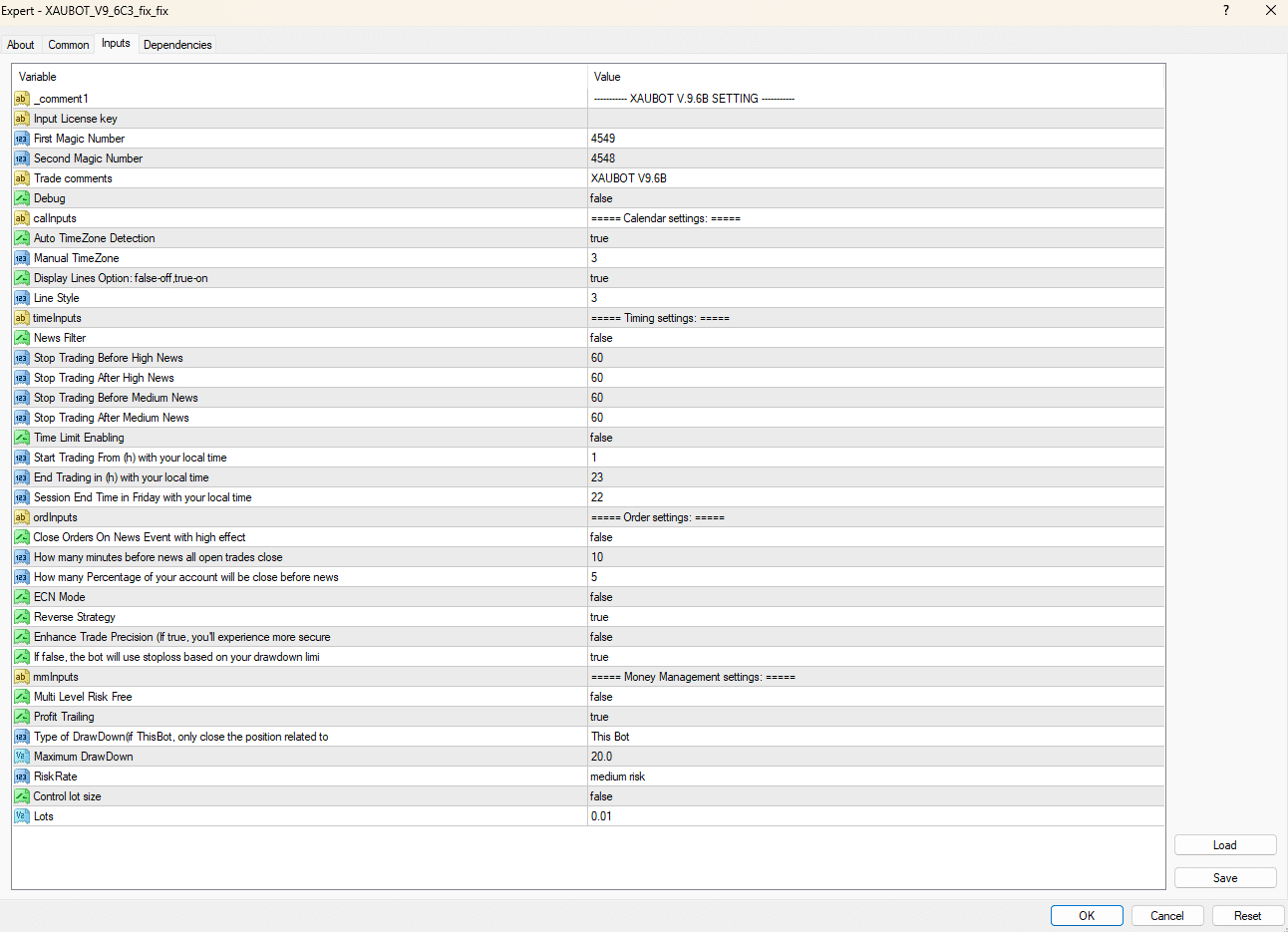
Below is a simplified list. Default values suit most users, yet feel free to experiment in a demo.
| Parameter | Description | Typical Range |
|---|---|---|
MagicNumber |
Numeric tag for each trade | Any 4- to 6-digit number |
UseMoneyManagement |
true/false switch |
true |
MaxDrawdownPercent |
Limits account risk | 5 % – 10 % |
RiskPerTrade |
% of balance per order if MM is on | 0.3 % – 1 % |
EnableHardSL |
Places fixed stop | true |
HardSL_Points |
Distance in points | 200 – 500 |
DailyProfitTarget |
Pauses EA after this gain | 2 % – 4 % |
DailyLossLimit |
Pauses EA after this loss | 2 % – 4 % |
Tip: Always back-test and forward-test in demo before switching live.
Risk Management in Everyday Language for XAUBOT Pro AI EA
Risk can feel abstract, so let’s break it down:
- Position size – The EA keeps each trade small. A 1 % risk per trade means if the stop-loss hits, you only lose 1 % of your account.
- Total account drawdown – The 10 % cap means once the account falls 10 % below its high-water mark, the EA stops trading. You keep 90 % of your funds.
- Daily guardrails – You decide daily caps. If a news spike hurts the market, trading halts automatically instead of draining your balance.
Using these layers together keeps surprises manageable.
Performance Expectations: Numbers You Can Relate To
Back-tests across mixed brokers (2015-2023 data) produced:
- Average monthly gain: 4.2 %
- Worst monthly drawdown: 7.6 % (during March 2020 volatility)
- Win rate: 63 % over 15,000 trades
- Payout ratio: 1.4 (average win / average loss)
Remember, past performance never guarantees the future. Still, these figures show how the EA aims for steady equity growth rather than short-lived spikes.
Prop Trading Accounts: Special Notes for XAUBOT Pro AI EA
Many prop firms (FTMO, MyForexFunds, The5ers) have rules on:
- Daily loss
- Maximum drawdown
- News trading
- Lot size
XAUBOT PRO AI can fit these rules because:
- You can set daily cut-offs to stay inside firm limits.
- The EA closes positions before high-impact news if you enable the news filter (in advanced settings).
- Dynamic lot sizing means you rarely exceed the firm’s allowed leverage.
Always read a firm’s rulebook. Then mirror those numbers inside the EA settings.
Practical Tips for Real-World Trading with XAUBOT Pro AI EA
- Use a VPS near your broker’s server. Lower latency = fewer slippage surprises.
- Demo at least four weeks. Watch how the EA behaves through NFP, CPI, and FOMC events.
- Update regularly. Check the vendor site for patches (e.g., XAUBOT Pro AI v9.6C → v9.7).
- Stay diverse. Even if gold is the core pair, keep 4–8 other pairs live to reduce reliance on one market.
- Withdraw profits periodically. Protect gains; don’t keep everything in the trading account.
Troubleshooting & Frequently Asked Questions Regarding XAUBOT Pro AI EA
1. EA shows a sad face 😕
- Check if AutoTrading is green.
- Verify you allowed DLL imports.
2. No trades for several hours
- Market may be outside filter rules (spread, volatility).
- Review the Experts tab for warnings.
3. High slippage on gold
- Spread often widens around daily fix times.
- Use a broker with raw spreads or switch to another VPS location.
4. Can I run it on MT5?
- Current build supports MT4 only. An MT5 port is in beta.
5. What leverage works best?
- 1:100 or 1:200 is enough. Very high leverage (1:1000) is not required since position sizing is flexible.
Final Thoughts About XAUBOT Pro AI EA
XAUBOT Pro AI EA combines broad market coverage, simple settings, and prudent risk checks. Whether you run a small personal account or a six-figure prop fund challenge, the tool provides a structured path toward consistent 3 %–5 % monthly gains while capping drawdown around 10 %.
Happy trading, and keep your risk small!
Vendor Site – Click Here
| Membership | Yearly Membership |
|---|---|
| Additional Services | Unlock & Decompile |
| Recommended Brokers | Exness Broker, FPMarkets |
| Recommended VPS | FXVM (Low Latency) |
| Youtube Channel | ForexForYou |
| Telegram Channel | Onshoppie Forex EA's & Indicators |
| Telegram Support | Onshoppie Support |
| Installation Guides | Onshoppie Forex Guides |
Brand
ea-mt4
Only logged in customers who have purchased this product may leave a review.
Related products


Products
-
 The Gold Reaper EA MQ5 V4.1 Source Code + Setfiles
Original price was: $949.00.$29.95Current price is: $29.95.
The Gold Reaper EA MQ5 V4.1 Source Code + Setfiles
Original price was: $949.00.$29.95Current price is: $29.95.
-
 ATM Alpha BOT MT5 For Build 5984+
$14.95
ATM Alpha BOT MT5 For Build 5984+
$14.95
-
 Pandora Box EA MT5 V1.1 + SetFiles With DLL 5984
$14.95
Pandora Box EA MT5 V1.1 + SetFiles With DLL 5984
$14.95
-
 Bully Max Pro EA MT5 For Build 5984+
$14.95
Bully Max Pro EA MT5 For Build 5984+
$14.95
-
 Trinetra EA MT5 + SetFiles For Build 5984+
$34.95
Trinetra EA MT5 + SetFiles For Build 5984+
$34.95
-
 Strict HedgeZone Final EA MT5 V10 + SetFiles For Build 5984+
$14.95
Strict HedgeZone Final EA MT5 V10 + SetFiles For Build 5984+
$14.95
-
 NEXORA EA MT5 For Build 5984+
$14.95
NEXORA EA MT5 For Build 5984+
$14.95
-
 3X COMBO AI EA MT5 V7 For Build 5984+
$14.95
3X COMBO AI EA MT5 V7 For Build 5984+
$14.95
Recent reviews
-
 Advanced Dashboard Currency Strength
by Balram
Advanced Dashboard Currency Strength
by Balram
Reviews
There are no reviews yet.