




Total Lock MT4 2.5
Total Lock MT4 2.5

$9.95
Uncover proven Total Lock EA strategies delivering mind-blowing forex results. Learn why traders choose this reliable expert advisor for consistent profits.
This item: Total Lock MT4 2.5
$9.95
$9.95

Original price was: $14.95.$11.96Current price is: $11.96.

Total Lock EA: A Practical Way to Hold Your Trades When Price Turns
Total Lock EA – Keep Draw-downs Small, Keep Positions Alive
Table of Contents
- What Is Total Lock EA?
- Why Many Traders Prefer a Lock Over a Stop Loss
- How Total Lock EA Works – Step-by-Step
- Frequently Asked Questions
- Final Thoughts
What Is Total Lock EA?
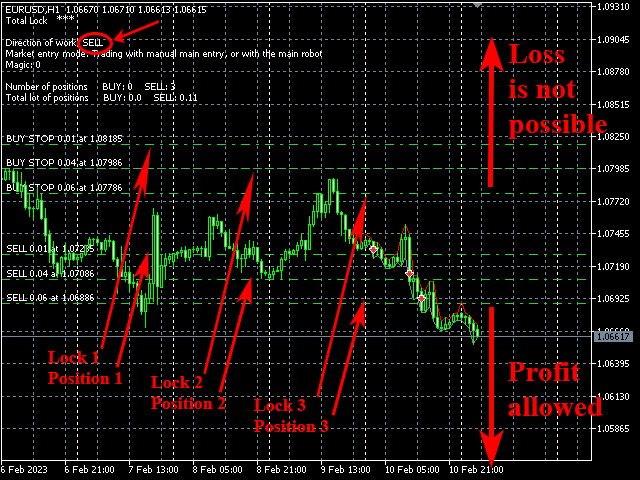
Total Lock EA is an Expert Advisor for MetaTrader that replaces the ordinary stop-loss with a small “lock.” The lock is a pending order in the opposite direction, placed at the level where you would usually hide your stop.If price dives against you, the pending order becomes a market order. Your floating loss stops growing because profit on the lock offsets loss on the main position. When price comes back, the EA can close the lock and give the original trade room to earn money again.
In short, a lock is a powerful tool for saving a trader’s money: losses freeze, positions stay open, and you still have a shot at profit.
Why Many Traders Prefer a Lock Over a Stop Loss
| Stop Loss | Lock via Total Lock EA |
|---|---|
| Position closes for good | Position stays alive |
| Loss is final | Loss is “frozen”; can be recovered |
| No profit if price later turns | Lock can be lifted and profit can grow |
| Simple but inflexible | Slightly more complex but adds options |
Some traders hate seeing a good trade idea ruined by a single news spike. Others run grid, martingale, or longer-term swing ideas where a wide stop is needed. Total Lock EA gives them an automatic, rule-based method to freeze draw-down without killing the trade.
How Total Lock EA Works – Step-by-Step
- You open a BUY or SELL order (manually or with another robot).
- Total Lock EA reads the order and places a pending counter order at Initial lock distance (e.g., 150 points away).
- Price moves:
- If price moves in your favor – nothing happens; the lock just waits.
- If price moves against you and hits the lock level – the pending order becomes a market order (the “lock”).
- While locked, loss on the main position is offset by profit on the lock, so the account equity stays roughly the same.
- If price turns back and reaches Activation for Break Even, the EA prepares to close the lock.
- When price reaches Break Even (a few points before the original entry), the EA closes the lock. Your main trade continues without the earlier draw-down.
Each main order gets its own lock. There is no limit on the number of positions. The lock lot size always equals the lot size of its main order, so the hedge is one-to-one.
Frequently Asked Questions
Q: Do I still need a stop loss on the main order?A: You can keep a very wide emergency stop, but most users remove their normal stop and rely on the lock.
Q: Is this hedging legal with every broker?A: In MT4/MT5 netting accounts (common in US), true hedging is not possible. You need a hedge-friendly broker (FIFO-free) or a separate sub-account.
Q: Does the lock cost extra margin?A: Yes, because it is a second position. Check that your free margin can handle both sides.
Q: Can I adjust the lock manually?A: Yes. The EA will respect your changes unless they conflict with its core logic.
Q: How many trades can the EA handle?A: Unlimited. Each order gets its own lock regardless of lot size.
Final Thoughts
Total Lock EA offers a middle path between closing a trade and hoping for a reversal. By freezing loss and giving price room to breathe, it can help reduce emotional exits and sudden account hits.If you test the settings carefully, match the Initial lock distance to your normal stop level, and stay aware of margin, a lock can be a simple but effective tool in your risk plan.
Vendor Site – Click Here
| Membership | Yearly Membership |
|---|---|
| Additional Services | Unlock & Decompile |
| Recommended Brokers | Exness Broker, FPMarkets |
| Recommended VPS | FXVM (Low Latency) |
| Youtube Channel | ForexForYou |
| Telegram Channel | Onshoppie Forex EA's & Indicators |
| Telegram Support | Onshoppie Support |
| Installation Guides | Onshoppie Forex Guides |
Brand
ea-mt4
Only logged in customers who have purchased this product may leave a review.









Reviews
There are no reviews yet.