











Smart Gold Hunter EA MT5 V2.0 For Build 6093+
Original price was: $249.00.$14.95Current price is: $14.95.
Looking for a reliable and powerful trading edge? Smart Gold Hunter EA offers jaw-dropping performance that experienced and new traders absolutely love.


Description
Smart Gold Hunter EA: A Practical Guide for Safe Gold Trading on MetaTrader 5
Smart Gold Hunter EA – Your No Grid, No Martingale, Single-Shot Solution for XAUUSD
Table of Contents
- What Makes Smart Gold Hunter EA Different?
- Core Philosophy: No Grid, No Martingale, Real SL & TP
- Risk-Control & Protection Features
- How to Install and Set Up Smart Gold Hunter EA
- Recommended Broker & VPS Conditions
- Prop-Firm Trading Checklist
- FAQ: Your Top Questions Answered
- Final Thoughts
What Makes Smart Gold Hunter EA Different?
Smart Gold Hunter EA is built for traders who want controlled, one-shot entries with a real Stop Loss and Take Profit—no endless recovery, hedging, or lot multiplication.
| Feature | Smart Gold Hunter EA | Many High-Risk Gold Bots |
|---|---|---|
| Grid Strategy | ❌ No | ✅ Yes (often) |
| Martingale | ❌ No | ✅ Yes (very common) |
| Hedging | ❌ No | ✅ Sometimes |
| Single Entry with SL | ✅ Yes (always) | ❌ Rare |
| No Recovery Sequences | ✅ Yes | ❌ Often infinite |
| Built-in News Filter | ✅ Yes | ❌ Rare |
By avoiding the usual “double-up after loss” playbook, the EA keeps equity swings smaller and drawdowns easier to stomach—key for passing and keeping funded trader accounts.
Core Philosophy: No Grid, No Martingale, Real SL & TP
1. No Grid
A grid layers buy and sell orders every X pips. While profitable on ranging days, it can vaporize accounts in trends. Smart Gold Hunter EA opens one position at a time. The logic is clear, and trade history remains tidy.
2. No Martingale
Martingale means doubling lot size after each loss. It works—until it doesn’t. One long losing streak is enough to destroy months of gains. This EA keeps position size fixed or risk-percent based.
3. No Recovery / No Hedging
Recovery systems add new positions hoping to “average out.” Hedging enters opposite trades simultaneously, which can lock margin for weeks. The EA avoids both tactics.
4. Single Entry with SL & One Shot
Each trade uses a pre-defined Stop Loss in points—not mental, not hidden. When TP or SL is hit, the EA is free to wait for the next setup. Clean execution equals clear risk.
Risk-Control & Protection Features in Smart Gold Hunter EA
Smart Gold Hunter EA adds multiple safety nets beyond the fixed SL:
- Daily Profit Target – example: close all trades when +2 % equity for the day.
- Daily Loss Limit – halt trading if daily drawdown hits –3 %.
- Equity Protection – close positions if account equity falls below chosen threshold.
- High-Impact News Filter – avoids entries minutes before/after red-flag events (Fed Rate, CPI, NFP).
- Spread Guard – skips trades if current spread exceeds safe value (e.g., 30 points).
- Session Close – optional auto-close before NY session ends to avoid low-liquidity spikes.
- Friday Close – flatten all trades an hour before market shut to dodge Monday gaps.
These tools matter because XAUUSD can move 500 pips in a flash. Even a solid strategy can lose if spreads widen to 100 points during news.
How to Install and Set Up Smart Gold Hunter EA
- Open MetaTrader 5 → Market tab → search “Smart Gold Hunter EA”.
- Click Rent or Buy, then Install.
- Drag the EA onto a XAUUSD chart (any timeframe).
- In the Inputs tab:
- Choose Profile (Scalper, Prop Scalper, etc.).
- Select Risk % or Fixed Lot.
- Confirm news filter key if required.
- Tick “Allow Algo Trading” on the toolbar and in Common settings.
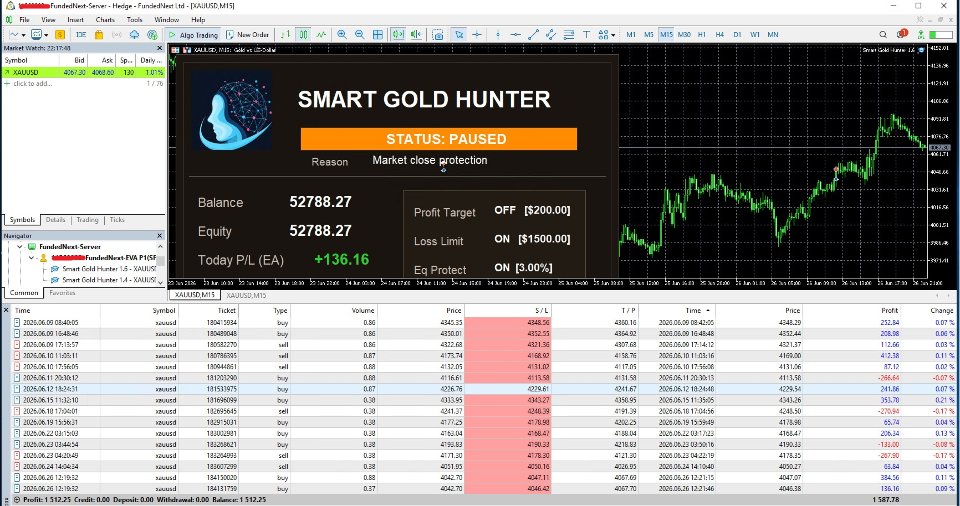
- Press OK. The on-chart panel shows status, spread, next news, and daily P/L.
Tip: Use a cloud VPS near your broker’s data center for < 5 ms ping. That can shave slippage during fast gold spikes.
Recommended Broker & VPS Conditions for Smart Gold Hunter EA
| Item | Minimum | Ideal |
|---|---|---|
| Spread on XAUUSD | ≤ 30 points | < 20 points |
| Commission (round-turn) | ≤ 7 USD / lot | 4–6 USD / lot |
| Execution speed | ≤ 200 ms | < 70 ms |
| Stop-level | 0 or small | 0 |
| VPS latency | < 15 ms | < 5 ms |
A true ECN raw-spread account is crucial. Some brokers widen spreads to 100+ points during news; the spread protection in the EA helps, but it is better to start with fair conditions.
Prop-Firm Trading Checklist
Before attaching Smart Gold Hunter EA to a funded-challenge account, double-check:
- Max daily loss allowed? (e.g., 5 %)
- Max overall drawdown? (e.g., 10 %)
- News trading permitted? Some firms forbid holding through NFP/FOMC.
- Weekend holding okay? Many require flat before Friday close.
- Minimum trading days? Plan to run EA enough days (often 5–10).
- Scaling plan? Prop firms may raise capital after hitting targets; consider risk-% recalibration.
Tick all boxes to avoid unexpected violations.
FAQ: Your Top Questions Answered
Q1: Is Smart Gold Hunter EA beginner-friendly?Yes. Default profiles let you skip the “parameter maze.” Still, read the user manual and start on demo.
Q2: Can I run multiple pairs?The EA is optimized for gold only. Running on EURUSD or indices may produce unknown results.
Q3: Do I need a VPS?Strongly recommended. A power outage at home can ruin a trade.
Q4: What is the minimum balance?You can start with 100 USD on micro lots, but spread and commission eat more at nano size. 1 000 USD or above is practical.
Final Thoughts About Smart Gold Hunter EA
Smart Gold Hunter EA targets the sweet spot between safety and opportunity in XAUUSD trading. By sticking to a strict “No Grid, No Martingale” framework, using one-shot entries with a real Stop Loss, and offering handy protections like news and spread filters, the EA fits traders who value steady growth over overnight riches. Test it on demo, pick the profile matching your style, and keep risk small. Gold trading is never risk-free, yet with a disciplined tool like Smart Gold Hunter EA, you stand a better chance of staying in the game for the long run.
Have questions or want to share your results? Drop a comment below or join our Discord community.
Live Signal – Click Here
Vendor Site – Click Here
| Membership | Yearly Membership |
|---|---|
| Additional Services | Unlock & Decompile |
| Recommended Brokers | Exness Broker, FPMarkets |
| Recommended VPS | FXVM (Low Latency) |
| Youtube Channel | ForexForYou |
| Telegram Channel | Onshoppie Forex EA's & Indicators |
| Telegram Support | Onshoppie Support |
| Installation Guides | Onshoppie Forex Guides |
Brand
ea-mt5
Only logged in customers who have purchased this product may leave a review.
Related products



Products
-
 The Gold Reaper EA MQ5 V4.1 Source Code + Setfiles
Original price was: $949.00.$29.95Current price is: $29.95.
The Gold Reaper EA MQ5 V4.1 Source Code + Setfiles
Original price was: $949.00.$29.95Current price is: $29.95.
-
 ATM Alpha BOT MT5 For Build 5984+
$14.95
ATM Alpha BOT MT5 For Build 5984+
$14.95
-
 Pandora Box EA MT5 V1.1 + SetFiles With DLL 5984
$14.95
Pandora Box EA MT5 V1.1 + SetFiles With DLL 5984
$14.95
-
 Bully Max Pro EA MT5 For Build 5984+
$14.95
Bully Max Pro EA MT5 For Build 5984+
$14.95
-
 Trinetra EA MT5 + SetFiles For Build 5984+
$34.95
Trinetra EA MT5 + SetFiles For Build 5984+
$34.95
-
 Strict HedgeZone Final EA MT5 V10 + SetFiles For Build 5984+
$14.95
Strict HedgeZone Final EA MT5 V10 + SetFiles For Build 5984+
$14.95
-
 NEXORA EA MT5 For Build 5984+
$14.95
NEXORA EA MT5 For Build 5984+
$14.95
-
 3X COMBO AI EA MT5 V7 For Build 5984+
$14.95
3X COMBO AI EA MT5 V7 For Build 5984+
$14.95
Recent reviews
-
 Advanced Dashboard Currency Strength
by Balram
Advanced Dashboard Currency Strength
by Balram
Reviews
There are no reviews yet.