


SafeGold Scalper EA MT4 DLL Build 1443
Original price was: $199.00.$9.95Current price is: $9.95.
SafeGold Scalper EA is a specialized trading expert advisor built for one purpose: low-risk, intraday scalping on XAUUSD (Gold).




Description
SafeGold Scalper EA: A Practical Guide to Consistent XAUUSD Scalping Without High-Risk Tactics
SafeGold Scalper EA – The Safer Way to Trade Gold: Everything You Need to Know
Table of Contents
- Quick Overview SafeGold Scalper EA
- Why Trade Gold With an EA?
- What Makes SafeGold Scalper EA Different?
- Core Strategy Explained
- Recommended Settings & Minimum Requirements
- Step-by-Step Installation Guide
- Back-Testing Tips for Realistic Results
- Prop-Firm Compatibility Checklist
- Risk Management & Money Management
- Frequently Asked Questions
- Final Thoughts
Quick Overview
SafeGold Scalper EA is a specialized trading expert advisor built for one purpose: low-risk, intraday scalping on XAUUSD (Gold). Unlike many robots that pile up positions in a grid or double lot sizes via martingale, SafeGold Scalper EA follows a strict scalping and trend-trading plan. It uses fixed stop loss and take profit levels, enters on sudden market impulses, and even offers a “second-chance” entry if price shifts in your favor after an exit.
Why Trade Gold With an EA?
Gold (ticker: XAUUSD) attracts traders because:
- High liquidity almost 24 hours a day.
- Clear reactions to global macro-events, giving measurable volatility.
- Tight spreads on reputable ECN brokers.
- Well-defined intraday swings that suit scalping.
Yet, manual trading can be stressful. SafeGold Scalper EA removes emotional bias, monitors multiple timeframes in milliseconds, and executes orders with precision. If you already trade gold manually, an EA like this can free up screen time without forcing you into high-risk approaches.
What Makes SafeGold Scalper EA Different?
| Typical High-Risk EA | SafeGold Scalper EA |
|---|---|
| Martingale or grid lot size escalation | Fixed lot or fixed % risk per trade |
| Undefined stops or huge hidden stops | Visible, fixed stop loss & take profit |
| Random entries or outdated indicators | Multi-timeframe candlestick pattern filter |
| No capital protection logic | Losses cut early if momentum fades |
Key benefits at a glance:
- Scalping and trend-following combined: captures quick bursts yet filters direction.
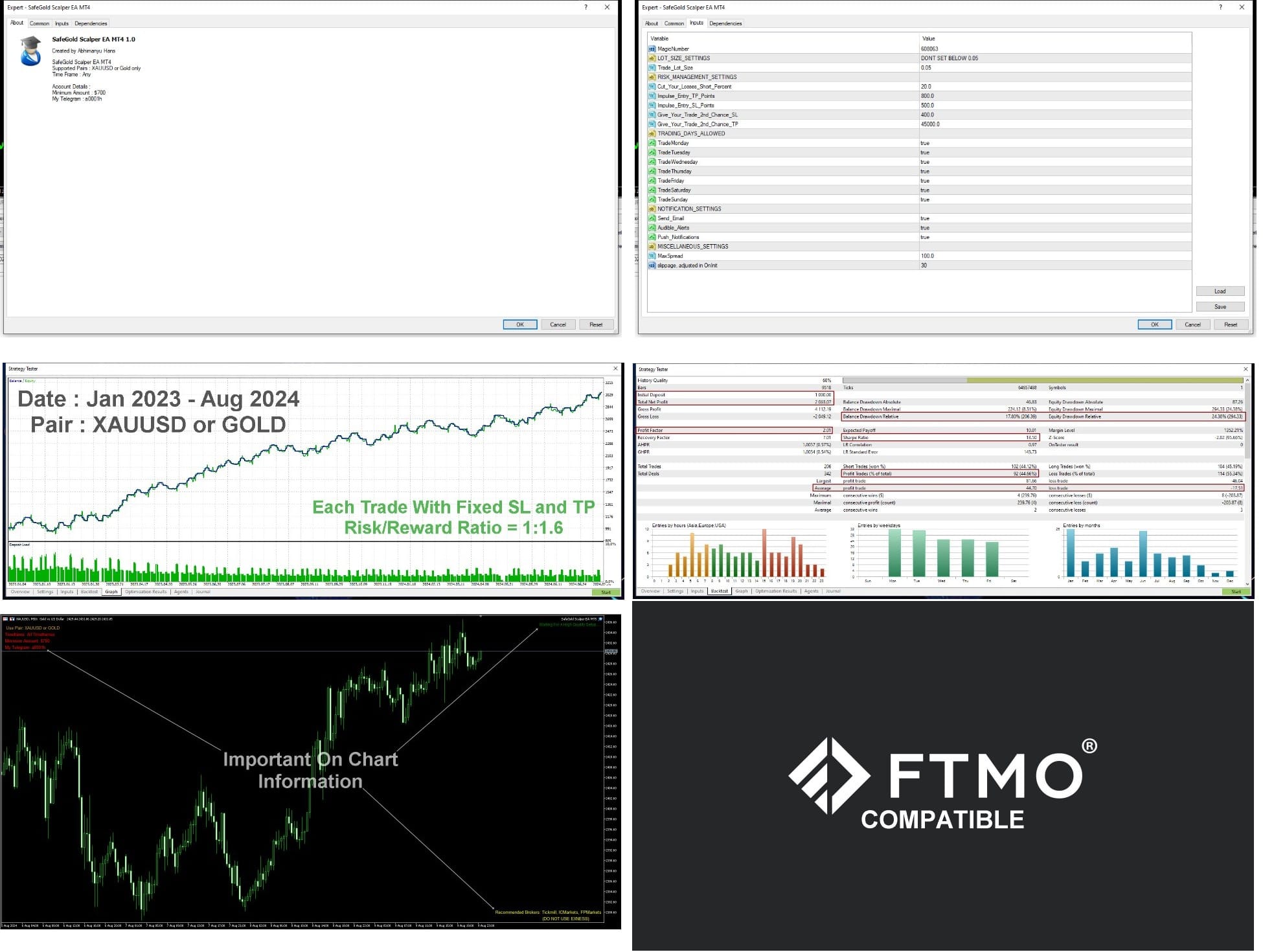
- 1:1.6 risk/reward ratio: statistically favorable—win one, lose one, still net positive.
- Universal compatibility: works on XAUUSD with any suffix (XAUUSDm, XAUUSD.a, etc.).
- Plug-and-play sets: no need to tweak pages of inputs—settings already optimized for Tickmill, ICMarkets, FPMarkets, and similar low-spread brokers.
- Prop-firm friendly: trades meet most risk models (daily drawdown, soft time limits, lot caps).
Core Strategy Explained
1. Scalping & Trend Trading
The EA checks higher-timeframe direction (H1 and H4) before allowing a trade on the operating chart. If the short-term push aligns with the broader trend, an order is placed.
2. Impulse Entry Logic
A sudden burst in tick volume or candle range often hints at institutional activity. SafeGold Scalper EA measures the size of the impulse against the recent average true range. It jumps in within milliseconds to capture the move.
3. Fixed Stop Loss & Take Profit
- Default stop loss: 250 points (Gold points).
- Default take profit: 400 points.These numbers equal a 1:1.6 ratio, giving an edge even with a 45–50 % win rate.
4. Active Risk Control – “Cut Loss Early”
If momentum dies before the stop is hit, the EA closes the position, usually trimming a few dollars off the full stop size. Over hundreds of trades this small reduction matters.
5. Second-Chance Trading
Should price whip back into the original zone after a minor pullback, the EA can attempt one more entry. The second ticket uses the same stop but halves the lot size, keeping overall exposure unchanged.
6. Candlestick Pattern Filter
Patterns such as bullish engulfing, inside bar breakout, or pin bar rejection are scanned across M5, M15, and M30. Only when two timeframes line up does the EA engage.
Recommended Settings & Minimum Requirements
| Category | Recommendation | Reason |
|---|---|---|
| Initial Capital | USD 700 or higher | Allows room for spread, commissions, and risk tolerance. |
| Symbol | XAUUSD / Gold (any suffix) | Strategy built around gold’s speed and volatility. |
| Broker | Tickmill, ICMarkets, FPMarkets, or other ECN with < 20 ms VPS latency (avoid Exness for now) | Low spread and low commission protect tight SL/TP. |
| VPS | Yes (1 GB RAM, 1 CPU min) | Keeps ping under 20 ms, crucial for scalping fills. |
| Timeframe | Any (logic independent of chart) | EA pulls multi-timeframe data internally. |
| Platform | MetaTrader 5 | MT5 strategy tester offers 100 % tick precision. |
Tip: Always set the magic number unique per chart to avoid conflicts with other robots.
Step-by-Step Installation Guide
- Download SafeGold Scalper EA (.ex5 file) after purchase.
- Copy the file to:
MQL5 > Expertsfolder of your MT5 data directory. - Restart MetaTrader 5.
- Open an XAUUSD chart (suffix included).
- Drag the EA onto the chart and:
- Allow Algo Trading.
- Leave default risk at 1 % per trade or adjust.
- Confirm the smiley face in the upper-right corner—EA is live.
Need help? Send a direct message or ping Telegram user @a0001h.
Back-Testing Tips for Realistic Results
- Download fresh tick data for the last 4–5 months only.
- Use “Every Tick Based on Real Ticks” in MT5 for accuracy.
- Disable “Forward Testing” toggle; focus on the most recent market cycle.
- Match the broker’s exact spread and commission in the tester.
- Review metrics:
- Win %
- Profit factor
- Average trade duration (should be under two hours)
We avoid long history back-tests because gold’s structure evolves roughly every quarter. Testing the latest 4–5 months offers a clearer view of near-term performance.
Prop-Firm Compatibility Checklist for SafeGold Scalper EA
Most prop firms (FTMO, MyForexFunds, FundedNext, etc.) require:
- Maximum daily loss: 5 % (or lower)
- Maximum overall drawdown: 10 %
- No “prohibited strategies” such as grid/martingale
- Minimum trading days: 5–10
SafeGold Scalper EA ticks all these boxes because:
- Each trade uses fixed risk.
- The EA never staggers positions.
- Trade frequency is consistent—usually 3–8 trades per day depending on volatility.
- Account equity curve remains smooth due to controlled stops.
Risk Management & Money Management for SafeGold Scalper EA
Best practice allocation (example based on USD 5 k account):
- Risk per trade: 0.5 %–1 %
- Max concurrent trades: 2
- Weekly loss cap: 5 % (EA auto-stops if breached—optional setting)
Position sizing formula (fixed % risk):
Lot Size = (Account Equity × Risk %) / (Stop Loss in points × Point Value)Gold point value on most brokers = USD 0.01 for 0.01 lots. Adjust accordingly.
Frequently Asked Questions Regarding SafeGold Scalper EA
Q1. Can I run SafeGold Scalper EA on MetaTrader 4?Currently no. The logic relies on MT5’s faster tick handling and built-in multi-currency tester.
Q2. Does it trade during news?Yes, but with reduced lot size 30 minutes before and after high-impact releases (NFP, FOMC).
Q3. What leverage is ideal?1:200 or higher keeps margin usage modest; however, strict risk control ensures we never over-leverage.
Q4. Will it work on micro or cent accounts?Technically yes if the broker offers XAUUSD, but spread often rises on non-ECN accounts, eating into scalper profit.
Q5. How often are updates released?Roughly every quarter, aligned with our 4–5 month optimization cycle. Updates are free for all existing users.
Final Thoughts About SafeGold Scalper EA
SafeGold Scalper EA offers a disciplined, well-documented solution for traders who want to scalp gold without the stress of high-risk tactics. By sticking to a 1:1.6 risk/reward ratio, fixed stops, and multi-timeframe confirmations, the EA keeps drawdowns small while aiming for steady gains. If you are searching for a practical, easy-to-install gold scalping robot that respects your capital, give SafeGold Scalper EA a try.
Vendor Site – Click Here

| Membership | Yearly Membership |
|---|---|
| Additional Services | Unlock & Decompile |
| Recommended Brokers | Exness Broker, FPMarkets |
| Recommended VPS | FXVM (Low Latency) |
| Youtube Channel | ForexForYou |
| Telegram Channel | Onshoppie Forex EA's & Indicators |
| Telegram Support | Onshoppie Support |
| Installation Guides | Onshoppie Forex Guides |
Brand
ea-mt4
Only logged in customers who have purchased this product may leave a review.
Related products


Products
-
 Quantum Emperor EA MT5 V7.5 For Build 5836+
Original price was: $799.00.$14.95Current price is: $14.95.
Quantum Emperor EA MT5 V7.5 For Build 5836+
Original price was: $799.00.$14.95Current price is: $14.95.
-
 Quantum King EA MT5 V3.1 For Build 5836+
Original price was: $649.00.$14.95Current price is: $14.95.
Quantum King EA MT5 V3.1 For Build 5836+
Original price was: $649.00.$14.95Current price is: $14.95.
-
 Bitcoin Robot Grid EA MT4 V6.0 For Build 1473+
Original price was: $899.00.$14.95Current price is: $14.95.
Bitcoin Robot Grid EA MT4 V6.0 For Build 1473+
Original price was: $899.00.$14.95Current price is: $14.95.
-
 IS PI Scalper EA Virtual Level Final MT4 + SetFiles
$14.95
IS PI Scalper EA Virtual Level Final MT4 + SetFiles
$14.95
-
 ArtQuant Gold EA MT5 V3.0 For Build 5836+
Original price was: $700.00.$14.95Current price is: $14.95.
ArtQuant Gold EA MT5 V3.0 For Build 5836+
Original price was: $700.00.$14.95Current price is: $14.95.
-
 Gold Trap EA MT5 V4.24 + Setfiles For Build 5836+
$24.95
Gold Trap EA MT5 V4.24 + Setfiles For Build 5836+
$24.95
-
 AI X HFT VIP EA MT4 V14 With DLL 1473
$14.95
AI X HFT VIP EA MT4 V14 With DLL 1473
$14.95
-
 Sentinel KMZ EA MT5 v2.5 + SetFiles For Build 5836+
Original price was: $999.00.$14.95Current price is: $14.95.
Sentinel KMZ EA MT5 v2.5 + SetFiles For Build 5836+
Original price was: $999.00.$14.95Current price is: $14.95.
Recent reviews
-
 Advanced Dashboard Currency Strength
by Balram
Advanced Dashboard Currency Strength
by Balram
Reviews
There are no reviews yet.