

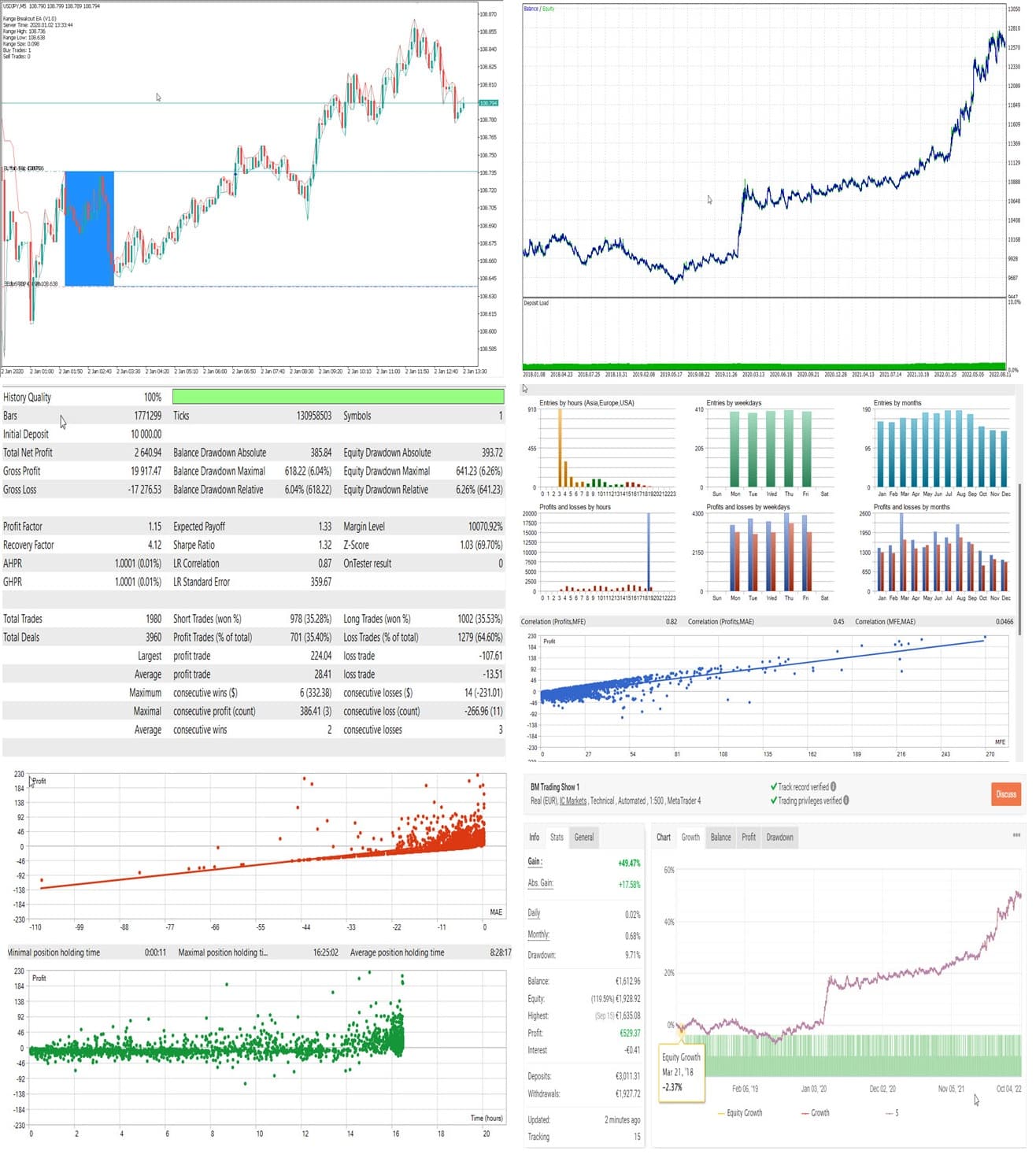

Range Breakout EA MT4 v1.35 For Build 1460+
Original price was: $197.00.$9.95Current price is: $9.95.
Proven Range Breakout EA secrets exposed! Learn the best trading techniques that successful traders use. Download your guide and start winning now.



Description
Range Breakout EA: A Practical Guide to Consistent Day Trading Results
Range Breakout EA – A Proven Time-Based Breakout Strategy for MT4 & MT5
Alternative Title
Range Breakout EA Review: How This Simple Time-Window Strategy Beats Noise Without Martingale
Table of Contents
- Introduction
- What Makes the Range Breakout EA Different?
- Step-by-Step Installation (MT4)
- Frequently Asked Questions
- Conclusion
Introduction
If you trade the London or New York open, you know how often price pauses in a tight range before breaking out and running for the rest of the session. The Range Breakout EA is built around this exact behaviour. Unlike many automated systems, it does not rely on martingale, grid, or other risky “double-up” ideas. Instead, it follows a clear time-based plan: define a range, wait for price to break, enter, manage risk, and step aside. This article explains how the EA works, how to set it up, and how to adapt it to your own trading style.
What Makes the Range Breakout EA Different?
| Area | Range Breakout EA | Many Other EAs |
|---|---|---|
| Strategy Type | Genuine day trading breakout | Often scalping, martingale, or grid |
| Risk Control | Fixed SL/TP, no position doubling | May add to losses |
| Time Focus | Uses specific morning window | Trades all day without context |
| Tested Live | Verified on Myfxbook | Frequently demo only |
Because it sticks to one clear idea, the code stays light and predictable. No hidden recovery modes or open-ended drawdowns—an important point for traders looking for consistent, repeatable results.
Step-by-Step Installation (MT4)
- Download the EA
- Open your terminal
File → Open Data Folder → MQL4 → Experts
- Copy the .ex4 file into the Experts folder.
- Restart MT4 or click Refresh in the Navigator.
- Attach to a chart
- Use the correct symbol and timeframe (any timeframe; logic is time-based, not bar-based).
- Allow Algo Trading
- Check the smiling face in the top right of the chart.
- Test on Demo
- At least two weeks to confirm broker compatibility.
Frequently Asked Questions Regarding Range Breakout EA
Q1: Can I use Range Breakout EA on other pairs like GBPUSD?A: Yes, but you must find a stable time window and adjust range filters and TP/SL values. Start on demo.
Q2: How many trades per day can I expect?A: Usually one. Some days none if the range filter blocks a setup. The goal is quality, not quantity.
Q3: Will the EA work during high-impact news?A: It places orders before news in most cases. Consider disabling on days with bank rate decisions.
Q4: What VPS specs are required?A: Very light. 1 GB RAM and one CPU core are more than enough because the EA evaluates price once per second.
Q5: Does it support prop-firm rules (e.g., FTMO)?A: Yes, because it limits daily drawdown, doesn’t martingale, and stops trading once the daily target/loss is hit.
Conclusion for Range Breakout EA
The Range Breakout EA offers a clear, logical, and proven way to trade the daily range break in major currency pairs. It avoids risky methods like martingale, keeps risk capped with hard stops, and gives traders the tools they need—time windows, range filters, trailing stops, and fixed daily limits—to tailor the system to their own comfort level. With verified live results and a free demo for both MT4 and MT5, traders can test the strategy without pressure and decide if the approach fits their plan.
Happy trading, and remember: a solid plan plus disciplined risk management beats random entries every time.
Vendor Site – Click Here
| Membership | Yearly Membership |
|---|---|
| Additional Services | Unlock & Decompile |
| Recommended Brokers | Exness Broker, FPMarkets |
| Recommended VPS | FXVM (Low Latency) |
| Youtube Channel | ForexForYou |
| Telegram Channel | Onshoppie Forex EA's & Indicators |
| Telegram Support | Onshoppie Support |
| Installation Guides | Onshoppie Forex Guides |
Brand
ea-mt4
Only logged in customers who have purchased this product may leave a review.
Related products


Products
-
 Quantum Emperor EA MT5 V7.5 For Build 5836+
Original price was: $799.00.$14.95Current price is: $14.95.
Quantum Emperor EA MT5 V7.5 For Build 5836+
Original price was: $799.00.$14.95Current price is: $14.95.
-
 Quantum King EA MT5 V3.1 For Build 5836+
Original price was: $649.00.$14.95Current price is: $14.95.
Quantum King EA MT5 V3.1 For Build 5836+
Original price was: $649.00.$14.95Current price is: $14.95.
-
 Bitcoin Robot Grid EA MT4 V6.0 For Build 1473+
Original price was: $899.00.$14.95Current price is: $14.95.
Bitcoin Robot Grid EA MT4 V6.0 For Build 1473+
Original price was: $899.00.$14.95Current price is: $14.95.
-
 IS PI Scalper EA Virtual Level Final MT4 + SetFiles
$14.95
IS PI Scalper EA Virtual Level Final MT4 + SetFiles
$14.95
-
 ArtQuant Gold EA MT5 V3.0 For Build 5836+
Original price was: $700.00.$24.95Current price is: $24.95.
ArtQuant Gold EA MT5 V3.0 For Build 5836+
Original price was: $700.00.$24.95Current price is: $24.95.
-
 Gold Trap EA MT5 V4.1 For Build 5836+
$44.95
Gold Trap EA MT5 V4.1 For Build 5836+
$44.95
-
 AI X HFT VIP EA MT4 V14 With DLL 1470
$24.95
AI X HFT VIP EA MT4 V14 With DLL 1470
$24.95
-
 Wisdom EA MT4 + SetFiles For Build 1471+
$14.95
Wisdom EA MT4 + SetFiles For Build 1471+
$14.95
Recent reviews
-
 Advanced Dashboard Currency Strength
by Balram
Advanced Dashboard Currency Strength
by Balram
Reviews
There are no reviews yet.