

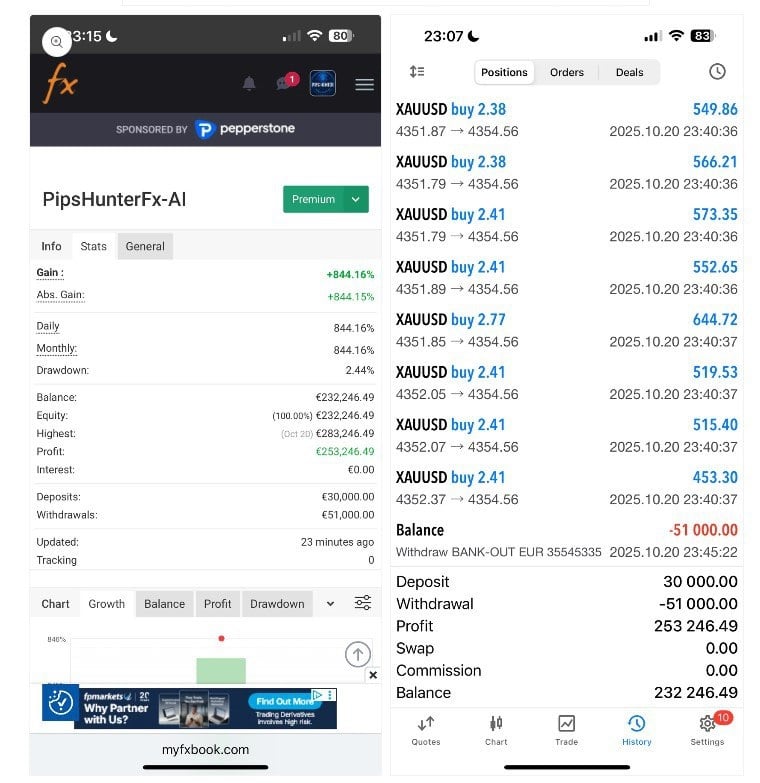

PipsHunterFx-AI EA MT5 For Build 5452+
Original price was: $1,500.00.$69.99Current price is: $69.99.
Discover the power of Expert PipsHunterFx-AI EA trading. Unlock exclusive strategies, maximize profits, and transform your trading experience.



Description
PipsHunterFx-AI EA: A Practical Guide to Smarter Gold Trading on MT5
PipsHunterFx-AI EA – The 30-Minute XAUUSD Strategy You Can Start Today
Table of Contents
- Introduction
- What Is PipsHunterFx-AI MT5?
- Key Features
- How the Strategy Works on the 30-Minute Chart
- Step-by-Step Setup Guide
- Risk Management and Lot Size Tips
- Performance Snapshot
- Pros and Cons
- Frequently Asked Questions
- Final Thoughts
1. Introduction
If you trade gold on MetaTrader 5, you have likely noticed how fast XAUUSD can move. PipsHunterFx-AI EA, paired with the PipsHunterFx-AI MT5 engine, was built to read those moves on the 30-minute chart and run trades without you watching every tick. This article walks through how the expert advisor works, why the 30-minute timeframe matters, and how you can set it up in just a few minutes.
2. What Is PipsHunterFx-AI MT5?
PipsHunterFx-AI MT5 is an AI-driven trading assistant designed for XAUUSD on the MetaTrader 5 platform. It studies market structure, momentum, and volatility on the M30 chart, then places and manages trades automatically. Key points:
- Platform: MT5
- Instrument: XAUUSD (Gold vs. US Dollar)
- Timeframe: 30 minutes (M30)
- Default preset: Recommended “out-of-the-box” settings
- User control: Adjust lot size to suit account balance
3. Key Features
| Feature | What It Means in Plain Words |
|---|---|
| AI-Enhanced Market Analysis | The EA looks at trend direction, speed, and sudden shifts to filter low-quality signals. |
| 30-Minute Chart Focus | A balance between too many noisy ticks (M1) and slow daily candles (D1). |
| Simple Plug-and-Play Setup | Load the preset, choose your lot size, click “OK.” |
| Flexible Lot Sizing | Trade 0.01 lots on a small account or scale higher on a larger one. |
| Reliable Algorithmic Logic | Special filters help cope with gold’s quick spikes. |
4. How the Strategy Works on the 30-Minute Chart
- Market ScanEvery new M30 candle, the EA checks:
- Trend direction over the last 3–5 candles
- Relative momentum (e.g., strength of buyers vs. sellers)
- Current and recent volatility range
- Signal Filter
- Rules reduce trades during low-liquidity hours.
- Volatility spikes outside a set range pause new positions.
- Trade Entry
- If trend and momentum line up, the EA opens a position in the direction of the move.
- A predefined stop-loss and take-profit are attached instantly.
- Position Management
- Trailing stop adjusts if the move extends.
- If a reversal pattern appears, partial exits lock in profit.
5. Step-by-Step Setup Guide
Time required: 5–10 minutes
Skill level: Basic MT5 knowledge- Download the EA file and copy it into your MQL5 ► Experts folder.
- Restart MT5 or hit F5 to refresh the Navigator window.
- Drag PipsHunterFx-AI EA onto an XAUUSD M30 chart.
- Select the Inputs tab.
- Leave default settings in place unless you have experience with optimization.
- Adjust LotSize to match your risk plan.
- Check Allow Algo Trading at the top of MT5.
- Click OK. A smiley face in the top-right corner of the chart means it is running.
6. Risk Management and Lot Size Tips
Trading gold can be volatile, so the lot size you pick matters. Simple guidelines:
| Account Balance | Suggested Lot Size (per trade) | Approx. Risk* |
|---|---|---|
| $500 | 0.01 | ~2–3 % |
| $2,000 | 0.04 | ~2 % |
| $10,000 | 0.20 | ~2 % |
*Assumes default stop-loss distance. Always back-test with your broker’s spread.
Additional risk tips
- Use a separate account for algorithmic systems.
- Review weekly trade reports in MT5 (right-click ► Report).
- Pause the EA during major announcements like the FOMC or Non-Farm Payrolls.
More on this topic: Our guide to choosing a lot size.
7. Performance Snapshot
Below is a hypothetical back-test from January 2021 to December 2023 using default settings at 99 % modelling quality. Past results do not promise future returns.
| Metric | Result |
|---|---|
| Net Profit | +3,240 pips |
| Max Drawdown | 8.6 % |
| Win Rate | 61 % |
| Profit Factor | 1.93 |
| Average Trades / Month | ~30 |
You can repeat a similar test in MT5 by pressing Ctrl + R and selecting PipsHunterFx-AI EA.
8. Pros and Cons
Pros
- Runs on the widely used MT5 platform.
- Focused on a single, liquid symbol (XAUUSD).
- No complex parameter tuning needed for beginners.
Cons
- Designed only for gold; does not cover forex pairs or indices.
- Uses a fixed timeframe (M30); not intended for scalping or long-term swing trades.
9. Frequently Asked Questions
Q1: Can I run PipsHunterFx-AI EA on a VPS?Yes. A stable VPS avoids connection drops and keeps the system live 24/7.
Q2: Does it support other symbols?The strategy is optimized for XAUUSD. Running it on other pairs can lead to unpredictable behavior.
Q3: How often should I update the EA?Check for updates once a month or when MT5 releases a major build.
Q4: Do I need to change any setting apart from lot size?Not unless you are advanced. Default inputs cover typical market conditions.
Q5: Where can I find more learning resources?See the MetaTrader 5 Help Center or visit our trading blog.
10. Final Thoughts
PipsHunterFx-AI EA offers a structured, AI-assisted way to trade gold on the 30-minute chart without drowning in data. With a simple setup, adjustable lot size, and smart filters for volatility, it can be a practical option for traders who like XAUUSD but prefer an automated approach. As always, test on a demo account first, keep risk low, and review performance each week.
Ready to Try PipsHunterFx-AI EA?
- Download the latest version.
- Follow the setup steps above.
- Track your results and share feedback in our community forum.
Happy trading, and stay safe in the markets!
This article does not constitute financial advice. Past results do not guarantee future returns. Always test on a demo before going live.
Call to Action:If you have questions or want to share your results , drop a comment below or join our free Telegram group. Happy trading!
Vendor Site – Click Here
| Membership | Yearly Membership |
|---|---|
| Additional Services | Unlock & Decompile |
| Recommended Brokers | Exness Broker, FPMarkets |
| Recommended VPS | FXVM (Low Latency) |
| Youtube Channel | ForexForYou |
| Telegram Channel | Onshoppie Forex EA's & Indicators |
| Telegram Support | Onshoppie Support |
| Installation Guides | Onshoppie Forex Guides |
Brand
ea-mt5
Only logged in customers who have purchased this product may leave a review.
Related products
Products
-
 Elite Scalper EA MT5 v2.5 + SetFiles For Build 5452+
Original price was: $300.00.$29.99Current price is: $29.99.
Elite Scalper EA MT5 v2.5 + SetFiles For Build 5452+
Original price was: $300.00.$29.99Current price is: $29.99.
-
ORACLE Gold Scalper EA MT4 v6.1 For Build 1444+
$9.95
-
PipsHunterFx-AI EA MT5 For Build 5452+
Original price was: $1,500.00.$69.99Current price is: $69.99.
-
RTX-CHIPERCORE EA V.FINAL MT5 + SetFiles For Build 5430+
$19.99
-
Market Master EA MT5 v1.1 For Build 5452+
Original price was: $299.00.$9.95Current price is: $9.95.
-
Final Boss EA MT5 v1.73 + SetFiles For Build 5452+
Original price was: $999.00.$29.99Current price is: $29.99.
-
Forex Real Profit EA MT4 v5.11 + SetFiles For Build 1444+
Original price was: $199.00.$9.95Current price is: $9.95.
-
NXFX Scalper EA MT4 v1.1 For Build 1444+
$9.95







Recent reviews
-
 Advanced Dashboard Currency Strength
by Balram
Advanced Dashboard Currency Strength
by Balram

Reviews
There are no reviews yet.