


Night Hunter Pro EA MT4 V6.57 + Setfiles For Build 1473+
Original price was: $2,600.00.$14.95Current price is: $14.95.
Discover the powerful Night Hunter Pro EA! Uncover thrilling secrets, proven results, and why traders love this best forex tool.




Description
Night Hunter Pro EA: A Practical Guide to a Rule-Based Scalping Expert Advisor
Table of Contents
- What Is Night Hunter Pro EA?
- How the Strategy Works
- Why It Avoids Martingale and Grid
- Supported Pairs and Timeframe
- Installation: One-Chart Setup
- Recommended Broker Settings
- Live Trading Tips
- Frequently Asked Questions
- Final Thoughts
What Is Night Hunter Pro EA?
Night Hunter Pro EA is an expert advisor designed for short-term scalping during calm market hours. It relies on carefully coded entry and exit rules, coupled with several filtering layers, to find low-risk opportunities. The EA was first released several years ago and has been updated regularly to reflect market changes and new MetaTrader innovations.
Unlike many automated systems that promise sky-high returns with gimmicks, Night Hunter Pro EA focuses on long-term, stable growth:
- Uses pending orders for every trade
- Sets a stop-loss immediately after order placement
- No martingale, no grid – therefore no exponential risk
- Filters out trades during high-impact news events
The bottom line: Night Hunter Pro EA follows a strict rule-based plan, helping traders maximize return while keeping risks under control.
How the Strategy Works
Calm-Hour Scalping
The EA operates during low-volatility periods (usually late U.S. session and early Asian session). In these hours, spreads are tighter, and price swings are often limited—ideal for short scalps.
Smart Entry/Exit Algorithms
The core algorithm:
- Scans multiple pairs simultaneously for specific price patterns.
- Confirms a favorable spread, low swap cost, and quiet order book.
- Places a pending order just outside the current price.
- Activates only if price moves into the pre-defined range.
- Closes partly or fully based on micro-targets and protective trailing stops.
Multi-Layer Filtering
- News filter: Blocks trading several minutes before and after red-flag events.
- Negative swap filter: Avoids trades with costly overnight charges.
- Self-diagnostic checks: Stops trading if broker time, leverage, or margin data appear abnormal.
Why It Avoids Martingale and Grid
Many EAs rely on adding more lots to losing trades (martingale) or stacking multiple orders at fixed intervals (grid). These methods can look impressive on paper yet become disastrous when an extended trend appears.
Night Hunter Pro EA limits exposure:
- Single entry per setup – no escalating lot sizes.
- Fixed stop-loss – predefined risk per trade.
- Trade frequency – quality over quantity; only the safest setups pass.
By staying away from path-doubling tactics, the EA preserves capital through inevitable losing streaks.
Supported Pairs and Timeframe for Night Hunter Pro EA
Core Currency Pairs
- GBPUSD
- EURUSD
- EURCHF
- USDCAD
- USDCHF
Additional Pairs
- CHFJPY
- AUDCAD
- EURCAD
- EURAUD
Recommended Timeframe
- M5 (5-minute) — The EA is calibrated to read micro price movements and session volatility on this timeframe.
Installation: One-Chart Setup
Follow these steps:
- Download & copy Night Hunter Pro EA to
MQL4/ExpertsorMQL5/Expertsfolder inside your MetaTrader platform. - Restart MetaTrader so the EA appears in the Navigator.
- Open one M5 chart (any of the supported pairs is fine).
- Drag the EA onto the chart and confirm necessary permissions (live trading, DLL imports).
- In the inputs tab, choose your lot size approach (fixed, percent of balance, or risk %).
- Enable AutoTrading in the toolbar.
- Verify smiley face or green play icon in the upper-right corner of the chart.
That’s it—Night Hunter Pro EA will automatically scan and trade all supported symbols without extra charts.
Recommended Broker Settings for Night Hunter Pro EA
Night Hunter Pro EA performs best with:
- ECN or RAW spread account
- Low commissions — 0 to 7 USD per lot (round trip)
- Fast execution — ping under 50 ms to the trading server
- GMT+2 with U.S. DST feed (used by many brokers and required for back-testing consistency)
- No dealing-desk intervention—makes a noticeable difference for scalping
Tip: Use a VPS located near your broker’s data center to ensure low latency.
Live Trading Tips
- Disable trading on weekends (Friday evening until Sunday open) as spreads can widen and volatility is random.
- Check VPS health daily: CPU load, memory, and disk usage influence MetaTrader stability.
- Avoid over-leveraging. Stick to risk per trade under 1–2 % of balance.
- Monitor broker performance: If slippage or spread deterioration appears consistently, consider switching.
Frequently Asked Questions regarding Night Hunter Pro EA
Q1: Can I run Night Hunter Pro EA on MetaTrader 5?No
Q2: Do I need to change settings for each pair?No. Default parameters work across all supported pairs, thanks to built-in multiplier logic.
Q3: What account size do you recommend?Ideally 500 USD or higher. Smaller accounts will work but may not handle diversified risk.
Q4: Does the EA require 24/5 uptime?Yes, because trades can trigger at any time during low-volatility windows.
Final Thoughts About Night Hunter Pro EA
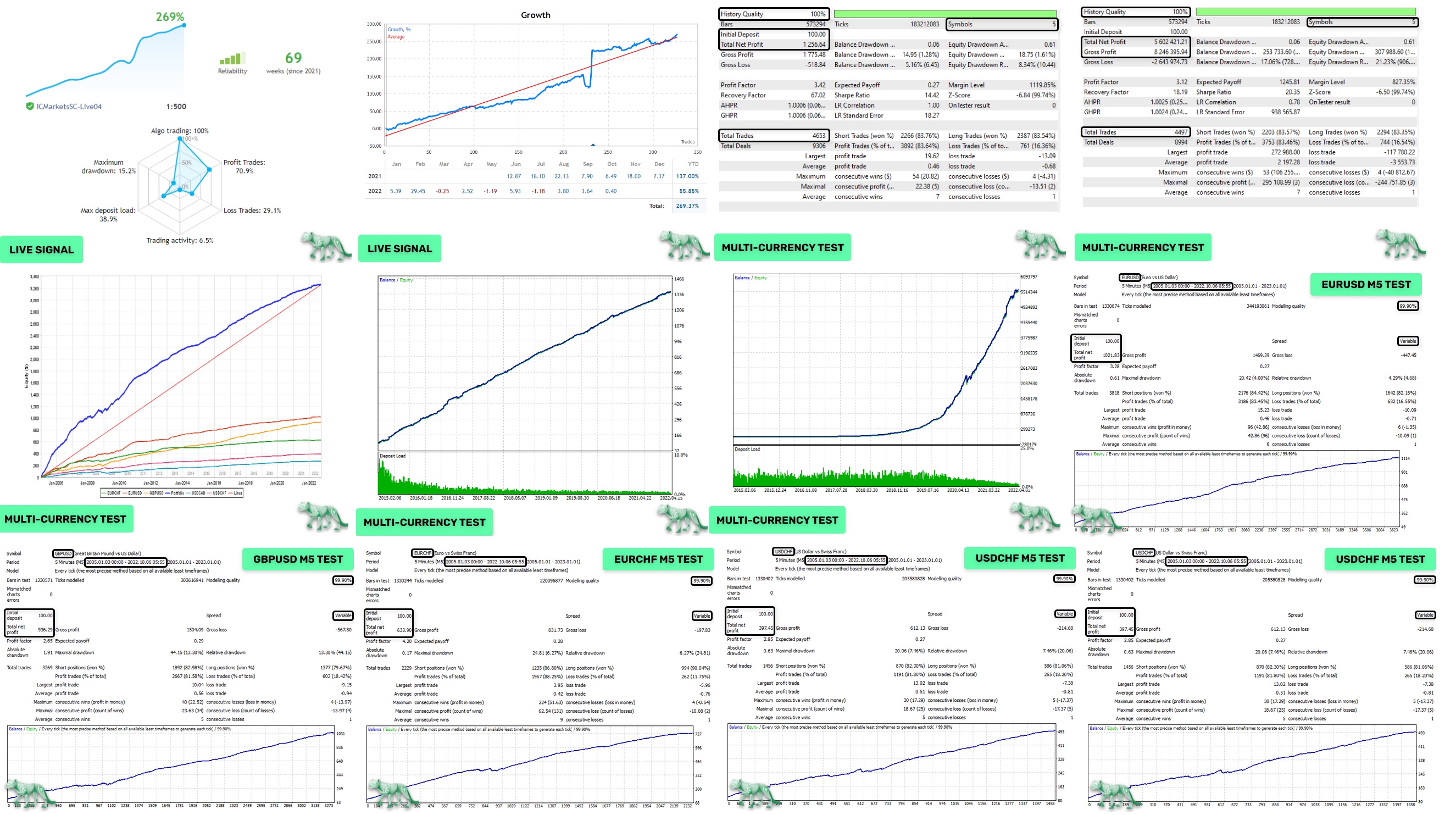
Night Hunter Pro EA offers a disciplined, well-documented way to scalp the FX market without resorting to risky tactics such as martingale or grid systems. Featuring one-chart trading, solid backtest data, and built-in news filters, the EA focuses on stable long-term growth.
If you are looking for an automated tool that values safety as much as profit potential, Night Hunter Pro EA may fit nicely into your trading plan.
Happy trading, and remember: steady wins the race.
Vendor Site – Click Here
Reviews – Click Here
| Membership | Yearly Membership |
|---|---|
| Additional Services | Unlock & Decompile |
| Recommended Brokers | Exness Broker, FPMarkets |
| Recommended VPS | FXVM (Low Latency) |
| Youtube Channel | ForexForYou |
| Telegram Channel | Onshoppie Forex EA's & Indicators |
| Telegram Support | Onshoppie Support |
| Installation Guides | Onshoppie Forex Guides |
Brand
ea-mt4
Only logged in customers who have purchased this product may leave a review.
Related products



Products
-
 Quantum Queen X EA MT5 V4.3 MQ5 Source Code
Original price was: $1,799.00.$19.95Current price is: $19.95.
Quantum Queen X EA MT5 V4.3 MQ5 Source Code
Original price was: $1,799.00.$19.95Current price is: $19.95.
-
 Smart Gold Hunter EA MT5 V2.0 MQ5 Source Code
Original price was: $249.00.$28.95Current price is: $28.95.
Smart Gold Hunter EA MT5 V2.0 MQ5 Source Code
Original price was: $249.00.$28.95Current price is: $28.95.
-
 The Gold Reaper EA MQ5 V4.1 Source Code + Setfiles
Original price was: $949.00.$19.95Current price is: $19.95.
The Gold Reaper EA MQ5 V4.1 Source Code + Setfiles
Original price was: $949.00.$19.95Current price is: $19.95.
-
 ATM Alpha BOT MT5 For Build 5984+
$14.95
ATM Alpha BOT MT5 For Build 5984+
$14.95
-
 Pandora Box EA MT5 V1.1 + SetFiles With DLL 5984
$14.95
Pandora Box EA MT5 V1.1 + SetFiles With DLL 5984
$14.95
-
 Bully Max Pro EA MT5 For Build 5984+
$14.95
Bully Max Pro EA MT5 For Build 5984+
$14.95
-
 Trinetra EA MT5 + SetFiles For Build 5984+
$34.95
Trinetra EA MT5 + SetFiles For Build 5984+
$34.95
-
 Strict HedgeZone Final EA MT5 V10 + SetFiles For Build 5984+
$14.95
Strict HedgeZone Final EA MT5 V10 + SetFiles For Build 5984+
$14.95
Recent reviews
-
 Advanced Dashboard Currency Strength
by Balram
Advanced Dashboard Currency Strength
by Balram
Reviews
There are no reviews yet.