



MultiWay EA MT5 v1.11 + Setfiles DLL Build 5430
Original price was: $1,984.00.$9.95Current price is: $9.95.
Ultimate MultiWay EA review reveals thrilling new bot features. Transform your trading experience with this powerful automated solution.



Description
MultiWay EA Review: The Mean-Reversion Expert Advisor You Can Truly “Set and Forget”
Alternative Title: MultiWay EA – Smart, Stable, and Simple Automated Forex Trading for Nine Correlated Pairs
Table of Contents
- What Is MultiWay EA?
- Currency Pairs Covered
- Step-by-Step Installation Guide
- Frequently Asked Questions
- Final Thoughts
What Is MultiWay EA?
MultiWay EA is an automated trading system (“Expert Advisor”) designed for the MetaTrader platform. The core idea is straightforward:
- It follows a mean-reversion strategy—looking for price moves that stretch too far from the average and positioning for a return.
- It runs simultaneously on nine correlated currency pairs to gain diversification.
- Once configured, you can let it run with minimal day-to-day attention—true “set and forget” trading.
Unlike many grid EAs, MultiWay EA uses controlled grids without martingale. If trades move against the strategy, the EA cuts them at a predefined loss instead of holding on indefinitely.
Why Traders Like It
- Simplicity – A clean, logical approach with only the essential settings.
- Diversification – Running nine pairs smooths the equity curve.
- Volatility Awareness – Optional filters watch stock-market volatility, futures, and options signals to avoid brutal trends.
- Flexible Money Management – You choose fixed lots, risk percentage per trade, or balance-adaptive sizing.
Currency Pairs Covered for MultiWay EA
MultiWay EA trades nine symbols chosen for partial correlation:
- AUDNZD
- NZDCAD
- AUDCAD
- USDCAD
- EURUSD
- GBPUSD
- EURCAD
- EURGBP
- GBPCAD
Pairs 5 and 6 (EURUSD, GBPUSD) can show long one-way trends. Advanced filters watch them carefully so the EA can stay flat during runaway moves.
Step-by-Step Installation Guide for MultiWay EA
Step 1 – Get the Files
- Purchase or download MultiWay EA from the official store.
- Copy the
.ex4or.ex5file to:/MQL4/Experts/(MT4) or/MQL5/Experts/(MT5).
Step 2 – Restart MetaTrader
Close and reopen the platform so it can read the new Expert Advisor.
Step 3 – Attach to a Chart
- Open any of the nine supported pairs.
- Pick time frame M15 or H1.
- Drag MultiWay EA from the Navigator onto the chart.
- Tick “Allow live trading.”
Step 4 – Repeat for All Pairs
Attach the EA to each of the nine charts—same magic number or unique value?
- If you want separate basket controls per pair → unique magic numbers.
- If you prefer a global basket → same magic number.
Step 5 – Activate on VPS
Move the platform to your VPS or use your broker’s hosted solution. Keep MetaTrader running 24/7.
Frequently Asked Questions Regarding MultiWay EA
Q1. Can I run MultiWay EA on fewer than nine pairs?
Yes, but diversification drops. If margin is tight, start with 4–5 pairs (e.g., AUDNZD, EURGBP, EURCAD, NZDCAD, AUDCAD).
Q2. What drawdown should I expect?
Historical tests show equity drawdowns around 8–15% with default risk. Higher risk settings amplify both gains and drawdowns.
Final Thoughts About MultiWay EA
This EA delivers a clear value proposition: simple, mean-reversion trading across nine correlated forex pairs with built-in safeguards. It avoids the biggest pitfall of grid systems—endless underwater trades—by using strict loss caps.
If you are looking for a hands-off Expert Advisor with moderate risk and the flexibility to fine-tune position sizing, MultiWay EA is worth a closer look. Download a demo, test it on a VPS, and decide whether it earns a spot in your portfolio.
Happy trading, and remember: the best strategy is one you can stick with long enough to let probabilities play out.
Setup instructions
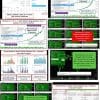
- Add permission in the terminal to receive information about financial markets from our analytical server paveludoservice_com (screenshot).
- Correct way #1: Run the EA with default settings on any one chart (screenshot).
- Correct way #2: Remove the symbol list in settings and launch the EA on 9 charts: AUDNZD, NZDCAD, AUDCAD, USDCAD, EURUSD, GBPUSD, EURCAD, EURGBP, GBPCAD (screenshot).
- Wrong way: Keep default settings and launch the EA on 9 separate charts (screenshot).
Live Signal: CLICK HERE
Vendor Site – Click Here
| Membership | Yearly Membership |
|---|---|
| Additional Services | Unlock & Decompile |
| Recommended Brokers | Exness Broker, FPMarkets |
| Recommended VPS | FXVM (Low Latency) |
| Youtube Channel | ForexForYou |
| Telegram Channel | Onshoppie Forex EA's & Indicators |
| Telegram Support | Onshoppie Support |
| Installation Guides | Onshoppie Forex Guides |
Brand
ea-mt5
Only logged in customers who have purchased this product may leave a review.
Related products



Products
-
 Quantum Queen X EA MT5 V4.3 MQ5 Source Code
Original price was: $1,799.00.$19.95Current price is: $19.95.
Quantum Queen X EA MT5 V4.3 MQ5 Source Code
Original price was: $1,799.00.$19.95Current price is: $19.95.
-
 Smart Gold Hunter EA MT5 V2.0 MQ5 Source Code
Original price was: $249.00.$28.95Current price is: $28.95.
Smart Gold Hunter EA MT5 V2.0 MQ5 Source Code
Original price was: $249.00.$28.95Current price is: $28.95.
-
 The Gold Reaper EA MQ5 V4.1 Source Code + Setfiles
Original price was: $949.00.$19.95Current price is: $19.95.
The Gold Reaper EA MQ5 V4.1 Source Code + Setfiles
Original price was: $949.00.$19.95Current price is: $19.95.
-
 ATM Alpha BOT MT5 For Build 5984+
$14.95
ATM Alpha BOT MT5 For Build 5984+
$14.95
-
 Pandora Box EA MT5 V1.1 + SetFiles With DLL 5984
$14.95
Pandora Box EA MT5 V1.1 + SetFiles With DLL 5984
$14.95
-
 Bully Max Pro EA MT5 For Build 5984+
$14.95
Bully Max Pro EA MT5 For Build 5984+
$14.95
-
 Trinetra EA MT5 + SetFiles For Build 5984+
$34.95
Trinetra EA MT5 + SetFiles For Build 5984+
$34.95
-
 Strict HedgeZone Final EA MT5 V10 + SetFiles For Build 5984+
$14.95
Strict HedgeZone Final EA MT5 V10 + SetFiles For Build 5984+
$14.95
Recent reviews
-
 Advanced Dashboard Currency Strength
by Balram
Advanced Dashboard Currency Strength
by Balram
Reviews
There are no reviews yet.