





Mosquito EA MT5 V1.3 + SetFiles For Build 6106+
$14.95
Mosquito EA is a fascinating, reliable trading tool that gives you the competitive edge you need to succeed in today’s markets.


Description
Mosquito EA: A Practical Guide to Confident Gold Trading
Mosquito EA – Follow Gold Trends, Skip the Noise
Table of Contents
- Intro: Why Mosquito EA Matters for Gold
- Setting Up Mosquito EA in MetaTrader 5
- Common Questions (FAQ)
- Action Plan: Getting Started Today
- Key Takeaways
Intro: Why Mosquito EA Matters for Gold
Gold (XAUUSD) attracts traders for its strong moves and clear trends. Yet those same swings can wipe out accounts when trades are placed at random. Mosquito EA steps in by doing three simple things:
- Looks for the dominant direction on the H1 chart.
- Confirms the move with familiar tools like Bollinger Bands, Moving Averages, and plain Price Action.
- Enters only when the odds appear solid, then manages the position without second-guessing.
Because the robot ignores choppy periods, many traders find it easier to avoid emotional trades and stick to the plan.
Setting Up Mosquito EA in MetaTrader 5
Installing the EA takes minutes if you stick to a simple checklist.
Broker Checklist
| Requirement | Why It Matters |
|---|---|
| ECN or RAW spread account | Lower costs on Gold trades. |
| Hedging allowed | EA opens a single direction, but hedging keeps the door open for manual overlays. |
| Low latency | Fast fills mean less slippage during Gold spikes. |
| 24/5 reliable server | Gold trades nearly around the clock. Downtime hurts. |
Platform & Chart Settings
- Add XAUUSD (sometimes named GOLD or XAUUSD.) to Market Watch.
- Open an H1 chart.
- Drag Mosquito MT5 onto the chart.
- Tick “Allow Algo Trading.”
- Check that AutoTrading button is green on the platform.
Common Questions (FAQ)
Q: Can I run Mosquito EA on MetaTrader 4?A: No. The current build is coded for MT5 only.
Q: What happens during news events like NFP?A: The EA includes a volatility filter. If spreads spike or candles exceed a set size, it skips entries.
Q: Does it trade other pairs?A: It is fine-tuned for XAUUSD. Running it on EURUSD or BTCUSD is not advised.
Q: How many VPS cores do I need?A: One CPU core and 1 GB RAM is plenty for a single MT5 instance.
Q: Can I close a trade manually?A: Yes, manual override works, but doing it often defeats the purpose of automation.
Action Plan: Getting Started Today
- Open or switch to an ECN/RAW account that offers at least 1:100 leverage on Gold.
- Download MetaTrader 5 from the official page.
- Install Mosquito EA and attach it to an H1 XAUUSD chart.
- Pick a low risk setting (0.5 %–1 % per trade).
- Run on demo for two weeks.
- Go live when you feel comfortable monitoring but not interfering.
Stay aware of your own tolerance. Automation helps, but discipline remains your responsibility.
Key Takeaways
- Mosquito EA focuses on quality trades, not quantity, by following the current XAUUSD trend.
- Bollinger Bands, Moving Averages, and Price Action combine to filter weak setups.
- Hard stop-loss and smart trailing stop keep risks defined.
- Optimal performance comes from an MT5 platform, H1 timeframe, and RAW spread broker.
- Consistency, not rapid double-digit daily gains, is the main target.
Ready to give structured Gold trading a fair shot? Install Mosquito EA, let the rules work, and keep your attention on risk—not on guessing every market twist.
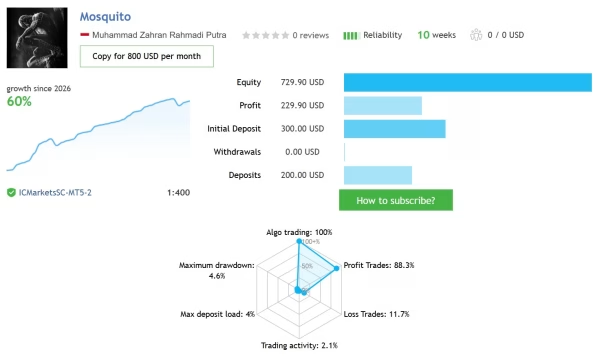
Live Signal – Click Here
Vendor Site – Click Here
| Membership | Yearly Membership |
|---|---|
| Additional Services | Unlock & Decompile |
| Recommended Brokers | Exness Broker, FPMarkets |
| Recommended VPS | FXVM (Low Latency) |
| Youtube Channel | ForexForYou |
| Telegram Channel | Onshoppie Forex EA's & Indicators |
| Telegram Support | Onshoppie Support |
| Installation Guides | Onshoppie Forex Guides |
Brand
ea-mt5
Only logged in customers who have purchased this product may leave a review.
Related products



Products
-
 The Gold Reaper EA MQ5 V4.1 Source Code + Setfiles
Original price was: $949.00.$29.95Current price is: $29.95.
The Gold Reaper EA MQ5 V4.1 Source Code + Setfiles
Original price was: $949.00.$29.95Current price is: $29.95.
-
 ATM Alpha BOT MT5 For Build 5984+
$14.95
ATM Alpha BOT MT5 For Build 5984+
$14.95
-
 Pandora Box EA MT5 V1.1 + SetFiles With DLL 5984
$14.95
Pandora Box EA MT5 V1.1 + SetFiles With DLL 5984
$14.95
-
 Bully Max Pro EA MT5 For Build 5984+
$14.95
Bully Max Pro EA MT5 For Build 5984+
$14.95
-
 Trinetra EA MT5 + SetFiles For Build 5984+
$34.95
Trinetra EA MT5 + SetFiles For Build 5984+
$34.95
-
 Strict HedgeZone Final EA MT5 V10 + SetFiles For Build 5984+
$14.95
Strict HedgeZone Final EA MT5 V10 + SetFiles For Build 5984+
$14.95
-
 NEXORA EA MT5 For Build 5984+
$14.95
NEXORA EA MT5 For Build 5984+
$14.95
-
 3X COMBO AI EA MT5 V7 For Build 5984+
$14.95
3X COMBO AI EA MT5 V7 For Build 5984+
$14.95
Recent reviews
-
 Advanced Dashboard Currency Strength
by Balram
Advanced Dashboard Currency Strength
by Balram
Reviews
There are no reviews yet.