
MON SCALPER EA MT4 For BUILD 1455+
Original price was: $499.00.$9.95Current price is: $9.95.
MON SCALPER EA is an automated trading robot built for MetaTrader 4. Unlike many scalpers, it is designed exclusively for XAUUSD on the 15-minute chart.

Description
MON SCALPER EA – A Practical Guide for Gold Traders
MON SCALPER EA: Trade Gold Like Clockwork (Alternative Title)
Table of Contents
- What Is MON SCALPER EA?
- Why Trade Only Gold (XAUUSD)?
- Step-by-Step Installation Guide
- Frequently Asked Questions
- Final Thoughts
What Is MON SCALPER EA?
MON SCALPER EA is an automated trading robot (Expert Advisor) built for MetaTrader 4 and MetaTrader 5. Unlike many scalpers, it is designed exclusively for XAUUSD (Gold) on the 15-minute chart. The EA waits for two separate trendlines—one long term and one short term—to point in the same direction. Only when both lines agree and a breakout forms does the EA place a buy or sell order.
In plain English: the program looks for a strong push on gold, checks it twice, and then trades.
Why Trade Only Gold (XAUUSD)?
- High Liquidity – Gold enjoys tight spreads during most of the day.
- Predictable Sessions – XAUUSD often moves sharply during the London–New York overlap.
- Distinct Trend Moves – Gold tends to respect trendlines; ideal for breakout scalping.
- Consistent Volatility – Enough price action to make short targets viable without extending risk.
Curious about gold as an asset? Check the Investopedia gold overview for a beginner-friendly read.
Step-by-Step Installation Guide for MON SCALPER EA
Prerequisites
- MetaTrader 4 or 5 platform installed.
- XAUUSD chart open on M15.
- MON SCALPER EA file (.ex4).
1. Copy the EA File
File → Open Data Folder → MQL4/Experts Paste MonScalper.ex4.
2. Restart or Refresh
Right-click inside Navigator → “Refresh” or simply restart MetaTrader.
3. Attach to Chart
- Drag MonScalper onto the XAUUSD M15 chart.
- Allow “Algo Trading” and “DLL imports” if prompted.
4. Load Default Settings
- Click “OK”.
5. Enable AutoTrading
The green play button (MetaTrader 4) or “Algo Trading” slider (MetaTrader 5) must be active.
Tip: To run multiple charts on one account, add a separate XAUUSD M15 window for each risk level and attach a copy of the EA with adjusted lot size.
Frequently Asked Questions Regarding MON SCALPER EA
Q1: Can I change the symbol to silver or FX pairs?A: The EA is not coded for other pairs. You can, but expect untested behaviour.
Q3: How many trades per day?A: On average 1–5. Some days none—patience is part of the strategy.
Q4: What broker type is best—ECN or standard?A: Both work. A raw/ECN account with low commission usually yields tighter total costs.
Q5: Do I need to leave my PC on?A: If you run on a VPS, no. If local, the platform must stay open.
Final Thoughts About MON SCALPER EA
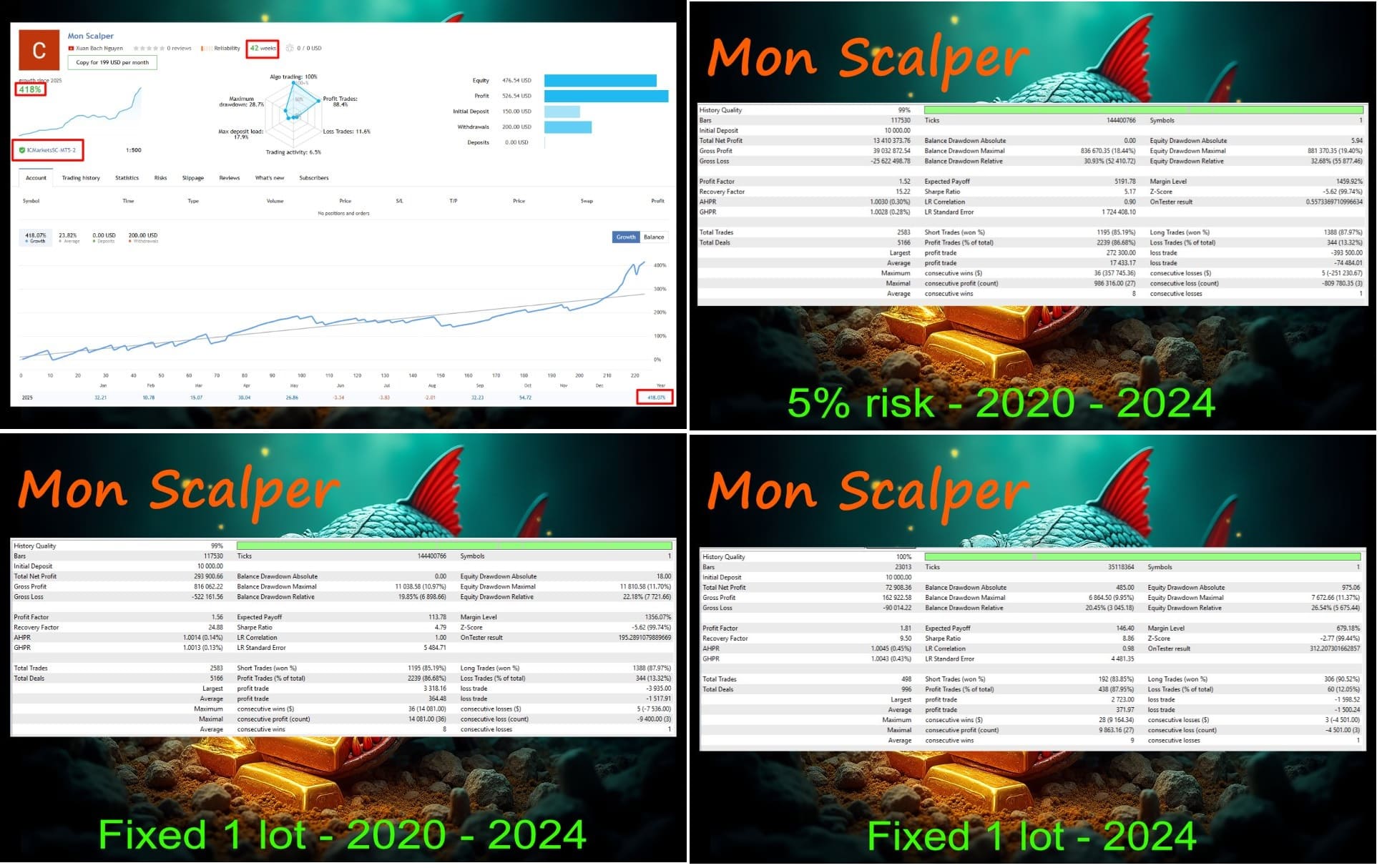
MON SCALPER EA offers a straightforward path for traders who enjoy gold’s movement but prefer an automated solution. With its dual-trendline check, fixed stop loss, and avoidance of risky tactics like martingale, the EA aims to keep drawdowns reasonable while catching clean breakouts.
If you are looking for an Expert Advisor that focuses on discipline rather than gambling, consider giving MON SCALPER EA a trial on a demo account first. Keep the setup simple, follow the recommended risk rules, and track results in a trade journal. Happy trading!
Ready to dive in? Download MON SCALPER EA, set it up on an XAUUSD M15 chart, and start observing its trades today.
Disclaimer: Trading carries risk. Past performance is not a guarantee of future returns.
Vendor Site – Click Here
| Membership | Yearly Membership |
|---|---|
| Additional Services | Unlock & Decompile |
| Recommended Brokers | Exness Broker, FPMarkets |
| Recommended VPS | FXVM (Low Latency) |
| Youtube Channel | ForexForYou |
| Telegram Channel | Onshoppie Forex EA's & Indicators |
| Telegram Support | Onshoppie Support |
| Installation Guides | Onshoppie Forex Guides |
Brand
ea-mt4
Only logged in customers who have purchased this product may leave a review.
Related products


Products
-
 Quantum Queen X EA MT5 V4.3 MQ5 Source Code
Original price was: $1,799.00.$19.95Current price is: $19.95.
Quantum Queen X EA MT5 V4.3 MQ5 Source Code
Original price was: $1,799.00.$19.95Current price is: $19.95.
-
 Smart Gold Hunter EA MT5 V2.0 MQ5 Source Code
Original price was: $249.00.$28.95Current price is: $28.95.
Smart Gold Hunter EA MT5 V2.0 MQ5 Source Code
Original price was: $249.00.$28.95Current price is: $28.95.
-
 The Gold Reaper EA MQ5 V4.1 Source Code + Setfiles
Original price was: $949.00.$19.95Current price is: $19.95.
The Gold Reaper EA MQ5 V4.1 Source Code + Setfiles
Original price was: $949.00.$19.95Current price is: $19.95.
-
 ATM Alpha BOT MT5 For Build 5984+
$14.95
ATM Alpha BOT MT5 For Build 5984+
$14.95
-
 Pandora Box EA MT5 V1.1 + SetFiles With DLL 5984
$14.95
Pandora Box EA MT5 V1.1 + SetFiles With DLL 5984
$14.95
-
 Bully Max Pro EA MT5 For Build 5984+
$14.95
Bully Max Pro EA MT5 For Build 5984+
$14.95
-
 Trinetra EA MT5 + SetFiles For Build 5984+
$34.95
Trinetra EA MT5 + SetFiles For Build 5984+
$34.95
-
 Strict HedgeZone Final EA MT5 V10 + SetFiles For Build 5984+
$14.95
Strict HedgeZone Final EA MT5 V10 + SetFiles For Build 5984+
$14.95
Recent reviews
-
 Advanced Dashboard Currency Strength
by Balram
Advanced Dashboard Currency Strength
by Balram
Reviews
There are no reviews yet.