

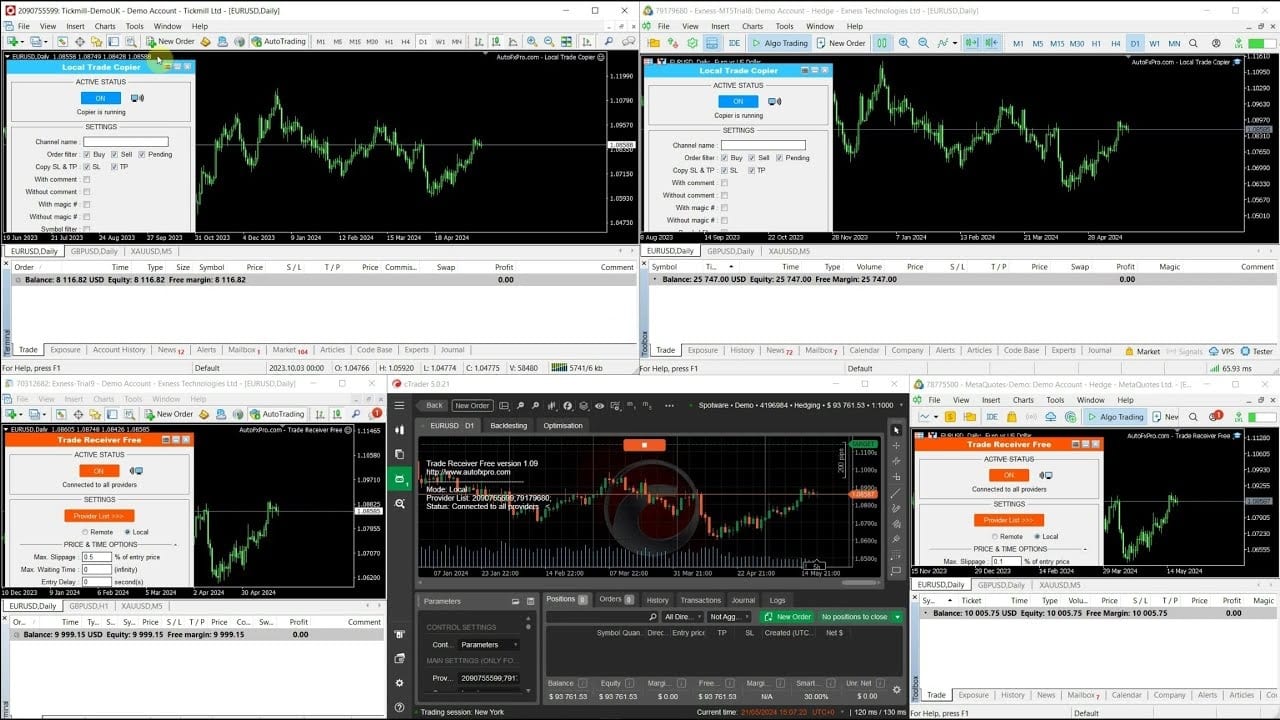

Local Trade Copier EA MT4 For All Builds
Original price was: $50.00.$14.95Current price is: $14.95.
Local Trade Copier fits that need. It is an automated trading system for MetaTrader 4 (MT4) puts trend recognition, timing filters, and strict risk control.




Description
Local Trade Copier: The Complete Guide for Stress-Free Multi-Account Trading
Local Trade Copier – Why It Is Still the Best Copier on the Market
Table of Contents
- What Is a Local Trade Copier?
- How the Local Trade Copier Works
- Step-by-Step Setup Guide
- Troubleshooting & FAQ
- Final Thoughts & Next Steps
What Is a Local Trade Copier?
A Local Trade Copier (LTC) is a small piece of software that instantly copies trading positions from one account (the “provider”) to one or more other accounts (the “receivers”) running on the same computer or Virtual Private Server (VPS).
Unlike cloud or social copy services, a local solution keeps every order inside your own trading terminal, giving you full control and near-zero delay.
In short, the Local Trade Copier sends your trades from MT4, to unlimited follower accounts with super-fast execution and plenty of safety checks.
How the Local Trade Copier Works
- You open two (or more) terminals on the same machine.
- Attach the Provider EA to the master account.
- Attach the Receiver EA to each follower account.
- The Provider watches for new positions, modifications, and closures.
- Once detected, the Receiver instantly sends the equivalent order to its own broker.
Because everything happens locally, the delay is often less than 50 ms—faster than most cloud solutions that route orders through external servers.
Need to see it in action? Check the short demo on YouTube. (External link)
Step-by-Step Setup Guide
Prerequisites
- Windows PC or Windows-based VPS
- MT4, cTrader installed
- Account logins for each terminal
- Sufficient free RAM (approx. 200 MB per terminal)
Installation
- Download the latest Local Trade Copier package from the official site.
- Extract the ZIP and copy the .ex4 files into
MQL4/Experts. - Restart each terminal so MetaTrader recognizes the files.
Configuration
- In Tools → Options → Expert Advisors, tick “Allow automated trading.”
- Drag the Provider EA onto any chart in the master account.
- Drag the Receiver EA onto charts in follower accounts.
Quick Test
- Place a 0.10 lot EURUSD market order in the master.
- Watch the follower account open the same (or proportional) position almost instantly.
- Close the trade on the Provider; check the Receiver closes, too.
If everything matches, you’re ready for live trading.
Troubleshooting & FAQ Regarding Local Trade Copier
Q: My receiver didn’t copy a trade. Why?A: Look at the “Copy Filter” log; spread, symbol mismatch, or time filters may have blocked it.
Q: I see partial fills on the follower.A: Some brokers route orders differently. Switch to market execution instead of instant if possible.
Final Thoughts & Next Steps for Local Trade Copier
The Copier remains a favorite among multi-account traders because it is both simple for beginners and powerful for experts. Whether you manage money, provide signals, or just juggle several personal accounts, a reliable copier saves time, reduces errors, and lets you focus on strategy instead of admin work.
Happy trading!
Vendor Site – Click Here
| Membership | Yearly Membership |
|---|---|
| Additional Services | Unlock & Decompile |
| Recommended Brokers | Exness Broker, FPMarkets |
| Recommended VPS | FXVM (Low Latency) |
| Youtube Channel | ForexForYou |
| Telegram Channel | Onshoppie Forex EA's & Indicators |
| Telegram Support | Onshoppie Support |
| Installation Guides | Onshoppie Forex Guides |
Brand
ea-mt4
Only logged in customers who have purchased this product may leave a review.
Related products



Products
-
 ThunderGold Scalper MT5 V1.3 + Setfiles For Build 6140+
Original price was: $379.00.$14.95Current price is: $14.95.
ThunderGold Scalper MT5 V1.3 + Setfiles For Build 6140+
Original price was: $379.00.$14.95Current price is: $14.95.
-
 Steve Pro EA MT5 V5.0 + Setfiles For Build 6140+
$14.95
Steve Pro EA MT5 V5.0 + Setfiles For Build 6140+
$14.95
-
 HEXA FX Scalper EA MT5 With DLL Build 6140
Original price was: $749.00.$34.95Current price is: $34.95.
HEXA FX Scalper EA MT5 With DLL Build 6140
Original price was: $749.00.$34.95Current price is: $34.95.
-
 H4 Gold Scalper EA MT5 V1.5 With DLL Build 6122
Original price was: $150.00.$14.95Current price is: $14.95.
H4 Gold Scalper EA MT5 V1.5 With DLL Build 6122
Original price was: $150.00.$14.95Current price is: $14.95.
-
 Mavrik Scalper EA MT5 V18.306 For Build 6140+
$14.95
Mavrik Scalper EA MT5 V18.306 For Build 6140+
$14.95
-
 Dude Alpha Gold EA MT5 V1.4.2 + Set Files For Build 6140+
Original price was: $499.00.$14.95Current price is: $14.95.
Dude Alpha Gold EA MT5 V1.4.2 + Set Files For Build 6140+
Original price was: $499.00.$14.95Current price is: $14.95.
-
 Ultra Beast EA MT5 + Setfiles For Build 6140+
$14.95
Ultra Beast EA MT5 + Setfiles For Build 6140+
$14.95
-
 Algo Edge SMC AI EA MT5 V3 For Build 6140+
$14.95
Algo Edge SMC AI EA MT5 V3 For Build 6140+
$14.95
Recent reviews
-
 Advanced Dashboard Currency Strength
by Balram
Advanced Dashboard Currency Strength
by Balram
Reviews
There are no reviews yet.