




IND SCALPER EA MT4 Forex Trading Robot
$9.95
Ind Scalper EA studies short-term volatility. When price nudges a predefined distance, it adds the first pending order.


Description
Main Title
Ind Scalper EA: A Practical Guide to Fast Forex Scalping on MT4
Alternative Title
Ind Scalper EA – Everything You Need to Know Before You Let It Trade for You
Table of Contents
- What Is Ind Scalper EA?
- How the Grid-Based Scalping Logic Works
- Key Features at a Glance
- Step-by-Step Installation on MetaTrader 4
- Recommended Settings and Money Management
- Choosing a Suitable Broker and VPS
- Back-Test and Forward-Test Results
- Tips to Reduce Risk
- Frequently Asked Questions
- Pros and Cons
- Final Thoughts & Next Steps
What Is Ind Scalper EA?
Ind Scalper EA is a Forex Expert Advisor designed to catch quick price moves on pairs such as EURUSD, GBPUSD, AUDUSD, USDCHF, USDJPY, and USDCAD.
- It places small, rapid trades on the 5-minute (M5) and 1-hour (H1) charts.
- The system relies on a well-defined grid method rather than martingale or hedging.
- Pending orders and trailing stops are set automatically, allowing the EA to adapt to sharp market moves and scheduled news releases.
For a broader overview of Expert Advisors, see our complete EA comparison guide.
How the Grid-Based Scalping Logic Works
1. Entry Logic
Ind Scalper EA studies short-term volatility. When price nudges a predefined distance, it adds the first pending order. If price keeps moving in the same direction, the grid expands in measured steps.
2. Trade Volume
Lot sizes are fixed (or can be set to a small percentage of equity). Because the EA does not double the lot size as in martingale, each new order keeps risk predictable.
3. Exit Logic
- A built-in trailing stop locks in gains.
- Should the floating loss hit your preset limit, the EA closes all open positions automatically.
4. News Filter
High-impact events from the economic calendar can trigger large spreads and slippage. The Ind Scalper EA news filter pauses new trades several minutes before and after big announcements. Data is fetched in real time from an external web source (you can enter your own news URL in the EA settings).
Key Features at a Glance
| Feature | Description |
|---|---|
| Platform | MetaTrader 4 |
| Timeframes | M5 and H1 |
| Pairs | EURUSD, GBPUSD, AUDUSD, USDCHF, USDJPY, USDCAD |
| Method | Grid-based scalping, no martingale |
| Minimum Deposit | 500 USD (or currency equivalent) |
| News Filter | Built in |
| Stop-Loss Protection | Global loss cap and per-trade SL |
| Trailing Stop | Yes |
| VPS | Low-latency (under 10 ms) strongly advised |
Step-by-Step Installation on MetaTrader 4
Time to finish: About 15 minutes
- Download the EA file (
.ex4or.mq4). - Open MT4 → File → Open Data Folder →
MQL4/Experts/. - Copy the EA file into the
Expertsfolder. - Restart MT4 or right-click Expert Advisors → Refresh.
- Drag Ind Scalper EA onto your M5 chart.
- Check Allow live trading and Allow DLL imports.
- Enter your preferred lots, grid step, news filter URL, and max daily loss in the Inputs tab.
- Click OK. When the smiley face appears in the top-right corner of the chart, you are live.
Need visual help? See our illustrated tutorial: Installing an EA on MT4.
Recommended Settings and Money Management
| Parameter | Suggested Value | Why It Matters |
|---|---|---|
| Lots | 0.01 per 1 000 USD | Keeps risk moderate |
| Grid Step (points) | 15–25 on EURUSD | Wider steps calm choppy periods |
| Max Trades | 5–7 | Limits exposure |
| Global Loss Cap | 3 % of account per day | Stops a losing streak |
| Trailing Stop | 50 points | Locks gains without cutting winners too soon |
| News Pause (minutes) | 15 before & 10 after | Avoids spread spikes |
Pro tip: Once your account balance doubles, consider withdrawing the original capital and letting profits trade on. Regular withdrawals guard against sudden market shocks.
Choosing a Suitable Broker and VPS
Broker Checklist
- Account Type: ECN, PRO, or Raw Spread.
- Spread: Below 1 pip on EURUSD during peak hours.
- Commission: ≤ 7 USD per lot round turn.
- Execution Delay: ≤ 100 ms (lower is better).
Popular choices among Ind Scalper EA users include:
- IC Markets Raw
- Pepperstone Razor
- Tickmill Pro
VPS Checklist
- Ping to Broker: < 10 ms.
- RAM: 1 GB minimum per MT4 terminal.
- CPU: 1 core at 2 GHz+.
- Cost: Free trials are available at Amazon AWS, Google Cloud, and some brokers for active traders.
Back-Test and Forward-Test Results
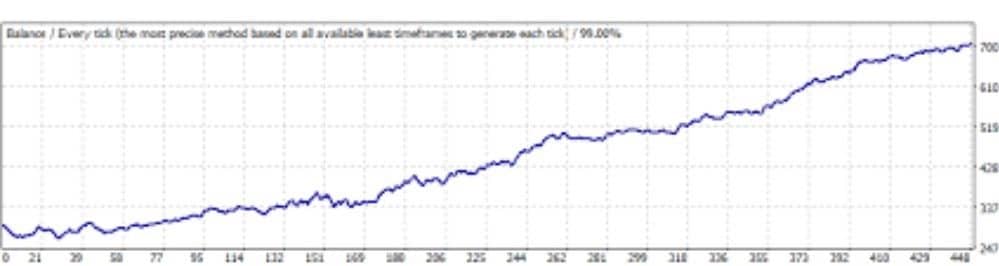
Back-Test (2015-2023)
- Pair: EURUSD
- Model: Tick data, spread 0.6 pip, 99 % modeling quality
- Initial Deposit: 1 000 USD
- Net Profit: 5 430 USD
- Max Drawdown: 12.7 %
- Profit Factor: 2.31
Forward-Test (Live, Jan–Apr 2024)
- Account: 1 500 USD live ECN
- Gain: +18.4 %
- Max DD: 4.3 %
- Trades: 486
- Win Rate: 82 %
Tips to Reduce Risk
- Trade Only Approved Pairs – the EA is calibrated for the six majors listed.
- Avoid Overlapping Sessions – spreads widen at rollover (23:59 MT4 time).
- Update News Calendar Weekly – verify the filter still connects to the data feed.
- Set a Weekly Profit Target – for example, 5 %. Switch the EA off after you hit it.
- Keep Leverage Sensible – 1:100 is enough because positions are small. Higher leverage tempts over-trading.
- Use Separate MT4 Accounts – isolate the EA from manual trades to keep reporting clean.
Frequently Asked Questions
Q1: Does Ind Scalper EA work on MetaTrader 5?A: The current build supports MT4 only. An MT5 version is on the roadmap.
Q2: Is 500 USD really enough?A: Technically yes, but many traders start with 1 000 USD to allow more breathing room for the grid.
Q3: What happens during unexpected news when the filter fails?A: The global loss cap should limit damage. Still, keeping an eye on your VPS during major events is good practice.
Q4: Can I run the EA on several pairs at once?A: Yes, but open each pair in a separate chart to avoid internal conflicts. Make sure your CPU and RAM can handle multiple instances.
Q5: How often do I need to update the EA?A: Check the developer’s release notes monthly. Updates often fine-tune the news filter and address broker changes.
Pros and Cons
Pros
- Simple scalping logic, no martingale or hedging
- Built-in news filter
- Works on popular majors with low spreads
- Automatic trailing stop and loss cap
Cons
- Requires a solid VPS for best fills
- Performance depends on broker quality
- Grid trading still faces risk if trends stretch unusually long
Final Thoughts & Next Steps
Ind Scalper EA offers a straightforward way to trade frequent, small moves on major currency pairs. Its grid method, trailing stops, and news filter give traders a layer of protection, while daily loss caps keep emotions out of the equation. If you decide to give Ind Scalper EA a try, start on a demo account, move to a live ECN broker with a low-latency VPS, and stick to a clear withdrawal plan once your balance grows.
Ready to see it in action?
- Download the EA.
- Install on an MT4 demo today.
- Share your results in the comments below or in our Forex community forum.
Happy trading—and remember, capital preservation always comes first with Ind Scalper EA.
CTA: If you found this guide useful, subscribe to our weekly newsletter for more hands-on EA reviews, strategy tweaks, and broker promos.
Vendor Site – Private
✍️ Reviews
???? https://www.myfxbook.com/members/indscalper/ind-scalper/9633352
| Membership | Yearly Membership |
|---|---|
| Additional Services | Unlock & Decompile |
| Recommended Brokers | Exness Broker, FPMarkets |
| Recommended VPS | FXVM (Low Latency) |
| Youtube Channel | ForexForYou |
| Telegram Channel | Onshoppie Forex EA's & Indicators |
| Telegram Support | Onshoppie Support |
| Installation Guides | Onshoppie Forex Guides |
Brand
ea-mt4
Only logged in customers who have purchased this product may leave a review.
Related products



Products
-
 Quantum Queen X EA MT5 V4.3 MQ5 Source Code
Original price was: $1,799.00.$19.95Current price is: $19.95.
Quantum Queen X EA MT5 V4.3 MQ5 Source Code
Original price was: $1,799.00.$19.95Current price is: $19.95.
-
 Smart Gold Hunter EA MT5 V2.0 MQ5 Source Code
Original price was: $249.00.$28.95Current price is: $28.95.
Smart Gold Hunter EA MT5 V2.0 MQ5 Source Code
Original price was: $249.00.$28.95Current price is: $28.95.
-
 The Gold Reaper EA MQ5 V4.1 Source Code + Setfiles
Original price was: $949.00.$19.95Current price is: $19.95.
The Gold Reaper EA MQ5 V4.1 Source Code + Setfiles
Original price was: $949.00.$19.95Current price is: $19.95.
-
 ATM Alpha BOT MT5 For Build 5984+
$14.95
ATM Alpha BOT MT5 For Build 5984+
$14.95
-
 Pandora Box EA MT5 V1.1 + SetFiles With DLL 5984
$14.95
Pandora Box EA MT5 V1.1 + SetFiles With DLL 5984
$14.95
-
 Bully Max Pro EA MT5 For Build 5984+
$14.95
Bully Max Pro EA MT5 For Build 5984+
$14.95
-
 Trinetra EA MT5 + SetFiles For Build 5984+
$34.95
Trinetra EA MT5 + SetFiles For Build 5984+
$34.95
-
 Strict HedgeZone Final EA MT5 V10 + SetFiles For Build 5984+
$14.95
Strict HedgeZone Final EA MT5 V10 + SetFiles For Build 5984+
$14.95
Recent reviews
-
 Advanced Dashboard Currency Strength
by Balram
Advanced Dashboard Currency Strength
by Balram
Reviews
There are no reviews yet.