

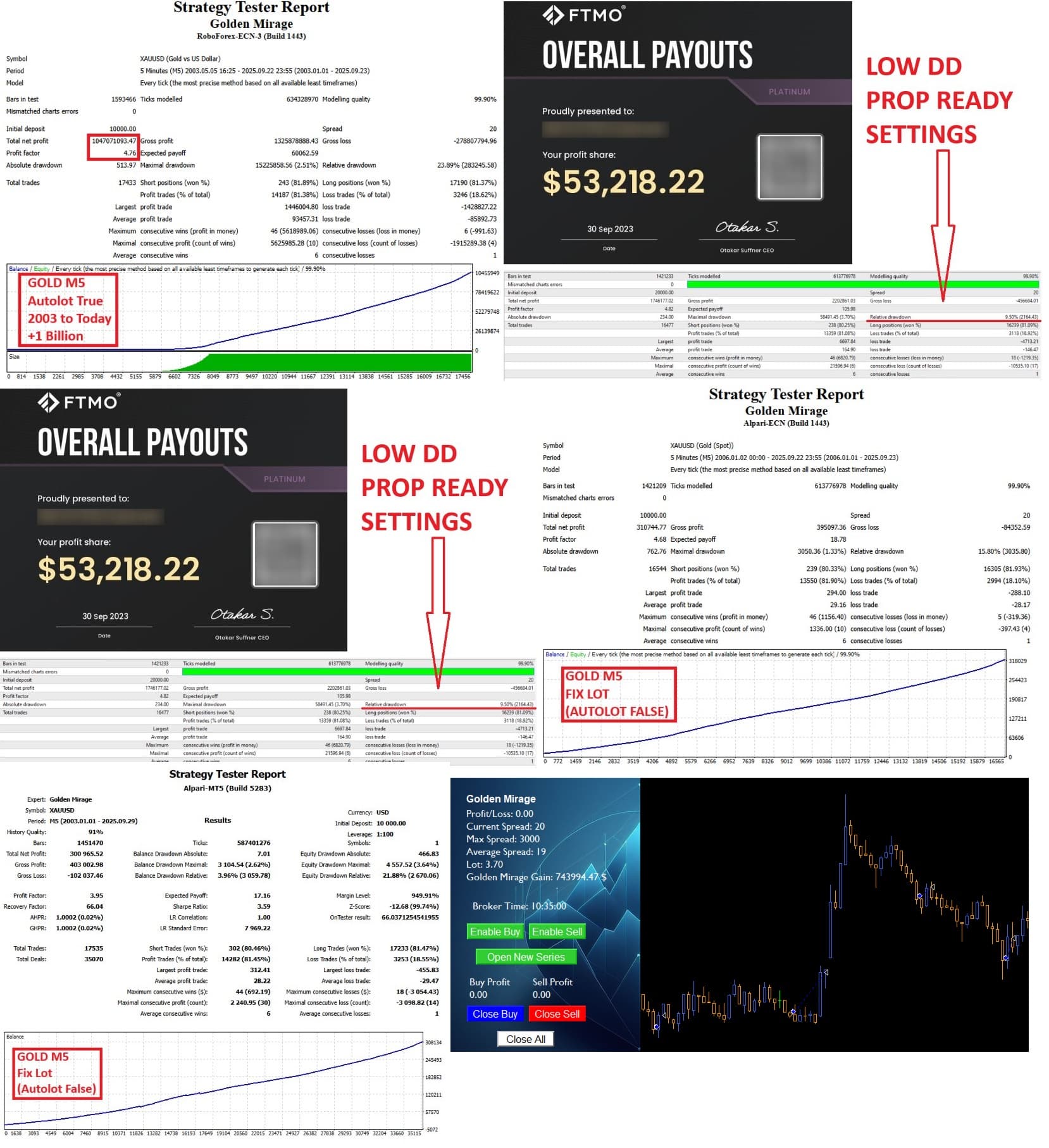

Golden Mirage EA MT4 v2.50 FOR Build 1455+
Original price was: $299.00.$9.95Current price is: $9.95.
Golden Mirage EA answers that need by offering a straightforward, fully automated approach designed for XAUUSD on the M5 chart.





Description
Golden Mirage EA: A Practical Guide to Reliable Gold Trading
Golden Mirage EA – Everything You Need to Know Before You Trade
Table of Contents
- Introduction Golden Mirage EA
- What Is Golden Mirage EA?
- Why Consistency Matters in Gold Trading Robots
- Step-by-Step Setup Guide
- Frequently Asked Questions
- Final Thoughts
Introduction
Gold trading attracts many retail and professional traders alike, yet it demands discipline and a solid method. Golden Mirage EA answers that need by offering a straightforward, fully automated approach designed for XAUUSD on the M5 chart. Backed by a blend of classic indicators—RSI, Moving Average, ADX, and High/Low levels—this robot promises reliable performance without complicated setup. In this post, we dive into how it works, why it may suit your style, and what to expect once you deploy it.
What Is Golden Mirage EA?
Golden Mirage EA is a gold trading robot built for traders who appreciate simplicity and steady returns. The default settings are pre-optimized, meaning you can install, attach, and trade without hours of tweaking. Here’s a quick snapshot:
| Attribute | Detail |
|---|---|
| Symbol | XAUUSD (GOLD) |
| Timeframe | M5 |
| Core Indicators | RSI, Moving Average, ADX, High/Low Levels |
| Risk Tools | Autolot, Risk %, Spread Filter, Unique Magic Number |
| Prop Firm Support | Max Daily Drawdown, Max Account Drawdown |
Unlike many “black box” systems, Golden Mirage relies on transparent logic you can verify in the code and in backtests.
Why Consistency Matters in Gold Trading Robots
Gold moves fast—sometimes too fast for manual trades. Consistency gives you:
- Stress Reduction – The robot follows its rules every time.
- Data-Driven Results – With a fixed method, you can measure and refine.
- Improved Risk Control – Automated stops and lot sizing prevent impulsive manual errors.
- Regulation Compliance – For prop firms, stable strategies keep drawdowns inside limits.
Golden Mirage EA was created after hundreds of forward tests to refine these aspects.
Step-by-Step Setup Guide for Golden Mirage EA
- Download & Install
- Copy
GoldenMirageEA.ex4or.ex5into theExpertsfolder. - Restart MetaTrader.
- Copy
- Open XAUUSD M5 Chart
- Check that your broker supplies at least 1:100 leverage for gold.
- Drag EA Onto the Chart
- Tick “Allow Algo Trading.”
- Choose the risk mode:
- Fixed lot
- Autolot by Account Balance
- Autolot by Equity
- Adjust Prop Firm Settings (Optional)
- Set Max Daily Drawdown to match your funding rules.
- Input Max Total Drawdown percent.
- Enable News Filter (Optional)
- You may prefer the EA to pause during high-impact news. A free calendar feed can trigger this.
- Click OK
- A smiley face in the chart corner shows it’s active.
Internal link: Full Installation Guide
Frequently Asked Questions Regarding Golden Mirage EA
Q1: Does Golden Mirage EA trade other pairs?A: It is coded for XAUUSD on M5. You may try other metals, but results will differ.
Q2: Can I run it on a VPS?A: Yes. A VPS with 1 GB RAM and low ping to your broker is ideal.
Q3: How often does it trade?A: About 40–60 trades a week under normal volatility.
Q4: Is the code open source?A: The logic is visible in MetaEditor, though core functions may be compiled.
Q5: What account size do I need?A: Even $200 works if you use low risk. For smoother equity curves, $1,000+ is suggested.
Final Thoughts About Golden Mirage EA
Golden Mirage EA gives gold traders a balanced mix of reliability, simplicity, and pro-level features. The pre-optimized setup saves time, while transparent risk tools keep you in control. Whether you trade your own funds or a prop firm account, a methodical approach like this can help you stay consistent in the fast-moving world of XAUUSD. Test, monitor, and refine—and let Golden Mirage EA do the heavy lifting while you focus on the bigger picture.
Need more details? Drop your questions in the comments or visit our Golden Mirage FAQ page. Good trading!
Vendor Site – Click Here
| Membership | Yearly Membership |
|---|---|
| Additional Services | Unlock & Decompile |
| Recommended Brokers | Exness Broker, FPMarkets |
| Recommended VPS | FXVM (Low Latency) |
| Youtube Channel | ForexForYou |
| Telegram Channel | Onshoppie Forex EA's & Indicators |
| Telegram Support | Onshoppie Support |
| Installation Guides | Onshoppie Forex Guides |
Brand
ea-mt4
Only logged in customers who have purchased this product may leave a review.
Related products



Products
-
 Quantum Queen X EA MT5 V4.3 MQ5 Source Code
Original price was: $1,799.00.$19.95Current price is: $19.95.
Quantum Queen X EA MT5 V4.3 MQ5 Source Code
Original price was: $1,799.00.$19.95Current price is: $19.95.
-
 Smart Gold Hunter EA MT5 V2.0 MQ5 Source Code
Original price was: $249.00.$28.95Current price is: $28.95.
Smart Gold Hunter EA MT5 V2.0 MQ5 Source Code
Original price was: $249.00.$28.95Current price is: $28.95.
-
 The Gold Reaper EA MQ5 V4.1 Source Code + Setfiles
Original price was: $949.00.$19.95Current price is: $19.95.
The Gold Reaper EA MQ5 V4.1 Source Code + Setfiles
Original price was: $949.00.$19.95Current price is: $19.95.
-
 ATM Alpha BOT MT5 For Build 5984+
$14.95
ATM Alpha BOT MT5 For Build 5984+
$14.95
-
 Pandora Box EA MT5 V1.1 + SetFiles With DLL 5984
$14.95
Pandora Box EA MT5 V1.1 + SetFiles With DLL 5984
$14.95
-
 Bully Max Pro EA MT5 For Build 5984+
$14.95
Bully Max Pro EA MT5 For Build 5984+
$14.95
-
 Trinetra EA MT5 + SetFiles For Build 5984+
$34.95
Trinetra EA MT5 + SetFiles For Build 5984+
$34.95
-
 Strict HedgeZone Final EA MT5 V10 + SetFiles For Build 5984+
$14.95
Strict HedgeZone Final EA MT5 V10 + SetFiles For Build 5984+
$14.95
Recent reviews
-
 Advanced Dashboard Currency Strength
by Balram
Advanced Dashboard Currency Strength
by Balram
Reviews
There are no reviews yet.