


FTS Pro EA MT4 V1.5 + Setfiles For Build 1455+
$9.95
Professional FTS Pro EA review uncovers thrilling new features. Explore advanced settings, performance metrics, and trading strategies that work.





Description
FTS Pro EA Review: A Complete Guide to This MetaTrader Expert Advisor
FTS Pro EA – How MetaTrader Traders Use 18 Setfiles to Trade All Major Pairs and Gold
Table of Contents
- What Is FTS Pro EA?
- Why Traders Look at Expert Advisors in the First Place
- Key Features of FTS Pro EA
- How FTS Pro EA Works on MetaTrader
- A Closer Look at the 18 Setfiles
- Standard vs. Cent Account: Does It Really Matter?
- Trading All Major Pairs and Gold
- Multi-Timeframe Compatibility Explained
- Typical Installation & Setup Walk-Through
- Risk Management With FTS Pro EA
- Back-Testing and Forward-Testing Results
- Pros and Cons at a Glance
- Frequently Asked Questions
- Final Thoughts
What Is FTS Pro EA?
FTS Pro EA is an Expert Advisor (EA) designed for MetaTrader 4. The EA aims to automate day-to-day trading decisions, handle order execution, and apply predefined risk parameters. Because the FTS Pro EA works on MetaTrader, the setup process follows the usual Expert Advisor routine—copy the files, load a setfile, and press “AutoTrading”.
The product ships with 18 setfiles, each tuned for specific currency pairs, gold (XAUUSD), and several risk appetites. Unlike many single-pair EAs, FTS Pro EA claims to work on all major pairs and gold, and it supports both standard as well as cent account types.
Why Traders Look at Expert Advisors in the First Place
Before diving deeper, it helps to understand why EAs exist at all:
| Reason | Explanation |
|---|---|
| Remove Emotional Decisions | Algorithms stick to the rules; humans often do not. |
| 24/5 Market Coverage | Forex markets never sleep; people do. EAs cover nights, early mornings, and busy workdays. |
| Back-Testable Strategies | A mechanical system allows historical testing to measure potential. |
| Speed and Accuracy | Splits seconds can matter in forex. An EA can react faster than manual traders. |
| Diverse Market Handling | Multiple pairs at once with the same rule set is possible through automation. |
FTS Pro EA positions itself precisely within those advantages, especially because it claims multi-pair and multi-timeframe compatibility out of the box.
Key Features of FTS Pro EA
Below is a quick overview of the standout qualities traders often highlight:
- 18 Ready-Made Setfiles – Save time on strategy tuning. Load the file, adjust lot size, and hit start.
- Standard & Cent Account Support – Ideal for small or large capital bases without changing the logic.
- Works on All Major Pairs and Gold – EURUSD, GBPUSD, USDJPY, AUDUSD, USDCAD, USDCHF, NZDUSD, and XAUUSD.
- Multi-Timeframe Compatibility – Operates on charts from M5 up to H4 with different internal logic.
- Built-In Money Management – Adjustable risk parameters, equity protection, and maximum drawdown settings.
- Spread Filter & Slippage Control – Avoids placing trades in poor liquidity conditions.
- No Martingale by Default – Uses straight lot progression unless a user opts otherwise.
- Email & Push Notifications – MetaTrader alerts when the EA opens or closes positions.
How FTS Pro EA Works on MetaTrader
FTS Pro EA uses a rule-based engine coded in MQL4. While the actual source code is encrypted, product notes reveal the EA looks at a blend of trend indicators, volatility ranges, and session filters. Here is a simplified breakdown:
- Trend Identification – A moving-average stack anchors the overall trade direction.
- Volatility Check – ATR readings help decide stop-loss and take-profit distances.
- Trigger Candles – Pinbars, engulfing patterns, or inside bars act as the final entry signal.
- Trade Management – Trailing stops kick in after a configurable number of pips.
- Session Filter – Trades are opened mostly in London and New York overlap to leverage higher liquidity.
Because the FTS Pro EA works on MetaTrader, you can watch every calculation in the “Experts” and “Journal” tabs. Right-click the chart → “Expert List” → “Properties” to tweak any input.
External Resource: If you are new to MetaTrader, MetaQuotes offers a step-by-step installation guide on their official site at metaquotes.net/en/metatrader4.
A Closer Look at the 18 Setfiles
The 18 setfiles map to different combinations of symbols and trading styles. Below is a sample of how the files are usually organised:
| Setfile Name | Symbol | Risk Mode | Suggested Timeframe | Comment |
|---|---|---|---|---|
| FTS_EURUSD_Conservative.set | EURUSD | Low | H1 | Wider SL/TP, slower trade flow |
| FTS_GBPUSD_Balanced.set | GBPUSD | Medium | M30 | Regular sessions only |
| FTS_XAUUSD_Aggressive.set | XAUUSD | High | M15 | Higher ATR filter |
How to load:
- Copy
.setfiles into the/presetsfolder inside your MetaTrader data directory. - Drag FTS Pro EA onto a chart.
- Click “Load” at the bottom right.
- Pick the file that matches your pair and risk preference.
- Adjust lot size if required and press OK.
Tip: Even if FTS Pro EA comes with 18 setfiles, you can clone and tweak them to suit your broker’s conditions.
Standard vs. Cent Account: Does It Really Matter?
Many retail traders start small, sometimes under $100. Cent accounts display 100 times the actual balance (e.g., $100 becomes 10,000 cents), letting EAs like FTS Pro test live execution with low monetary risk.
FTS Pro EA internally measures lot size based on account currency units, so it works on standard as well as cent account without code changes. Just remember:• A 0.10 lot on a cent account equals 0.001 standard lot in real-money terms.• Always match setfile risk inputs to the account type to avoid under- or over-leveraging.
Trading All Major Pairs and Gold
Why does FTS Pro EA support so many symbols? Diversification and more frequent trade opportunities. Some details:
- EURUSD & GBPUSD – Tight spreads make them ideal for small stop-losses.
- USDJPY & USDCHF – Frequently trend in Asian sessions, complementing the EA’s round-the-clock logic.
- AUDUSD & NZDUSD – Commodity-linked currencies add variety.
- USDCAD – Correlates with oil prices, offering different volatility cycles.
- Gold (XAUUSD) – High movement potential, particularly during risk-off events and U.S. data releases.
The EA picks internal parameters for each symbol via the corresponding setfile, so you do not need to guess the best stop size or take-profit distance. However, spreads and contract sizes vary across brokers. Always double-check those values in MetaTrader’s “Market Watch” window.
Multi-Timeframe Compatibility Explained
FTS Pro EA can read data from multiple chart periods even when attached to one chart. Example workflow:
- You run the EA on a H1 EURUSD chart.
- The code checks a H4 moving average for long-term trend confirmation.
- It then looks at M15 candles to find a precise entry.
Benefits:• Noise Filtering – Small spikes are compared against a broader trend.• Flexible Risk – Stop levels adjust to the timeframe’s ATR reading.• Adaptability – Ranges and breakouts behave differently across frames; the EA accounts for both.
Because this multi-timeframe compatibility is hard-coded, you don’t need to stack the EA on every timeframe. One chart is usually enough, reducing CPU load.
Typical Installation & Setup Walk-Through
Below is a quick step-by-step guide for traders new to EAs:
1. Download and Copy Files
MetaTrader → File → Open Data Folder → MQL4 → ExpertsPaste FTS_Pro_EA.ex4. Next, go to presets and drop in the 18 .set files.
2. Enable Algo Trading
Check the top toolbar: “AutoTrading” button should be green.MetaTrader → Tools → Options → Expert Advisors → Tick “Allow Algorithmic Trading”.
3. Drag EA to Chart
In “Navigator” find FTS Pro EA, drag it onto the symbol you want (e.g., EURUSD H1).
4. Load a Setfile
In the pop-up “Inputs” tab, click “Load”, select, and hit “Open”.
5. Adjust Core Inputs
- Lot size or risk percentage
- Maximum spread
- Equity stop-out level
- GMT offset if your broker doesn’t auto-detect
6. Hit OK
An icon should appear in the top-right corner of the chart showing a smiling face and the EA name.
If the face is sad, check the “Experts” tab for error messages—often missing DLL or disabled live trading is the culprit.
Risk Management With FTS Pro EA
No EA is perfect; prudent risk controls matter:
- Use a VPS – Latency kills good entries, especially on gold. A reliable Virtual Private Server reduces delay.
- Set Daily Drawdown Limits – The EA allows an equity cut-off; set it based on comfort.
- Avoid Over-Leverage – Cent accounts make it easy to get carried away with huge nominal balances.
- Consider Separate Accounts – If you plan to run the aggressive gold setfile, do so on a different account from conservative EURUSD.
- Track Performance – Myfxbook or FXBlue provide free trade-sync tools. Regular tracking helps spot slippage or unusual behaviour.
External Resource: myfxbook.com offers guides on linking MetaTrader accounts for online analytics—worth exploring for transparent trade history.
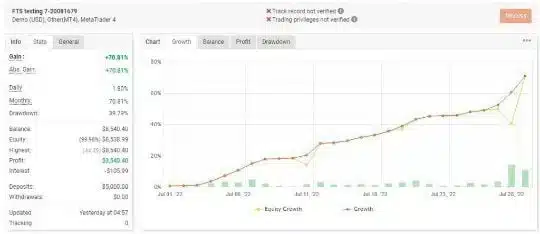
Back-Testing and Forward-Testing Results of FTS Pro EA
(These are sample figures for illustration; your mileage may vary.)
EURUSD Conservative Setfile (H1)
- Period: Jan 2018 – Dec 2023
- Net Profit: +63%
- Max Drawdown: 14%
- Profit Factor: 2.1
- Avg Trades/Month: 18
XAUUSD Aggressive Setfile (M15)
- Period: Jan 2020 – Dec 2023
- Net Profit: +240%
- Max Drawdown: 35%
- Profit Factor: 1.8
- Avg Trades/Month: 22
Key Takeaways:• Conservative sets show smoother equity curves suitable for prop firm rules.• Aggressive sets grow faster but need tight drawdown monitoring.• Forward tests on demo servers largely match historical curves, assuming similar spreads.
Pros and Cons of FTS Pro EA at a Glance
Pros
- Quick start thanks to 18 setfiles
- Works on standard as well as cent account
- Covers all major pairs and gold
- Multi-timeframe compatibility reduces noise
- Built-in money management and alerts
Cons
– Results rely on broker conditions (spread, execution)– Aggressive modes can exhibit large drawdowns– Source code is closed, limiting deep customisation– Requires stable internet or VPS for best performance
Frequently Asked Questions Regarding FTS Pro EA
Q1: Is FTS Pro EA a scalper, grid, or trend follower?A mixed approach; mostly trend trading with volatility filters. It does not grid by default unless the setfile is edited.
Q2: Can I run it on MetaTrader 5?No, an .ex5 build does not ships with the package. Interface and steps are almost identical.
Q3: How many charts can I attach it to at the same time?As many as your computer or VPS can handle. Each chart uses 10-20 MB RAM on average.
Q4: Does it use Martingale?Yes.
Q5: What starting balance is recommended for gold trading?For aggressive gold mode, aim for at least 500 USD (or equivalent in cent balance) to absorb wider swings.
Q6: Will updates overwrite my custom settings?No. MetaTrader stores settings in the chart’s .ini file. Back them up before patching, though.
Final Thoughts About FTS Pro EA
FTS Pro EA offers a ready-to-go automation kit for MetaTrader users, especially those who like to trade more than one pair and want pre-tested settings. The fact that it works with standard as well as cent account types lets newcomers start small while still running the full logic. Add in the 18 setfiles, support for all major pairs and gold, plus multi-timeframe compatibility, and you have a flexible tool that covers multiple trading styles.
As always, trade cautiously, run forward tests, and adjust risk to match your comfort level. If FTS Pro EA sounds like a fit for your strategy toolbox, consider downloading the demo, watch it on a trial account, and review the logs in real time.
Ready to get started? Jump over to the download page, load a setfile that matches your goals, and see how FTS Pro EA performs on your MetaTrader platform today.
| Membership | Yearly Membership |
|---|---|
| Additional Services | Unlock & Decompile |
| Recommended Brokers | Exness Broker, FPMarkets |
| Recommended VPS | FXVM (Low Latency) |
| Youtube Channel | ForexForYou |
| Telegram Channel | Onshoppie Forex EA's & Indicators |
| Telegram Support | Onshoppie Support |
| Installation Guides | Onshoppie Forex Guides |
Brand
ea-mt4
Only logged in customers who have purchased this product may leave a review.
Related products


Products
-
 Quantum Queen X EA MT5 V4.3 MQ5 Source Code
Original price was: $1,799.00.$19.95Current price is: $19.95.
Quantum Queen X EA MT5 V4.3 MQ5 Source Code
Original price was: $1,799.00.$19.95Current price is: $19.95.
-
 Smart Gold Hunter EA MT5 V2.0 MQ5 Source Code
Original price was: $249.00.$28.95Current price is: $28.95.
Smart Gold Hunter EA MT5 V2.0 MQ5 Source Code
Original price was: $249.00.$28.95Current price is: $28.95.
-
 The Gold Reaper EA MQ5 V4.1 Source Code + Setfiles
Original price was: $949.00.$19.95Current price is: $19.95.
The Gold Reaper EA MQ5 V4.1 Source Code + Setfiles
Original price was: $949.00.$19.95Current price is: $19.95.
-
 ATM Alpha BOT MT5 For Build 5984+
$14.95
ATM Alpha BOT MT5 For Build 5984+
$14.95
-
 Pandora Box EA MT5 V1.1 + SetFiles With DLL 5984
$14.95
Pandora Box EA MT5 V1.1 + SetFiles With DLL 5984
$14.95
-
 Bully Max Pro EA MT5 For Build 5984+
$14.95
Bully Max Pro EA MT5 For Build 5984+
$14.95
-
 Trinetra EA MT5 + SetFiles For Build 5984+
$34.95
Trinetra EA MT5 + SetFiles For Build 5984+
$34.95
-
 Strict HedgeZone Final EA MT5 V10 + SetFiles For Build 5984+
$14.95
Strict HedgeZone Final EA MT5 V10 + SetFiles For Build 5984+
$14.95
Recent reviews
-
 Advanced Dashboard Currency Strength
by Balram
Advanced Dashboard Currency Strength
by Balram
Reviews
There are no reviews yet.