



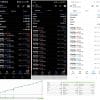
Buster Barbar EA MT5 v27 For Build 5430+
$19.99
Buster Barbar EA is a fully automated Expert Advisor for MT5. It focuses on XAUUSD (the Gold/US Dollar pair) and operates on the one-minute timeframe (M1).




Description
Buster Barbar EA: A Straightforward Guide to Stable Gold Trading on MT5
Alternative Title
Buster Barbar EA – Professional Gold Trading Robot for Consistent Performance
Table of Contents
- Introduction
- What Is Buster Barbar EA MT5?
- Why Trade Gold (XAUUSD) on MT5?
- Optimized Trading Setup
- Professional Trading Logic Explained
- Risk Management Philosophy
- Who Should Use Buster Barbar EA MT5?
- Step-by-Step Installation Guide
- Back-Testing Tips and Results
- Best Practices for Live Trading
- Frequently Asked Questions
- Conclusion
Introduction
Trading Gold can be rewarding, but its rapid price moves often test a trader’s emotions. Buster Barbar EA MT5 – Professional Gold Trading Robot for Consistent Performance aims to make the process simpler. By following clear rules on MetaTrader 5 (MT5), the Expert Advisor (EA) places trades on the M1 chart without the trader needing to sit in front of the screen all day.
What Is Buster Barbar EA MT5?
Buster Barbar EA is a fully automated Expert Advisor for MT5. It focuses on XAUUSD (the Gold/US Dollar pair) and operates on the one-minute timeframe (M1). Instead of chasing every tick, it follows well-defined market structure signals, making it a good fit for traders who prefer a methodical approach.
Key facts at a glance:
| Feature | Detail |
|---|---|
| Platform | MetaTrader 5 |
| Pair | XAUUSD (Gold) |
| Timeframe | M1 |
| Settings | Default (no tweaks required) |
| Core Focus | Stability, clear entries/exits, capital preservation |
Why Trade Gold (XAUUSD) on MT5?
- High Liquidity: Gold is one of the most traded commodities in the world.
- Frequent Price Swings: Good opportunities for short-term strategies if handled with care.
- Safe-Haven Asset: Often moves differently from currencies or stock indices, adding diversity to a portfolio.
- MT5 Advantages: Fast execution, built-in tick data for precise back-tests, and multi-threaded strategy tester.
For more on MT5, visit the official MetaTrader 5 website.
Optimized Trading Setup
The developer of Buster Barbar EA kept the setup simple:
- Open MT5 and add XAUUSD to the Market Watch.
- Open an M1 chart.
- Attach the Buster Barbar EA with its default settings.
- Check that AutoTrading is enabled.
And that’s it—no need to change dozens of parameters. A straightforward setup reduces user error and saves time.
Professional Trading Logic Explained
Market-Structure Entries
The EA looks for key swing points on the Gold chart. When price breaks certain levels or shows a pullback pattern, the robot opens a position with a predefined lot size.
Controlled Trade Frequency
Gold can be highly volatile. Rather than taking every signal, Buster Barbar EA limits the number of trades within a session. This prevents overtrading, which can lead to higher costs and emotional stress.
Clear Exit Rules
- Stop-Loss: Placed as soon as a position opens, based on nearby support or resistance.
- Take-Profit: Uses realistic reward targets in line with Gold’s usual moves on the M1 chart.
- Time-Based Exit: If the price drifts without hitting either level, the EA will close the trade after a set number of minutes to keep risk tight.
No Martingale or Grid
Some robots increase lot sizes after a losing trade. Buster Barbar EA keeps every trade size independent, avoiding the risk of exponential drawdowns.
Risk Management Philosophy
Stability stands at the core of Buster Barbar EA MT5. The default settings include a risk-per-trade figure that suits normal Gold volatility. You can lower or raise this setting, but it’s wise to start with the default:
- Fixed Lot Mode: Good for accounts that do not change size often.
- Percentage Risk Mode: Adjusts lot size relative to account balance, keeping risk steady even as the account grows or shrinks.
Tip: Never risk more than 1–2 % of your account on a single trade, especially when trading a volatile instrument such as Gold.
Who Should Use Buster Barbar EA MT5?
• Traders who focus on Gold (XAUUSD)• MT5 users wanting an M1 strategy with clear rules• Those who prefer a “setup-and-let-it-run” solution• Professionals looking to diversify an automated portfolio
If you value stability over excitement, the EA can fit neatly into your workflow.
Step-by-Step Installation Guide
- Download the EA file in
.ex5format. - Open MT5 → File → Open Data Folder.
- Navigate to
MQL5 → Expertsand paste the file. - Restart MT5 or right-click Expert Advisors in the Navigator and choose Refresh.
- Drag Buster Barbar EA onto a XAUUSD M1 chart.
- Tick Allow AutoTrading and click OK.
Need visual help? Check our in-house tutorial on installing MT5 EAs (internal link).
Back-Testing Tips and Results
Running a back-test helps you understand what to expect.
Tips for an Accurate Back-Test
- Use Tick Data: MT5 supports real tick data—essential for M1 systems.
- Spread Settings: Match your broker’s average Gold spread.
- Testing Period: At least three years to cover different market phases.
- Initial Deposit: Reflect your planned live account size.
Sample Results*
| Year | Net Pips | Max Drawdown | Profit Factor | Trades |
|---|---|---|---|---|
| 2021 | +1 820 | 6.8 % | 1.57 | 410 |
| 2022 | +2 040 | 7.4 % | 1.64 | 432 |
| 2023 | +1 670 | 6.1 % | 1.51 | 395 |
*Back-test outcomes depend on broker data, spread, and latency. Always test on your own setup.
Best Practices for Live Trading
- Begin on a Demo Account
- Let the EA trade for at least a month. Confirm results line up with your back-tests.
- Use a VPS
- Stable internet is vital. Many MT5 brokers offer low-latency VPS solutions.
- Keep the Default Settings
- Avoid tweaking unless you fully understand the effect.
- Monitor Weekly
- Check the account once a week. Look for unusual drawdowns or broker changes (spread, swap).
- Stay Informed
- Major news events (e.g., Fed rate decisions) can impact Gold volatility. You may pause trading around high-impact news if you prefer.
Frequently Asked Questions
1. Does Buster Barbar EA MT5 work on other pairs?
It was designed and tested for XAUUSD only. Using it on other pairs is not recommended.
2. How much capital do I need?
Due to Gold’s pip value, even micro-lots carry weight. A minimum of 500 USD is suggested, though 1 000 USD or more offers better flexibility.
3. Is the strategy FIFO compliant?
Yes, each trade has its own stop and take-profit. It closes positions in the order they were opened, making it FIFO friendly.
4. Can I run the EA on multiple accounts?
You can, as long as your license (if any) covers multiple accounts. Check with the vendor.
5. What about updates?
Most vendors provide free updates. Monitor your inbox or the official page for new versions.
Conclusion
Buster Barbar EA is a focused, rule-based Gold trading robot for MT5. It pairs a clear trading logic with practical risk controls and an easy setup—just the right mix for traders who prefer steady progress over flashy gains. Try it first on a demo, follow the best practices in this guide, and see how it complements your trading plan.
Thinking about giving it a spin? Download the EA, run a back-test, and see if Buster Barbar EA MT5 fits your goals. Happy trading!
Have questions or insights to share? Leave a comment below or reach us through our contact page.
Vendor Site – Private
| Membership | Yearly Membership |
|---|---|
| Additional Services | Unlock & Decompile |
| Recommended Brokers | Exness Broker, FPMarkets |
| Recommended VPS | FXVM (Low Latency) |
| Youtube Channel | ForexForYou |
| Telegram Channel | Onshoppie Forex EA's & Indicators |
| Telegram Support | Onshoppie Support |
| Installation Guides | Onshoppie Forex Guides |
Brand
ea-mt5
Only logged in customers who have purchased this product may leave a review.
Related products



Products
-
 Aura Scalper Engine EA MQ4 Source Code For Build 1444+
$349.99
Aura Scalper Engine EA MQ4 Source Code For Build 1444+
$349.99
-
Innovative EA MT4 v9.996.3 For Build 1444+
$19.99
-
VELOX SCALPER EA MT5 v4.7 (XAU) For Build 5430+
$19.99
-
Buster Barbar EA MT5 v27 For Build 5430+
$19.99
-
 FXStabilizer PRO EA MT4 V2 For Build 1444+
Original price was: $739.00.$9.95Current price is: $9.95.
FXStabilizer PRO EA MT4 V2 For Build 1444+
Original price was: $739.00.$9.95Current price is: $9.95.
-
 ARCHANGEL X EA MT5 V3.4 With DLL 5430
$9.95
ARCHANGEL X EA MT5 V3.4 With DLL 5430
$9.95
-
 VISERYS II EA MT4 V1.0 + SETFILES
Original price was: $1,500.00.$19.99Current price is: $19.99.
VISERYS II EA MT4 V1.0 + SETFILES
Original price was: $1,500.00.$19.99Current price is: $19.99.
-
 JKJK FINAL VERSION V3 PRO EA MT5 Forex Robot
Original price was: $1,500.00.$19.99Current price is: $19.99.
JKJK FINAL VERSION V3 PRO EA MT5 Forex Robot
Original price was: $1,500.00.$19.99Current price is: $19.99.



Recent reviews
-
 Advanced Dashboard Currency Strength
by Balram
Advanced Dashboard Currency Strength
by Balram

Reviews
There are no reviews yet.