

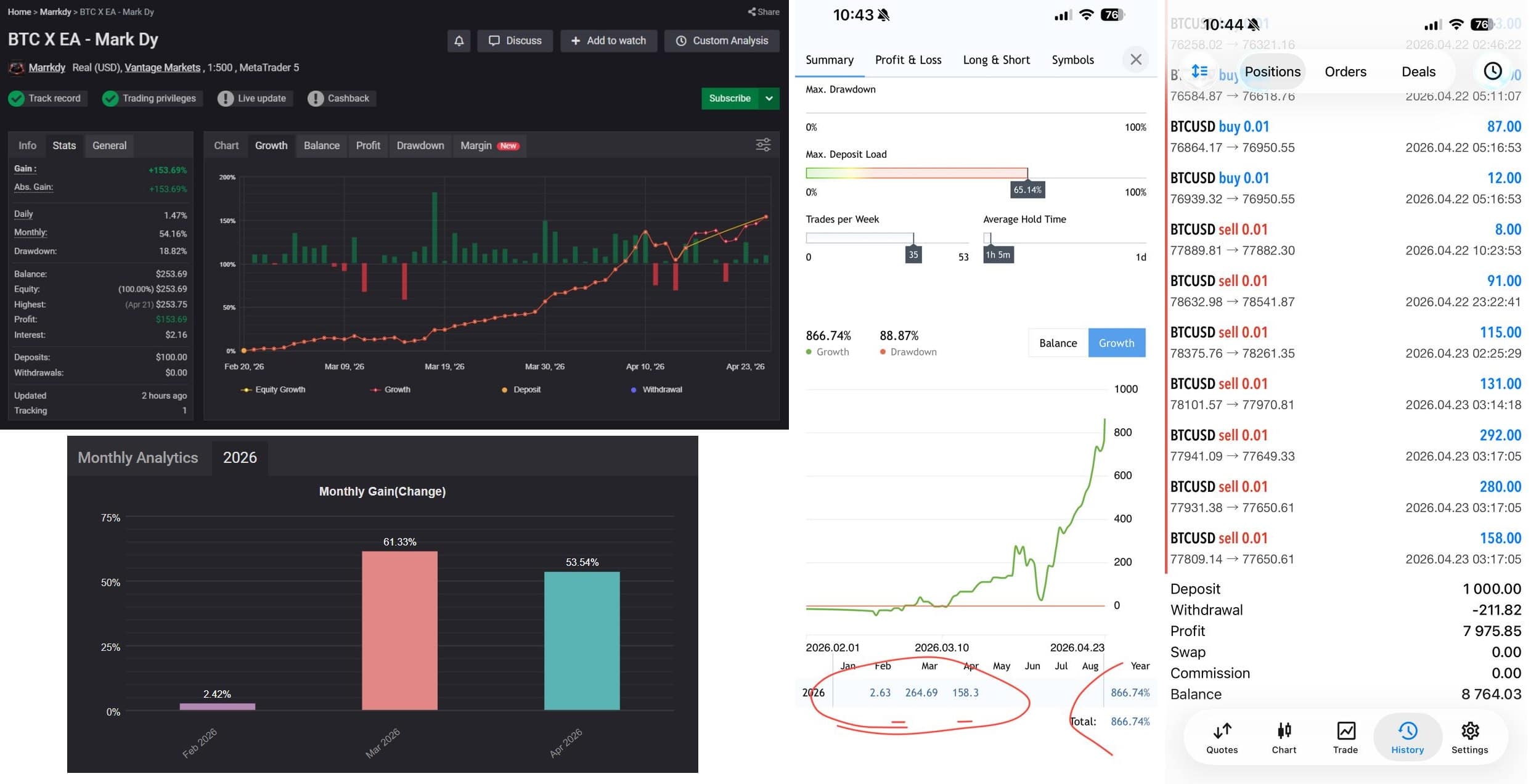

BTC X EA MT5 + SetFiles For Build 5800+
$14.95
BTC X EA is an Expert Advisor (EA) designed to trade Bitcoin (BTCUSD) on the MT5 platform. BTC X EA follows a high-frequency, short-term approach.





Description
BTC X EA: A Practical Guide to Running an Automated Bitcoin Strategy
BTC X EA – How It Stacks Up Against ROC Jarvis EA for Gold Traders
Table of Contents
- What Is BTC X EA?
- INTRODUCING ROC JARVIS EA: A Quick Look
- BTC X EA vs. ROC Jarvis EA: Core Differences
- Setting Up BTC X EA in MetaTrader 5
- Key Parameters You Should Know
- Risk Control and Money Management
- Performance Metrics to Watch
- Tips for Fine-Tuning BTC X EA
- Common Troubleshooting Steps
- Additional Resources and Helpful Links
- Final Thoughts
What Is BTC X EA?
BTC X EA is an Expert Advisor (EA) designed to trade Bitcoin (BTCUSD) on the MetaTrader 5 (MT5) platform. Much like INTRODUCING ROC JARVIS EA—an EA built for gold—BTC X EA follows a high-frequency, short-term approach. It seeks to capture small price fluctuations that often occur in the BTC market, particularly on the M1 and M5 timeframes.
Key points:
- Trading Instrument: BTCUSD (Bitcoin vs. U.S. dollar)
- Platform: MetaTrader 5
- Timeframes: Typically M1 (1-minute) or M5 (5-minute)
- Style: Scalping and micro-trend following
- Starting Capital: Many users begin with $250 to $500 on a micro or cent account.
The EA relies on rapid entry and exit logic, which aims to hold positions for only a few minutes. It keeps stop-loss and take-profit levels tight to reduce exposure and lock in frequent, small gains.
INTRODUCING ROC JARVIS EA: A Quick Look
While our main focus is BTC X EA, it helps to learn from similar tools. INTRODUCING ROC JARVIS EA is a high-frequency gold scalper for XAUUSD on the M1 chart, also running on MT5. Below is a concise recap:
| Feature | ROC Jarvis EA (Gold) | BTC X EA (Bitcoin) |
|---|---|---|
| Instrument | XAUUSD | BTCUSD |
| Timeframe | M1 | M1–M5 |
| Minimum Deposit | $200 (cent) | $250–$500 (micro/cent) |
| Method | Scalping & micro-trend detection | Scalping & range breakout |
| Risk Controls | Volatility filter, dynamic lots | Spread filter, max slippage, dynamic lots |
Both EAs share the goal of minimizing drawdown by closing trades quickly, but BTC X EA must handle wider spreads and higher volatility, which Bitcoin is well known for.
BTC X EA vs. ROC Jarvis EA: Core Differences
Below are several focal points that separate these two automated strategies:
1. Market Volatility
- BTCUSD can spike or dip several hundred dollars in seconds, so BTC X EA incorporates an additional spread filter and a time-based lockout if sudden jumps occur.
- XAUUSD moves fast too, yet its spread remains comparatively stable; ROC Jarvis EA doesn’t need an aggressive spread filter.
2. Trading Hours
- Bitcoin trades 24/7, requiring BTC X EA to include a daily trading window (often 00:00–23:59 broker time) to avoid thin weekend liquidity.
- Gold is largely active during weekdays and usually pauses from late Friday to early Monday; ROC Jarvis EA aligns to those hours automatically.
3. Slippage & Execution
- BTC pairs can show higher slippage on small accounts. BTC X EA caps slippage at a user-defined level (e.g., 20 points).
- Gold orders are often filled with tighter slippage on reputable brokers; ROC Jarvis EA sets a more generous cap.
4. Position Sizing
- BTC X EA may apply a fixed dollar amount per trade to cope with the large pip value of Bitcoin.
- ROC Jarvis EA uses a simple percentage of equity or a cent-account balance model.
Setting Up BTC X EA in MetaTrader 5
Below is a step-by-step walk-through:
- Open an MT5 live or demo account
- Choose a broker that offers BTCUSD with low spreads.
- Confirm they allow Expert Advisors in real time.
- Download BTC X EA
- Save the .ex5 file to:
…/MetaTrader 5/MQL5/Experts/ - Restart MT5 or refresh the navigator tree.
- Save the .ex5 file to:
- Attach the EA to a chart
- Open BTCUSD on M1 or M5.
- Drag BTC X EA onto the chart.
- Enable Algo Trading
- Click the “Algo Trading” button in MT5.
- Check “Allow algorithmic trading” in the EA settings.
- Adjust key variables
- LotSize (0.01 by default)
- MaxOrders (3–5)
- SpreadLimit (200 points)
- TradeStartTime / TradeEndTime
- Run a back-test
- Use MT5 Strategy Tester (visual mode) for at least three months of tick data.
- Evaluate drawdown, profit factor, and number of trades.
Quick Tip
Back-testing BTC can be heavy on your CPU. Close other tasks or run tests overnight.
Key Parameters You Should Know
| Parameter | What It Does | Recommended Range |
|---|---|---|
| LotSize | How many lots to open per trade | 0.01-0.10 on micro/cent |
| StopLoss | Distance in points | 150-300 |
| TakeProfit | Distance in points | 100-250 |
| MaxSpread | Won’t trade above this | 150-300 points |
| BreakEven | Move stop to entry after X points | 100 |
| TradeHours | Start/End time in HH:MM | 00:15 – 23:45 |
| MaxOrders | Total open trades allowed | 3-5 |
Fine-tune these settings based on broker data. If spreads widen at night, set TradeEndTime to 22:00.
Risk Control and Money Management
- Use a cent or micro account
- You can test live conditions with smaller actual risk.
- Dynamic lot scaling
- BTC X EA can raise position size by 0.01 for every $500 of balance.
- Avoid risky multipliers like 2× or 3× per loss.
- Daily profit cap
- Stop trading after hitting 3% daily gain.
- Prevents giving back profits in a choppy session.
- Drawdown cut-off
- Shut down trading if overall drawdown exceeds 10%.
- Broker safeguards
- Turn on negative balance protection if available.
- Use a virtual private server (VPS) for 24/7 uptime.
Performance Metrics to Watch
| Metric | Ideal Target for Scalping EAs |
|---|---|
| Profit Factor | Above 1.5 |
| Win Rate | 60%–70% |
| Average Trade Length | Under 5 minutes |
| Maximum Drawdown | Under 12% |
| Trades per Day | 20–50 on M1 |
Check these metrics weekly. If the profit factor drops below 1.2, consider reducing lot size or limiting active hours.
Tips for Fine-Tuning BTC X EA
- Broker Selection
- Choose brokers with crypto liquidity pools; spreads under $20 (2.0 pips in crypto terms) are preferable.
- Time-Filter Calibration
- During heavy U.S. announcements, spreads and volatility can spike. Add “news pause” periods via built-in MT5 calendar filters.
- Trailing Stop
- Test a trailing stop of 40–60 points to protect profits during fast pumps.
- Partial Close
- Experiment with taking 50% of volume off at half your take-profit distance.
- Forward Test
- A 30-day demo track record is more reliable than a single back-test.
Common Troubleshooting Steps
- EA Not Trading
- Confirm Algo Trading is enabled and you can see a smiling face icon in the chart’s corner.
- Check the Experts and Journal tabs for error codes like
OrderSend error 131(invalid lot size).
- Frequent Requotes
- Increase MaxSlippage slightly.
- Switch to an ECN account.
- High CPU Usage
- Lower visual back-test speed or use non-visual mode.
- Inconsistent Results
- Verify that tick data quality is at least 90%.
- Ensure GMT offset in the EA matches broker server time.
Final Thoughts
BTC X EA offers a structured, automated route to tapping short-term moves in Bitcoin. It brings together tight stops, rapid exits, and a built-in set of filters that help handle BTC’s unique volatility. Compared with INTRODUCING ROC JARVIS EA on gold, BTC X EA must cope with wider spreads and round-the-clock trading—yet it can be adapted through careful lot sizing, spread limits, and time filters.
Vendor Site – Private
| Membership | Yearly Membership |
|---|---|
| Additional Services | Unlock & Decompile |
| Recommended Brokers | Exness Broker, FPMarkets |
| Recommended VPS | FXVM (Low Latency) |
| Youtube Channel | ForexForYou |
| Telegram Channel | Onshoppie Forex EA's & Indicators |
| Telegram Support | Onshoppie Support |
| Installation Guides | Onshoppie Forex Guides |
Brand
ea-mt5
Only logged in customers who have purchased this product may leave a review.
Related products


Products
-
 Stable Gold EA MT5 V1.1 For Build 5977+
Original price was: $1,999.00.$29.95Current price is: $29.95.
Stable Gold EA MT5 V1.1 For Build 5977+
Original price was: $1,999.00.$29.95Current price is: $29.95.
-
 Adaptive Gold Scalper EA MT5 V1.9 + Setfiles With DLL 5836
Original price was: $375.00.$14.95Current price is: $14.95.
Adaptive Gold Scalper EA MT5 V1.9 + Setfiles With DLL 5836
Original price was: $375.00.$14.95Current price is: $14.95.
-
 Zerqon EA MT5 V22.2 For Build 5836+
Original price was: $299.00.$14.95Current price is: $14.95.
Zerqon EA MT5 V22.2 For Build 5836+
Original price was: $299.00.$14.95Current price is: $14.95.
-
 MHD Scalper Pro EA MT5 V9.1 For Build 5836+
Original price was: $1,200.00.$14.95Current price is: $14.95.
MHD Scalper Pro EA MT5 V9.1 For Build 5836+
Original price was: $1,200.00.$14.95Current price is: $14.95.
-
 Quantum OmniGold EA MT5 V1.8 For Build 5836+
Original price was: $1,099.00.$14.95Current price is: $14.95.
Quantum OmniGold EA MT5 V1.8 For Build 5836+
Original price was: $1,099.00.$14.95Current price is: $14.95.
-
 BTC Scalper IA EA MT5 V1.2 For Build 5836+
$14.95
BTC Scalper IA EA MT5 V1.2 For Build 5836+
$14.95
-
 Eternal Engine EA MT5 V2.30 + Setfiles For Build 5836+
Original price was: $599.00.$29.95Current price is: $29.95.
Eternal Engine EA MT5 V2.30 + Setfiles For Build 5836+
Original price was: $599.00.$29.95Current price is: $29.95.
-
 Endurance EA MT4 V2.13 For Build 1473+
$14.95
Endurance EA MT4 V2.13 For Build 1473+
$14.95
Recent reviews
-
 Advanced Dashboard Currency Strength
by Balram
Advanced Dashboard Currency Strength
by Balram
Reviews
There are no reviews yet.