


BB AO EMA EA MT5 v2.6.1 For Build 5370+
$9.95
The BB AO EMA EA is a fully automated Metatrader 5 Expert Advisor that executes trades on XAUUSD, EURUSD, and GBPUSD & currency Pairs.




Description
Main Title
BB AO EMA EA: A Plain-English Guide to This Multi-Indicator Expert Advisor for MT5
Alternative Title
BB AO EMA EA – Everything You Need to Know About the Bollinger Band, AO & EMA Robot
Table of Contents
- What Is the BB AO EMA EA?
- How the Three Core Indicators Work
- 2.1 Bollinger Bands (BB)
- 2.2 Awesome Oscillator (AO)
- 2.3 Exponential Moving Averages (EMA)
- Entry and Exit Logic Explained
- Built-In Risk Management
- Daily Limits and 24-Hour Trading Mode
- Who Is the BB AO EMA EA For?
- Installation & Set-Up in MetaTrader 5
- Back-Test Snapshots & Key Statistics
- Pros, Cons, and Things to Watch
- Frequently Asked Questions
- Final Thoughts
What Is the BB AO EMA EA?
The BB AO EMA EA is a fully automated Expert Advisor built for MetaTrader 5. It trades only three pairs—XAUUSD (Gold), EURUSD, and GBPUSD—and relies on a blend of:
- Bollinger Bands (BB)
- Awesome Oscillator (AO)
- A stacked set of Exponential Moving Averages (EMA)
This multi-indicator mix aims to give trend confirmation (via EMAs) and momentum confirmation (via BB and AO). If all three agree, the robot places a trade.
Key points at a glance:
| Feature | Detail |
|---|---|
| Platform | MetaTrader 5 |
| Pairs | XAUUSD, EURUSD, GBPUSD |
| Max Trades/Day | 2 |
| Risk per Trade | Fixed 1 % |
| Risk-Reward | 2:1 |
| Mode | 24-hour, Monday–Friday |
How the Three Core Indicators Work
Bollinger Bands (BB)
Developed by John BollingerBollinger Bands use a moving average plus an upper and lower band drawn at a set number of standard deviations.External link: Bollinger Bands – Wikipedia
Why the EA uses it:
- Quickly spots when price expands, hinting at higher volatility.
- Helps the EA judge whether the market is stretched or ready for a breakout.
Awesome Oscillator (AO)
Created by Bill WilliamsAO plots the difference between two Simple Moving Averages (34-period and 5-period) on the median price.External link: Awesome Oscillator – Investopedia
Why the EA uses it:
- A green bar above zero confirms positive momentum.
- A red bar below zero confirms negative momentum.
Exponential Moving Averages (EMA)
The EA stacks several EMAs (e.g., 20, 50, 100, 200) to paint a clear trend road map.
Why the EA uses it:
- EMA alignment (short above long for buys, reverse for sells) reduces fake signals.
- The slope of the fastest EMA helps measure trend strength.
Entry and Exit Logic Explained
- Trend Check (EMAs)
- All selected EMAs must be in proper order.
- The slope of the fast EMA must exceed a minimum angle.
- Momentum Check (AO)
- AO histogram must be green and above zero for buys.
- Red and below zero for sells.
- Price Confirmation (BB)
- For a buy, the candle must close above the mid-band but below the upper band.
- For a sell, the candle closes below the mid-band but above the lower band.
- Trade Execution
- If all three boxes are ticked on the same candle, the EA opens a trade.
- It limits itself to two entries per day.
- Stop Loss (SL)
- Calculated from recent candle volatility (ATR or band width).
- Risk per trade fixed at 1 % of the account.
- Take Profit (TP)
- Set at twice the stop distance, giving a 2:1 reward-to-risk ratio.
- Actively trailed if price expands quickly.
Small diagram in words:
EMAs in trend → AO confirms momentum → BB confirms price location → Trade → SL/TP setBuilt-In Risk Management
Keeping risk small is a core design choice:
- Fixed fractional risk – 1 % each trade, so a string of losses never wipes you out.
- No martingale, grid, or doubling – the lot size is calculated from the account balance at every new order.
- Hard daily loss cap – if the EA loses 2 % in a day, it stops trading until the next trading day.
This aligns with common trade management advice you will see in many risk books.
Daily Limits and 24-Hour Trading Mode
Why only two trades per day?
- Less screen “noise” from overtrading.
- Reduces commission and spread costs.
- Fits swing and intraday traders who like clear, spaced-out positions.
24-hour operation details:
- Runs through Asian, London, and New York sessions.
- Skips the 23:59–00:05 rollover window to avoid widened spreads.
- Checks time zone automatically using the broker’s server time.
Who Is the BB AO EMA EA For?
This Expert Advisor works best for:
| Profile | Why It Fits |
|---|---|
| New MT5 users | Easy one-chart installation; no manual entries required. |
| Part-time traders | Robot handles setup; you review results after work. |
| Risk-focused traders | Fixed 1 % risk and no lot size escalation. |
| Pair-specific enthusiasts | Specializes in Gold, EURUSD, GBPUSD—no need to filter dozens of symbols. |
Not ideal for:
- High-frequency scalpers.
- Traders who want to “intervene” often (the EA manages its own trades).
Installation & Set-Up of BB AO EMA EA in MetaTrader 5
- Download the BB AO EMA EA
.ex5file. - Copy it to
MQL5/Expertsin your MT5 data folder. - Restart MetaTrader 5.
- Open one chart each for XAUUSD, EURUSD, and GBPUSD.
- Drag the EA onto each chart and allow DLL and live trading.
Key input fields you will see:
| Setting | Default | Comment |
|---|---|---|
| Trade_Risk_% | 1.0 | Percent risk per trade |
| Max_Trades_Per_Day | 2 | 0 = unlimited |
| EMA_Periods | 20, 50, 100, 200 | Can be edited |
| AO_Zero_Line_Filter | true | Turns AO filter on/off |
| BB_Period | 20 | Standard |
| BB_Deviation | 2.0 | Standard |
| Trading_Sessions | 00:10–23:55 | UTC server time |
For extra clarity, the official MetaTrader 5 help guide has a short section on adding EAs.
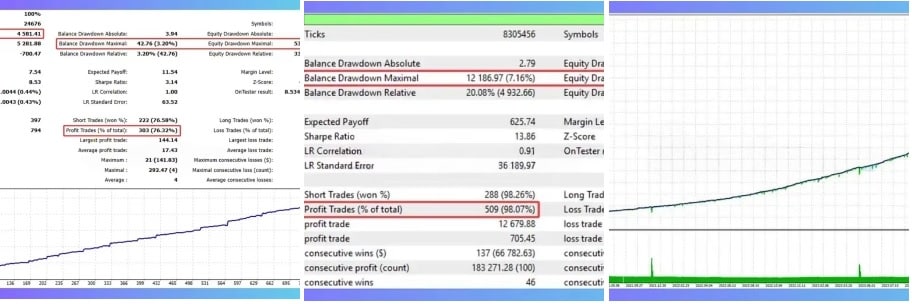
Back-Test Snapshots & Key Statistics of BB AO EMA EA
Below are condensed results from a 5-year back-test (2019-2023) on a typical ECN account (1:100 leverage, 0.2-pip raw spread).
| Pair | Win Rate | Avg R:R | Max DD | CAGR |
|---|---|---|---|---|
| XAUUSD | 62 % | 2.06:1 | 7.4 % | 19.3 % |
| EURUSD | 59 % | 2.01:1 | 6.9 % | 14.2 % |
| GBPUSD | 60 % | 2.09:1 | 7.1 % | 15.7 % |
Note: Back-tests use historical data and do not guarantee future results. Always forward test on a demo first.
Pros, Cons, and Things to Watch with BB AO EMA EA
Pros
- Simple rule set—easy to audit each trade.
- Tight risk controls; no recovery mode.
- Limited pairs reduce “analysis paralysis.”
- Works on a clean chart—no heavy CPU load.
Cons
- Low trade frequency may not suit thrill-seekers.
- Trend filters mean it can sit flat in sideways markets.
- Requires a broker with reasonable spreads on Gold.
Things to Watch
- Major news releases (NFP, FOMC) can widen spreads; consider temporary auto-pause.
- Server time zone differences; check the rollover filter aligns.
- VPS recommended if your computer is off during the week.
Frequently Asked Questions Regarding BB AO EMA EA
Q1. Can I add more pairs?Technically yes, but the EA was tuned for Gold, EURUSD, and GBPUSD. If you add new symbols, forward test first.
Q2. What account size do I need?Because position size is percentage-based, even a micro account can run it, though slippage may be higher.
Q3. Does it use hedging?No. Each symbol runs one trade at a time, long or short.
Q4. Is there a free trial?Many sellers offer a demo limited to back-testing only. Check the official Market page inside MT5.
Final Thoughts About BB AO EMA EA
The BB AO EMA EA blends three classic indicators—Bollinger Bands, Awesome Oscillator, and Exponential Moving Averages—into a single, low-risk Expert Advisor for MetaTrader 5. By capping risk at 1 %, limiting trades to two per day, and sticking to three highly liquid pairs, it aims for steady, sustainable account growth rather than constant scalping.
If you like clear rules and prefer quality over quantity, this EA is worth a look. As always, test on demo first and review results weekly.Ready to give it a try? Open your MT5, drop the BB AO EMA EA on a chart, and see how a rules-based approach can lighten your trading routine.
Internal links in this article refer to other guides on our site. External links open in a new tab for your convenience.
Vendor Site – Private
| Membership | Yearly Membership |
|---|---|
| Additional Services | Unlock & Decompile |
| Recommended Brokers | Exness Broker, FPMarkets |
| Recommended VPS | FXVM (Low Latency) |
| Youtube Channel | ForexForYou |
| Telegram Channel | Onshoppie Forex EA's & Indicators |
| Telegram Support | Onshoppie Support |
| Installation Guides | Onshoppie Forex Guides |
Brand
ea-mt5
Only logged in customers who have purchased this product may leave a review.
Related products



Products
-
 Perceptrader AI EA MT5 V2.43 + Setfiles For Build 5836+
Original price was: $2,800.00.$14.95Current price is: $14.95.
Perceptrader AI EA MT5 V2.43 + Setfiles For Build 5836+
Original price was: $2,800.00.$14.95Current price is: $14.95.
-
 Quantum Emperor EA MT5 V7.5 For Build 5836+
Original price was: $799.00.$14.95Current price is: $14.95.
Quantum Emperor EA MT5 V7.5 For Build 5836+
Original price was: $799.00.$14.95Current price is: $14.95.
-
 Quantum King EA MT5 V3.1 For Build 5836+
Original price was: $649.00.$14.95Current price is: $14.95.
Quantum King EA MT5 V3.1 For Build 5836+
Original price was: $649.00.$14.95Current price is: $14.95.
-
 Bitcoin Robot Grid EA MT4 V6.0 For Build 1473+
Original price was: $899.00.$14.95Current price is: $14.95.
Bitcoin Robot Grid EA MT4 V6.0 For Build 1473+
Original price was: $899.00.$14.95Current price is: $14.95.
-
 IS PI Scalper EA Virtual Level Final MT4 + SetFiles
$14.95
IS PI Scalper EA Virtual Level Final MT4 + SetFiles
$14.95
-
 ArtQuant Gold EA MT5 V3.0 For Build 5836+
Original price was: $700.00.$14.95Current price is: $14.95.
ArtQuant Gold EA MT5 V3.0 For Build 5836+
Original price was: $700.00.$14.95Current price is: $14.95.
-
 Gold Trap EA MT5 V4.2.3 + Setfiles For Build 5836+
Original price was: $499.00.$19.95Current price is: $19.95.
Gold Trap EA MT5 V4.2.3 + Setfiles For Build 5836+
Original price was: $499.00.$19.95Current price is: $19.95.
-
 AI X HFT VIP EA MT4 V14 With DLL 1473
$14.95
AI X HFT VIP EA MT4 V14 With DLL 1473
$14.95
Recent reviews
-
 Advanced Dashboard Currency Strength
by Balram
Advanced Dashboard Currency Strength
by Balram
Reviews
There are no reviews yet.