

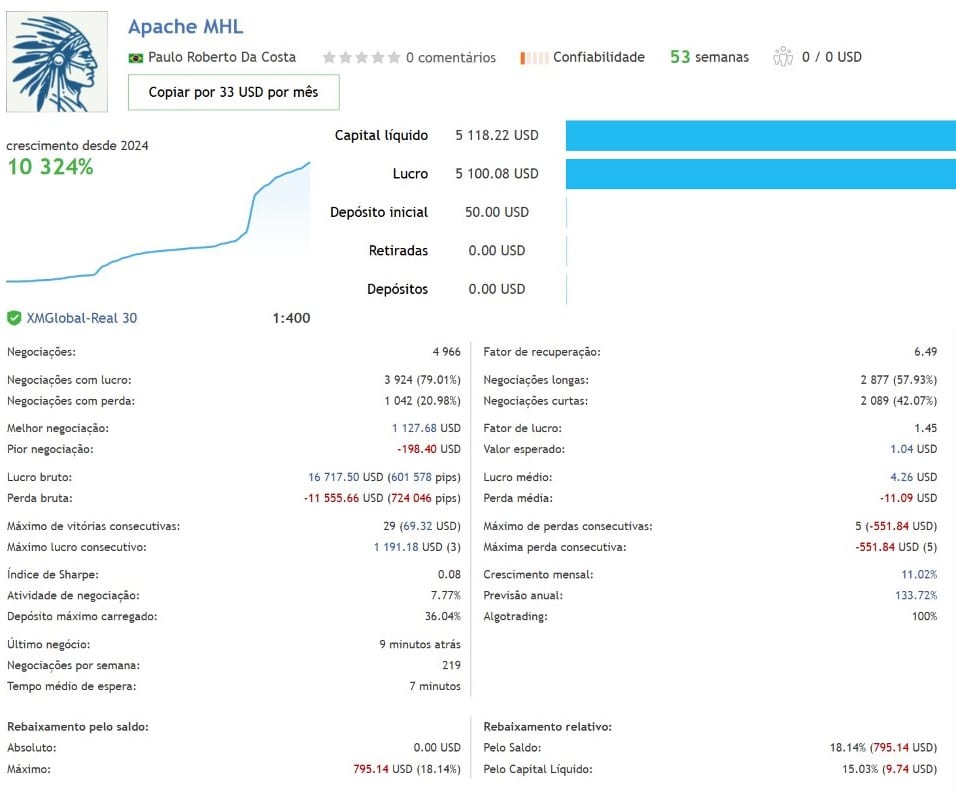


Apache MHL Moving Average EA MT4 v1.9 For Build 1470+
Original price was: $1,500.00.$19.95Current price is: $19.95.
The Apache MHL Moving Average EA brings together tried-and-tested ideas—moving average breakouts, spacing filters, and a capped Martingale.


Description
Apache MHL Moving Average: The Complete Guide to This Gold-Focused Expert Advisor
Alternative Title: Apache MHL Moving Average – How the EA Trades GOLD/XAUUSD with Moving Averages, Breakouts, and Martingale
Table of Contents
- Apache MHL Moving Average Quick Overview
- Default Settings for GOLD (XAUUSD)
- Installing the EA in MetaTrader 5 – Step-by-Step
- Key Parameters Explained in Plain English
- Reading the On-Chart Information Panel
- Best Practices and Risk Tips
- Final Thoughts and Next Steps
1. Quick Overview
The Apache MHL Moving Average Expert Advisor (EA) is an automated trading robot made for the GOLD/XAUUSD pair. It blends three ideas traders already know:
- Simple Moving Averages (SMA)
- A layered breakout filter that waits for price to cross several key levels
- A capped Martingale system that tries to recover small losing cycles
Because gold is highly volatile, the EA’s default setup focuses on filtering noise with wide point spacing and on ending cycles when an overall profit target is reached. Everything is adjustable, so traders keep full control.
2. Default Settings for GOLD (XAUUSD)
| Setting | Value | Why It Matters |
|---|---|---|
| First spacing | 100 pts | Blocks tiny noise |
| Max spacing | 700 pts | Waits for strong break |
| SMA periods | 20 & 50 | Short-term direction |
| Martingale steps | Up to 10 | Limits risk |
| Multiplier | 2.0 | Doubles lot each step |
| Take-profit | 100 pts (fresh) / 10 pts (grouped) | Fast cycle close |
| Stop-loss | User-defined or none | Adds extra safety |
| Trading hours | 24/5 by default | Can limit to London/NY |
Feel free to tune every line for your own style.
3. Installing the EA in MetaTrader 5 – Step-by-Step
- Download the Apache MHL Moving Average.ex5 file from the author’s page on MQL5.
- Open MetaTrader 5 → Menu File → Open Data Folder.
- Go to MQL5 → Experts folder.
- Copy the EA file there.
- Restart MetaTrader 5.
- Drag the EA from the Navigator → Expert Advisors list onto a GOLD (XAUUSD) chart.
- In the pop-up:
- Tick Allow Algo Trading.
- Review inputs (lot size, spacing, Martingale steps, RSI filter, etc.).
- Click OK.
- Make sure the “Algo Trading” button on the top toolbar is green.
- Observe the info panel that appears on the chart.
Tip: Always begin on a demo account for at least a few weeks.
4. Key Parameters Explained in Plain English
| Group | Parameter | Plain Description |
|---|---|---|
| Money Management | InitialLot |
The first trade size. Keep it small. |
LotMultiplier |
Factor for the next lot if Martingale kicks in. | |
| Breakout | MA_High_Period / MA_Low_Period |
How many candles to build the MA lines. |
BreakMarginPoints |
Extra points beyond the MA before an order. | |
| Spacing | BaseSpacingPoints |
Minimum gap from one order to the next. |
MaxSpacingPoints |
Largest allowed gap in the layered filter. | |
| Martingale | MaxMartingaleSteps |
Hard cap, so risk does not spiral. |
MartingaleSpacing |
Distance between recovery trades. | |
CloseAllAtProfit |
Total profit in account currency or points that closes the cycle. | |
| Filters | UseRSI |
Yes/No switch. |
RSI_Period |
14 by default, common value. | |
RSI_BuyAbove / RSI_SellBelow |
Numbers that confirm trend strength. | |
| Safety | MaxSpread |
Skips trading when spread is wide. |
MaxOrders |
Upper limit of total open trades. | |
| Visual | ShowPanel |
Shows the on-chart dashboard. |
5. Reading the On-Chart Information Panel
The EA prints a small dashboard in the corner:
- Status: Running / Paused / Spread too high
- Open Trades: 0-N
- Current Cycle Profit: live number in points and money
- Next Lot Size: preview of the next step
- Time Filters: whether current hour is allowed
Green text means all filters are clear. Yellow is a warning (for example, wide spread). Red blocks trading.
6. Best Practices and Risk Tips
- Demo FirstTrade the EA in a demo for a full market cycle – at least 30 days, including high-impact news.
- Pick a Sensible LotMany issues come from oversizing. Try 0.01 lot per 1 000 USD as a starter.
- Adjust Martingale StepsIf you prefer calmer equity curves, lower the MaxMartingaleSteps to 3–5.
- Watch Major NewsNon-Farm Payrolls, Fed decisions, CPI – gold can jump 500 pts; consider pausing the EA.
- Use a VPSStable 24/7 connection keeps the EA from missing breakout entries.
- Daily Log ReviewOpen the Experts and Journal tabs to spot errors (e.g., “trade context busy”).
- Keep Spread Filter OnDuring New York close, spreads widen; the filter will sit idle and save costs.
7. Final Thoughts and Next Steps
The Apache MHL Moving Average EA brings together tried-and-tested ideas—moving average breakouts, spacing filters, and a capped Martingale—to tackle the lively gold market. While the logic is sound, success comes from thoughtful risk management, patient testing, and realistic profit goals.
Vendor Site – Click Here
| Membership | Yearly Membership |
|---|---|
| Additional Services | Unlock & Decompile |
| Recommended Brokers | Exness Broker, FPMarkets |
| Recommended VPS | FXVM (Low Latency) |
| Youtube Channel | ForexForYou |
| Telegram Channel | Onshoppie Forex EA's & Indicators |
| Telegram Support | Onshoppie Support |
| Installation Guides | Onshoppie Forex Guides |
Brand
ea-mt4
Only logged in customers who have purchased this product may leave a review.
Related products



Products
-
Apache MHL Moving Average EA MT4 v1.9 For Build 1470+
Original price was: $1,500.00.$19.95Current price is: $19.95.
-
 Superbot Live EA MT5 v4.0 + SetFiles For Build 5660+
Original price was: $900.00.$19.95Current price is: $19.95.
Superbot Live EA MT5 v4.0 + SetFiles For Build 5660+
Original price was: $900.00.$19.95Current price is: $19.95.
-
 AI Gold Trading EA MT5 v3.0 For Build 5660+
Original price was: $499.00.$38.95Current price is: $38.95.
AI Gold Trading EA MT5 v3.0 For Build 5660+
Original price was: $499.00.$38.95Current price is: $38.95.
-
 Gold GPT EA MT5 Forex Bot For Build 5660+
$14.95
Gold GPT EA MT5 Forex Bot For Build 5660+
$14.95
-
POSEIDON EA MT4 v1.1 + SetFiles For Build 1470+
$19.95
-
Gecko EA MT4 v1.2 + SetFiles For Build 1470+
Original price was: $149.00.$14.95Current price is: $14.95.
-
BTX VERSION EA MT5 V3 + SetFiles For Build 5660+
$48.95
-
BUSTER BTC – Single Entry EA MT5 v1.23 For Build 5660+
$29.95




Recent reviews
-
 Advanced Dashboard Currency Strength
by Balram
Advanced Dashboard Currency Strength
by Balram

Reviews
There are no reviews yet.